
ZR13s
Contents
Zurich ZR13s OBD2 Code Reader User Manual
Model: ZR13s
Introduction
The Zurich ZR13s OBD2 Code Reader is a professional diagnostic tool designed for master technicians. It provides comprehensive vehicle diagnostics, including reading and clearing Diagnostic Trouble Codes (DTCs), viewing live data, and performing ABS/SRS/FIXASSIST functions. This manual provides detailed instructions for the proper use, maintenance, and troubleshooting of your ZR13s device.

Figure 1: Front view of the Zurich ZR13s OBD2 Code Reader, displaying its color screen and control buttons.
Safety Information
Always observe the following safety precautions when operating the ZR13s:
- Do not operate the device while driving.
- Ensure the vehicle is in a safe, well-ventilated area before connecting the device.
- Wear appropriate personal protective equipment (PPE) such as safety glasses.
- Avoid contact with hot engine components or moving parts.
- Do not expose the device to extreme temperatures, moisture, or corrosive substances.
- Only use the provided cable and accessories.
Package Contents
Verify that all items are present in the package:
- Zurich ZR13s OBD2 Code Reader Unit
- OBD-II Diagnostic Cable
- User Manual (this document)
Device Overview
The ZR13s features a color screen and intuitive button layout for easy navigation and operation.
Figure 2: Detailed view of the ZR13s interface, highlighting the color display and various function buttons such as ERASE, STATUS, MENU, and LIVE DATA.
Key components include:
- Color Display: Shows diagnostic information, menus, and data streams.
- Navigation Buttons: Up, Down, Left, Right arrows for menu navigation.
- OK/Enter Button: Confirms selections.
- Menu Button: Accesses the main menu.
- Erase Button: Clears Diagnostic Trouble Codes (DTCs).
- Status Button: Checks vehicle readiness status.
- Live Data Button: Displays real-time sensor data.
- OBD-II Connector: Connects to the vehicle's OBD-II port.
Setup
Follow these steps for initial setup and connection to your vehicle:
- Locate the vehicle's OBD-II port, typically under the dashboard on the driver's side.
- Ensure the vehicle's ignition is in the OFF position.
- Connect the ZR13s OBD-II diagnostic cable to the vehicle's OBD-II port. Ensure a secure connection.
- Turn the vehicle's ignition to the ON position (engine off). The ZR13s will power on automatically.
- The device will perform a system check and display the main menu.
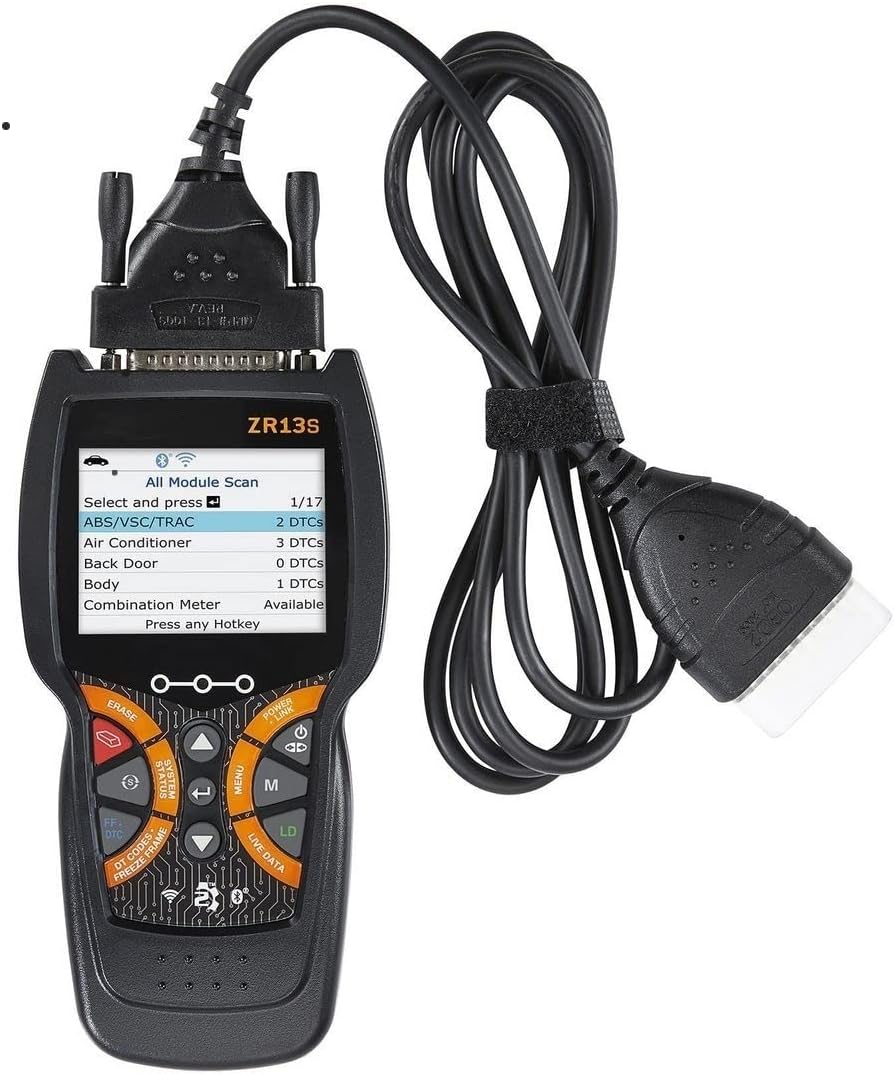
Figure 3: The ZR13s device with its attached OBD-II diagnostic cable, ready for connection to a vehicle.
Operating Instructions
Navigation
Use the directional arrow buttons to scroll through menu options. Press the OK/Enter button to select an option. Press the Menu button to return to the previous screen or the main menu.
Reading Diagnostic Trouble Codes (DTCs)
- From the main menu, select Read Codes.
- The ZR13s will communicate with the vehicle's onboard computer and display any stored DTCs.
- Each DTC will be displayed with its corresponding definition. Use the arrow buttons to scroll through multiple codes.
Figure 4: The ZR13s display showing a list of detected modules and the number of DTCs associated with each, such as ABS/VSC/TRAC.
Viewing Live Data
- From the main menu, select Live Data or press the LD hotkey.
- Choose the desired data stream (e.g., Engine RPM, Coolant Temperature, O2 Sensor Voltage).
- The device will display real-time data points, up to 20 at a time, allowing for dynamic monitoring of vehicle performance.
Erasing DTCs
Clearing DTCs will turn off the Check Engine Light (CEL) and erase all diagnostic data from the vehicle's computer. Ensure the underlying issue has been resolved before clearing codes.
- From the main menu, select Erase Codes or press the ERASE hotkey.
- Confirm the action when prompted.
- The device will confirm if the codes have been successfully cleared.
ABS/SRS/FIXASSIST Functions
The ZR13s supports advanced diagnostic functions for Anti-lock Braking System (ABS), Supplemental Restraint System (SRS), and FIXASSIST. These functions allow for reading and clearing codes specific to these systems, providing more in-depth diagnostics beyond standard OBD2.
- Navigate to the ABS/SRS/FIXASSIST menu option.
- Select the specific system you wish to diagnose.
- Follow the on-screen prompts to read or clear codes for the selected system.
Maintenance
- Cleaning: Use a soft, damp cloth to clean the device. Do not use abrasive cleaners or solvents.
- Storage: Store the ZR13s in a dry, cool place, away from direct sunlight and extreme temperatures.
- Cable Care: Inspect the OBD-II cable regularly for any signs of damage. Do not bend or crimp the cable excessively.
Troubleshooting
| Problem | Possible Cause | Solution |
|---|---|---|
| Device does not power on. | Loose connection; Vehicle ignition off; Vehicle battery low. | Ensure cable is securely connected. Turn ignition to ON. Check vehicle battery. |
| "Link Error" message. | Vehicle not OBD-II compliant; Faulty connection; Communication protocol issue. | Verify vehicle is OBD-II compliant (1996 and newer). Reconnect cable. Try on another vehicle if possible. |
| Cannot clear DTCs. | Engine running; Underlying fault still present. | Ensure engine is off (ignition ON). Repair the underlying issue before attempting to clear codes. |
Specifications
| Feature | Detail |
|---|---|
| Model | ZR13s |
| Screen Size | 2.8 Inches |
| UPC | 792363576666 |
| Manufacturer | HFT |
| Supported Protocols | OBD-II, EOBD, CAN, ABS, SRS |
| Data Points Displayed | Up to 20 at a time |
Warranty Information
This product comes with a limited manufacturer's warranty. Please refer to the warranty card included in your product packaging or visit the manufacturer's official website for detailed terms and conditions regarding warranty coverage, duration, and claims process. Keep your purchase receipt as proof of purchase.
Customer Support
For technical assistance, troubleshooting, or product inquiries, please contact the manufacturer's customer support. Contact information can typically be found on the product packaging, the manufacturer's website, or the warranty card.
Documents and downloads
Ask a question about this manual
Ask about setup, troubleshooting, compatibility, parts, safety, or missing instructions. Manuals+ will review the question and use this page’s manual context to help answer it.