
1. Introduction
The Zipforce Distance is an innovative e-bike conversion kit designed to transform your standard bicycle into an electric bicycle. This comprehensive package includes all necessary components for electric pedal assistance, offering an eco-friendly and efficient way to enhance your cycling experience. Developed and manufactured in Sweden, the Zipforce Distance is known for its portability and ease of installation.

Image 1.1: A person riding a bicycle with the Zipforce Distance motor installed on the front wheel, demonstrating its integration with a standard bike.
2. Product Overview and Included Components
The Zipforce Distance kit provides everything required to convert your bicycle. Please verify that all components listed below are present in your package.

Image 2.1: The complete Zipforce Distance kit, showing the motor unit, battery, charger, wireless pedal sensor, and bicycle mounting hardware.
Included Parts:
- Electric Motor Unit: The main drive unit that provides pedal assistance.
- Battery: Rechargeable power source for the motor.
- Charger: For recharging the battery.
- Wireless Pedal Sensor: Detects pedaling activity to activate motor assistance.
- Bicycle Mount: Hardware for attaching the motor unit to your bicycle.

Image 2.2: Detailed view of the Zipforce Distance motor unit, highlighting its compact and portable design.
3. Specifications
| Feature | Specification |
|---|---|
| Motor Power | 250 W |
| Maximum Speed with Assist | Up to 25 km/h |
| Estimated Range | Up to 70 km |
| Motor Unit Weight | 2.7 kg |
| Power Source | Electric Motor (Battery) |
| Assistance Levels | 5 |
| Material | Plastic |
| Recommended Age Group | Adults |
| Intended Use | Road, Trail |
4. Setup and Installation
The Zipforce Distance is designed for easy installation on most standard bicycles. Follow these general steps for setup. For detailed, model-specific instructions, please refer to the official Zipforce installation guide available on their website.
4.1 Mounting the Motor Unit
- Choose Mounting Position: The motor can typically be mounted on either the front or rear wheel of your bicycle. Ensure there is sufficient clearance.
- Attach Mounting Bracket: Secure the provided bicycle mount to your bike frame according to the specific instructions for your bike type.
- Install Motor Unit: Slide the Zipforce motor unit onto the mounting bracket until it clicks securely into place. Ensure it is firmly attached and does not interfere with wheel rotation or braking.
4.2 Installing the Pedal Sensor
The wireless pedal sensor detects when you are pedaling and signals the motor to provide assistance.

Image 4.1: The wireless pedal sensor mounted on a bicycle's crank arm, essential for activating the motor's assistance.
- Attach Sensor: Secure the wireless pedal sensor to your bicycle's crank arm, typically near the pedal. Ensure it is positioned correctly to detect pedal rotation.
- Pair with Motor: Follow the instructions in the Zipforce app to pair the pedal sensor with the motor unit via Bluetooth.
4.3 Charging the Battery
Before first use, fully charge the battery. Connect the charger to the battery and then to a power outlet. The charging indicator will show the charging status.
5. Operating Instructions
Operating your Zipforce Distance e-bike conversion kit is straightforward, primarily managed through the dedicated Zipforce smartphone application.
5.1 Using the Zipforce App
The Zipforce app allows you to control assistance levels, monitor battery status, and access various settings.
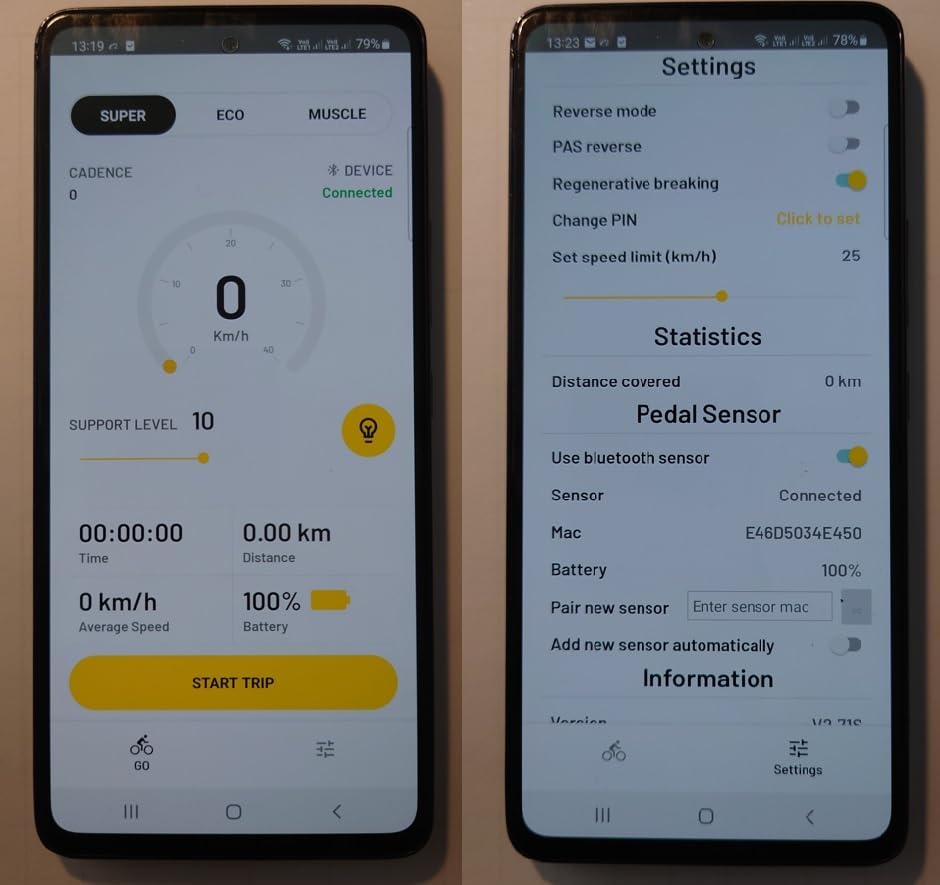
Image 5.1: The Zipforce mobile application interface, displaying ride statistics and customizable settings for the e-bike kit.
- Download and Install: Download the official Zipforce app from your smartphone's app store.
- Connect to Device: Open the app and follow the prompts to connect to your Zipforce motor unit via Bluetooth.
- Select Assistance Level: Use the app to choose from the 5 available assistance levels (e.g., Eco, Super, Muscle) to match your desired riding experience.
- Start Riding: Once connected and an assistance level is selected, begin pedaling. The motor will engage automatically to provide assistance.
- Monitor Status: The app displays real-time information such as current speed, battery level, and distance covered.
5.2 Powering On/Off
The motor unit typically powers on automatically when connected to the app and pedaling begins. To power off, disconnect from the app or manually switch off the unit if a power button is present (refer to specific product documentation).
6. Maintenance
Regular maintenance ensures the longevity and optimal performance of your Zipforce Distance kit.
- Cleaning: Keep the motor unit and battery clean. Wipe with a damp cloth. Avoid using high-pressure water jets directly on electrical components.
- Battery Care: Charge the battery regularly, even if not in frequent use, to maintain its health. Store the battery in a cool, dry place.
- Check Connections: Periodically inspect all connections, including the motor mount and pedal sensor, to ensure they are secure.
- Software Updates: Check the Zipforce app for any available firmware updates for the motor unit to ensure you have the latest features and improvements.
7. Troubleshooting
If you encounter issues with your Zipforce Distance kit, consider the following common troubleshooting steps:
- No Power/Assistance:
- Ensure the battery is charged.
- Verify the motor unit is securely mounted.
- Check that the pedal sensor is correctly installed and paired with the motor.
- Confirm Bluetooth connection between the app and the motor unit.
- Motor Not Engaging:
- Ensure you are pedaling. The system is pedal-assist, not throttle-based.
- Check the pedal sensor's alignment and functionality.
- Review the assistance level selected in the app.
- App Connectivity Issues:
- Ensure your phone's Bluetooth is enabled.
- Restart the app and/or your phone.
- Ensure the motor unit is powered on.
If problems persist, consult the official Zipforce support resources or contact customer service.
8. Safety Information
Always prioritize safety when operating your e-bike. Adhere to local traffic laws and regulations.
- Wear a Helmet: Always wear a certified bicycle helmet.
- Pre-Ride Checks: Before each ride, check brakes, tire pressure, and ensure the motor unit and battery are securely attached.
- Traffic Laws: Obey all local traffic laws, signs, and regulations.
- Weather Conditions: Exercise caution when riding in wet or adverse weather conditions.
- No Modifications: Do not attempt to modify the motor unit or battery, as this can be dangerous and void your warranty.
9. Warranty and Support
For detailed information regarding the product warranty, including coverage, duration, and terms, please refer to the documentation provided with your purchase or visit the official Zipforce website. For technical support, spare parts, or further assistance, please contact Zipforce customer service through their official channels.


