1. Introduction
Thank you for choosing the Xiaomi Robot Vacuum E10. This intelligent cleaning device is designed to provide efficient and convenient floor cleaning for your home. Featuring powerful suction, versatile vacuum and mop functions, and smart navigation, the Robot Vacuum E10 simplifies your daily cleaning routine. Please read this manual thoroughly before use and retain it for future reference.

Figure 1: Xiaomi Robot Vacuum E10
2. Safety Information
To prevent personal injury and property damage, please observe the following safety precautions:
- This appliance can be used by children aged from 8 years and above and persons with reduced physical, sensory or mental capabilities or lack of experience and knowledge if they have been given supervision or instruction concerning use of the appliance in a safe way and understand the hazards involved.
- Children shall not play with the appliance. Cleaning and user maintenance shall not be made by children without supervision.
- Do not use the robot vacuum in environments with open flames, flammable or explosive materials, or in wet conditions.
- Ensure the charging dock is placed on a level surface against a wall, with no obstacles within 1 meter to the front and 0.5 meters to the sides.
- Before cleaning, remove any loose cables, small objects, or fragile items from the floor to prevent entanglement or damage.
- Do not use the robot vacuum to clean liquids, glass fragments, or burning substances.
- Only use the original power adapter and charging dock provided with the device.
- Do not attempt to repair or modify the robot vacuum yourself. Contact authorized service personnel for assistance.
3. Package Contents
Verify that all items are present and in good condition:
- Xiaomi Robot Vacuum E10
- Main Brush
- Side Brush
- Dustbin
- Water Tank (2-in-1 dustbin and water tank)
- Mop Pad
- Charging Dock
- Power Adapter
- Cleaning Tool
- User Manual
4. Product Overview
Familiarize yourself with the components of your Xiaomi Robot Vacuum E10.
Robot Vacuum
- Power/Clean Button: Press to start/pause cleaning. Press and hold to power on/off.
- Recharge Button: Press to send the robot back to the charging dock.
- Dustbin/Water Tank: Integrated 2-in-1 design for dust collection and water storage.
- Main Brush: For deep cleaning of various floor types.
- Side Brush: Sweeps debris from edges and corners into the main brush's path.
- Universal Wheel: Allows for 360-degree movement.
- Driving Wheels: Provide traction for movement.
- Cliff Sensors: Detects drops to prevent falling down stairs.
- Wall Sensor: Helps the robot navigate along walls.
- Charging Contacts: Connects with the charging dock for power.

Figure 2: Robot Vacuum E10 with multiple sensors for adaptable navigation.
Charging Dock
- Charging Contacts: Connects with the robot vacuum's charging contacts.
- Power Indicator: Shows charging status.
- Power Port: Connects to the power adapter.
5. Setup
5.1 Charging Dock Placement
Place the charging dock on a hard, level surface against a wall. Ensure there is at least 1 meter of clear space in front of the dock and 0.5 meters on either side. Connect the power adapter to the charging dock and plug it into a power outlet.
5.2 Initial Charging
Place the robot vacuum on the charging dock. The robot will automatically align its charging contacts. For first-time use, fully charge the robot vacuum before operation. The power indicator on the robot will show charging status.
5.3 Connecting to Mi Home/Xiaomi Home App
For full functionality and smart control, connect your robot vacuum to the Mi Home/Xiaomi Home app.
- Download the Mi Home/Xiaomi Home app from your app store.
- Create or log in to your Xiaomi account.
- Tap '+' in the top right corner to add a device.
- Search for 'Xiaomi Robot Vacuum E10' or scan the QR code on the device.
- Follow the in-app instructions to connect the robot to your Wi-Fi network.
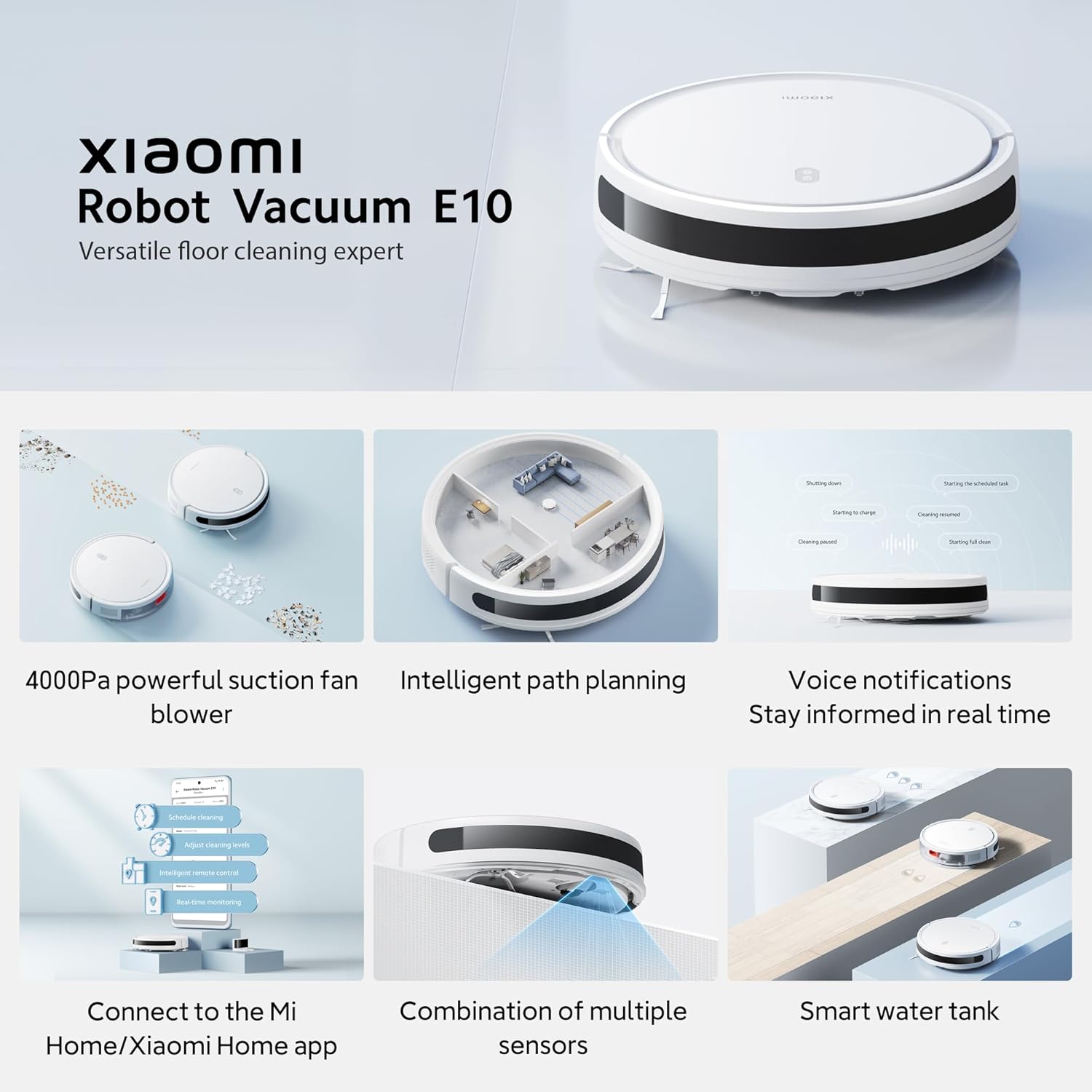
Figure 3: App control interface for the Xiaomi Robot Vacuum E10.
6. Operating the Robot Vacuum
6.1 Starting/Pausing/Stopping Cleaning
- Start Cleaning: Press the Power/Clean button on the robot or tap 'Start Cleaning' in the app.
- Pause Cleaning: Press the Power/Clean button during operation or tap 'Pause' in the app.
- Stop Cleaning: Press and hold the Power/Clean button for 3 seconds, or tap 'End Cleaning' in the app. The robot will return to the charging dock.
6.2 Cleaning Modes
The Xiaomi Robot Vacuum E10 supports multiple cleaning modes:
- Vacuum Only: For dry cleaning and dust collection.
- Mop Only: For wet mopping (ensure water tank is filled and mop pad is attached).
- Vacuum & Mop: Simultaneous vacuuming and mopping for comprehensive cleaning.
You can switch between these modes via the Mi Home/Xiaomi Home app.

Figure 4: Illustration of Vacuum, Mop, and Vacuum & Mop modes.
6.3 Smart Mapping and Path Planning
The robot vacuum utilizes intelligent path planning to navigate your home efficiently, ensuring thorough coverage. It follows a zigzag cleaning path for increased efficiency.

Figure 5: Intelligent zigzag path planning for efficient cleaning.
6.4 Voice Notifications
The robot vacuum provides real-time voice notifications to keep you informed about its status, such as starting cleaning, returning to charge, or encountering an error.

Figure 6: Voice notifications keep you informed of the robot's status.
6.5 Scheduling Cleaning
Use the Mi Home/Xiaomi Home app to set up cleaning schedules. You can specify cleaning times, modes, and areas for automated cleaning.
7. Maintenance
Regular maintenance ensures optimal performance and extends the lifespan of your robot vacuum.
7.1 Cleaning the Dustbin and Filter
Empty the dustbin after each cleaning session. Clean the filter regularly to maintain suction power.
- Press the dustbin release button and pull out the 2-in-1 dustbin and water tank.
- Open the dustbin cover and empty the collected debris.
- Remove the filter and tap it gently to remove dust. If washable, rinse with water and air dry completely before reinstallation.
- Wipe the inside of the dustbin with a dry cloth.
7.2 Cleaning the Main Brush
Clean the main brush weekly or as needed.
- Turn the robot vacuum over and press the clips to remove the main brush cover.
- Lift out the main brush.
- Use the provided cleaning tool to remove hair and debris tangled around the brush.
- Reinstall the main brush and cover.
7.3 Cleaning the Side Brush
Check the side brush regularly for tangled hair or debris. If necessary, remove the screw holding the side brush, clean it, and reattach.
7.4 Cleaning the Water Tank and Mop Pad
After mopping, empty any remaining water from the tank and clean the mop pad.

Figure 7: Smart water tank for controlled water discharge.
- Remove the 2-in-1 dustbin and water tank.
- Open the water tank plug and pour out any remaining water.
- Detach the mop pad from the tank. Rinse the mop pad thoroughly with water and air dry.
- Wipe the water tank with a dry cloth.
7.5 Cleaning Sensors and Charging Contacts
Wipe the cliff sensors, wall sensor, and charging contacts on both the robot and the charging dock with a soft, dry cloth. Do not use liquids.
8. Troubleshooting
If you encounter issues with your robot vacuum, refer to the table below for common problems and solutions.
| Problem | Possible Cause | Solution |
|---|---|---|
| Robot does not power on | Low battery; Power button not pressed correctly | Place on charging dock; Press and hold Power button for 3 seconds |
| Robot cannot charge | Charging contacts dirty; Charging dock not powered | Clean charging contacts; Ensure charging dock is plugged in |
| Robot gets stuck frequently | Too many obstacles; Cliff sensors dirty | Clear floor area; Clean cliff sensors |
| Suction power is weak | Dustbin full; Filter clogged; Main brush tangled | Empty dustbin; Clean/replace filter; Clean main brush |
| No water discharge during mopping | Water tank empty; Water outlet clogged | Fill water tank; Check for blockages in water outlet |
| Robot makes unusual noise | Main brush or side brush tangled; Foreign object inside | Clean brushes; Check for and remove foreign objects |
| App connection issues | Incorrect Wi-Fi password; Robot too far from router | Re-enter Wi-Fi password; Move robot closer to router; Restart robot and router |
9. Specifications
| Feature | Detail |
|---|---|
| Brand | Xiaomi |
| Model Name | E10 |
| Model Number | Xiaomi Robot Vacuum E10 |
| Suction Power | 4000 Pa |
| Functions | Vacuum & Mop Combo |
| Runtime | Up to 110 minutes |
| Battery Capacity | 2600 mAh |
| Product Dimensions | 35 x 10 x 35 cm |
| Item Weight | 3.3 Kilograms |
| Color | White |
| Control Method | Mi Home/Xiaomi Home App, Alexa, Buttons |
| Surface Recommendation | Carpets, Hard Floors, Marble |
10. Warranty and Support
For warranty information, please refer to the warranty card included with your product or visit the official Xiaomi website. If you require technical support or have questions not covered in this manual, please contact Xiaomi customer service or your local distributor.
You can also visit the official Xiaomi Store for more information: Xiaomi Official Store