1. Introduction
This manual provides essential information for the safe and effective use of your Bosch Professional 18V System Cordless Jigsaw GST 18V-125 S. Please read these instructions carefully before operating the tool and keep them for future reference. Proper use and maintenance will ensure optimal performance and extend the lifespan of your jigsaw.
2. Safety Instructions
Always observe general power tool safety warnings and local regulations. Failure to follow these instructions may result in electric shock, fire, and/or serious injury.
General Power Tool Safety
- Work Area Safety: Keep the work area clean and well-lit. Cluttered or dark areas invite accidents.
- Electrical Safety: Avoid body contact with earthed or grounded surfaces. Do not expose power tools to rain or wet conditions.
- Personal Safety: Always wear eye protection, hearing protection, and a dust mask when operating the jigsaw. Dress appropriately; avoid loose clothing or jewelry.
- Tool Use and Care: Do not force the power tool. Use the correct power tool for your application. Disconnect the battery pack before making any adjustments, changing accessories, or storing power tools.
Jigsaw Specific Safety
- Secure Workpiece: Always clamp the workpiece firmly. Do not hold it by hand.
- Blade Selection: Use the correct blade type for the material being cut. Ensure the blade is sharp and undamaged.
- Starting the Cut: Ensure the blade is clear of the workpiece before starting the tool. Allow the tool to reach full speed before engaging the material.
- Dust Management: Connect a dust extraction system when possible to reduce dust exposure.
3. Product Overview
The Bosch Professional 18V System Cordless Jigsaw GST 18V-125 S is designed for precise and efficient cutting in various materials, particularly wood. It features a robust design and a brushless motor for extended tool runtime and longevity.
Figure 1: Bosch Professional 18V System Cordless Jigsaw GST 18V-125 S. This image shows the overall design of the cordless jigsaw, highlighting its ergonomic grip and robust construction.
Key Features:
- Brushless Motor: Ensures excellent tool runtime and increased tool longevity.
- SDS Blade Holder: For quick and tool-free blade changes.
- LED Light: Illuminates the cutting line for improved visibility.
- 4-Stage Pendulum Action: Adjustable for faster cutting in different materials.
- Dust Blower: Keeps the cutting line clear of sawdust.
- Speed Selection: Variable speed control for adapting to various materials and applications.
- Adjustable Baseplate: Can be adjusted up to 45° for bevel cuts.
4. Setup
4.1 Battery Installation
- Ensure the jigsaw is switched off.
- Insert a charged Bosch Professional 18V System battery pack into the battery receptacle until it clicks into place.
- To remove the battery, press the release button and pull the battery out.
4.2 Blade Installation (SDS Blade Holder)
The SDS blade holder allows for quick and secure blade changes without additional tools.
- Ensure the battery is removed from the tool for safety.
- Push the SDS blade holder lever forward.
- Insert the jigsaw blade into the blade holder with the teeth facing forward until it locks into place.
- Release the lever. Gently pull the blade to ensure it is securely seated.
- To remove the blade, push the SDS blade holder lever forward again and pull the blade out.
4.3 Dust Extraction Setup
For a cleaner work environment and improved visibility, connect the dust extraction set.
- Attach the dust extraction adapter to the designated port on the jigsaw.
- Connect a suitable vacuum cleaner hose to the dust extraction adapter.
5. Operating Instructions
5.1 Powering On/Off and Speed Selection
- To switch on the tool, press the ON/OFF switch. The LED light will illuminate the cutting area.
- The jigsaw features variable speed control. Adjust the speed dial to select the appropriate stroke rate for your material. Lower speeds are suitable for harder materials or intricate cuts, while higher speeds are for softer materials and faster cuts.
- To switch off, release the ON/OFF switch.
5.2 Pendulum Action Adjustment
The 4-stage pendulum action allows you to optimize cutting speed and finish.
- Position 0 (No Pendulum): For fine, precise cuts and cutting hard materials.
- Positions I-III (Increasing Pendulum): For faster cutting in softer materials like wood. Higher settings provide faster, rougher cuts.
- Adjust the pendulum lever to the desired setting before starting the cut.
5.3 Making Bevel Cuts
The baseplate can be adjusted for bevel cuts up to 45 degrees.
- Ensure the battery is removed.
- Loosen the screw that secures the baseplate.
- Tilt the baseplate to the desired angle (up to 45°). Use an angle gauge for accuracy.
- Tighten the screw firmly to secure the baseplate in position.
5.4 Cutting Techniques
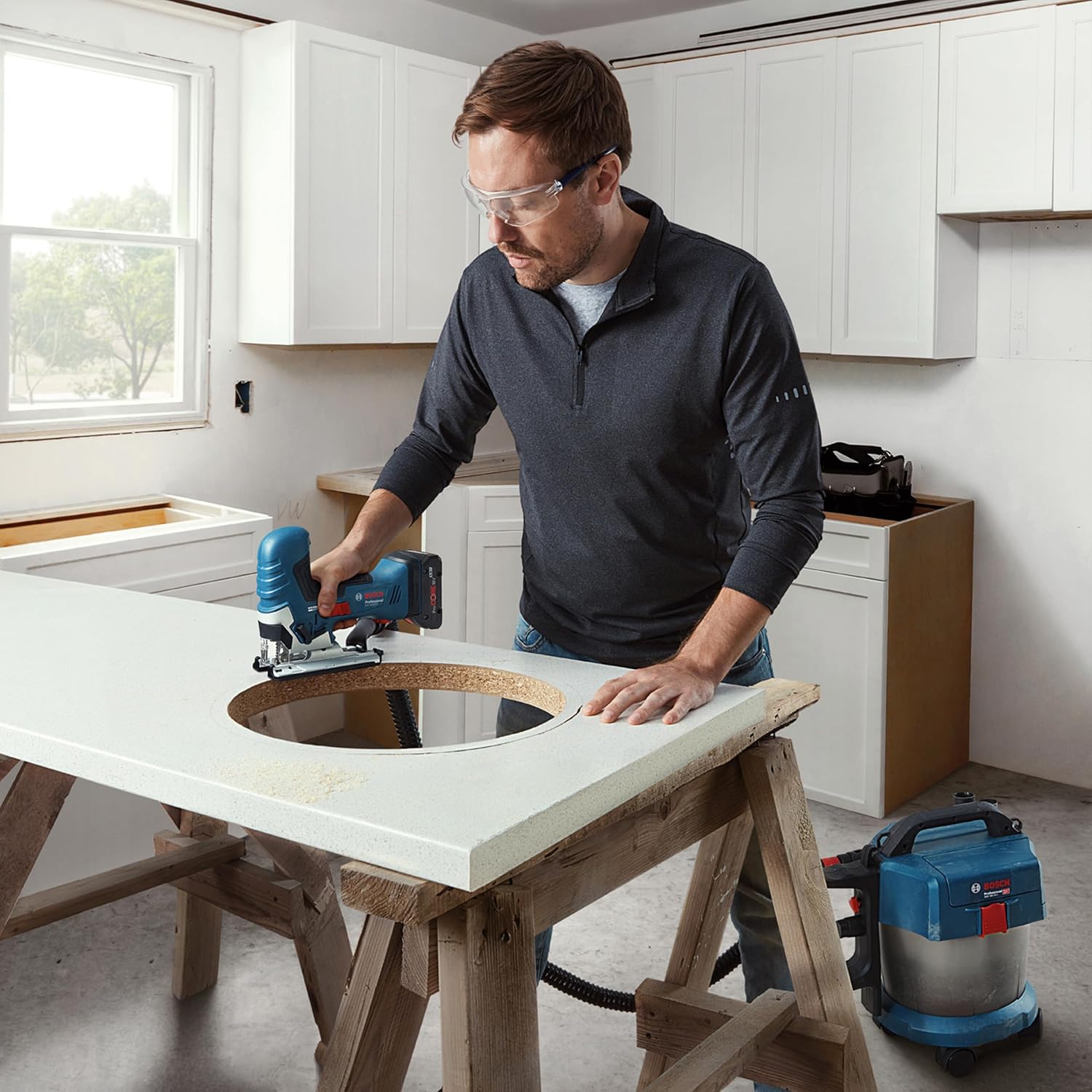
Figure 2: User operating the Bosch Professional Jigsaw for a curved cut. This image demonstrates the tool's use in creating precise curved cuts in a workpiece.

Figure 3: User operating the Bosch Professional Jigsaw for a cross cut. This image illustrates the tool's capability for straight cross cuts across a wooden panel.

Figure 4: Close-up view of the Bosch Professional Jigsaw blade cutting wood. This image provides a detailed look at the cutting action and the dust blower keeping the line clear.
- Starting a Cut: Place the front edge of the baseplate flat on the workpiece. Start the tool and allow it to reach full speed before slowly guiding the blade into the material.
- Straight Cuts: Guide the jigsaw along a marked line or against a straight edge guide.
- Curved Cuts: Use a narrow blade and guide the tool smoothly along the curve. Avoid forcing the tool, especially in tight curves.
- Plunge Cuts: For internal cutouts, drill a pilot hole large enough for the jigsaw blade to enter, then proceed with the cut.
6. Maintenance
Regular maintenance ensures the longevity and safe operation of your jigsaw.
6.1 Cleaning
- Always remove the battery pack before cleaning.
- Keep the ventilation openings of the tool clean to prevent overheating.
- Regularly clean the dust extraction port and the area around the blade holder.
- Use a soft brush or compressed air to remove dust and debris. Do not use solvents or abrasive cleaners.
6.2 Blade Replacement
Replace dull or damaged blades promptly. Refer to Section 4.2 for blade installation and removal instructions.
6.3 Storage
- Store the jigsaw in a dry, secure place, out of reach of children.
- Remove the battery pack before storing for extended periods.
- If storing in the L-BOXX, ensure the tool and accessories are properly secured.
7. Troubleshooting
This section addresses common issues you might encounter with your jigsaw.
| Problem | Possible Cause | Solution |
|---|---|---|
| Tool does not start | Battery not inserted correctly or discharged. | Ensure battery is fully inserted and charged. |
| Poor cut quality / Blade deflection | Dull or incorrect blade. Too much force applied. Incorrect pendulum setting. | Replace blade. Reduce feed pressure. Adjust pendulum setting. |
| Excessive vibration | Loose blade. Damaged blade. | Check blade for secure installation. Replace damaged blade. |
| Overheating | Blocked ventilation slots. Overloading the tool. | Clean ventilation slots. Reduce load, allow tool to cool. |
If you encounter issues not listed here or if solutions do not resolve the problem, please contact Bosch Professional customer support.
8. Specifications
Technical data for the Bosch Professional 18V System Cordless Jigsaw GST 18V-125 S.
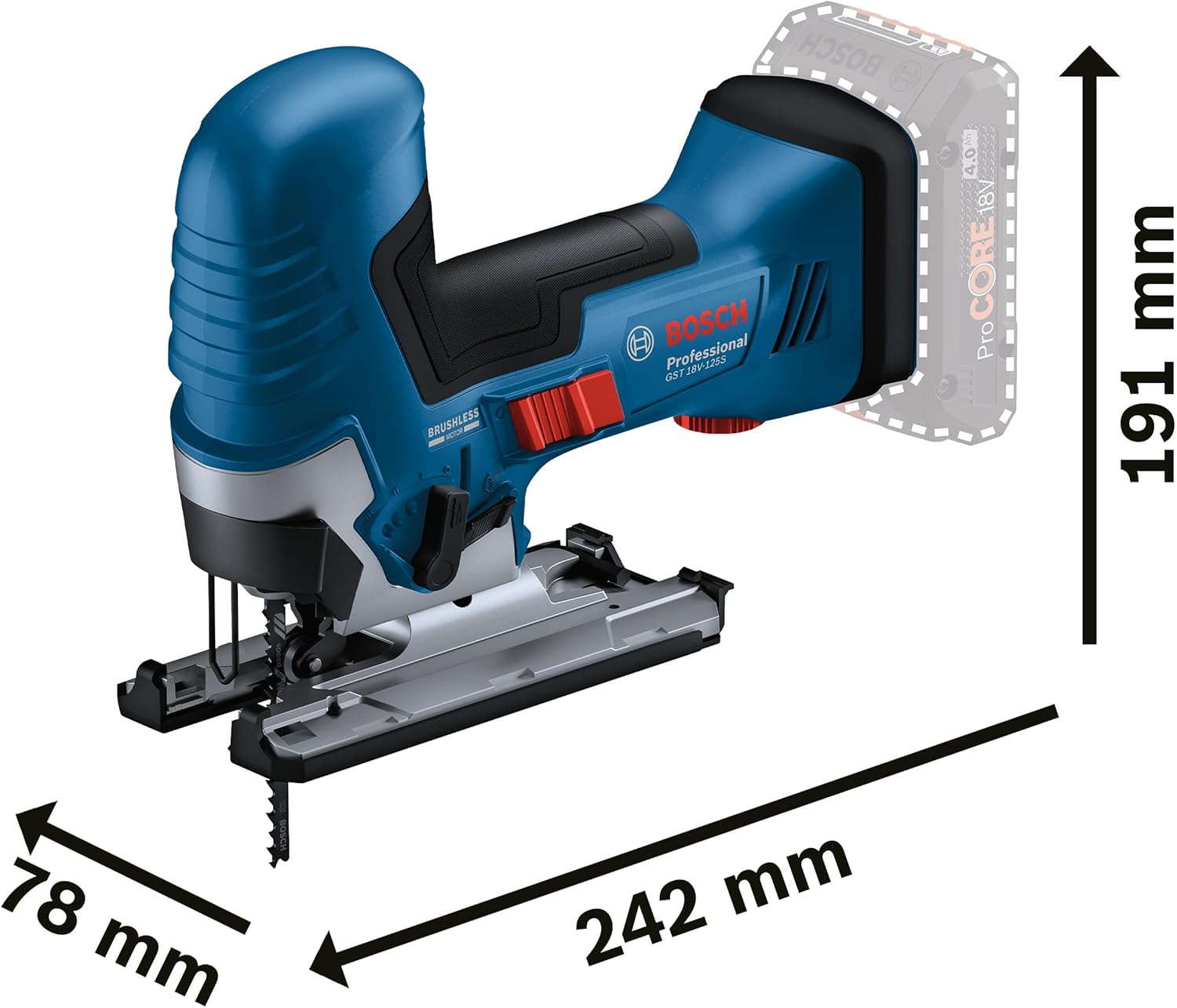
Figure 5: Dimensions of the Bosch Professional 18V System Cordless Jigsaw GST 18V-125 S. This image provides key measurements for the tool, including length, width, and height.
| Feature | Specification |
|---|---|
| Brand | Bosch Professional |
| Model | GST 18V-125 S |
| Voltage | 18 Volts |
| Power Source | Battery Powered |
| Motor Type | Brushless |
| Blade Material | Alloy Steel |
| Blade Length | 125 Millimeters |
| Cutting Angle | Up to 45 Degrees |
| Item Weight | 1.9 Kilograms (approx. 4.18 pounds) |
| Product Dimensions (L x W x H) | 17.4" x 14.17" x 5.51" |
| Included Components | GST 18V-125 S, 1 x jigsaw blade T 144 D, Dust extraction set, Anti-splinter guard, L-BOXX 136 |
9. Warranty and Support
Your Bosch Professional 18V System Cordless Jigsaw GST 18V-125 S comes with a Limited Warranty. For specific warranty terms and conditions, please refer to the documentation included with your product or visit the official Bosch Professional website.
For technical assistance, spare parts, or warranty claims, please contact Bosch Professional customer support. Contact information can typically be found on the Bosch Professional website or in your product's packaging.


