
1. Introduction
The HOLOSUN HE503R-GD is a cutting-edge micro sight engineered for precision and durability in rifle and carbine applications. It incorporates advanced features such as a Gold Super LED for extended battery life and a flexible Multi-Reticle System (MRS) that allows users to switch between a crisp 2 MOA dot and a combined 65 MOA circle with a 2 MOA dot. Its robust 6061 aluminum housing ensures resilience, while multilayer reflective glass optimizes optical performance. This manual provides comprehensive instructions for setup, operation, maintenance, and troubleshooting to ensure optimal performance of your HE503R-GD sight.
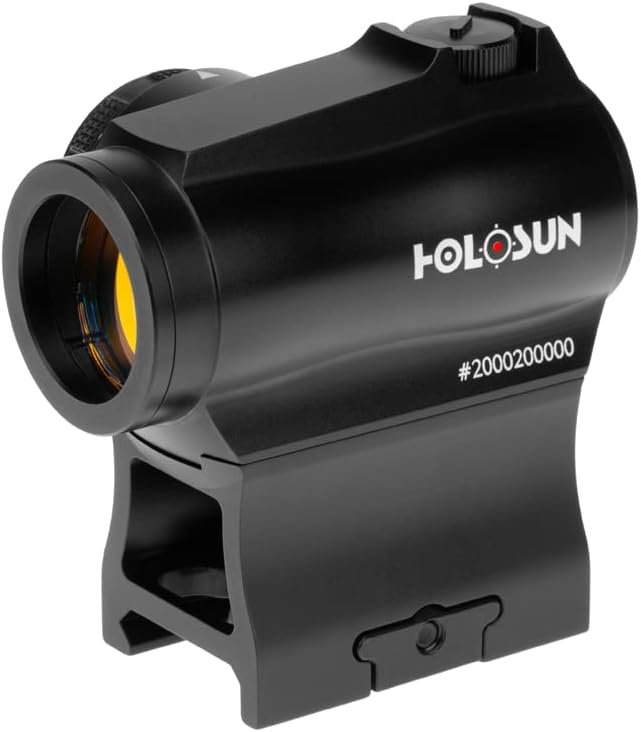
Figure 1: HOLOSUN HE503R-GD Micro Sight
2. In the Box
Upon opening your HOLOSUN HE503R-GD package, please verify that all the following components are included:
- Lower 1/3 Cowitness Mount
- Low Profile Mount
- User Manual (this document)
- Lens Cloth
- T10 L Key
- Rubber Cover
- CR2032 Battery

Figure 2: Package Contents
3. Setup
3.1 Mounting the Sight
The HE503R-GD comes with two mounting options: a lower 1/3 co-witness mount (1.63") and a low mount (.75"). Choose the appropriate mount for your rifle or carbine application. Use the provided T10 L Key to securely attach the sight to your firearm's Picatinny rail.
3.2 Battery Installation
The sight is powered by a CR2032 battery, which is integrated into the rotary switch compartment. To install or replace the battery, unscrew the battery cap located on the side of the rotary switch. Insert the CR2032 battery with the positive (+) side facing outwards. Securely screw the cap back on to ensure a watertight seal.

Figure 3: Battery Compartment
4. Operating the Sight
4.1 Brightness Adjustment
The HE503R-GD features a rotary switch for selecting reticle intensity. There are 12 brightness settings, including 10 for daylight and 2 for night vision compatibility. Rotate the dial to increase or decrease the brightness to suit ambient light conditions.

Figure 4: Brightness Adjustment Dial
4.2 Reticle Selection (Multi-Reticle System - MRS)
The Multi-Reticle System (MRS) allows you to choose between a 2 MOA dot and a 65 MOA circle with a 2 MOA dot. To switch between reticles, turn the rotary dial all the way to one side (off position) and then back to an active brightness setting. This action cycles the reticle pattern. The 65 MOA circle with 2 MOA dot is ideal for fast target acquisition at shorter distances, while the 2 MOA dot provides an uncluttered sight picture for increased precision.

Figure 5: Multi-Reticle System in action
5. Specifications
| Feature | Description |
|---|---|
| Brand | HOLOSUN |
| Model Name | HE503R-GD |
| Color | Gold 2 MOA Dot & 65 MOA Circle (HE503R-GD) |
| Reticle Type | Dot & Circle Combination (2 MOA Dot, 65 MOA Circle) |
| Brightness Settings | 10 Daylight & 2 Night Vision |
| Battery Type | CR2032 |
| Battery Life | Up to 100,000 Hours (Setting 6) |
| Housing Material | 6061 Aluminum |
| Objective Lens Diameter | 20 Millimeters |
| Magnification | 1x |
| Eye Relief | Unlimited |
| Parallax | Parallax Free |
| Adjustment per Click | 0.5 MOA |
| W&E Travel Range | ±50 MOA |
| Item Weight | 4 ounces |
| UPC | 605930625394 |

Figure 6: Product Specifications
6. Maintenance
To ensure the longevity and optimal performance of your HOLOSUN HE503R-GD sight, regular maintenance is recommended:
- Lens Cleaning: Use the provided lens cloth or a soft, lint-free cloth to gently wipe the optical surfaces. For stubborn smudges, a small amount of lens cleaning solution designed for optics can be applied to the cloth, not directly to the lens.
- Housing Cleaning: Wipe the aluminum housing with a damp cloth to remove dirt and debris. Avoid using harsh chemicals or abrasive materials.
- Battery Check: Periodically check the battery compartment for corrosion and ensure the battery cap is tightly sealed to maintain waterproof integrity. Replace the CR2032 battery as needed.
- Storage: When not in use, store the sight in a cool, dry place, preferably in its original packaging or a protective case. Ensure the rubber lens covers are in place to protect the lenses.
7. Troubleshooting
If you encounter any issues with your HOLOSUN HE503R-GD sight, consider the following common troubleshooting steps:
- Reticle Not Visible:
- Check the battery: Ensure the CR2032 battery is correctly installed and has sufficient charge. Replace if necessary.
- Adjust brightness: Rotate the brightness dial to a higher setting, especially in bright environments.
- Verify reticle selection: Ensure the rotary dial is not in the 'off' position and that the desired reticle (dot or circle-dot) is selected.
- Reticle Appears Blurry or Distorted:
- Clean the lenses: Use a lens cloth to clean both the objective and ocular lenses.
- Check for parallax: While the sight is parallax-free, ensure your eye is centered as much as possible for optimal clarity.
- Environmental factors: Extreme temperatures or humidity can sometimes affect optical clarity temporarily. Allow the sight to acclimate.
- Mounting Instability:
- Tighten mount screws: Ensure all mounting screws are securely tightened using the T10 L Key.
- Check rail integrity: Verify that the Picatinny rail on your firearm is not damaged or worn.
If problems persist after attempting these steps, please contact HOLOSUN customer support for further assistance.
8. Warranty & Support
For detailed information regarding the product warranty and customer support, please refer to the official HOLOSUN manufacturer's website or the warranty card included with your product. HOLOSUN provides comprehensive support for its products to ensure customer satisfaction.


