
Product Overview
The DaranEner NEO300 Pro is a compact and powerful portable power station designed to provide reliable electricity for various applications, from home backup to outdoor adventures. Featuring a 299Wh LiFePO4 battery, it offers fast charging capabilities and multiple output ports to power a wide range of devices.

Figure 1: Front view of the DaranEner NEO300 Pro Portable Power Station, showing its display, input/output ports, and integrated handle.
What's Included
Upon unboxing your DaranEner NEO300 Pro, please verify that all the following components are present:
- DaranEner NEO300 Pro Portable Power Station
- Product Manual (this document)
- Cigarette Lighter Female Connector (Car Charger Cable)
- USB-C To C Cable
- AC Cable
- Adapter
Setup
Initial Charging
Before first use, it is recommended to fully charge the DaranEner NEO300 Pro. The unit can be fully charged in approximately 1.3 hours using the included AC cable and adapter. Multiple charging methods are available:
- AC Wall Outlet: Approximately 1.3 hours for a full charge.
- Solar Panel (DaranEner SP100, MPPT mode): Approximately 2.5 hours.
- 12V Car Outlet (via DC5525): Approximately 2.5 hours.
- AC + Solar Panel or Car Charge: Can reach 80% charge in 40 minutes.
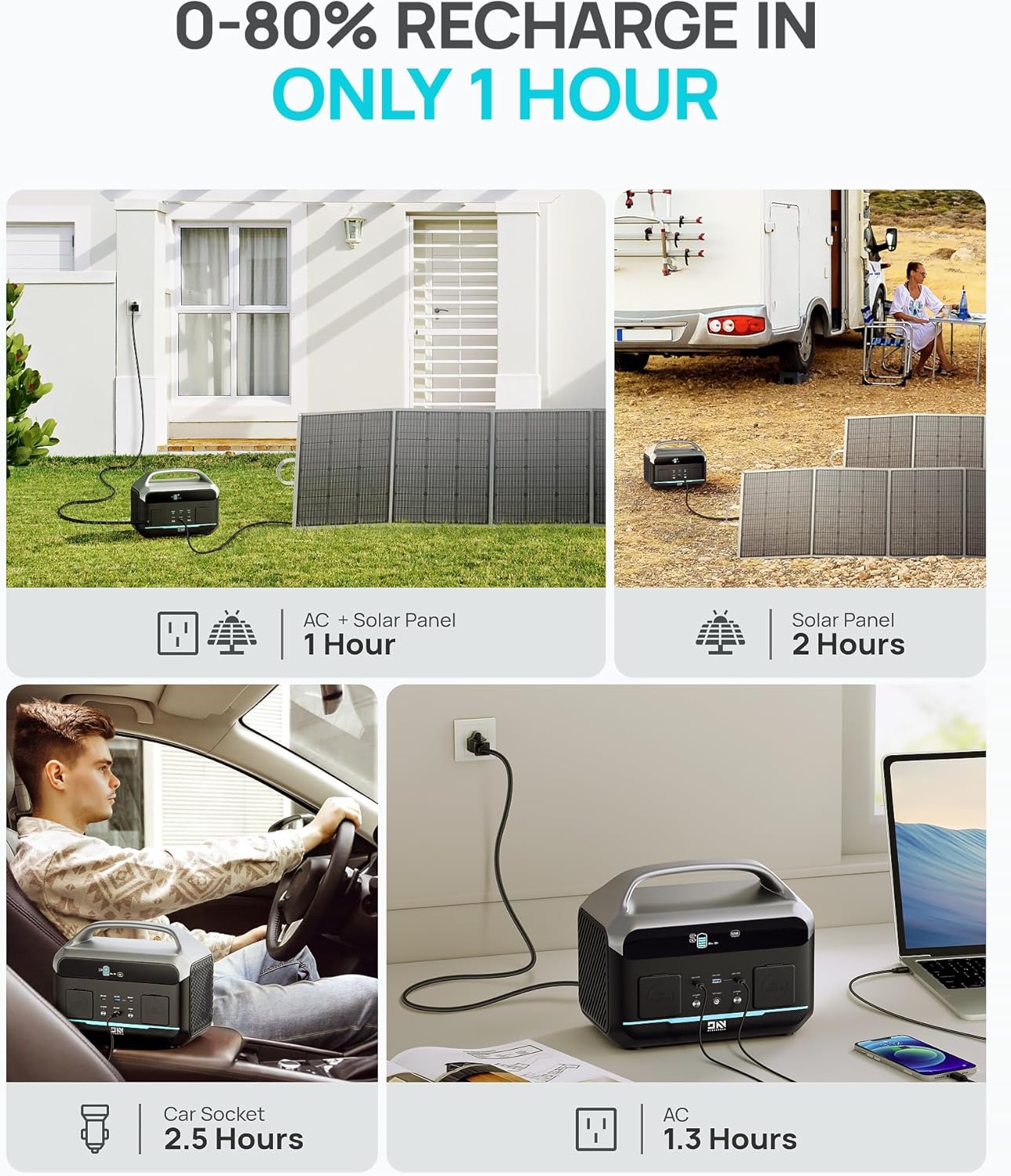
Figure 2: Illustration of various charging methods for the power station, including AC, solar panel, and car socket options.
Operating Instructions
Powering On/Off
To power on the unit, press and hold the main power button until the display illuminates. To power off, press and hold the main power button again until the display turns off. Individual output sections (AC, DC, USB) may have their own power buttons.
Connecting Devices
The NEO300 Pro offers a variety of output ports to connect your electronic devices:
- AC Outlets: One standard AC outlet is available for devices requiring up to 600W continuous power (1200W peak).
- Cigarette Socket: One 12V cigarette lighter socket for compatible car accessories.
- USB-A Port: One USB-A port with QC3.0 18W fast charging capability.
- USB-C Ports: Two USB-C ports, supporting up to 100W and 60W Power Delivery respectively.
The power station can supply power to up to 5 devices simultaneously.

Figure 3: The DaranEner NEO300 Pro providing power to multiple devices, including a laptop, game console, and phone, in an outdoor setting.
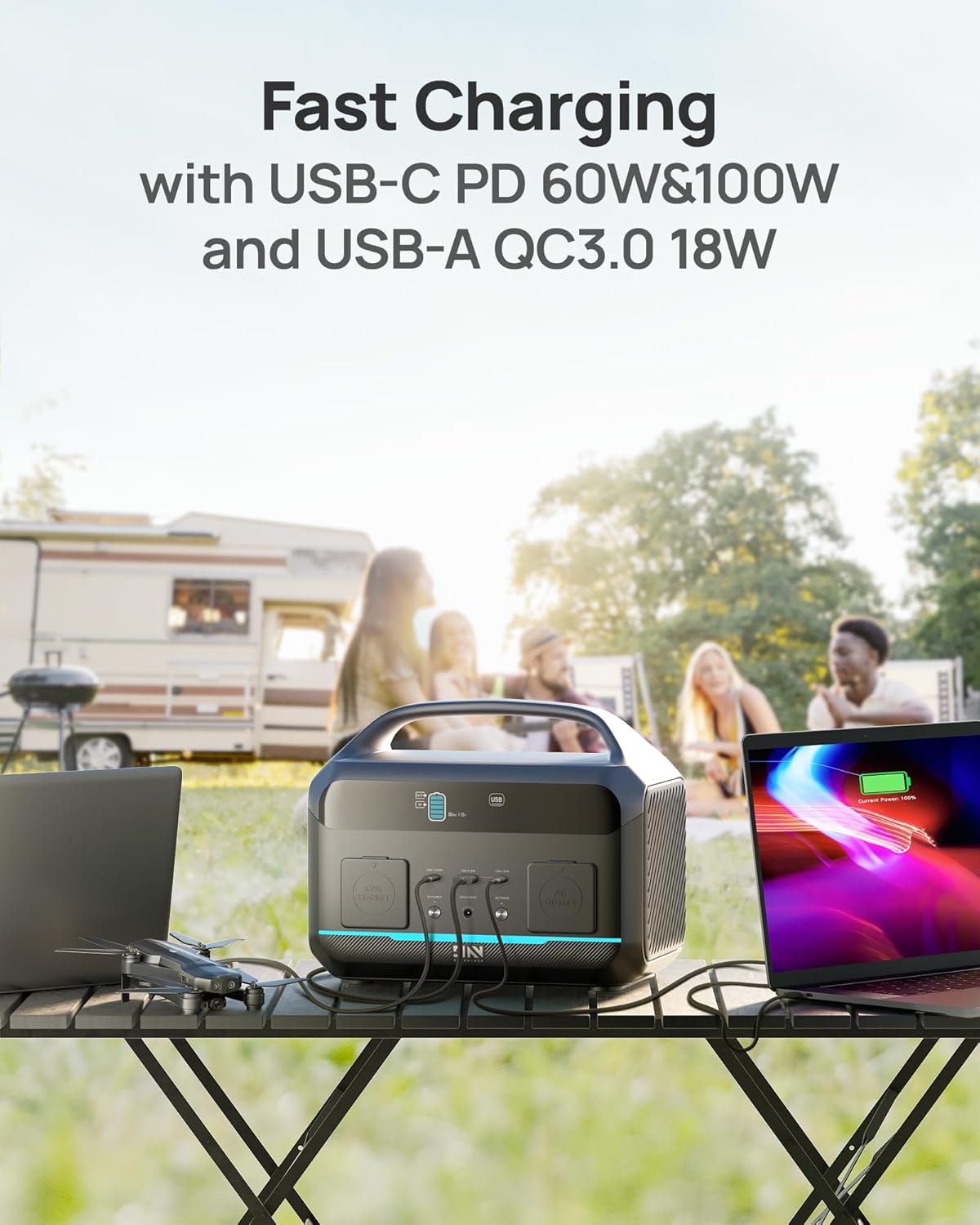
Figure 4: Close-up view of the power station's fast charging ports, including USB-C PD 60W & 100W and USB-A QC3.0 18W, in use with various devices.
Uninterruptible Power Supply (UPS) Function
The NEO300 Pro features a reliable UPS function. When connected to an AC wall outlet and simultaneously powering devices, it can immediately switch to battery power within 20 milliseconds in the event of a grid failure. This protects sensitive devices such as desktop PCs and file servers from data loss due to sudden power interruptions.

Figure 5: The power station connected to a desktop computer, illustrating its ability to provide continuous backup power during an outage.
Maintenance
Battery Care
The DaranEner NEO300 Pro utilizes advanced LiFePO4 battery cells, known for their safety and longevity. These cells can withstand over 3500 charge cycles before their capacity drops to 80%, equating to approximately 10 years of regular use. The integrated Battery Management System (BMS) continuously monitors voltage, current, and temperature to ensure optimal battery health and safety.

Figure 6: Diagram illustrating the extended lifetime of the LiFePO4 battery (7x longer, 3500 cycles) and the 5-year warranty.
Cleaning and Storage
Keep the power station clean by wiping it with a dry, soft cloth. Avoid using abrasive cleaners or solvents. Store the unit in a cool, dry place away from direct sunlight and extreme temperatures. For long-term storage, it is recommended to charge the unit to approximately 50-80% every 3-6 months to maintain battery health.
Troubleshooting
If you encounter issues with your DaranEner NEO300 Pro, please refer to the following common problems and solutions:
| Problem | Possible Cause | Solution |
|---|---|---|
| Unit does not power on | Battery is depleted; Power button not pressed correctly. | Charge the unit using the AC adapter; Press and hold the power button for 3 seconds. |
| AC output not working | AC output not enabled; Device exceeds 600W continuous power; Overload protection activated. | Ensure AC button is pressed; Check device wattage; Disconnect device and restart unit. |
| USB ports not charging | USB output not enabled; Cable issue; Device not compatible. | Ensure USB button is pressed; Try a different USB cable; Check device compatibility. |
| Slow charging speed | Using a low-power charging method; Environmental factors. | Use the AC adapter for fastest charging; Ensure proper ventilation. |
If the problem persists, please contact DaranEner customer support.
Specifications
| Feature | Detail |
|---|---|
| Model Name | NEO300L |
| Battery Capacity | 299 Wh (LiFePO4) |
| AC Output | 600W (Continuous), 1200W (Peak) |
| USB-A Output | 1 x QC3.0 18W |
| USB-C Output | 1 x 100W PD, 1 x 60W PD |
| Car Socket Output | 1 x 12V |
| Input Charging Methods | AC, Solar (MPPT), 12V Car |
| Full Charge Time (AC) | Approx. 1.3 hours |
| Dimensions (L x W x H) | 12.1" x 7.7" x 9.7" |
| Weight | 11.68 lbs |
| Operating Noise Level | 46dB (NEO300 Pro) |
| UPS Function | Yes (20ms switchover) |

Figure 7: Detailed dimensions of the DaranEner NEO300 Pro Portable Power Station.

Figure 8: Comparison of the NEO300 Pro's operating noise level (46dB) with common environments like a library or office.
Warranty and Support
The DaranEner NEO300 Pro Portable Power Station comes with a 2-year warranty from the date of purchase. This warranty covers defects in materials and workmanship under normal use. Please retain your proof of purchase for warranty claims.
For technical support, troubleshooting assistance, or warranty inquiries, please contact DaranEner customer service. Refer to the contact information provided on the DaranEner official website or the packaging for the most up-to-date support channels.