
1. Introduction
The M1A2 RV Surge Protector is designed to safeguard your recreational vehicle's electrical system from power surges and improper wiring at shore power pedestals. This portable unit includes a built-in polarity tester and a surge indicator to ensure a safe and reliable power connection for your RV.

Image 1.1: M1A2 RV Surge Protector 50 Amp with waterproof cover and anti-theft accessories.
2. Safety Information
Please read and understand all safety instructions before using this product. Failure to follow these instructions may result in electric shock, fire, or serious injury.
- Ensure the power pedestal breaker is OFF before plugging in or unplugging the surge protector.
- Do not use if the unit appears damaged.
- This device is designed for recreational vehicle use only.
- Keep the unit dry and protected from direct water exposure when possible, despite its weather-resistant design.
- Always check the diagnostic lights before connecting your RV to ensure safe power conditions.
- The unit operates within a temperature range of -40°C to 105°C.
3. Package Contents
Verify that all items are present in the package:
- M1A2 RV Surge Protector (50 Amp)
- Anti-theft Cable Lock
- Keys for Padlock
- Padlock
- Finishing Towel (for cleaning)
- Storage Bag

Image 3.1: M1A2 RV Surge Protector and included accessories: cable lock, keys, padlock, finishing towel, and storage bag.
4. Setup and Installation
Follow these steps to properly set up your M1A2 RV Surge Protector:
- Turn off Power: Ensure the circuit breaker at the RV power pedestal is in the OFF position.
- Plug in Surge Protector: Insert the M1A2 RV Surge Protector's male plug into the 50 amp receptacle on the power pedestal.
- Turn on Power: Flip the circuit breaker at the power pedestal to the ON position.
- Check Diagnostic Lights: Observe the diagnostic lights on the surge protector. Refer to the 'Operating Instructions' section to interpret the light patterns. Ensure a 'POWER ON' (green) light and no fault indicators are present.
- Connect RV: Once the diagnostic lights confirm safe power, plug your RV's 50 amp power cord into the female receptacle of the M1A2 RV Surge Protector.
- Secure with Anti-Theft Cable (Optional): Use the provided cable lock and padlock to secure the surge protector to the power pedestal, deterring theft.

Image 4.1: M1A2 RV Surge Protector connected to a power pedestal, providing power to an RV.

Image 4.2: Detail of the anti-theft cable lock securing the surge protector to a power source.
5. Operating Instructions: Circuit Analyzer Diagnostic Chart
The M1A2 RV Surge Protector features a diagnostic light panel to indicate the status of the power connection. Interpret the lights as follows:
| Indicator | Status | Meaning |
|---|---|---|
| Green Light (POWER ON) | ON | Power is present and wiring is correct. Safe to connect RV. |
| Red Light (OPEN NEUTRAL) | ON | Neutral wire is disconnected. Do not connect RV. |
| Red Light (OPEN GROUND) | ON | Ground wire is disconnected. Do not connect RV. |
| Red Light (MISSING L1 120V) | ON | Line 1 (120V) is missing. Do not connect RV. |
| Red Light (MISSING L2 120V) | ON | Line 2 (120V) is missing. Do not connect RV. |
| Red Light (REVERSE POLARITY) | ON | Hot and neutral wires are reversed. Do not connect RV. |
| Red Light (L1 & GND REVERSED) | ON | Line 1 and Ground wires are reversed. Do not connect RV. |
| Red Light (L2 & GND REVERSED) | ON | Line 2 and Ground wires are reversed. Do not connect RV. |
| Red Light (OPEN CIRCUIT) | ON | An open circuit condition exists. Do not connect RV. |
| Green Light (SURGE PROTECTION) | ON | Surge protection is active. |
| Red Light (OVER HEAT WHEN ON) | ON | Unit is overheating. Disconnect immediately. |
Important: If any red fault indicator lights are illuminated, do not connect your RV. Seek assistance from campground staff or a qualified electrician to resolve the wiring issue at the power pedestal.
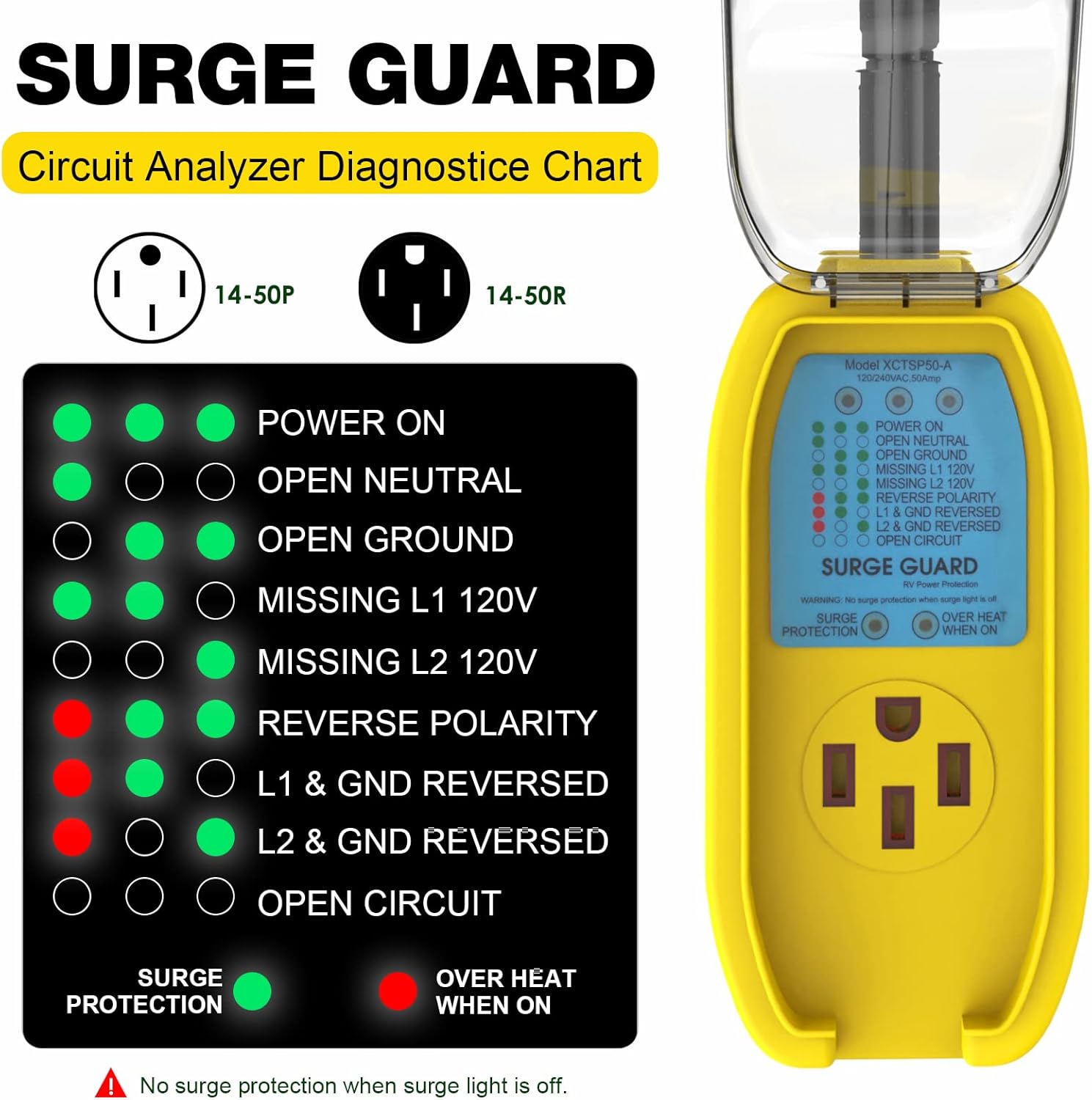
Image 5.1: Detailed view of the M1A2 Surge Guard diagnostic light panel and corresponding circuit analyzer chart.
6. Maintenance
The M1A2 RV Surge Protector is designed for durability and minimal maintenance. To ensure optimal performance and longevity:
- Cleaning: Use the provided finishing towel or a soft, damp cloth to wipe down the unit as needed. Ensure the unit is unplugged and dry before cleaning.
- Storage: When not in use, store the surge protector in the provided storage bag in a cool, dry place.
- Inspection: Periodically inspect the unit for any signs of physical damage, such as cracks in the housing or frayed wiring. Do not use if damage is observed.
- Waterproof Cover: Ensure the waterproof cover is properly closed over the receptacle when in use to protect against elements.

Image 6.1: Close-up view of the M1A2 Surge Protector's waterproof cover, designed to protect the receptacle from environmental elements.
7. Troubleshooting
If you encounter issues with your M1A2 RV Surge Protector, refer to the diagnostic chart in Section 5. Here are common scenarios:
- No Lights: If no lights illuminate after plugging into the pedestal and turning on the breaker, check the pedestal's breaker. If the breaker is on and still no lights, the pedestal may have no power, or the surge protector may be faulty.
- Red Fault Lights: If any red fault lights are on (e.g., Open Neutral, Open Ground, Reverse Polarity), this indicates an unsafe wiring condition at the power pedestal. Do not connect your RV. Try a different pedestal if available, or contact campground management/electrician.
- Surge Protection Light Off: If the green 'SURGE PROTECTION' light is off, it indicates that the surge protection component has been compromised, likely due to a significant power surge. The unit may still function as a circuit analyzer, but surge protection is no longer active. The unit should be replaced for full protection.
- Overheat Light On: If the red 'OVER HEAT WHEN ON' light illuminates, immediately disconnect the surge protector from the power source and your RV. Allow the unit to cool down. If the issue persists, discontinue use and contact support.
8. Specifications
| Feature | Detail |
|---|---|
| Model | M1A2 |
| Amperage | 50 Amps |
| Voltage | 120V / 240V |
| Wattage | 12,000W |
| Surge Protection | 4200 Joules |
| Response Time | < 1 nanosecond (10⁻⁹ second) |
| Operating Temperature | -40°C to 105°C |
| Ingress Protection (IP) Rating | IP65 (Rugged outdoors rain proof designed) |
| Certifications | UL Certified, Canadian Approved |
| Item Weight | 3.39 pounds |
| Dimensions (Approx.) | 15.8 in (overall length), 4.1 in (width of main unit), 3.3 in (height of main unit) |

Image 8.1: Diagram showing the N14-50P plug, N14-50R receptacle, and key dimensions of the M1A2 RV Surge Protector.

Image 8.2: Close-up of the UL Listed certification mark on the surge protector's plug, indicating compliance with safety standards.
9. Warranty and Support
The M1A2 RV Surge Protector comes with a 12-month money-back and quality warranty. If you experience any issues with the product or require assistance, please contact M1A2 customer service. Timely and friendly customer service is available to address your concerns.
For support, please refer to the contact information provided with your purchase or visit the official M1A2 brand store online.


