
1. Product Overview
This manual provides instructions for the Bushnell Wingman View Golf GPS Bluetooth Speaker and the accompanying Wearable4U Ultimate Black Earbuds and charging accessories. The Bushnell Wingman View combines a high-quality Bluetooth speaker with a golf GPS display, offering audible and visual distance information for golf courses. The Wearable4U earbuds provide a personal audio experience, complemented by wall and car chargers for convenient power management.
1.1. What's in the Box
- 1x Bushnell Wingman View Bluetooth Speaker with Audible/Viewable GPS
- 1x Remote Control for Wingman View
- 1x USB-C Charging Cable
- 1x Wearable4U Ultimate Black EarBuds
- 1x Wearable4U Earbuds Charging E-Bank Case
- 1x Wearable4U Wall Charger
- 1x Wearable4U Car Charger

2. Setup Guide
2.1. Bushnell Wingman View Speaker Setup
- Charging the Speaker: Connect the provided USB-C charging cable to the Wingman View speaker and then to either the Wearable4U wall charger or car charger. A full charge provides up to 10 hours of operation.
- Powering On/Off: Press and hold the power button (⏻) on the side of the speaker to turn it on or off.
- Bluetooth Pairing:
- Ensure the Wingman View is powered on.
- Activate Bluetooth on your smartphone or tablet.
- Search for "Wingman View" in your device's Bluetooth settings and select it to pair. A confirmation sound will indicate successful pairing.
- Bushnell Golf App Installation: Download the Bushnell Golf app from your device's app store. This app is essential for accessing course data and advanced features.
- Remote Control Pairing: The remote control is typically pre-paired. If re-pairing is needed, refer to the Bushnell Golf app for specific instructions.
- BITE Magnetic Mount: The Wingman View features an integrated BITE magnetic mount. This allows for secure attachment to a golf cart bar or any ferrous metal surface.

Image 2.1: The Bushnell Wingman View speaker demonstrating its magnetic attachment to a golf cart, alongside its remote control.
2.2. Wearable4U Ultimate Black Earbuds Setup
- Charging the Earbuds and Case: Place the earbuds into their charging E-Bank case. Connect the USB-C cable to the case and then to a power source (wall or car charger). The case's LED display indicates charge status.
- Powering On/Off: Earbuds typically power on automatically when removed from the case and power off when returned. Manual power control may vary; refer to the specific earbud instructions if included separately.
- Bluetooth Pairing:
- Remove both earbuds from the charging case.
- Activate Bluetooth on your smartphone or tablet.
- Search for the earbud device name (e.g., "Wearable4U Earbuds Pro") in your device's Bluetooth settings and select it to pair.

3. Operating Instructions
3.1. Bushnell Wingman View Speaker Operation
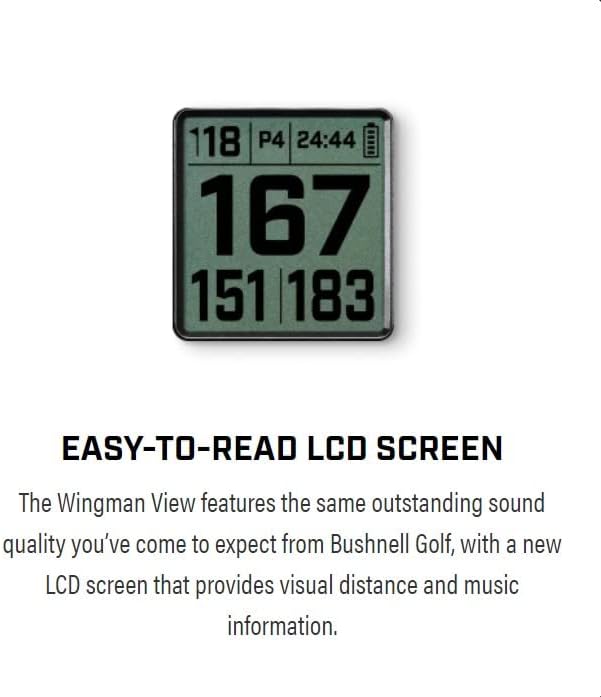
- GPS Distances: Once paired with the Bushnell Golf app and a course is selected, the LCD screen will display visual distances to the front, middle, and back of the green. It can also show up to 6 audible and viewable hazard distances per hole.
- Audible Distances: Press the remote button to hear audible distance readings for the current hole.
- Music Playback: Connect your smartphone via Bluetooth to stream music through the speaker. Use the speaker's physical buttons (+ / -) or the remote to adjust volume and skip tracks.
- Remote Control Functions: The redesigned remote allows you to:
- Get GPS distances.
- Adjust speaker volume.
- Change music tracks.
- Play pre-loaded sound bites or 1st tee introductions.
3.2. Wearable4U Ultimate Black Earbuds Operation
- Music Playback: Once paired, stream audio from your device. Control playback (play/pause, skip) using the touch controls on the earbuds, if available, or directly from your connected device.
- Call Handling: Answer or end calls using the earbud controls.
4. Maintenance
- Cleaning: Use a soft, damp cloth to clean the exterior of the speaker and earbuds. Avoid harsh chemicals or abrasive materials.
- Water Resistance: The Bushnell Wingman View is water resistant. However, it is not designed for submersion. Wipe dry if it gets wet. The Wearable4U earbuds are designed to be fearless of rain and sweat.
- Battery Care:
- Charge devices regularly, even if not in frequent use, to maintain battery health.
- Avoid extreme temperatures for storage and operation.
- Do not attempt to replace the internal batteries.
- Storage: Store devices in a cool, dry place when not in use.
5. Troubleshooting
| Problem | Possible Cause | Solution |
|---|---|---|
| Wingman View not powering on. | Low battery. | Charge the speaker using the provided USB-C cable and charger. |
| No Bluetooth connection. | Device not in pairing mode; out of range; interference. | Ensure device is in pairing mode. Move devices closer. Turn off other Bluetooth devices. Re-pair through settings. |
| GPS not acquiring signal. | Obstructed view of sky; app not updated; course not downloaded. | Move to an open area. Ensure Bushnell Golf app is updated and the course is downloaded. |
| Poor sound quality. | Low battery; device too far from speaker/earbuds; audio source issue. | Charge devices. Move connected device closer. Check audio source quality. |
| Remote control not responding. | Remote battery low; not paired. | Ensure remote battery is charged (if applicable, or replace). Re-pair remote via Bushnell Golf app. |
6. Product Specifications
6.1. Bushnell Wingman View Golf GPS Bluetooth Speaker
- Model Name: Wingman View
- Item Model Number: 362210
- Mounting Type: BITE Magnetic Mount
- Speaker Type: Built-In
- Special Features: Built-in USB port, LCD Display, Premium Sound Quality, Removable bite remote, View hazard distances
- Connectivity Technology: Bluetooth
- Power Source: Battery Powered (1 Lithium Ion battery included)
- Battery Capacity: 350 Milliamp Hours
- Speaker Maximum Output Power: 30 Watts
- Frequency Response: 60 KHz
- Water Resistance Level: Water Resistant
- Product Dimensions: 3.1"D x 3.2"W x 7.3"H
- Item Weight: Approximately 0.811 ounces (speaker only, 23 Grams)
- Control Method: Remote
- Indoor/Outdoor Usage: Outdoor
6.2. Wearable4U Ultimate Black Earbuds
- Included Components: Wearable4U Ultimate Black EarBuds, Charging E-Bank Case
- Power Bank Capacity (E-Bank Case): 1500 mAh
- Wireless Communication Technology: Bluetooth 5.0 (implied by "Wearable4U Bluetooth EarBuds Pro" in feature bullets)
- Water Resistance: Fearless of rain and sweat (as per feature bullets)
6.3. Charging Accessories
- 1x Wall Charger
- 1x Car Charger
7. Warranty and Support
The Bushnell Wingman View Golf GPS Bluetooth Speaker comes with a Limited Warranty. For specific details regarding the warranty period and coverage, please refer to the documentation included with your product or visit the official Bushnell Golf website.
For technical support, troubleshooting assistance, or warranty claims, please contact the respective manufacturers:
- Bushnell Golf: For inquiries related to the Wingman View speaker and its GPS/Bluetooth functionalities.
- Wearable4U: For inquiries related to the Ultimate Black Earbuds and charging accessories.
Always retain your proof of purchase for warranty purposes.