
Lienuis OX-60PA
Lienuis 110 Pint Crawl Space Dehumidifier
Model: OX-60PA | User Manual
1. Introduction
Thank you for choosing the Lienuis 110 Pint Crawl Space Dehumidifier, Model OX-60PA. This unit is specifically designed to effectively control humidity levels in challenging environments such as crawl spaces, basements, and other large areas up to 1,300 sq.ft. By removing excess moisture, this dehumidifier helps prevent issues like mold growth, musty odors, and structural damage, contributing to a healthier indoor environment. Please read this manual thoroughly before operation to ensure proper use, maintenance, and longevity of your dehumidifier.
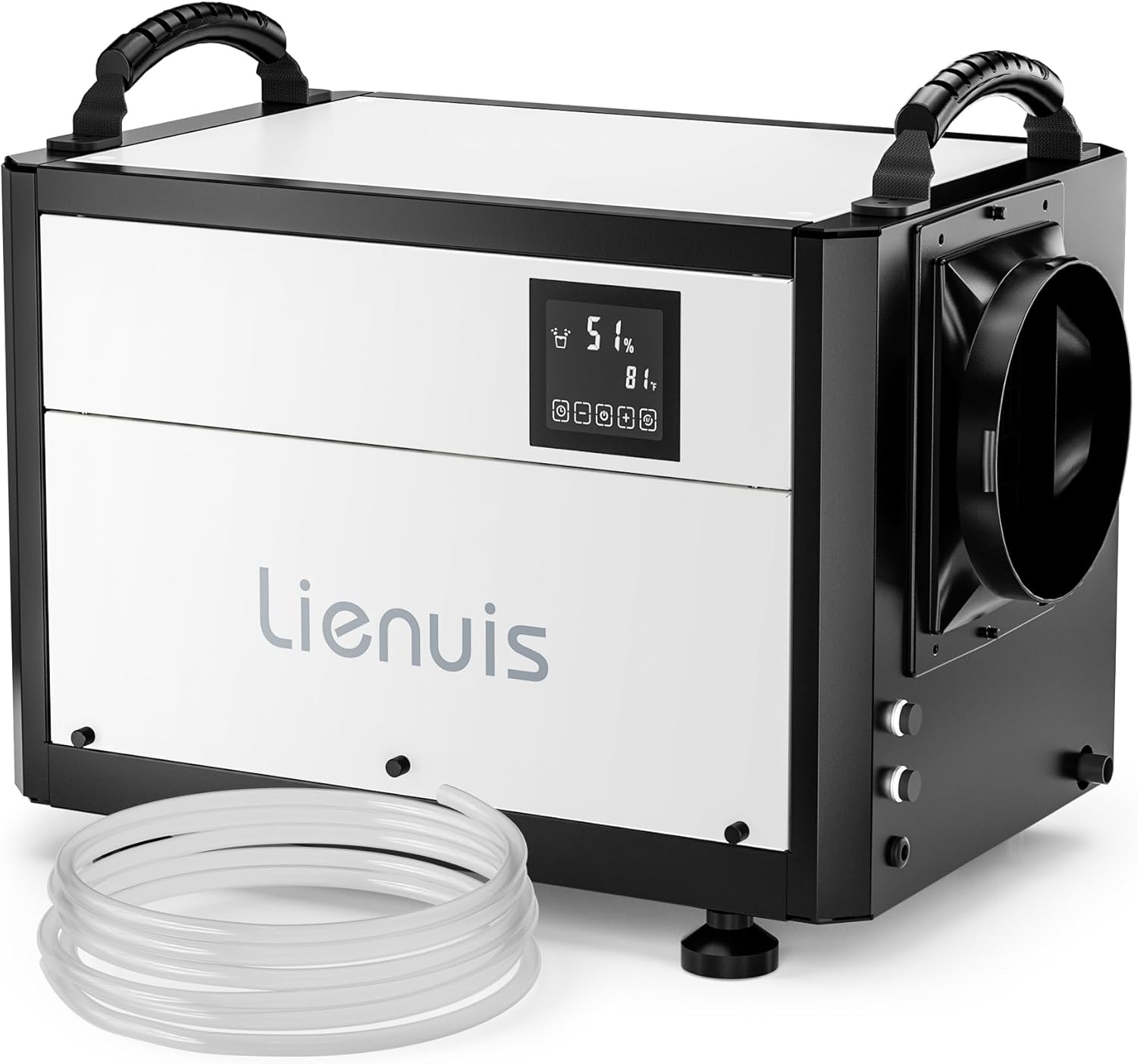
Image: The Lienuis 110 Pint Crawl Space Dehumidifier, a compact unit with a digital display and handles, shown with its drain hose.
2. Safety Information
Always adhere to basic safety precautions when using electrical appliances to reduce the risk of fire, electric shock, or injury.
- Ensure the power supply matches the voltage specified on the unit's rating label.
- Do not operate the dehumidifier with a damaged cord or plug.
- Keep the unit away from water and other liquids. Do not immerse the unit in water.
- Do not block air inlets or outlets. Maintain adequate clearance around the unit for proper airflow.
- Unplug the unit before cleaning or performing any maintenance.
- This appliance is not intended for use by persons (including children) with reduced physical, sensory or mental capabilities, or lack of experience and knowledge, unless they have been given supervision or instruction concerning use of the appliance by a person responsible for their safety.
- Do not use the dehumidifier in areas where flammable gases or liquids are stored.
3. Product Features
- Compact and Durable Design: Measuring 20.5″D x 14″W x 14″H, this unit is built with materials resistant to high humidity and corrosion, ideal for tight crawl spaces.
- High Efficiency Dehumidification: Capable of removing 110 pints of water per day under saturated conditions and 60 pints per day under AHAM conditions, covering up to 1,300 sq.ft.
- Continuous Drainage: Offers two drainage options: gravity drainage using the included hose or connection to an external condensate pump (pump not included) for more flexible water removal.
- Remote Control Panel: Features a smart touch panel with a 32.8 FT extension cable, allowing for convenient remote monitoring and control from a different location.
- Automatic Defrost System: Operates effectively at temperatures as low as 41°F (5°C). Built-in sensors detect frost on the coil and initiate an automatic defrost cycle to prevent ice buildup.
- Washable and Reusable Filter: Equipped with a removable filter to protect internal components from dust and particles, ensuring efficient operation and extending the unit's lifespan.
- Memory Restart Function: The unit will automatically restart with previous settings after a power outage.
- 24-Hour Timer: Allows for scheduled operation, enhancing energy efficiency.

Image: The dehumidifier highlighting its multi-functional and compact design, showing icons for 3 modes, auto defrost, memory restart, 24H timer, and auto drain.

Image: A graphic illustrating the dehumidifier's capacity: 110 Pints/Day, 1300 Sq.Ft coverage, and 120 CFM Airflow.
4. Package Contents
Upon unpacking, please ensure all items listed below are present and in good condition.
- Lienuis Crawl Space Dehumidifier Unit
- Remote Control Panel with 32.8 FT Extension Cable
- Drain Hose for Gravity Drainage
- Leveling Feet
- User Manual (this document)
5. Setup & Installation
5.1 Placement
The dehumidifier is designed for use in crawl spaces, basements, and other areas requiring humidity control.
- Place the unit on a level, stable surface.
- Ensure there is at least 12 inches (30 cm) of clearance around all sides of the unit for proper airflow.
- Avoid placing the unit near heat sources or in direct sunlight.
- The unit can be installed on the floor using the provided leveling feet or suspended using optional hanging kits (not included).

Image: The dehumidifier installed in a crawl space, demonstrating its suitability for such environments and showing hanging installation.

Image: Diagram showing both hanging installation and floor installation options for the dehumidifier.
5.2 Drainage Connection
The dehumidifier is designed for continuous drainage.
- Gravity Drainage: Connect the provided drain hose to the unit's drain outlet. Ensure the hose is sloped downwards continuously to a floor drain or suitable receptacle. Avoid kinks or elevated sections in the hose that could impede water flow.
- External Condensate Pump (Optional): For situations where gravity drainage is not feasible, an external condensate pump (not included) can be connected to the unit. Follow the pump manufacturer's instructions for installation.

Image: Visual representation of gravity drainage and pump drainage options for the dehumidifier. Note: Pump is not included.

Image: A comparison showing gravity drainage with a 9.84 ft drain hose and pump drainage with a potential drain height of 19.6 ft. It explicitly states "Pump not included".
5.3 Remote Control Panel Setup
The unit comes with a detachable smart touch panel and a 32.8 FT extension cable for remote control.
- Carefully detach the control panel from the main unit.
- Connect the extension cable to both the main unit and the detached control panel.
- Mount the control panel in a convenient location (e.g., upstairs, in a closet) for easy access and monitoring.

Image: A user interacting with the remote control panel mounted on a wall, with the dehumidifier visible in the background, illustrating remote humidity control.

Image: A close-up of the smart touch panel, showing its digital display and control buttons for timer, mode, and humidity settings.
6. Operating Instructions
6.1 Power On/Off
Press the power button on the control panel to turn the unit on or off.
6.2 Setting Desired Humidity Level
Use the humidity control buttons on the smart touch panel to set your desired relative humidity (RH) level. The unit will operate until the set humidity is reached, then cycle on and off to maintain it.
6.3 Operating Modes
The dehumidifier offers multiple operating modes:
- Auto Mode: The unit automatically adjusts its operation based on the ambient humidity to maintain the set level.
- Continuous Drying Mode: The unit runs continuously regardless of the humidity level, ideal for very damp conditions or for drying purposes.
- Sleep Mode: Reduces fan speed and display brightness for quieter operation, suitable for nighttime use.

Image: A visual showing the dehumidifier operating in continuous drying mode, with arrows indicating airflow and humidity reduction from 85% RH to 30% RH.

Image: The dehumidifier in a bedroom setting, illustrating its quiet operation in Sleep Mode with a noise level graph.
6.4 Timer Function
The 24-hour timer allows you to schedule when the unit turns on or off. Refer to the control panel instructions for detailed timer setup.

Image: The dehumidifier with an overlay indicating its 24-hour timer function and quiet operation, comparing its noise level to common sounds.
7. Maintenance
7.1 Cleaning the Air Filter
Regular cleaning of the air filter is crucial for optimal performance and air quality.
- Turn off and unplug the dehumidifier.
- Locate and remove the air filter (typically on the side or back of the unit).
- Wash the filter with warm, soapy water. Rinse thoroughly.
- Allow the filter to air dry completely before reinserting it into the unit.
- Clean the filter every two weeks or more frequently depending on usage and air quality.

Image: The dehumidifier with its side panel open, showing the removable filter being washed under running water, emphasizing its washable and reusable nature.
7.2 Auto Defrost Function
The unit is equipped with an automatic defrost system. If frost builds up on the evaporator coils, the unit will temporarily stop dehumidifying and run the fan to melt the frost. This is a normal operation and ensures efficient performance in cooler temperatures.

Image: A cutaway view of the dehumidifier's internal components, illustrating the auto defrost feature preventing coils from freezing.
7.3 General Cleaning
Wipe the exterior of the unit with a soft, damp cloth. Do not use harsh chemicals or abrasive cleaners.
8. Troubleshooting
| Problem | Possible Cause | Solution |
|---|---|---|
| Dehumidifier does not turn on. | No power, power cord unplugged, circuit breaker tripped. | Ensure unit is plugged in securely. Check household fuse/circuit breaker. |
| Unit is running but not collecting water. | Humidity level already low, air filter clogged, temperature too low, unit in defrost mode. | Check current humidity reading. Clean air filter. Ensure ambient temperature is above 41°F (5°C). Allow defrost cycle to complete. |
| Unit is icing up. | Ambient temperature too low, air filter clogged. | Ensure ambient temperature is within operating range (41°F - 113°F). Clean air filter. The unit has an auto-defrost function that will activate. |
| Water is leaking. | Drain hose kinked or blocked, improper hose connection. | Check drain hose for kinks or blockages. Ensure hose is securely connected and sloped downwards for gravity drainage. |
| Unit is noisy. | Unit not level, fan obstruction. | Ensure unit is on a level surface. Check for any obstructions near the fan. |
| E2 Error Code. | Sensor malfunction or issue with humidity detection. | Turn off the unit, unplug it for a few minutes, then plug it back in and restart. If the error persists, contact customer support. |
9. Specifications
| Attribute | Detail |
|---|---|
| Brand | Lienuis |
| Model Name | OX-60PA |
| Dehumidification Capacity (Saturated) | 110 Pints/Day |
| Dehumidification Capacity (AHAM) | 60 Pints/Day |
| Coverage Area | Up to 1,300 sq.ft. |
| Air Flow Capacity | 125 Cubic Feet Per Minute (CFM) |
| Product Dimensions (D x W x H) | 14.17"D x 14.17"W x 20.47"H |
| Item Weight | 66 Pounds |
| Operating Temperature Range | 41°F - 113°F (5°C - 45°C) |
| Operating Humidity Range | 20% - 95% RH |
| Wattage | 567 Nanowatts |
| Number of Speeds | 3 |
| Operation Modes | Auto, Continuous Drying, Sleep Mode |
| Drainage | Continuous (Gravity or External Pump) |
| Remote Control Cable Length | 32.8 FT |
10. Warranty and Support
For warranty information and technical support, please refer to the official Lienuis website or the warranty card included with your product. You may also contact Lienuis customer service directly for assistance with any issues or questions regarding your dehumidifier.
A digital version of this user manual is available for download: Lienuis Dehumidifier User Manual (PDF).