
RG51F/E
User Manual for Generic Air Conditioner Remote Control
Models: RG51F/E, RG51F2/BGEF, RG51F3/BGEF
1. Product Overview
This remote control is designed to operate various air conditioner units, including those from Midea, Ecox, and KORYO, as well as specific compatible models. It provides full functionality for controlling temperature, mode, fan speed, and other features of your air conditioning system.
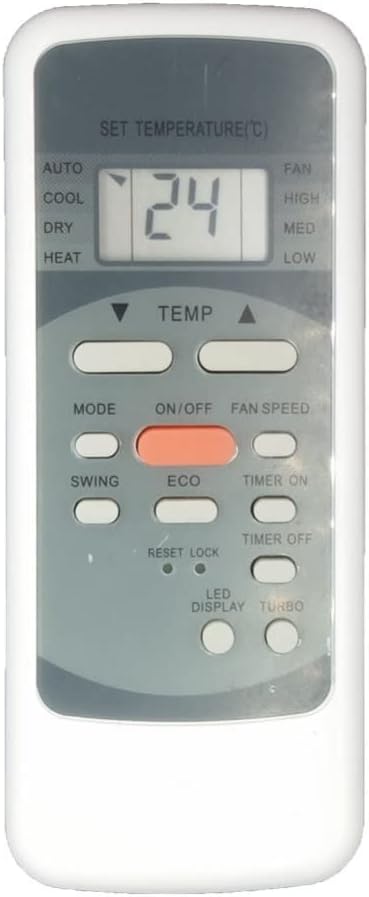
Image: Front view of the remote control, showing the display and various control buttons.
2. Setup and Battery Installation
2.1 Battery Requirements
- The remote control requires two (2) AAA batteries (not included).
- Ensure to use new, high-quality batteries for optimal performance.
2.2 Installation Steps
- Locate the battery compartment on the back of the remote control.
- Slide the battery cover downwards or press the latch to open it.
- Insert the two AAA batteries, ensuring the positive (+) and negative (-) ends align correctly with the markings inside the compartment.
- Close the battery cover securely until it clicks into place.
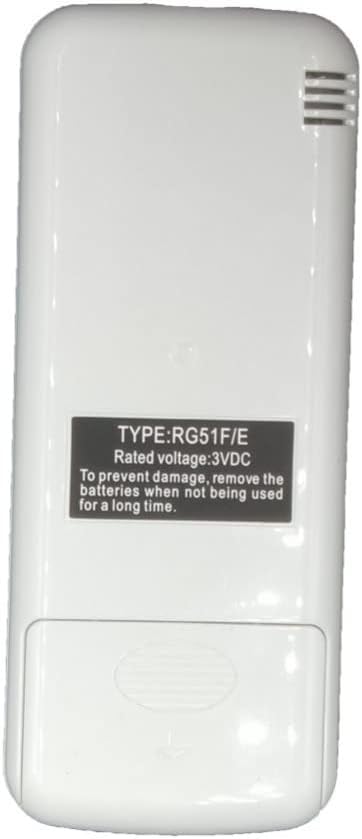
Image: Back view of the remote control, showing the battery compartment and product label.
3. Operating Instructions
Point the remote control directly at the air conditioner unit's receiver when pressing buttons. Ensure there are no obstructions between the remote and the unit.
3.1 Button Functions
| Button | Function |
|---|---|
| ON/OFF | Powers the air conditioner unit on or off. |
| MODE | Cycles through operating modes: AUTO, COOL, DRY, HEAT. |
| TEMP ▲/▼ | Adjusts the desired temperature setting up or down. |
| FAN SPEED | Cycles through fan speeds: HIGH, MED (Medium), LOW, or AUTO. |
| SWING | Controls the vertical swing of the air conditioner's louvers. |
| ECO | Activates or deactivates the energy-saving mode. |
| TIMER ON | Sets a timer for the air conditioner to automatically turn on. |
| TIMER OFF | Sets a timer for the air conditioner to automatically turn off. |
| RESET/LOCK | Used to reset settings or lock the remote's buttons to prevent accidental changes. |
| LED DISPLAY | Toggles the LED display on the air conditioner unit on or off. |
| TURBO | Activates rapid cooling or heating for quick temperature adjustment. |

Image: Angled view of the remote control, highlighting the button layout.
4. Maintenance
4.1 Battery Replacement
Replace batteries when the remote's range decreases or the display becomes dim. Always replace both batteries at the same time. Dispose of used batteries according to local regulations.
4.2 Cleaning the Remote
Wipe the remote control with a soft, dry cloth. Do not use liquid cleaners or abrasive materials, as they may damage the remote's surface or internal components.
5. Troubleshooting
If your remote control is not functioning as expected, please refer to the following common issues and solutions:
- Remote is not working:
- Check if the batteries are correctly installed with the proper polarity (+/-).
- Replace old batteries with new ones. Sometimes, rolling the batteries inside the compartment can improve connection if springs are loose.
- Ensure there are no obstructions between the remote and the air conditioner's infrared receiver.
- Remote is not responding to the unit:
- Verify that the remote control is compatible with your specific air conditioner model. Refer to the 'Compatible Air Conditioner Models' section.
- This remote typically does not require programming. If you suspect it needs pairing, consult your air conditioner's original manual.
- Limited range or intermittent response:
- This could indicate low battery power. Replace the batteries.
- Ensure you are within the effective operating range of the air conditioner's IR receiver.
6. Specifications
| Feature | Detail |
|---|---|
| Model Numbers | RG51F/E, RG51F2/BGEF, RG51F3/BGEF |
| Brand | Generic |
| Wireless Communication | Infrared (IR) |
| Controller Type | Button Control |
| Max Number of Supported Devices | 1 (One air conditioner unit) |
| Color | RG51F3 BGEF (as per product variant) |
| Rated Voltage | 3VDC |
7. Compatible Air Conditioner Models
This remote control is compatible with various air conditioner models, including but not limited to:
- Midea Air Conditioners
- Ecox Air Conditioners
- KORYO Air Conditioners
- Edem009c18b
- Edem012c18b
- Edem012c18a
- Edem018c18b
- Edem024c18b
- Edem036h18b
- Edem030h18b
If your specific model is not listed, please compare your original remote with the images provided or consult the product listing for further compatibility details.
8. Warranty and Support
Specific warranty information is not provided with this manual. For any issues, questions, or support regarding your remote control, please contact the seller or manufacturer directly through your purchase platform. Ensure to provide your order details and the product model number for efficient assistance.
Related documentsRG51F/E


Ask a question about this manual
Ask about setup, troubleshooting, compatibility, parts, safety, or missing instructions. Manuals+ will review the question and use this page’s manual context to help answer it.