
1. Important Safety Information
CAUTION: Contains sharp blades. Keep away from children. Do not use near water. Always unplug when not in use. Follow proper cleaning and maintenance procedures to avoid injury.
Statements regarding dietary supplements have not been evaluated by the FDA and are not intended to diagnose, treat, cure, or prevent any disease or health condition.
2. Product Overview
The RESUXI Grooming Kit provides a comprehensive solution for men's hair cutting and shaving needs, featuring both a professional hair clipper and an electric shaver.
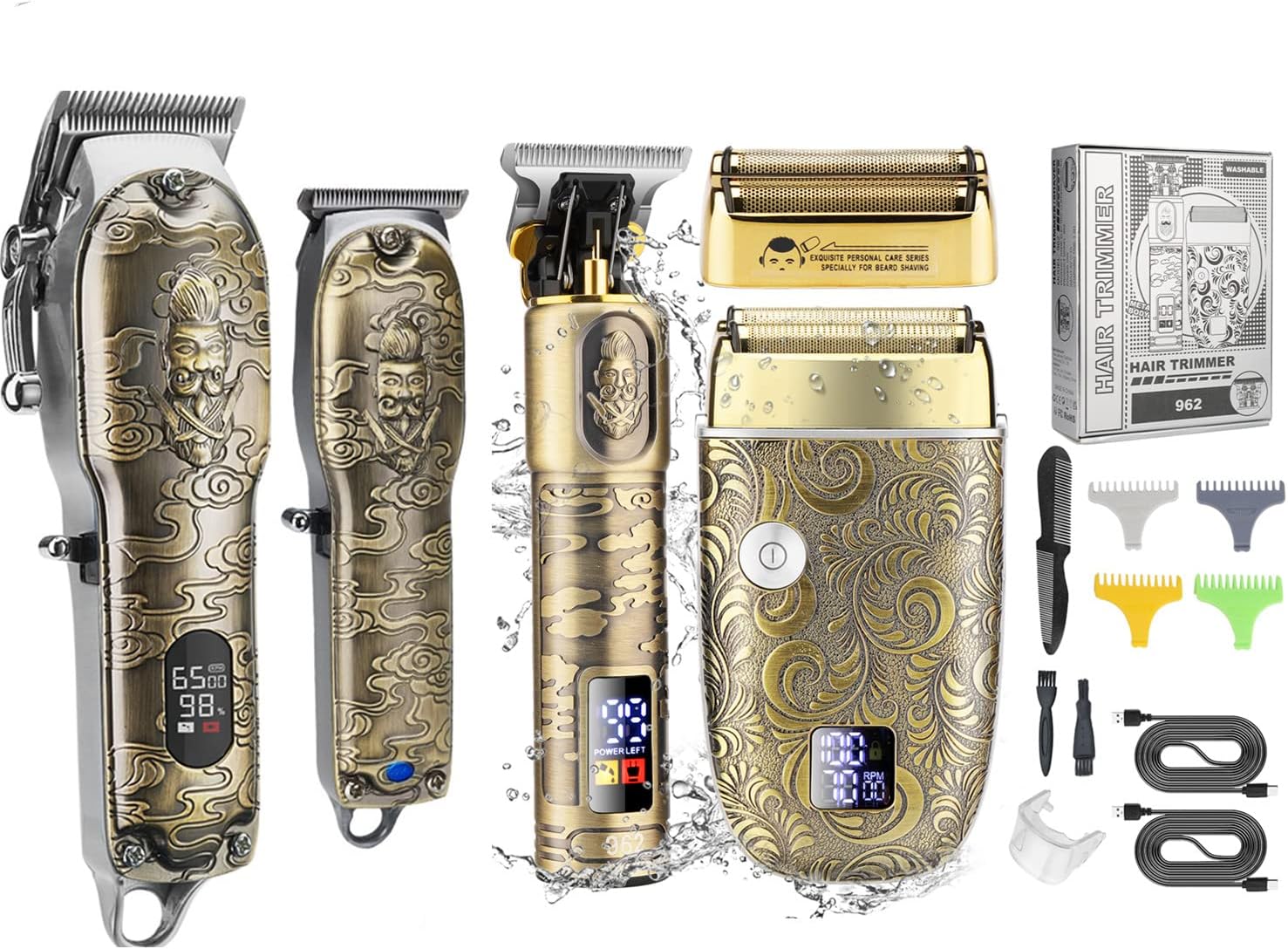
Figure 2.1: Complete RESUXI Grooming Kit including hair clipper, electric shaver, and accessories.
2.1 Package Contents
- Professional Hair Clipper
- Electric Double Foil Shaver
- T-Blade Hair Trimmer (integrated with clipper in some kits)
- Multiple Guide Combs (for clipper and trimmer)
- Cleaning Brush
- USB Charging Cables
- Protective Cap for Trimmer Blade
- Barber Cape
- Comb

Figure 2.2: T-Blade Trimmer, Electric Shaver, and included accessories.
2.2 Key Features
- Upgraded Men’s Grooming Kit: Designed for professional-level cutting performance.
- Sharp High Carbon Steel Blade: Maintains long-term sharpness without pulling hair.
- Intelligent Floating Double Foil Head: Provides a comfortable, quick, and clean shave, adapting to facial contours.
- Quiet & Powerful Rotary Motor: 10W motor with noise below 60db, suitable for home and professional use.
- Ergonomic Design: Embossed knight pattern for comfortable grip and ease of use.
- LED Display: Indicates battery level, oil reminder, and charging status.
- Adjustable Blade Length: Taper lever on clipper for precise hair length control (0.1mm-3.0mm).
- Multiple Guide Combs: Various sizes for diverse hairstyles and lengths.

Figure 2.3: Close-up view of the double foil head shaver with ultrathin mesh design.

Figure 2.4: Internal structure of the shaver showing intelligent floating heads, LED display, and bottom charging port.
3. Setup
3.1 Charging the Device
- Ensure the device is turned off before charging.
- Connect the provided USB charging cable to the charging port at the bottom of the clipper/shaver.
- Plug the other end of the USB cable into a compatible USB power adapter (not included) or a computer USB port.
- The LED display will show charging progress. A full charge typically takes 2-3 hours.
- Unplug the device once fully charged to preserve battery life.
3.2 Attaching and Detaching Guide Combs
- Select the desired guide comb length.
- Align the comb with the blade of the clipper or trimmer.
- Gently push the comb onto the blade until it clicks securely into place.
- To remove, gently pull the comb away from the blade.

Figure 3.1: Selection of guide combs for both the main clipper and the T-blade trimmer.
4. Operating Instructions
4.1 Using the Hair Clipper
- Ensure the clipper is charged and a suitable guide comb is attached if desired.
- Press the ON/OFF button to start the clipper.
- Adjust the taper lever on the side of the clipper to fine-tune the cutting length between 0.1mm and 3.0mm.
- Move the clipper against the direction of hair growth for an even cut.
- After use, press the ON/OFF button to turn off the clipper.

Figure 4.1: Detail of the main clipper's adjustable blade length and sharp high carbon steel blade.
4.2 Using the T-Blade Hair Trimmer
- Ensure the trimmer is charged. Attach a guide comb for beard trimming or use without for crisp lining.
- Press the ON/OFF button to activate the trimmer.
- For outlining and detailing, use the T-blade directly against the skin.
- For beard or stubble trimming, use the appropriate guide comb and move the trimmer in smooth strokes.
- Turn off the trimmer after use.

Figure 4.2: The T-blade trimmer featuring a zero-gapped design and available guide comb lengths (1mm, 2mm, 3mm, 4mm).
4.3 Using the Electric Shaver
- Ensure the shaver is charged.
- Press the ON/OFF button to start the shaver.
- The shaver features two speeds; press the power button again to switch between speeds if available.
- Gently press the shaver against your skin and move it in circular or linear motions for a close shave. The floating foil heads will adapt to your facial contours.
- Turn off the shaver after use.
5. Maintenance
5.1 Cleaning the Blades and Foils
- Turn off and unplug the device before cleaning.
- For clippers/trimmers: Use the provided cleaning brush to remove hair clippings from the blades. For a deeper clean, the blades can often be detached (refer to specific product instructions for blade removal).
- For shavers: Press the foil frame release buttons to detach the foil head. Use the cleaning brush to remove hair from the foils and the internal cutter head.
- Some components may be washable; however, always ensure the device is completely dry before reassembly and storage. Do not submerge the main body of the device in water unless explicitly stated as fully waterproof.
5.2 Oiling the Blades (Clipper/Trimmer)
- After cleaning, apply a small drop of clipper oil (not included) to the teeth of the blades.
- Turn on the clipper/trimmer for a few seconds to distribute the oil evenly.
- Wipe off any excess oil with a clean cloth. Regular oiling ensures smooth operation and extends blade life.
5.3 Storage
Store the grooming kit in a cool, dry place, away from direct sunlight and moisture. Keep all accessories organized to prevent loss or damage.
6. Troubleshooting
| Problem | Possible Cause | Solution |
|---|---|---|
| Device does not turn on. | Low battery; device not charged. | Charge the device fully. Check charging cable and adapter. |
| Poor cutting performance / pulling hair. | Blades are dull or dirty; insufficient oiling. | Clean blades thoroughly. Apply clipper oil. Consider blade replacement if excessively dull. |
| Shaver not providing a close shave. | Foil head is dirty or damaged; not pressing firmly enough. | Clean the foil head and cutter. Ensure proper contact with skin. Replace foil head if damaged. |
| Device makes unusual noise. | Blades need oiling; internal component issue. | Oil the blades. If noise persists, contact customer support. |
| LED display not working. | Device malfunction. | Ensure device is charged. If issue persists, contact customer support. |
If the problem persists after attempting these solutions, please contact RESUXI customer support.
7. Specifications
| Property | Value |
|---|---|
| Brand | RESUXI |
| Model | 962 (Kit) |
| Power Source | Corded Electric (for charging) |
| Material | Foil, Steel |
| Color | Gold |
| Recommended Uses | Clipping, Professional, Shaving, Trimming |
| Manufacturer | RESUXI |
| ASIN | B0C3R11ZNK |
8. Warranty and Support
RESUXI products are manufactured to high-quality standards. For specific warranty information, please refer to the documentation included with your purchase or contact the seller directly.
If you have any questions, concerns, or require technical assistance, please contact RESUXI customer support through the retailer's platform or the official RESUXI website. Please have your product model number (962) and ASIN (B0C3R11ZNK) ready when contacting support.
For more information, visit the RESUXI Store on Amazon.


