
Introduction
This smart smoke detector utilizes low-power Zigbee wireless network technology. Upon detecting smoke reaching a threshold level, the alarm emits high-decibel sounds with a rapidly flashing red LED indicator, alerting the user and their family promptly. Alarm messages are also sent to the user's application in real-time.
Safety Information
- Read all instructions carefully before installation and use.
- Do not paint the smoke detector. Paint can clog the sensing chambers and prevent the alarm from operating correctly.
- Do not attempt to repair this device. Refer all servicing to qualified personnel.
- Test the smoke detector weekly to ensure proper operation.
- Replace the battery immediately when the low battery warning is indicated.
- This device is designed for indoor use only.
Package Contents
- Smoke Detector: 1 piece (Note: Product is available in multi-packs, but each unit includes these components)
- Mounting Bracket: 1 piece
- User Manual: 1 piece
- Screws: 3 pieces
- Anchor Bolts: 3 pieces
- CR123A Lithium Battery: 1 piece (pre-installed or included)
Product Overview
The HEIMAN WS2SA-1-TY is a smart photoelectric smoke detector designed for reliable fire safety. It features a compact, circular design and integrates with smart home systems via WiFi and Bluetooth for real-time notifications.

Figure 1: HEIMAN WS2SA-1-TY Smoke Detectors and App Interface. This image shows a multi-pack of the smoke detectors along with a smartphone screen displaying a smoke alarm notification within the companion application.

Figure 2: Product Features Overview. This image highlights the compatibility of the smoke detector with Tuya smart home platforms, its WiFi connectivity, and EN14604 certification, indicating compliance with European safety standards.
Key Features:
- Long Battery Life: Equipped with a CR123A lithium battery, offering up to 5 years of operation.
- Loud Alarm: Produces an 85dB alarm sound (at 3 meters) to alert occupants effectively.
- Visual Indicator: An LED lamp flashes approximately every 53 seconds to confirm the detector is powered on and functioning.
- Acoustic and Optical Alarm: When smoke is detected, a red light flashes rapidly, and the buzzer sounds with quick beeps.
- Smart Connectivity: Integrates with a mobile application for real-time notifications and alarm silencing.
Setup
1. Battery Installation
The smoke detector uses one CR123A lithium battery. Ensure the battery is correctly inserted according to the polarity markings inside the battery compartment. The battery is typically pre-installed or included in the package.

Figure 3: Battery Compartment and Battery Life. This image displays the underside of the smoke detector, indicating where the replaceable CR123A 3V battery is located, which provides approximately 5 years of battery life.
2. Mounting Location
Choose a central location on the ceiling, away from corners, vents, and sources of steam or smoke (e.g., kitchen, bathroom). Avoid placing it in dead air spaces. For optimal coverage, ensure the detector is within 20-50 square meters of the area to be monitored.
3. Installation
- Attach the mounting bracket to the desired ceiling location using the provided screws and anchor bolts.
- Align the smoke detector with the mounting bracket and twist it clockwise until it clicks securely into place.
- After installation, the LED indicator should flash approximately every 53 seconds, confirming the device is active.
4. App Pairing and Network Connection
The detector connects via WiFi and Bluetooth for fast setup and real-time notifications through a compatible smart home application (e.g., Tuya Smart app).
- Download and install the recommended smart home application (e.g., Tuya Smart) on your iOS or Android device.
- Open the app and create an account or log in.
- Follow the in-app instructions to add a new device. The app will typically guide you through connecting the smoke detector to your home WiFi network using Bluetooth for initial pairing.
- Ensure your smartphone is close to the smoke detector and your WiFi network is active during the pairing process.

Figure 4: Fast Connection via WiFi + Bluetooth. This image shows the smoke detector installed on a ceiling and a hand holding a smartphone, demonstrating the quick pairing process using both WiFi and Bluetooth networking.
Operating Instructions
Normal Operation
During normal operation, the LED indicator will flash approximately every 53 seconds, signifying that the detector is powered on and monitoring for smoke.
Alarm Condition
When smoke is detected and reaches the alarm threshold, the device will activate both an acoustic and optical alarm:
- The built-in buzzer will emit a loud, rapid beeping sound (85dB at 3 meters).
- The red LED indicator will flash rapidly.
- A real-time alarm notification will be sent to your paired smartphone application.

Figure 5: Alarm Activation. This image illustrates the smoke detector's rapid response to smoke, activating an 85dB alarm to alert occupants to potential danger.
Silencing the Alarm via App
In case of a false alarm or after addressing the smoke source, you can silence the alarm directly from your smartphone application.
- Open the smart home application on your smartphone.
- Navigate to the smoke detector's device page.
- Look for an option to "Silence Alarm" or "Mute". Confirm the action within the app.

Figure 6: Real-Time Notification and App Control. This image shows the smoke detector in a home setting, with a smartphone displaying a real-time smoke alarm notification and the ability to silence the alarm through the application.
Low Battery Warning
When the battery level is low, the detector will provide a warning. This typically involves a distinct chirp sound and/or a specific LED flash pattern, along with a notification to your smartphone app. Replace the battery immediately upon receiving this warning.
Maintenance
Testing the Detector
Test your smoke detector weekly to ensure it is functioning correctly. Press and hold the test button on the device until the alarm sounds. The alarm should be loud and clear. If the alarm does not sound, refer to the Troubleshooting section.
Cleaning the Detector
Dust and debris can accumulate on the smoke detector, potentially affecting its performance. Clean the detector at least once a month:
- Gently vacuum the exterior of the detector using a soft brush attachment.
- Wipe the exterior with a clean, damp cloth. Do not use cleaning solvents or chemicals.
- Do not open the detector's casing for cleaning.
Battery Replacement
The CR123A lithium battery has an estimated life of 5 years. Replace the battery immediately when the low battery warning is indicated.
- Twist the smoke detector counter-clockwise to remove it from its mounting bracket.
- Open the battery compartment.
- Remove the old CR123A battery and dispose of it according to local regulations.
- Insert a new CR123A lithium battery, ensuring correct polarity.
- Close the battery compartment and reattach the detector to its mounting bracket by twisting clockwise until secure.
- Test the detector after battery replacement.
Troubleshooting
| Problem | Possible Cause | Solution |
|---|---|---|
| Detector does not power on or LED does not flash. | Battery not installed correctly or depleted. | Check battery polarity. Replace battery if necessary. |
| Alarm does not sound during test. | Faulty unit or depleted battery. | Replace battery. If problem persists, contact support. |
| False alarms. | Dust accumulation, steam, cooking fumes, or high humidity. | Clean the detector. Relocate if frequently exposed to steam/fumes. Ensure proper ventilation. |
| No app notifications or connectivity issues. | WiFi network issues, incorrect pairing, or app malfunction. | Check WiFi router. Re-pair the device with the app. Ensure app is updated. Restart smartphone. |
| Low battery warning persists after battery replacement. | Incorrect battery type or faulty new battery. | Ensure a fresh CR123A lithium battery is used. Try another new battery. |
Specifications
| Feature | Detail |
|---|---|
| Model Number | WS2SA-1-TY |
| Brand | HEIMAN |
| Dimensions (L x W x H) | 8.5 x 8.5 x 2.8 cm |
| Weight | 240 Grams |
| Power Source | Battery Powered (1x CR123A Lithium Battery) |
| Battery Life | Up to 5 years (CR123A) |
| Operating Voltage | 3V |
| Sound Level | 85dB (at 3 meters) |
| LED Indicator | Flashes approximately every 53 seconds |
| Connectivity | WiFi, Bluetooth (for pairing) |
| Compatible Devices | iOS, Android |
| Installation Method | Screw-in |
| Material | ABS Plastic |
| Certification | EN 14604 |
| Operating Humidity | ≤ 95% RH |
| Upper Rated Temperature | 55.01 Degrees Celsius |
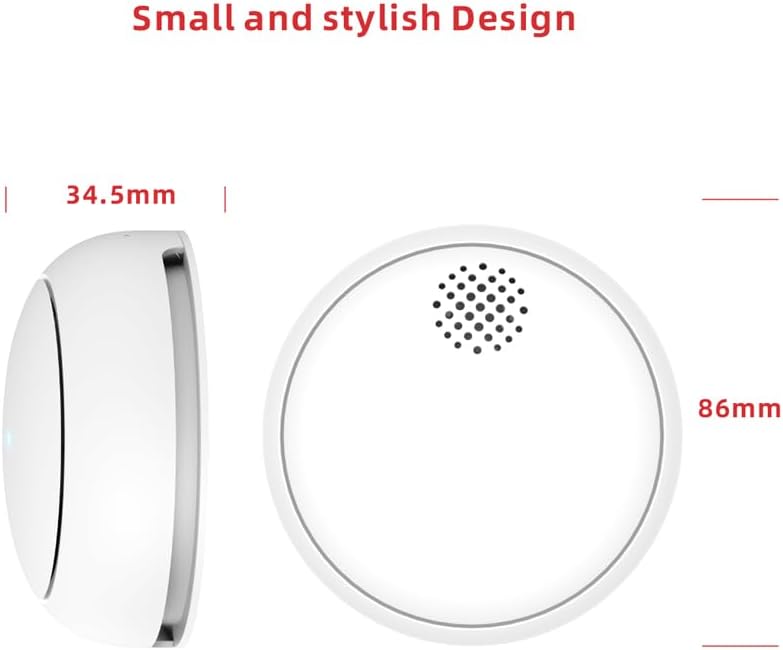
Figure 7: Product Dimensions. This diagram illustrates the compact size of the smoke detector, with a diameter of 86mm and a height of 34.5mm.
Warranty and Support
For warranty information, technical support, or service inquiries, please contact HEIMAN customer support through their official website or the contact information provided with your purchase. Please have your model number (WS2SA-1-TY) and purchase date available when contacting support.


