
1. Introduction
Welcome to the KOSPET T2 Smartwatch user manual. This guide provides detailed instructions on how to set up, operate, maintain, and troubleshoot your new KOSPET T2 smartwatch. Designed for durability and performance, the KOSPET T2 offers a robust experience for daily use and active lifestyles.

Figure 1.1: KOSPET T2 Smartwatch in black with metal and silicone strap options.
2. What's in the Box
Upon opening your KOSPET T2 Smartwatch package, you should find the following items:
- KOSPET T2 Smartwatch Body x1
- Stainless Steel Strap x1
- Black Silicone Strap x1
- Magnetic Charging Base x1
- User Manual x1
- Screen Protector Kit x1

Figure 2.1: Contents of the KOSPET T2 Smartwatch package.
3. Product Overview & Key Features
The KOSPET T2 Smartwatch is engineered with advanced features to support your active lifestyle and connectivity needs.
3.1 Military-Grade Quality
The KOSPET T2 features a 1.43-inch third-generation Corning Gorilla screen and a TC4 titanium alloy case. Inspired by sci-fi mechanical design elements, its appearance is cool and rugged. The dual 9H glass display is extremely scratch-resistant. Certified MIL-STD-810H, this smartwatch is resistant to shocks, drops, and stress, making it suitable for extremely harsh environments.

Figure 3.1: KOSPET T2's military-grade durability features.
3.2 AMOLED Display
The TANK T2 features an AMOLED screen made with self-luminous materials, offering a pixel resolution of up to 480*480, which is double that of regular watches. This ensures a clear screen even in direct sunlight. The AMOLED display supports 24-hour online viewing and time display when the screen is off without needing a button press. It also saves 40% more energy compared to LCD screens, optimizing power consumption.
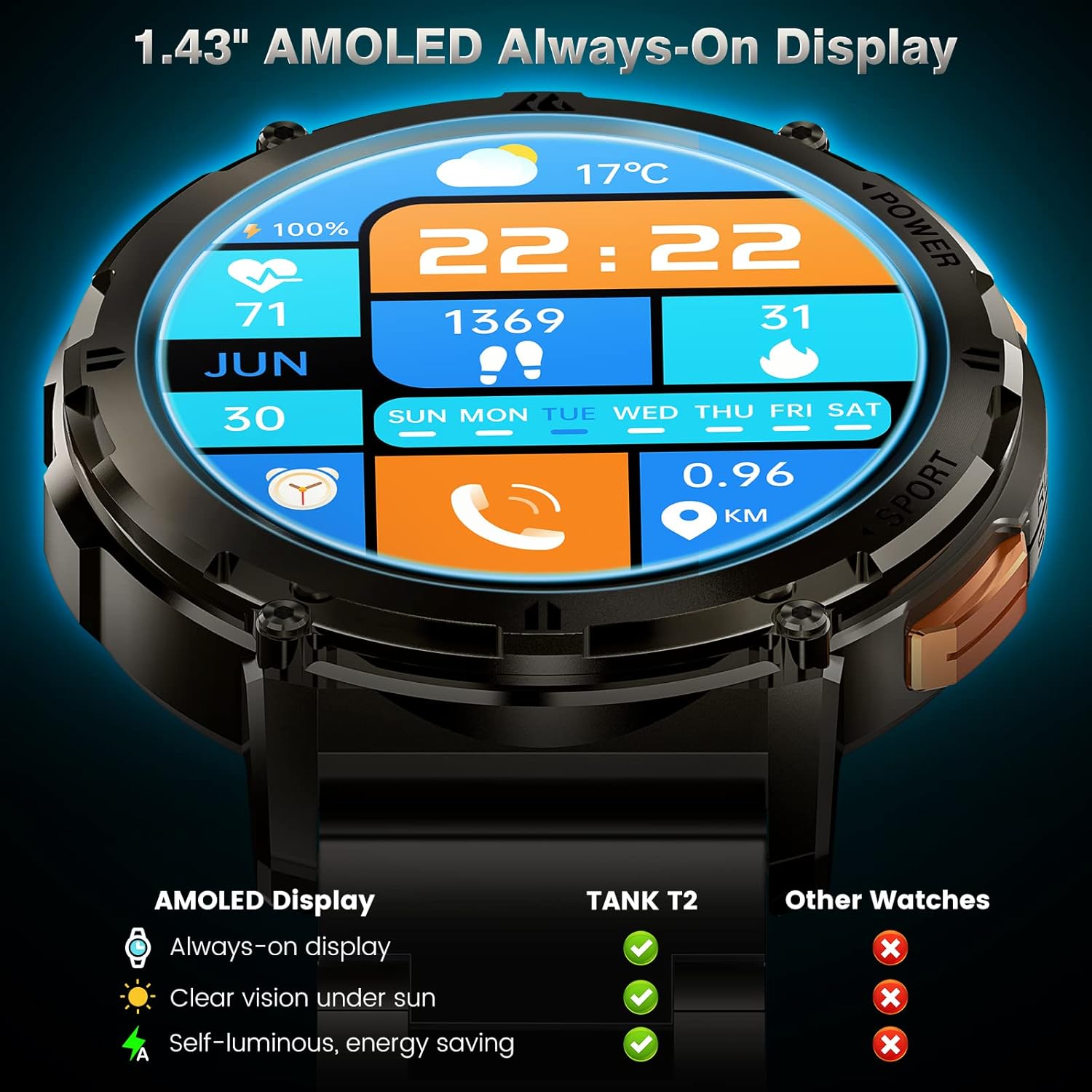
Figure 3.2: The vibrant and energy-efficient AMOLED display.
3.3 Dual Smart Chip & AI Voice Assistant
Equipped with an industry-leading dual smart chip, the KOSPET T2 supports AI Voice Assistant and Bluetooth calls. You can issue voice commands to play music, check the weather, set alarms, and timers. The voice assistant can also make calls, which is convenient while driving or jogging.

Figure 3.3: AI Voice Assistant and Bluetooth Calling functionality.
3.4 Extra-Long Battery Life
The KOSPET T2 Smartwatch is equipped with a 100% pure cobalt battery with a capacity of up to 410 mAh, offering double the power and duration of traditional smartwatches. With the latest AI power-saving algorithm, the battery lasts up to 2 weeks with continuous access to features like sport mode and health index measurement. In flight mode, the battery life extends to 60 days. A 30-minute charge provides enough backup battery for 3 days of use.

Figure 3.4: Impressive battery life and charging.
3.5 70 Sport Modes & Smart Recognition
The TANK T2 supports up to 70 sport modes, including indoor and outdoor activities such as hiking, skiing, and swimming. Thanks to the BioTracker PPG optical sensor and advanced AI algorithm, the fitness watch can intelligently recognize 6 sports: Walking, Running, Stationary State, Cycling, Elliptical Trainer, and Rowing Machine.

Figure 3.5: Extensive sport modes and smart recognition.
3.6 Health & Fitness Tracking
The KOSPET T2 harnesses the cutting-edge BioTracker tracking optical sensor for precise Blood Oxygen measurements and all-day Heart Rate Monitoring, providing deep insights into your health. It also offers comprehensive sleep tracking.

Figure 3.6: Health and fitness tracking capabilities.
3.7 Water Resistance
The military-grade smart watch features a fully enclosed metal case that can be easily immersed in 50m deep water (IP69K waterproof). This makes it suitable for various water activities.

Figure 3.7: IP69K Dynamic Waterproof rating.

Figure 3.8: 5ATM Static Water Resistance up to 50 meters.
4. Setup Guide
Follow these steps to connect your KOSPET T2 Smartwatch to your smartphone and enable notifications.
4.1 Initial Pairing (iOS & Android)
Watch this video for a visual guide on connecting your KOSPET T2 Smartwatch via Bluetooth:
Video 4.1: KOSPET T2 Bluetooth Connection Guide.
For iOS devices, follow these steps:
- Download the "KOSPET FIT" app from the App Store.
- Turn on Bluetooth on your iPhone.
- Open the "KOSPET FIT" app, go to "Device" and tap "Add a new device".
- Select "TANK T2" from the list and connect it.
- Tap "Pair" and allow the watch to receive notifications from your phone as desired.

Figure 4.1: iOS Smartwatch Connection Steps.
For Android devices, follow these steps:
- Download the "KOSPET FIT" app from the Google Play Store.
- Turn on Bluetooth on your Android phone.
- Open the "KOSPET FIT" app, go to "Device" and tap "Add a new device".
- Select "TANK T2" from the list and connect it.
- Tap "Pair" and allow the watch to receive notifications from your phone as desired.
4.2 Receiving Notifications
To ensure you receive message and app notifications on your KOSPET T2, follow these specific steps for your operating system:
4.2.1 Android Notifications
Ensure the "KOSPET FIT" app is active (Android users should add the app to the whitelist in settings). Deactivate "Do Not Disturb" and "Low Power Mode". Message synchronization will not occur if the app has accessed other devices or phones in the chat interface.
- Connect the watch and phone via Bluetooth.
- Go to "Device" and click to open "SMS Reminder".
- Go to "Device" and click on NOTE to allow "KOSPET FIT" to access "Notifications".
- Go to "Device" and click on "App Reminder", then enable the desired applications.

Figure 4.2: Android Notification Setup.
4.2.2 iOS Notifications
Ensure the "KOSPET FIT" app is active. Deactivate "Do Not Disturb" and "Low Power Mode". Message synchronization will not occur if the app has accessed other devices or phones in the chat interface.
- Connect the watch and phone via Bluetooth.
- Go to "Device" and click to open "SMS".
- Go to "Device" and click on "App", then enable the desired applications.
- Access your phone's "Settings" to allow "KOSPET FIT" to access "Notifications".

Figure 4.3: iOS Notification Setup.
5. Operating Your Smartwatch
The KOSPET T2 is designed for intuitive operation through its touchscreen and physical buttons.
5.1 Navigating the Interface
- Touchscreen: Swipe left/right, up/down to navigate through menus, widgets, and notifications. Tap to select items.
- Physical Buttons: The watch features dedicated buttons for power, sport modes, and navigation. Refer to the watch's on-screen prompts for specific button functions.
5.2 Making & Receiving Calls
Once paired via Bluetooth, you can make and receive calls directly from your KOSPET T2 Smartwatch using its built-in microphone and speaker. This is particularly useful when your hands are occupied.
5.3 Using the AI Voice Assistant
Activate the AI Voice Assistant by a designated button press or screen gesture (refer to watch settings). You can then speak commands for various functions like checking weather, setting reminders, or controlling music playback on your connected phone.
6. Maintenance
To ensure the longevity and optimal performance of your KOSPET T2 Smartwatch, follow these maintenance guidelines:
- Cleaning: Regularly wipe the watch body and straps with a soft, damp cloth. For stubborn dirt, use a mild soap solution and rinse thoroughly. Ensure the watch is completely dry before charging.
- Charging: Use only the provided magnetic charging base. Avoid exposing the charging contacts to water or corrosive liquids. Do not overcharge the battery; disconnect once fully charged.
- Storage: When not in use for extended periods, store the watch in a cool, dry place away from direct sunlight and extreme temperatures.
- Avoid Chemicals: Do not expose the watch to strong chemicals, detergents, or solvents, as these can damage the materials.
7. Troubleshooting
If you encounter issues with your KOSPET T2 Smartwatch, try the following troubleshooting steps:
| Problem | Possible Solution |
|---|---|
| Watch won't turn on | Ensure the watch is fully charged. Connect it to the charger for at least 30 minutes. |
| Cannot pair with phone | Ensure Bluetooth is enabled on your phone and the watch. Restart both devices. Make sure the KOSPET FIT app is updated. Forget the device in your phone's Bluetooth settings and try pairing again. |
| Notifications not received | Check app notification settings on your phone and within the KOSPET FIT app (refer to Section 4.2). Ensure "Do Not Disturb" or "Low Power Mode" are off. |
| Inaccurate health data | Ensure the watch is worn snugly on your wrist. Clean the sensor on the back of the watch. Update the KOSPET FIT app and watch firmware. |
| Short battery life | Reduce screen brightness, turn off unnecessary features (e.g., always-on display, continuous heart rate monitoring if not needed). Ensure the app is not running excessively in the background. |
If the problem persists after trying these steps, please contact KOSPET customer support for further assistance.
8. Specifications
| Feature | Detail |
|---|---|
| Model Number | TANK T2 |
| Display | 1.43-inch AMOLED, 480*480 resolution, Corning Gorilla Glass |
| Battery | 410 mAh Pure Cobalt Lithium-ion (included) |
| Battery Life (Typical Use) | Up to 2 weeks |
| Battery Life (Standby) | Up to 60 days |
| Water Resistance | 5ATM / IP69K |
| Dimensions | 20 x 2 x 1.9 cm |
| Weight | 360 grams |
| Connectivity | Bluetooth (Dual-mode) |
| Compatibility | iOS 10.0+ and Android 5.1+ |
| Manufacturer | KOSPET |
| Country of Origin | China |
9. Warranty and Support
KOSPET products are designed for reliability and performance. For specific warranty information, please refer to the warranty card included in your product packaging or visit the official KOSPET website. If you require technical support or have any questions not covered in this manual, please contact KOSPET customer service through their official channels.
Thank you for choosing KOSPET.