
1. Introduction
This manual provides instructions for the safe and effective use of the Proster 9-Piece Multimeter Test Leads Set. This versatile kit is designed for various electrical testing applications, offering a range of accessories for different measurement needs.
The set includes:
- 2 Test Probes
- 2 Test Leads (with 4mm banana plugs)
- 2 Test Hooks
- 2 Alligator Clips
- 1 Test Tweezer
- 1 Reusable Strap

Image 1.1: Overview of the Proster 9-Piece Multimeter Test Leads Set, showing all included components: test probes, test leads, test hooks, alligator clips, and test tweezers.
2. Safety Information
Always adhere to safety precautions when working with electrical circuits. Failure to do so may result in injury or damage to equipment.
- Ensure your multimeter is rated for the voltage and current you intend to measure.
- Always inspect test leads for damage (frayed insulation, exposed wires) before use. Do not use damaged leads.
- Wear appropriate personal protective equipment (PPE), such as safety glasses and insulated gloves.
- Avoid touching bare conductors or circuit components with your hands while testing.
- Connect the common (black) lead first, then the live (red) lead. Disconnect the live lead first, then the common lead.
- Do not exceed the maximum voltage and current ratings of the test leads (CAT III 1000V, 10A).

Image 2.1: Safety specifications indicating CAT III 1000V, 10A rating for safe electrical testing.
3. Setup and Connection
The test leads feature standard 4mm banana plugs for connection to most multimeters and other testing equipment.
- Connecting Test Leads: Insert the black banana plug into the "COM" (Common) input jack of your multimeter. Insert the red banana plug into the "VΩmA" (Voltage, Ohms, Milliamperes) or appropriate input jack for your measurement.
- Attaching Accessories: The test probes, test hooks, and alligator clips can be attached to the ends of the test leads. Ensure a secure connection for accurate readings and safety.

Image 3.1: Illustration of the standard 4mm banana plug, indicating its compatibility and interchangeability for various electrical applications.
4. Operating Instructions
4.1. Using Test Probes
Test probes are ideal for precise measurements on circuit boards and small components. Their insulated needle tips help prevent accidental short circuits.
- Attach the test probes to the test leads.
- Carefully touch the probe tips to the desired test points on the circuit.

Image 4.1.1: Detailed view of test probes, showing their insulated design and application for precise measurements on a circuit board.
4.2. Using Test Hooks
Test hooks provide a secure, hands-free connection to wires or component leads, preventing accidental disconnections during testing.
- Attach the test hooks to the test leads.
- Gently press the plunger to extend the hook, attach it to the wire or terminal, and release to secure.

Image 4.2.1: Illustration of test hooks, demonstrating their secure attachment to circuit components for hands-free testing.
4.3. Using Alligator Clips
Alligator clips offer a strong, temporary connection to larger terminals, battery posts, or ground points.
- Attach the alligator clips to the test leads.
- Open the clip and securely attach it to the desired connection point.
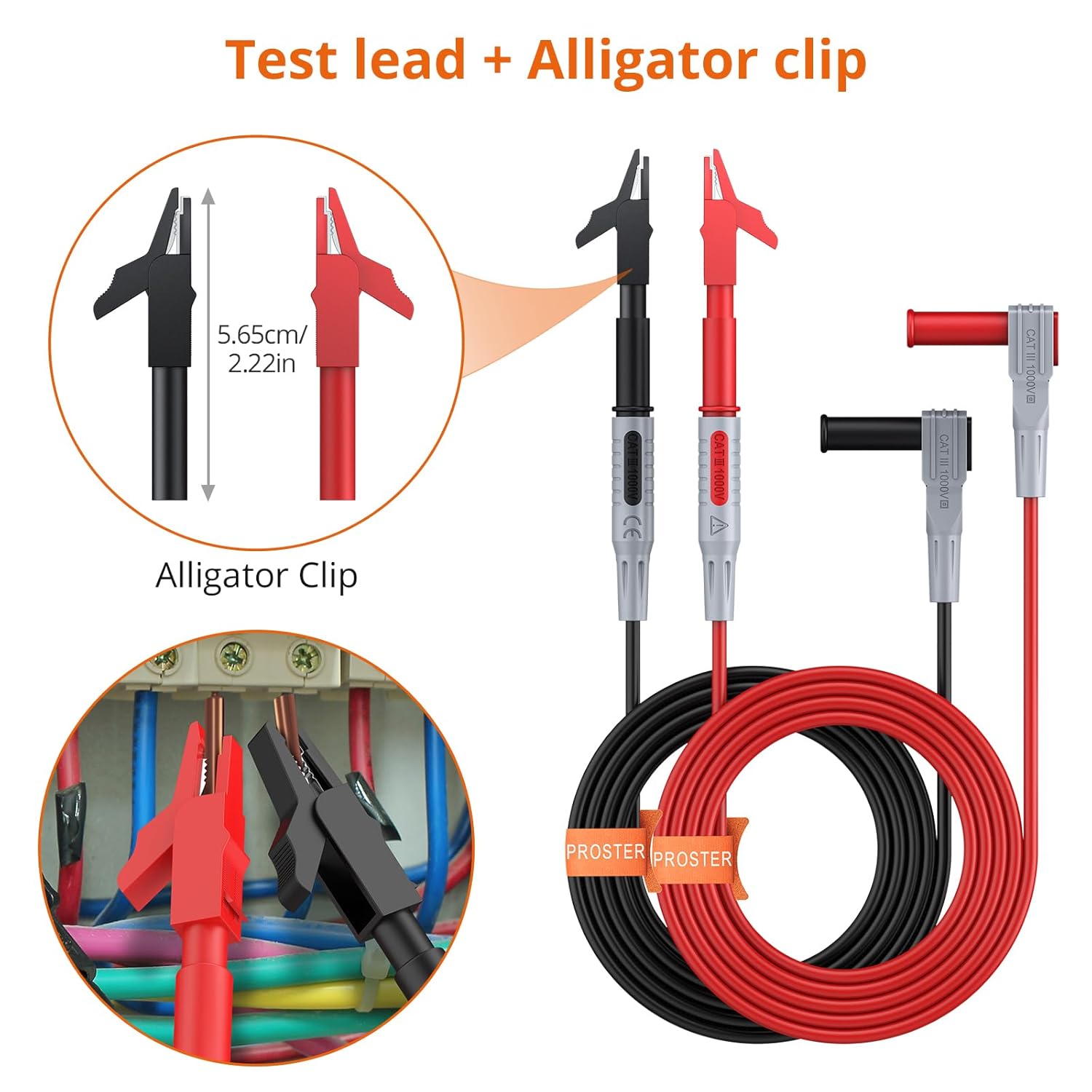
Image 4.3.1: View of alligator clips in use, showing their application for connecting to electrical terminals or wires.
4.4. Using Test Tweezers
The test tweezers are designed for testing small surface-mount device (SMD) components or for making precise connections in tight spaces.
- Connect the test tweezers to the multimeter.
- Carefully grasp the component or test points with the tweezer tips.

Image 4.4.1: Overview of versatile testing applications, including the use of test tweezers for small components, alligator clips for secure connections, test hooks for hands-free testing, and standard test probes.
5. Maintenance and Storage
- Cleaning: Wipe the test leads and accessories with a dry, clean cloth after each use. Do not use abrasive cleaners or solvents.
- Inspection: Regularly inspect all components for signs of wear, cuts, or damage to the insulation. Replace any damaged parts immediately.
- Storage: Store the test leads set in a dry, cool place, away from direct sunlight and extreme temperatures. Use the provided reusable strap to keep the leads organized.
6. Troubleshooting
If you encounter issues during testing, consider the following common troubleshooting steps:
- No Reading or Erratic Readings:
- Ensure leads are securely plugged into the multimeter and accessories are firmly attached.
- Check for continuity in the leads themselves using your multimeter's continuity function.
- Verify the multimeter is set to the correct function and range.
- Damaged Insulation:
- Immediately discontinue use of any lead with damaged insulation. Replace the affected component.
7. Specifications
| Feature | Specification |
|---|---|
| Model Number | PST285 |
| Safety Rating | CAT III 1000V, 10A (for leads and probes) |
| Alligator Clips Rating | CAT II 300V, 15A |
| Test Hooks Rating | 30VAC-60VDC, 10A |
| Test Tweezers Rating | CAT II 1000V |
| Material | Copper/Brass/PVC (Oxygen-free Copper Wire, ABS + PA Injection Layer) |
| Plug Type | Standard 4mm Banana Plug |
| Package Dimensions | 10.55 x 9.45 x 1.06 inches |
| Weight | 8.47 ounces |

Image 7.1: Details on the material composition and electrical ratings of the test leads, highlighting silicone wire flexibility, good plated copper, and insulation shell for durability and temperature resistance.
8. Warranty and Support
For warranty information or technical support, please contact Proster customer service. Refer to your purchase documentation for specific warranty terms and contact details.
Manufacturer: Proster Trading Limited
Seller: PROSTER US