
1. Introduction
Thank you for choosing the Ultenic AC1 Elite Wet Dry Vacuum Mop. This appliance is designed to simplify your floor cleaning routine by vacuuming, washing, and mopping simultaneously. It features smart detection for auto-adjusting suction, streak-free liquid vacuuming, and a one-touch self-cleaning function for the brush roller. Please read this manual thoroughly before use to ensure safe and optimal operation of your device.
For additional information or support, please visit the official Ultenic website or contact customer service.
2. Important Safety Instructions
WARNING: To reduce the risk of fire, electric shock, or injury, read all instructions before operating this appliance.
- This appliance is for household use only. Do not use outdoors or on wet surfaces other than those intended for cleaning.
- Do not allow to be used as a toy. Close attention is necessary when used by or near children.
- Use only as described in this manual. Use only manufacturer's recommended attachments.
- Do not use with damaged cord or plug. If appliance is not working as it should, has been dropped, damaged, left outdoors, or dropped into water, return it to a service center.
- Do not pull or carry by cord, use cord as a handle, close a door on cord, or pull cord around sharp edges or corners. Do not run appliance over cord. Keep cord away from heated surfaces.
- Do not unplug by pulling on cord. To unplug, grasp the plug, not the cord.
- Do not handle plug or appliance with wet hands.
- Do not put any object into openings. Do not use with any opening blocked; keep free of dust, lint, hair, and anything that may reduce airflow.
- Keep hair, loose clothing, fingers, and all parts of body away from openings and moving parts.
- Turn off all controls before unplugging.
- Use extra care when cleaning on stairs.
- Do not use to pick up flammable or combustible liquids, such as gasoline, or use in areas where they may be present.
- Do not pick up anything that is burning or smoking, such as cigarettes, matches, or hot ashes.
- Do not use without filters and water tanks in place.
- Prevent unintentional starting. Ensure the switch is in the off-position before connecting to battery pack, picking up or carrying the appliance.
- Recharge only with the charger specified by the manufacturer. A charger that is suitable for one type of battery pack may create a risk of fire when used with another battery pack.
- Under abusive conditions, liquid may be ejected from the battery; avoid contact. If contact accidentally occurs, flush with water. If liquid contacts eyes, additionally seek medical help. Liquid ejected from the battery may cause irritation or burns.
3. Product Overview and Package Contents
3.1 Package Contents
Ensure all items are present in the box:
- Ultenic AC1 Elite Wet Dry Vacuum Mop Unit
- Charging Adaptor
- Wet Mopping Pad (Pre-installed)
- Dry Filters (Spare)
- Cleaning Solution (Lemon Shine)
- Cleaning Brush
- Storage/Charging Base
3.2 Product Diagram
Familiarize yourself with the main components of your Ultenic AC1 Elite.
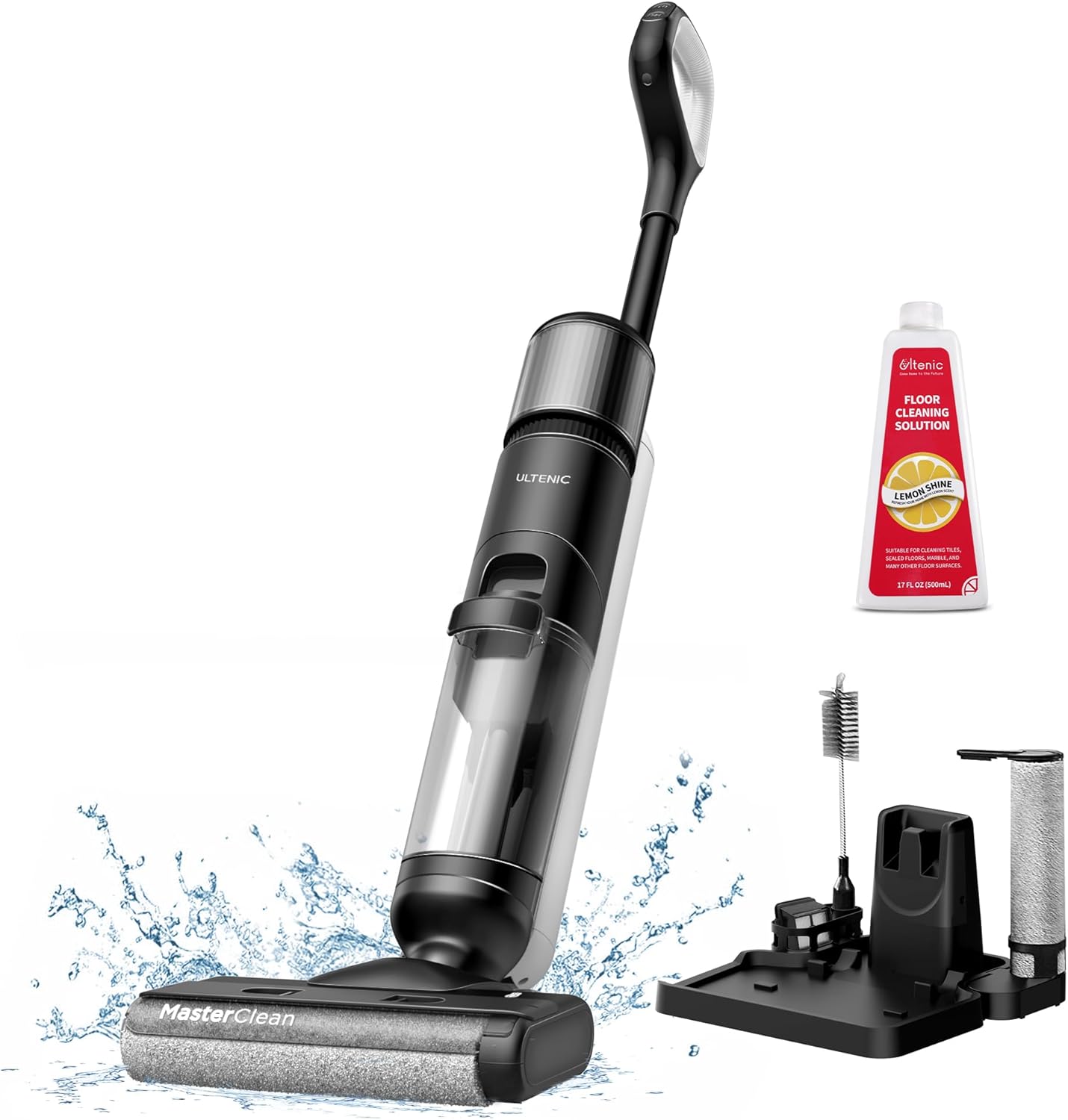
Image: The Ultenic AC1 Elite Wet Dry Vacuum Mop shown with its charging base, cleaning solution, and cleaning brush. The main unit is white and black, with a transparent dirty water tank visible. Water splashes are depicted around the brush head.
Key components include the handle, clean water tank, dirty water tank, main body, brush head, and charging base.
4. Setup and Initial Use
4.1 Assembly
- Attach the Handle: Insert the handle into the main body of the vacuum until it clicks securely into place.
- Install Water Tanks: Ensure both the clean water tank and dirty water tank are correctly seated in their respective positions.
4.2 Initial Charging
Before first use, fully charge the device. Place the vacuum mop on its charging base and connect the charging adaptor to a power outlet. The LED display will indicate charging status. A full charge typically takes approximately 4-5 hours.
4.3 Filling the Clean Water Tank
- Remove the clean water tank from the main unit.
- Open the tank cap.
- Fill the tank with clean tap water. For optimal cleaning, add a small amount of the provided Ultenic cleaning solution (refer to solution bottle for exact measurements). Do not overfill.
- Securely close the tank cap and reinsert the clean water tank into the main unit until it clicks.
5. Operating the Ultenic AC1 Elite
5.1 Powering On/Off
Press the Power button on the handle to turn the device on. Press it again to turn off.
5.2 Cleaning Modes
The Ultenic AC1 Elite offers different cleaning modes:
- Smart Mode: The device automatically detects the level of mess and adjusts suction power and water flow accordingly. This is the default mode for general cleaning.
- Max Mode: For stubborn stains and heavily soiled areas, switch to Max Mode for maximum suction and water output.
Use the Mode button on the handle to switch between Smart and Max modes.
5.3 Cleaning Procedure
- Ensure the clean water tank is filled and the dirty water tank is empty.
- Turn on the device and select your desired cleaning mode.
- Tilt the vacuum mop backward to engage the brush roller and begin cleaning.
- Move the device slowly over the floor surface, allowing the brush to effectively scrub and vacuum.
- For best results on tough messes, make two to three slow passes over the area.
5.4 Self-Cleaning Function
After each use, it is recommended to run the self-cleaning cycle:
- Place the vacuum mop back on its charging base.
- Ensure there is sufficient clean water in the clean water tank.
- Press the dedicated Self-Clean button (usually indicated by a water drop icon or similar).
- The device will automatically clean the brush roller and internal tubing. This process takes a few minutes.
- Once the cycle is complete, empty the dirty water tank.
5.5 Emptying the Dirty Water Tank
The device will alert you when the dirty water tank is full. Empty it promptly to prevent overflow and maintain performance.
- Remove the dirty water tank from the main unit.
- Open the tank lid and carefully pour out the dirty water.
- Rinse the tank and filter thoroughly with clean water.
- Reinsert the tank and ensure it is securely latched.
6. Maintenance and Care
Regular maintenance ensures optimal performance and extends the lifespan of your Ultenic AC1 Elite.
6.1 Cleaning the Brush Roller
Even with the self-cleaning function, occasional manual cleaning of the brush roller is recommended.
- Turn off the device and remove the brush cover.
- Remove the brush roller.
- Use the provided cleaning brush to remove any hair, debris, or tangled fibers from the roller.
- Rinse the brush roller under running water until clean. Allow it to air dry completely before reinstallation.
- Reinstall the dry brush roller and secure the brush cover.
6.2 Cleaning Filters
The device uses foam and disk filters. These should be cleaned regularly.
- Locate and remove the filters, typically found within the dirty water tank assembly.
- Rinse the filters under running water until all dirt and debris are removed.
- Allow filters to air dry completely for at least 24 hours before reinserting them. Do not use the device with wet filters.
6.3 Cleaning Water Tanks
Both the clean and dirty water tanks should be rinsed after each use to prevent odor and bacterial growth.
- Remove tanks from the unit.
- Rinse thoroughly with clean water.
- Allow to air dry before reassembling.
6.4 Storage
When not in use, store the Ultenic AC1 Elite on its charging base in a cool, dry place. Ensure the clean water tank is empty and the dirty water tank is clean and dry before storage.
7. Troubleshooting
If you encounter issues with your Ultenic AC1 Elite, refer to the following table for common problems and solutions.
| Problem | Possible Cause | Solution |
|---|---|---|
| Device does not turn on | Battery is low or depleted | Charge the device fully. |
| No water dispensing | Clean water tank is empty or incorrectly installed | Refill the clean water tank and ensure it is properly seated. |
| Poor suction or cleaning performance | Dirty water tank is full; Brush roller is clogged; Filters are dirty | Empty the dirty water tank. Clean the brush roller. Clean and dry the filters. |
| Device leaves streaks | Brush roller is dirty; Too much cleaning solution used | Clean the brush roller thoroughly. Use the recommended amount of cleaning solution. |
| Unpleasant odor | Dirty water tank or brush roller not cleaned | Empty and rinse the dirty water tank immediately after use. Clean the brush roller. Run the self-cleaning cycle. |
If the problem persists after trying these solutions, please contact Ultenic customer support.
8. Product Specifications
| Feature | Detail |
|---|---|
| Brand | Ultenic |
| Model Name | AC1 Elite |
| Special Feature | Bagless, Wet/Dry Cleaning, Self-Cleaning |
| Filter Type | Foam, Disk |
| Included Components | Wet Mopping Pad, Dry Filters, Charging Adaptor, Cleaning Solution |
| Cordless | Yes |
| Clean Water Tank Capacity | 1.15 Liters (approximate) |
| Wattage | 230 watts |
| Recommended Uses | Hard Floor, Bare Floor, Carpet, Rug (wet cleaning for hard floors only) |
| Form Factor | Stick |
| Color | White |
| Product Dimensions | 27.75"L x 13.25"W x 12"H |
| Battery Type | Lithium-Ion |
| Noise Level | 78 Decibels |
| Item Weight | 9.46 pounds |
| Control Method | Push Button, App |
9. Warranty and Customer Support
9.1 Warranty Information
The Ultenic AC1 Elite Wet Dry Vacuum Mop comes with a standard manufacturer's warranty. Please refer to the warranty card included in your product packaging or visit the official Ultenic website for detailed warranty terms and conditions. Keep your purchase receipt as proof of purchase for warranty claims.
9.2 Customer Support
For technical assistance, troubleshooting beyond this manual, or warranty inquiries, please contact Ultenic Customer Support:
- Website: Visit the official Ultenic website for FAQs, support resources, and contact forms.
- Email: Refer to your product packaging or the Ultenic website for the customer service email address.
- Phone: Contact numbers may be available on the official website for your region.
When contacting support, please have your product model (AC1 Elite) and purchase information ready.