
SEDETA 2680-desk
SEDETA L Shaped Gaming Desk User Manual
Model Number: 2680-desk
Brand: SEDETA
Important Safety Information
WARNING: This desk comes with a power outlet and USB ports. Always ensure that the power strip is turned off when not in use and never overload the outlets. Do not insert any object other than electrical plugs into the outlets. This desk is heavy and requires proper assembly for stability. Always follow the assembly instructions carefully and use appropriate tools. Keep children and pets away from the desk during assembly. Always supervise children when they are near the desk.
Product Overview
The SEDETA L Shaped Gaming Desk is a versatile and functional desk designed for home office and gaming environments. It features a reversible design, allowing it to be configured as an L-shaped corner desk or a long straight desk. Key components include a built-in power outlet, LED lights, a keyboard tray, a pegboard, and various storage options.

Figure 1: Overview of the SEDETA L Shaped Gaming Desk in a gaming setup.
What's Included
Your SEDETA L Shaped Gaming Desk package includes the following components:
- Desk panels and metal frame components
- Built-in power outlet with 4 AC outlets and 2 USB ports
- RGB LED lighting strip with remote and APP control
- Sliding keyboard tray
- Headphone hook
- Storage bag
- Top hutch with shelves
- Pegboard with S-hooks
- Two storage shelves
- CPU stand
- Assembly hardware (screws, connectors, etc.)
Assembly Instructions
Reversible Design
This desk features a reversible design, allowing you to assemble it as an L-shaped corner desk (67 inches) or a long straight office desk (94.5 inches) to best suit your space and needs. The top hutch can also be positioned on either the left or right side.
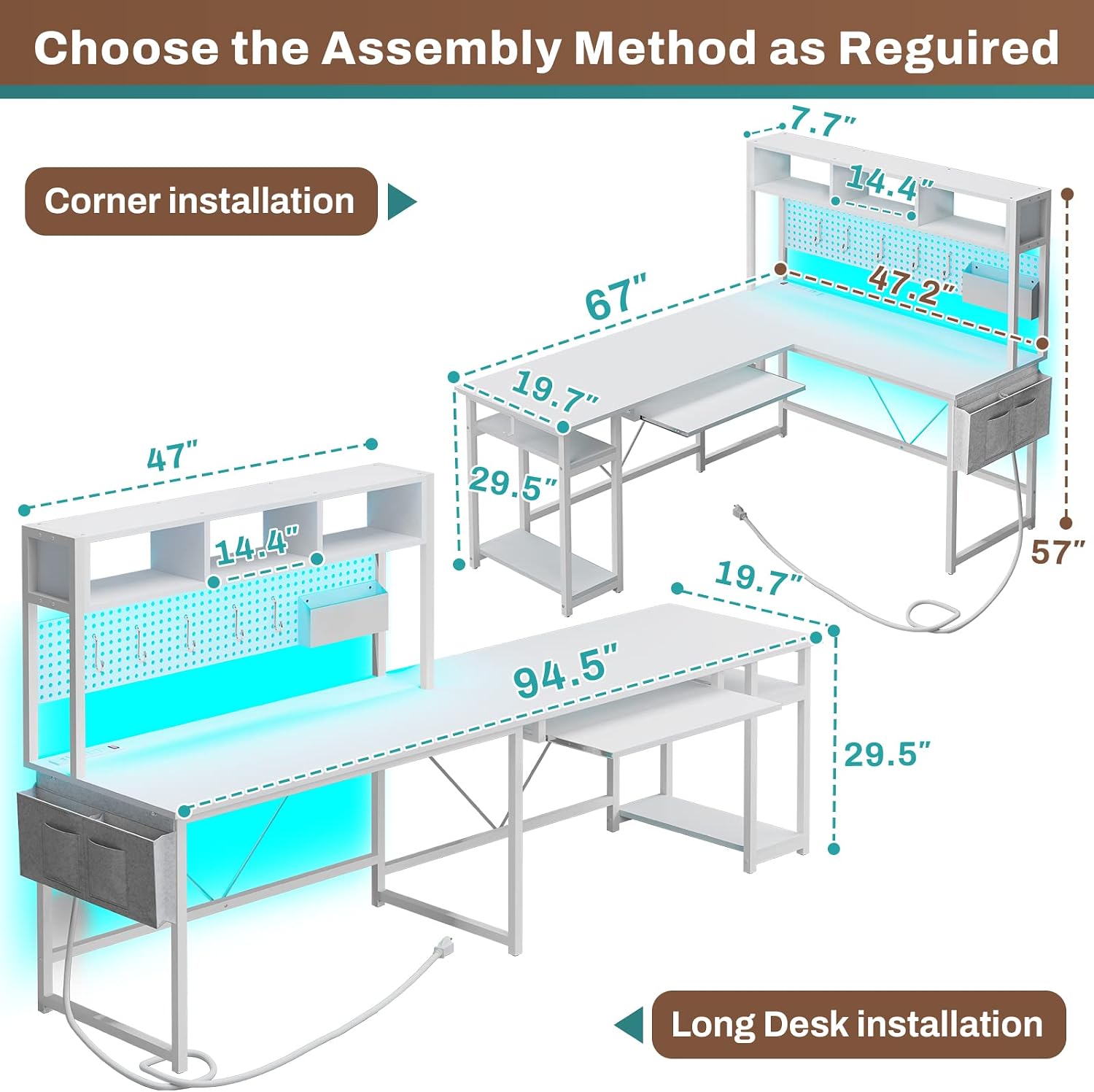
Figure 2: Choose your preferred assembly method: Corner or Long Desk configuration.
Step-by-Step Assembly
Follow the detailed instructions provided in the included assembly manual. Ensure all parts are accounted for before beginning. It is recommended to assemble the desk on a soft, clean surface to prevent scratches. While some tools may be provided, additional tools might be required for optimal assembly.

Figure 3: The desk configured as a 94.5-inch long office desk, providing ample space for multiple setups.

Figure 4: The desk's reversible design allows for various configurations, including a U-shaped setup for extensive workspaces.
Operating Your Desk
Power Outlet and USB Ports
The integrated charging station includes 4 AC outlets and 2 USB ports, allowing you to power and charge up to 6 devices simultaneously. It features an on-off switch for convenient and safe power control. Use this to charge cell phones, tablets, notebooks, and other electronic devices.

Figure 5: Detail of the integrated power outlet for convenient device charging.
LED Lighting System
The desk is equipped with RGB LED lights that offer over 60,000 colors and 29 flashing modes. Control the lights via a key control remote or a dedicated mobile application. The LED lights also feature a music sync function with a built-in sensitivity adjustable microphone, allowing the light color to change with the rhythm of sound and music, enhancing your gaming or work ambiance.

Figure 6: Control options for the RGB LED lighting system.
Keyboard Tray
The 21.7-inch sliding keyboard tray is designed to accommodate most 108-key or 87-key keyboards and a mouse, freeing up valuable desk space for other activities.

Figure 7: The convenient sliding keyboard tray.
Pegboard and Storage
The desk includes a 47.2-inch long pegboard with 5 S-hooks and a storage bag, providing ample space for organizing accessories, headphones, and other items. The top hutch offers additional shelving for books, files, or decorative items.

Figure 8: The pegboard and hutch provide versatile storage and organization options.
Maintenance and Care
To ensure the longevity and appearance of your SEDETA L Shaped Gaming Desk, follow these maintenance guidelines:
- Cleaning: Wipe surfaces with a soft, damp cloth. Avoid harsh chemicals or abrasive cleaners that may damage the finish.
- Spills: Immediately clean up any spills to prevent staining or damage to the engineered wood.
- Heat and Moisture: Avoid placing hot items directly on the desk surface. Use coasters for drinks to prevent moisture rings.
- Stability: Periodically check and tighten all screws and connections to maintain desk stability.
- Electrical Components: Keep the power outlet and LED lights dry. Do not attempt to repair electrical components yourself.
Troubleshooting
Here are some common issues and their potential solutions:
- Desk feels wobbly: Ensure all screws are securely tightened. Verify that the desk is assembled correctly according to the instructions, paying close attention to the orientation of all parts.
- LED lights not working or missing: Check all connections of the LED strip to the power source and controller. If the lights were missing upon arrival, contact customer service for assistance.
- Power outlet not charging devices: Ensure the power outlet's on-off switch is in the 'ON' position. Verify that the desk's main power cord is securely plugged into a working wall outlet. If issues persist, try charging devices directly from a wall outlet to rule out device-specific problems.
- Difficulty with assembly: Review the assembly manual carefully. Some parts may have specific orientations. If a hole does not align, double-check the part's position before attempting to modify the desk.
Product Specifications
| Feature | Detail |
|---|---|
| Brand | SEDETA |
| Model Number | 2680-desk |
| Product Dimensions | 19.7"D x 67"W x 57"H |
| Item Weight | 66 Pounds |
| Color | White With Power Outlet and Pegboard |
| Style | Industrial |
| Base Material | Metal |
| Top Material Type | Engineered Wood |
| Special Feature | Reversible |
| Power Outlet | 4 AC Outlets & 2 USB Ports |
| LED Lights | RGB, APP/Remote Control, Music Sync |
| Maximum Weight Recommendation | 110 Pounds |
| Required Assembly | Yes |
Warranty and Support
Thank you for your purchase of the SEDETA L Shaped Gaming Desk. We stand by the quality of our products. If your desk arrives damaged, scratched, or with missing parts, please do not hesitate to contact our professional after-sales customer service team. Our team is committed to addressing your concerns within 24 hours.
For support, please refer to the contact information provided with your purchase documentation or visit the official SEDETA store on Amazon.
Ask a question about this manual
Ask about setup, troubleshooting, compatibility, parts, safety, or missing instructions. Manuals+ will review the question and use this page’s manual context to help answer it.