
1. Introduction
This manual provides essential information for the safe and efficient operation, maintenance, and troubleshooting of your Antari Z-3000IIIE 3000W Fog Machine. Please read this manual thoroughly before operating the device to ensure proper usage and to prevent damage or injury.
The Antari Z-3000IIIE is a high-performance fog machine designed for professional applications, featuring an LCD display, rotary knob controls, and an integrated auto liquid detector to prevent dry runs. Its robust design and increased output volume make it suitable for various stage and event effects.
2. Safety Information
WARNING: Failure to follow these safety instructions may result in fire, electric shock, injury, or damage to the product or property.
- Always connect the machine to a grounded power outlet with the correct voltage (220-240V for this EU version).
- Use only Antari-approved fog fluid. Using other fluids may cause damage, poor performance, or health hazards, and will void the warranty.
- Do not operate the machine if the power cord is damaged.
- Ensure adequate ventilation around the machine. Do not block air vents.
- Keep the machine away from flammable materials.
- Do not touch the nozzle during operation or immediately after, as it becomes very hot.
- Keep out of reach of children.
- If the machine requires service, contact qualified personnel. Do not attempt to repair it yourself.
- Always disconnect power before cleaning or servicing.
3. Package Contents
Verify that all items are present and in good condition upon unpacking:
- Antari Z-3000IIIE Fog Machine
- Power Cord (EU plug)
- Wired Remote Controller (Z-20 or similar, depending on package)
- User Manual (this document)
4. Product Overview
Familiarize yourself with the components of your Antari Z-3000IIIE fog machine.
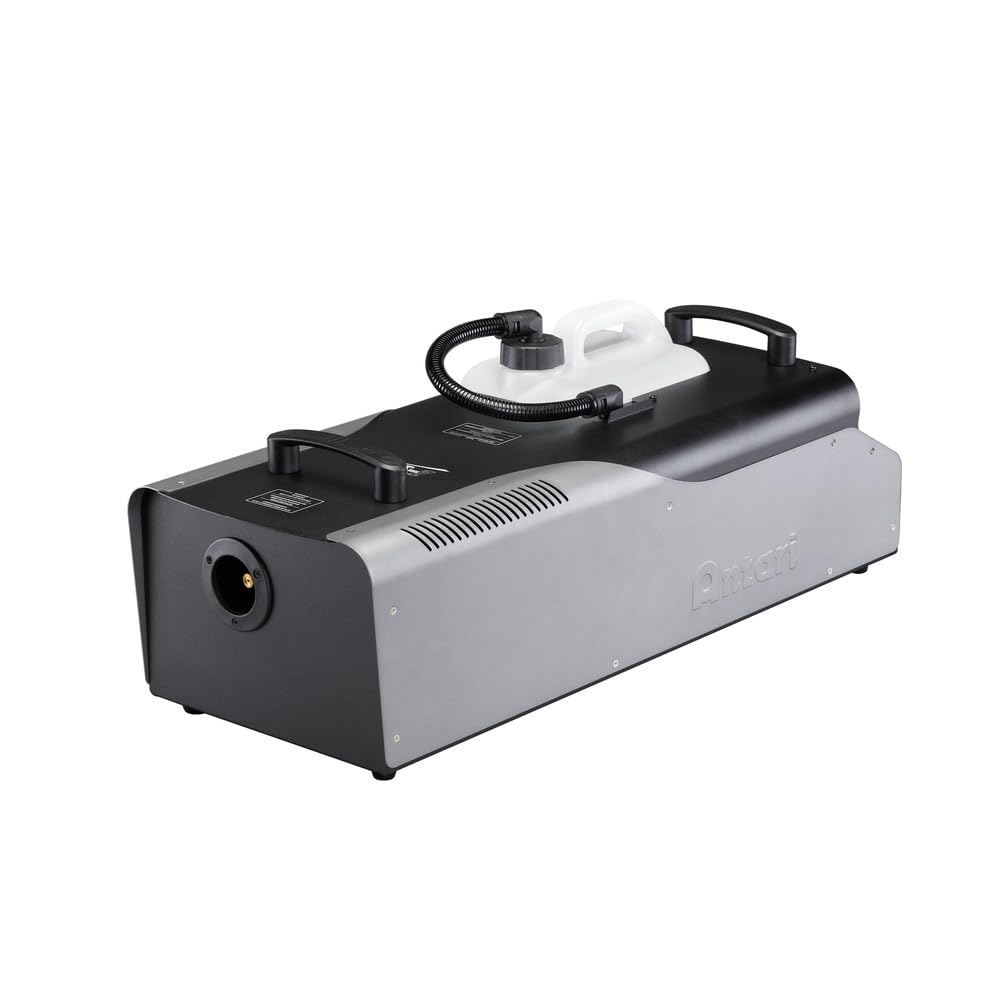
An angled view of the Antari Z-3000IIIE fog machine, showing its robust black and grey casing, the clear fluid reservoir on top, and the control panel with an LCD screen and rotary knobs on the front left.
- Fluid Reservoir: Transparent tank for fog fluid.
- Fluid Hose: Connects reservoir to the pump.
- Nozzle: Where fog is emitted. Gets very hot.
- Control Panel: Features LCD display and rotary knobs for settings.
- Power Switch: Main power on/off.
- Power Inlet: For connecting the power cord.
- Remote Control Port: For connecting wired or wireless remote controllers.
- Handles: For easy transport.
- Ventilation Grilles: For heat dissipation.
5. Setup
5.1 Unpacking and Placement
- Carefully remove the fog machine from its packaging.
- Place the machine on a flat, stable, and non-flammable surface.
- Ensure there is at least 50 cm (20 inches) of clear space around the machine for proper ventilation.
- Position the machine so that the fog output is directed away from people, animals, and sensitive equipment.
5.2 Fluid Installation
- Unscrew the cap of the fluid reservoir.
- Carefully pour Antari-approved fog fluid into the reservoir. Do not overfill.
- Securely screw the cap back onto the reservoir.
- Ensure the fluid hose is properly submerged in the fluid and securely connected.
5.3 Power Connection
- Ensure the power switch on the machine is in the "OFF" position.
- Connect the provided power cord to the power inlet on the machine.
- Plug the other end of the power cord into a grounded 220-240V AC, 50/60Hz power outlet.
5.4 Controller Connection
- If using a wired remote controller, connect its cable to the designated remote control port on the machine.
- Refer to the remote controller's specific manual for detailed operation instructions.
6. Operation
6.1 Powering On and Warm-up
- Flip the main power switch to the "ON" position.
- The LCD display will illuminate, and the machine will begin its warm-up cycle.
- The warm-up time typically takes 8-10 minutes. The display will indicate "READY" when the machine is ready to produce fog.
6.2 Using the Control Panel
The Z-3000IIIE features an LCD display and two rotary knobs for adjusting settings.
- Left Rotary Knob: Typically controls timer settings, interval, and duration.
- Right Rotary Knob: Typically controls continuous fog output volume or manual fog burst.
- LCD Display: Shows current status, settings, and error messages.
Consult the on-screen menu for specific functions and navigation using the rotary knobs.
6.3 Fog Output Adjustment
- Once "READY" is displayed, you can activate fog output.
- Use the rotary knobs or connected remote control to initiate fog production and adjust the volume.
- The machine's auto liquid detector will prevent operation if the fluid level is too low, protecting the pump.
6.4 Shutting Down
- Turn off the fog machine using the main power switch.
- Allow the machine to cool down completely before moving or storing.
- Disconnect the power cord from the outlet.
7. Maintenance
7.1 Regular Cleaning
- After every 40 hours of operation or monthly, whichever comes first, it is recommended to run a cleaning solution through the machine.
- Use Antari Fog Machine Cleaner or a mixture of 80% distilled water and 20% white vinegar.
- Empty the fog fluid reservoir and fill it with the cleaning solution.
- Run the machine in a well-ventilated area until the reservoir is nearly empty.
- Refill with distilled water and run again to flush out any remaining cleaning solution.
- Wipe down the exterior with a soft, damp cloth. Ensure no liquid enters internal components.
7.2 Fluid Handling and Storage
- Always use fresh, high-quality Antari fog fluid.
- Store fog fluid in a cool, dark place, away from direct sunlight and extreme temperatures.
- If storing the machine for an extended period (more than 30 days), empty the fluid reservoir and perform a cleaning cycle before storage.
8. Troubleshooting
| Problem | Possible Cause | Solution |
|---|---|---|
| No power | Power cord disconnected, faulty outlet, blown fuse/breaker. | Check power cord connection. Test outlet. Check building's fuse/breaker. |
| No fog output after warm-up | Fluid reservoir empty, fluid sensor activated, clogged nozzle, pump issue. | Refill fluid. Check fluid sensor. Perform cleaning cycle. Contact service if pump is suspected. |
| Weak or inconsistent fog | Low fluid level, incorrect fluid type, partial clog, insufficient warm-up. | Ensure fluid is full and correct type. Perform cleaning cycle. Allow full warm-up. |
| Machine leaks fluid | Loose connections, damaged reservoir/hose. | Check all fluid connections. If damage is visible, contact service. |
| Remote control not working | Loose connection, faulty remote. | Ensure remote cable is securely connected. Test with another compatible remote if available. |
9. Specifications
- Model: Z-3000IIIE
- Power: 3000W
- Voltage: AC 220-240V, 50/60Hz (EU Version)
- Warm-up Time: Approximately 8-10 minutes
- Fluid Consumption: Varies based on output setting (e.g., 200 ml/min at 100% output)
- Output: High volume fog output (approximately 30% increase over previous models)
- Control: On-board LCD display with rotary knobs, wired remote control (optional DMX interface)
- Weight: 46.7 pounds (approx. 21.2 kg)
- Safety Features: Auto liquid detector, thermal cut-off
10. Warranty and Support
Antari products are manufactured to high standards and are backed by a limited warranty. For specific warranty terms and conditions, please refer to the warranty card included with your product or visit the official Antari website.
For technical support, service, or replacement parts, please contact your authorized Antari dealer or distributor. When contacting support, please have your product model number (Z-3000IIIE) and serial number ready.
You can find more information and support resources on the official Antari website: www.antari.com


