Introduction
The Celltronix Titanium 6FT USB to Lightning Cable is an Apple MFi Certified accessory designed for reliable and efficient charging and data synchronization of your Apple devices, including iPhone, iPad, and iPod. This cable features a heavy-duty, tangle-free nylon braided exterior and secure aluminum tips for enhanced durability and optimal connectivity.
Key features include:
- Apple MFi Certified: Ensures full compatibility and safe operation with Apple devices.
- Built to Last: Constructed with heavy-duty, tangle-free nylon braiding for superior durability and resistance to wear.
- Fast Charging: Supports quick charge power delivery systems to efficiently recharge your device.
- Dual Action Sync+Charge: Enables simultaneous data synchronization and device charging.
- Aluminum Tips: Features robust aluminum connectors for secure and reliable connections.

Image: Celltronix Titanium 6FT USB to Lightning Cable in its retail packaging, highlighting its key features and Apple MFi certification.
Setup and Connection
This cable is designed for plug-and-play functionality. No software installation is required for basic operation.
- Connect to Power Source or Computer: Insert the USB-A end of the cable into a compatible USB power adapter (e.g., wall charger, car charger) or a USB port on your computer.
- Connect to Apple Device: Insert the Lightning connector end of the cable into the Lightning port of your iPhone, iPad, or iPod. Ensure the connector is fully seated for a secure connection.

Image: A close-up view of the Lightning and USB-A connectors of the Celltronix cable, showing their design and the braided cable.
Operating Instructions
Charging Your Device
Once connected to a power source, your Apple device will automatically begin charging. The cable supports fast charging when paired with a compatible power adapter and device.
Synchronizing Data
When connected to a computer, the cable facilitates data transfer between your Apple device and the computer. This allows for syncing photos, videos, music, and other files using iTunes or Finder (macOS Catalina and later).

Image: A person using the Celltronix 6FT cable to charge their phone from an outdoor charging station, demonstrating its length and tangle-free design.
Care and Maintenance
Proper care will extend the lifespan of your Celltronix Titanium cable:
- Avoid Extreme Bending: While the cable is designed to be heavy-duty and tangle-free, avoid sharp or excessive bends, especially near the connectors, to prevent internal wire damage.
- Clean Connectors: Periodically inspect and gently clean the metal contacts of the Lightning and USB connectors with a dry, soft cloth to ensure optimal conductivity.
- Store Properly: When not in use, coil the cable loosely. Avoid tightly wrapping or knotting the cable.
- Protect from Elements: Keep the cable away from extreme temperatures, direct sunlight, and moisture.

Image: An illustration showing the flexibility and durability of the Celltronix cable, emphasizing its "Built to Last" feature and resistance to bending.
Troubleshooting
If you encounter issues with your cable, try the following steps:
| Problem | Possible Solution |
|---|---|
| Device not charging or charging slowly. |
|
| Data synchronization issues. |
|
| Cable appears damaged. | Discontinue use immediately. Contact customer support for assistance. |
Product Specifications
- Brand: Celltronix
- Model Number: 08079842722
- ASIN: B0C3MXC299
- Connector Type: Lightning (Male), USB-A (Male)
- Cable Type: USB to Lightning
- Cable Length: 6 Feet (approx. 1.8 meters)
- Special Features: Data Transfer, Tangle Free, Fast Charging, Sync + Charge, Aluminum Tips
- Compatible Devices: Apple iPhone, iPad, iPod with Lightning port
- Manufacturer: SRP Companies
- Country of Origin: China
- Package Dimensions: 5.16 x 5 x 0.55 inches
- Item Weight: 2.15 ounces
- UPC: 0080798427227
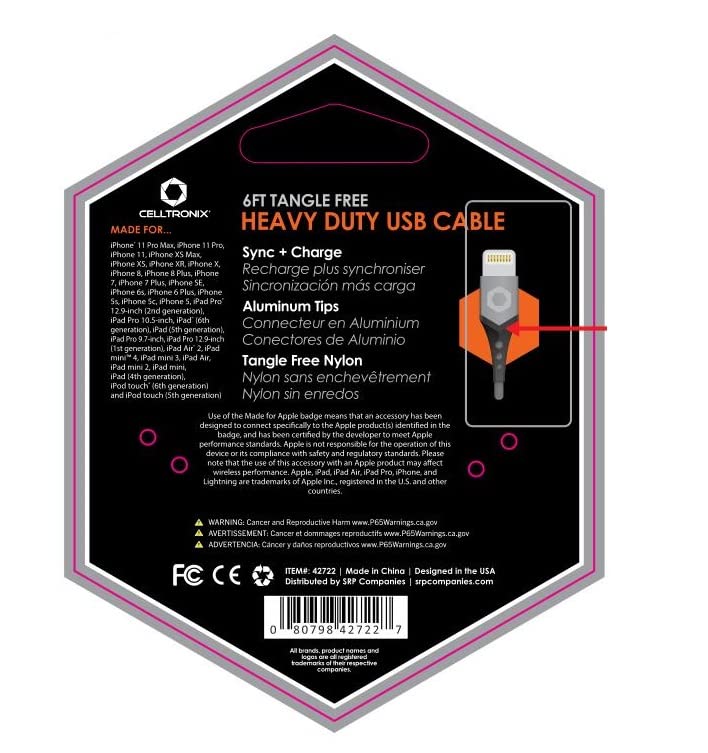
Image: The back of the Celltronix cable packaging, displaying compatibility information, features, and regulatory warnings, including the UPC.
Warranty Information
Specific warranty terms for the Celltronix Titanium 6FT USB to Lightning Cable may vary. Please refer to the product packaging or contact the manufacturer, SRP Companies, or your retailer for detailed warranty information and terms of service.
Customer Support
For further assistance, technical support, or inquiries regarding your Celltronix Titanium cable, please contact the manufacturer or the retailer from whom you purchased the product. Keep your proof of purchase handy when contacting support.
Manufacturer: SRP Companies
Website: srpcompanies.com