
JISULIFE FA50
JISULIFE Portable Neck Fan Instruction Manual
Model: FA50 | Brand: JISULIFE
1. Introduction
Thank you for choosing the JISULIFE Portable Neck Fan. This bladeless, hands-free fan is designed to provide optimal personal cooling and air purification, making it ideal for various indoor and outdoor activities. With its advanced features, including 100-speed adjustment, a powerful 6000mAh battery, and negative ion technology, you can enjoy a comfortable and refreshing experience. Please read this manual thoroughly before use to ensure proper operation and maintenance.
2. Product Overview
The JISULIFE FA50 Portable Neck Fan features a sleek, ergonomic design that comfortably fits around your neck, delivering 360° cooling airflow. Key components and their functions are outlined below:
- Bladeless Design: Ensures safety for users with long hair and provides a smooth, consistent airflow.
- Adjustable Neck Collar: Allows for a 15° pivot on each side to optimize airflow direction and fit various neck sizes.
- LED Display: Shows real-time battery level and current wind speed setting (1-100).
- Roller Switch: Used for precise 100-level wind speed adjustment.
- Power Button: Controls power on/off and activates the negative ion function.
- Air Outlets: Strategically placed around the neck for comprehensive 360° cooling.
- USB Type-C Charging Port: For fast and convenient recharging.

Figure 2.1: The JISULIFE Portable Neck Fan (Model FA50) and its packaging.

Figure 2.2: The adjustable neck collar allows for a customized fit and optimal airflow.
3. Setup
3.1 Charging the Device
Before first use, fully charge your JISULIFE Neck Fan. The device is equipped with a 6000mAh battery and supports 18W fast charging via its USB Type-C port. A full charge takes approximately 1.5 hours.
- Connect the provided USB Type-C cable to the charging port on the fan.
- Plug the other end of the cable into a compatible 18W (or higher) USB power adapter (not included) or a computer USB port.
- The LED display will show the charging progress. Once fully charged, the display will indicate 100%.
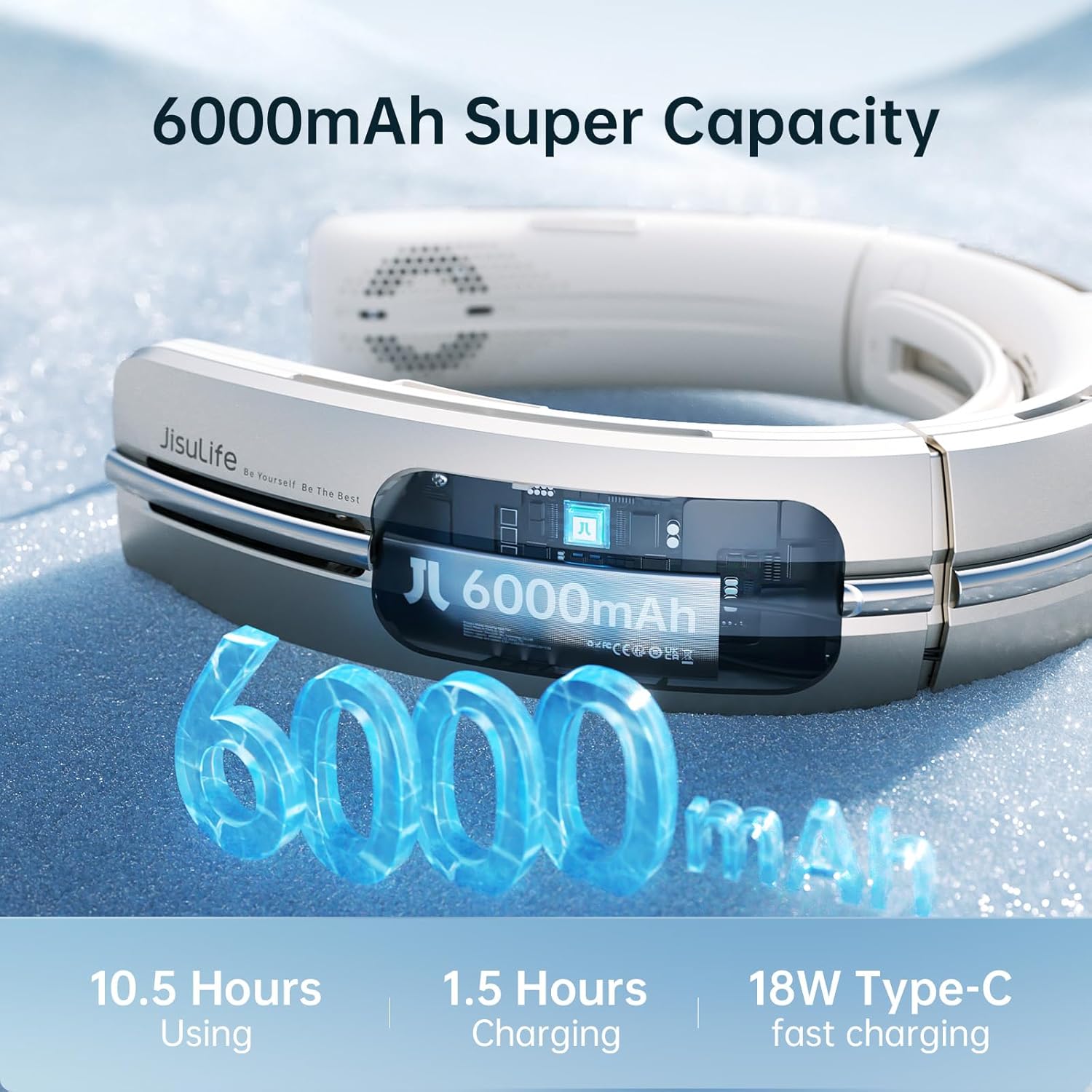
Figure 3.1: The 6000mAh battery provides extended usage and fast charging capabilities.
3.2 Initial Use
Once charged, the fan is ready for use. Place the fan around your neck, ensuring the air outlets are positioned comfortably for optimal cooling.
4. Operating Instructions
4.1 Power On/Off
- To power on, press and hold the Power Button located on the side of the fan. The LED display will light up, showing the current wind speed.
- To power off, press and hold the Power Button again until the LED display turns off.
4.2 Wind Speed Adjustment
The fan offers 100 levels of wind speed adjustment for precise control over your cooling experience.
- Use the Roller Switch (located near the power button) to adjust the wind speed.
- Roll the switch upwards to increase the wind speed.
- Roll the switch downwards to decrease the wind speed.
- The LED display will show the numerical wind speed level (1-100).

Figure 4.1: Easily adjust the wind speed from 1 to 100 using the roller switch.
4.3 Negative Ion Function
The fan includes a negative ion air purification function to help improve air quality around you.
- To activate the negative ion function, short press the Power Button while the fan is on. A green light on the LED display will indicate that the function is active.
- To deactivate, short press the Power Button again.

Figure 4.2: Activate the negative ion function for cleaner, fresher air.
4.4 Neck Collar Adjustment
The neck collar can be adjusted to fit different neck sizes and optimize airflow.
- Gently push or pull the sides of the neck fan to adjust the width. The fan is designed to pivot up to 15° on each side.
- Ensure a comfortable fit that allows for effective airflow around your neck and face.
4.5 Usage Scenarios
The JISULIFE Portable Neck Fan is versatile and suitable for a wide range of activities:
- Outdoor Activities: Cycling, hiking, sports, travel, gardening, and more.
- Indoor Use: Office, home, kitchen, school, and general daily use.

Figure 4.3: The fan is designed for comfort and cooling across various activities.
4.6 Official Product Video
Video 4.1: Official product overview of the JISULIFE Portable Neck Fan, demonstrating its features and use in various environments.
5. Maintenance
5.1 Cleaning
Due to its bladeless design, the JISULIFE Neck Fan is easy to clean.
- Ensure the device is powered off and unplugged before cleaning.
- Wipe the exterior surfaces with a soft, dry cloth.
- For dust accumulation in the air outlets, use a soft brush or compressed air to gently clear them.
- Do not use harsh chemicals, abrasive cleaners, or immerse the device in water.
5.2 Storage
When not in use for extended periods, store the fan in a cool, dry place away from direct sunlight and extreme temperatures. It is recommended to fully charge the device before storing to preserve battery life.
6. Troubleshooting
If you encounter any issues with your JISULIFE Portable Neck Fan, please refer to the common problems and solutions below:
| Problem | Possible Cause | Solution |
|---|---|---|
| Device does not power on. | Low battery. | Charge the device fully. |
| Fan not blowing air or one side not working (e.g., E2 Error). | Software issue or internal component malfunction. | Try restarting the device. If the issue persists, contact JISULIFE customer support for potential software updates or repair. |
| Wind speed adjustment is unresponsive. | Roller switch malfunction or software glitch. | Restart the device. Ensure the roller switch is clean and free of debris. If unresponsive, contact support. |
| Reduced airflow or unusual noise. | Blocked air outlets or internal debris. | Clean the air outlets as described in the Maintenance section. |
If you experience any issues not listed above or if the suggested solutions do not resolve the problem, please contact JISULIFE customer support for further assistance.
7. Specifications
| Feature | Specification |
|---|---|
| Brand | JISULIFE |
| Model Name | FA50 |
| Color | Gold |
| Electric Fan Design | Wearable Fan |
| Power Source | Battery Powered |
| Battery Capacity | 6000mAh (2 Lithium Ion batteries included) |
| Charging Time | Approx. 1.5 hours (with 18W fast charging) |
| Operation Time | 1.5 - 10.5 hours (depending on speed setting) |
| Product Dimensions | 2"D x 7.5"W x 8.4"H (51mm D x 190mm W x 213mm H) |
| Item Weight | 14.8 ounces (420 Grams) |
| Noise Level | 20 dB |
| Number of Power Levels | 100 |
| Control Method | Touch (Roller Switch, Push Button) |
| Special Feature | Negative Ion Air Purification, LED Display, Adjustable Neck Collar |
| Material | Plastic |
| Connector Type | USB Type C |
8. Warranty and Support
JISULIFE products come with a standard manufacturer's warranty. For detailed warranty information, product support, or to inquire about repairs, please visit the official JISULIFE website or contact their customer service team directly. Keep your purchase receipt as proof of purchase for warranty claims.
JISULIFE Customer Service: Please refer to the contact information provided on the product packaging or the official JISULIFE website.
Related Documents - FA50
 |
JISULIFE FA12 Bladeless Neck Cooler User Manual Comprehensive user manual for the JISULIFE FA12 bladeless neck cooler, covering appearance, features, operation, charging, maintenance, safety warnings, warranty information, and product specifications. |
 |
JisuLife FA14 Neck Fan Life3 - Uživatelská příručka a pokyny Uživatelská příručka pro přenosný ventilátor JisuLife FA14, model Neck Fan Life3. Obsahuje pokyny k použití, čištění, bezpečnostní upozornění a technické parametry pro optimální a bezpečné používání. |
 |
Посібник користувача шийного вентилятора JisuLife FA14 Life3 Детальний посібник користувача для шийного вентилятора JisuLife FA14 Life3, що охоплює експлуатацію, заходи безпеки, чищення, технічні характеристики та комплектацію. |
 |
JisuLife Life4 Neck Fan User Manual and Safety Guide Discover the JisuLife Life4 Neck Fan user manual. This guide provides comprehensive instructions on how to use, clean, and maintain your portable neck fan, including safety precautions, product specifications, and battery removal procedures. Optimize your cooling experience with this essential guide. |
 |
JisuLife FA14 Neck Fan User Manual | How to Use and Safety Guide Comprehensive user manual for the JisuLife FA14 Neck Fan. Learn about its features, how to use it, safety precautions, cleaning, and specifications. Get the most out of your portable cooling device. |
 |
JisuLife Neck Fan Life4 Uživatelský manuál Uživatelský manuál pro JisuLife Neck Fan Life4, který obsahuje pokyny k použití, bezpečnostní opatření, informace o čištění a specifikace produktu. |
Ask a question about this manual
Ask about setup, troubleshooting, compatibility, parts, safety, or missing instructions. Manuals+ will review the question and use this page’s manual context to help answer it.