
1. Introduction and Overview
The BAOFENG UV-17R is an advanced dual-band ham radio designed for reliable long-range communication. As an upgrade to the popular UV-5R, it features 999 memory channels, a 1.77-inch color display, Type-C USB charging, and enhanced functionalities like wireless frequency copy and NOAA weather alerts. This manual provides detailed instructions for setting up, operating, and maintaining your UV-17R radio.

Image: BAOFENG UV-17R radio and its complete set of accessories, including antennas, charger, earpiece, and USB cable.

Image: Two BAOFENG UV-17R radios communicating over a long distance in an outdoor setting, highlighting their range capability.
2. Package Contents
Please check the box for the following items:
- BAOFENG UV-17R Walkie Talkie (x1)
- Lithium Ion Battery (x1)
- Type-C USB Charger Cable (x1)
- Base Charger (x1)
- 21CM Antenna (x1)
- 38CM 771 Antenna (x1)
- Belt Clip (x1)
- Screwdriver (x1)
- Hand Strap (x1)
- Headset (x1)
- User Manual (x1)
3. Product Features
The BAOFENG UV-17R offers a robust set of features for enhanced communication:
- 999 Memory Channels: Extensive channel capacity for diverse communication needs.
- UHF/VHF Dual Band: Supports both Ultra High Frequency and Very High Frequency bands.
- CTCSS/DCS: Continuous Tone-Coded Squelch System / Digital-Coded Squelch for private communication.
- VOX Mode: Voice-Operated Exchange for hands-free operation.
- A/B Band Independent Operation: Allows simultaneous monitoring of two different frequencies.
- Dual Display & Dual Standby: Monitor two channels at once.
- Auto Keypad Lock: Prevents accidental key presses.
- Type-C USB Charging: Convenient charging method for on-the-go use.
- Base Charging: Efficient charging dock for home or office.
- NOAA Weather Alert: Scans 10 NOAA Weather channels and provides alerts for severe weather.
- Wireless Frequency Copy: Clone frequencies from other radios without PC programming.
- LED Flashlight: Built-in powerful flashlight for emergency illumination.
- 1.77" Color Large Screen: Clear and vibrant display for easy readability.
- High Gain Antenna: Improves signal reception and transmission.

Image: Visual representation of the BAOFENG UV-17R's key features, including its color screen, 999 channels, NOAA function, high power, dual band, encryption, high gain antenna, Type-C charging, LED flashlight, VOX function, FM radio, and large battery.

Image: The BAOFENG UV-17R highlighting its professional ham radio capabilities, including NOAA function, Type-C fast charging, UV dual band, 999 channels, LED flashlight, wireless frequency copy, VOX function, and FM radio.
4. Component Identification
Familiarize yourself with the various parts of your BAOFENG UV-17R radio:
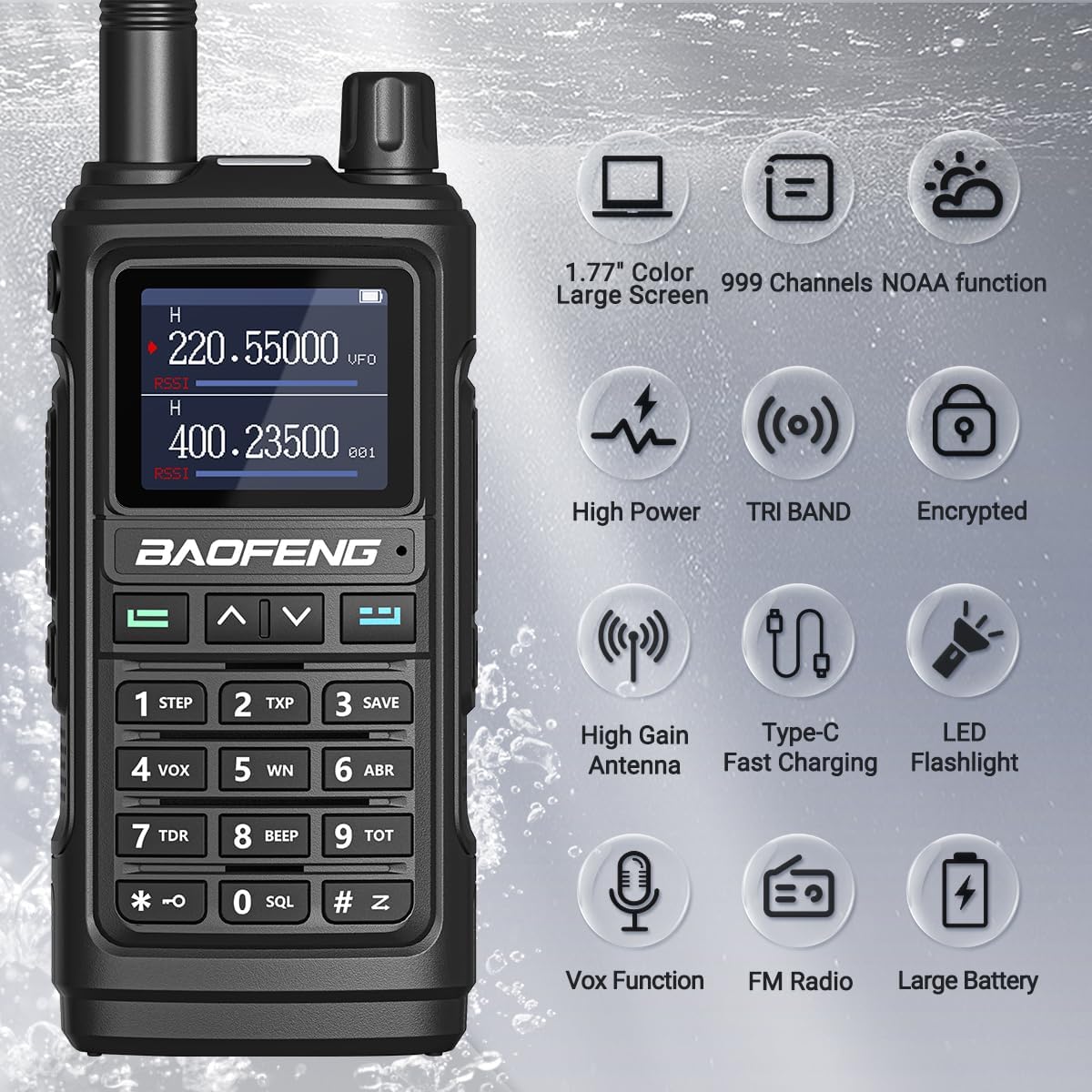
Image: Detailed diagram of the BAOFENG UV-17R showing its dimensions and numbered parts for easy identification.
- Antenna
- Flashlight/Emergency Alert Key
- PTT Key (Push-to-Talk)
- FM Broadcast/Monitor Key
- MENU Key
- Numeric Keypad
- Power/Volume Knob
- Color LCD Display
- Speaker/Mic Jacks
- MIC Input
- Exit Key
- ^ or v Navigation Keys
- Battery Pack
- Type-C Charging Port
- Battery Tightening Screw
- Type-C Charging Indicator
- LED Flashlight
- LED Status Indicator
5. Setup
5.1. Battery Installation
- Align the battery pack (13) with the grooves on the back of the radio.
- Slide the battery pack upwards until it clicks into place.
- Secure the battery by tightening the battery tightening screw (15) if present.
5.2. Antenna Attachment
Screw the desired antenna (1) clockwise onto the antenna connector at the top of the radio until it is finger-tight. Do not overtighten.
5.3. Initial Charging
Before first use, fully charge the battery. The UV-17R supports two charging methods:
- Type-C USB Charging: Connect the Type-C USB cable to the Type-C charging port (14) on the radio and to a compatible USB power source. The Type-C charging indicator (16) will show charging status.
- Base Charging: Place the radio into the charging base. Ensure the charging contacts on the radio align with those on the base. Connect the base charger to a power outlet.

Image: The BAOFENG UV-17R demonstrating both Type-C USB charging directly into the radio and traditional base charging with the radio placed in its dock.
6. Operating Instructions
6.1. Power On/Off and Volume
To power on the radio, rotate the Power/Volume knob (7) clockwise. Continue rotating to adjust the volume. To power off, rotate the knob counter-clockwise until it clicks.
6.2. Channel Selection and Frequency Input
Use the ^ or v navigation keys (12) to scroll through channels. Alternatively, use the Numeric Keypad (6) to directly input frequencies or channel numbers.
6.3. Transmitting (PTT)
To transmit, press and hold the PTT Key (3) on the side of the radio. Speak clearly into the microphone. Release the PTT key to receive.
6.4. Wireless Frequency Copy (FQSCAN)
This feature allows you to quickly clone frequencies from another radio without computer programming.
- Long press the MENU Key (5) to enter the "FQSCAN" interface.
- Press MENU (5) again. The UV-17R will begin searching for another radio's transmission frequency and privacy code.
- Once a frequency is detected and copied, press MENU (5) to store it.
- The two radios can now communicate normally.

Image: Two BAOFENG UV-17R radios side-by-side, illustrating the wireless frequency copy function that allows quick cloning of settings.
6.5. NOAA Weather Alert
The UV-17R can monitor NOAA weather channels for alerts.
- Access the NOAA weather function through the menu. Refer to the on-screen prompts.
- The radio can scan 10 NOAA Weather channels.
- When the weather alarm function is active, the radio will emit an alarm if there is a risk of severe weather, providing crucial time for preparation.

Image: The BAOFENG UV-17R displaying weather information, with an overlay indicating "10 NOAA WEATHER STATIONS" and "FM Radio" capabilities.
6.6. VOX Function (Hands-Free)
VOX mode allows transmission without pressing the PTT key, by detecting your voice.
- To activate VOX, press the VOX key (4) or navigate through the menu.
- Adjust the VOX sensitivity level in the menu to prevent accidental transmissions or missed voice activations.
6.7. LED Flashlight
The built-in LED flashlight (17) can be activated for illumination.
- Press the Flashlight/Emergency Alert key (2) to turn the flashlight on or off.
- This feature is useful in low-light conditions or emergencies.

Image: The BAOFENG UV-17R with its powerful LED flashlight activated, illuminating a dark area, demonstrating its utility as a light source.
7. Specifications
| Feature | Specification |
|---|---|
| Model Number | UV-17 |
| Number of Channels | 999 |
| Frequency Range | 136-174 MHz (VHF), 400-520 MHz (UHF) |
| Tuner Technology | UHF, VHF |
| Battery Type | 1 Lithium Ion battery (included) |
| Voltage | 3.7 Volts |
| Water Resistance Level | Water Resistant |
| International Protection Rating | IP54 |
| Special Features | Portable, UHF, Waterproof, VOX, NOAA, Wireless Frequency Copy, LED Flashlight |
8. Troubleshooting
If you encounter issues with your BAOFENG UV-17R, refer to the following common problems and solutions:
8.1. Radio Does Not Power On
- Check Battery: Ensure the battery is properly installed and fully charged.
- Battery Contacts: Verify that the battery contacts are clean and free of debris.
- Power Knob: Confirm the Power/Volume knob is rotated clockwise past the click.
8.2. Cannot Transmit or Receive
- Frequency/Channel: Ensure you are on the correct frequency or channel.
- Antenna: Check if the antenna is securely attached.
- Battery Level: Low battery can affect transmission power. Recharge the battery.
- CTCSS/DCS Settings: Verify that your CTCSS/DCS settings match those of the receiving radio.
- Range: You might be out of range of the other radio or obstructed by terrain/buildings.
8.3. Poor Audio Quality
- Volume: Adjust the volume knob (7).
- Antenna: Ensure the antenna is properly connected.
- Interference: Move away from sources of electromagnetic interference (e.g., large electronic devices, power lines).
- Speaker/Mic Jack: If using an external earpiece/microphone, ensure it is fully plugged into the Speaker/Mic Jacks (9).
9. Maintenance
Proper care and maintenance will extend the life of your BAOFENG UV-17R:
- Cleaning: Use a soft, damp cloth to clean the radio's surface. Do not use harsh chemicals or abrasive cleaners.
- Battery Care: Avoid overcharging or completely draining the battery. Store the battery in a cool, dry place when not in use for extended periods.
- Storage: Store the radio in a dry, dust-free environment away from direct sunlight and extreme temperatures.
- Antenna: Handle the antenna carefully to prevent bending or damage.
10. Warranty and Support
Please note that this product does not come with an explicit manufacturer's warranty as per available information. However, BAOFENG aims to provide customer satisfaction.
For any technical guidance or customer service inquiries, please refer to the contact information provided at the point of purchase. Customer service is available to ensure your purchase enjoyment.