1. Introduction
Thank you for choosing the seenda KTU-401 Foldable Bluetooth Keyboard. This full-size, portable keyboard is designed for convenience and efficiency, allowing you to connect to multiple devices seamlessly. Please read this manual carefully to ensure proper use and to maximize your product experience.
2. Package Contents
- seenda KTU-401 Foldable Bluetooth Keyboard
- USB Charging Cable (Type-C)
- User Manual
3. Product Overview
The seenda KTU-401 is a full-size AZERTY keyboard with a numeric keypad, designed for portability. It features a triple-fold mechanism, making it compact for travel while providing a comfortable typing experience when unfolded.

Image 3.1: The keyboard demonstrating its triple-fold design for easy portability.
Its ultra-slim design and lightweight construction (255g) allow it to fit easily into bags or purses. The keyboard also features a quiet scissor-switch key mechanism, reducing typing noise by over 90% for a comfortable and discreet experience.
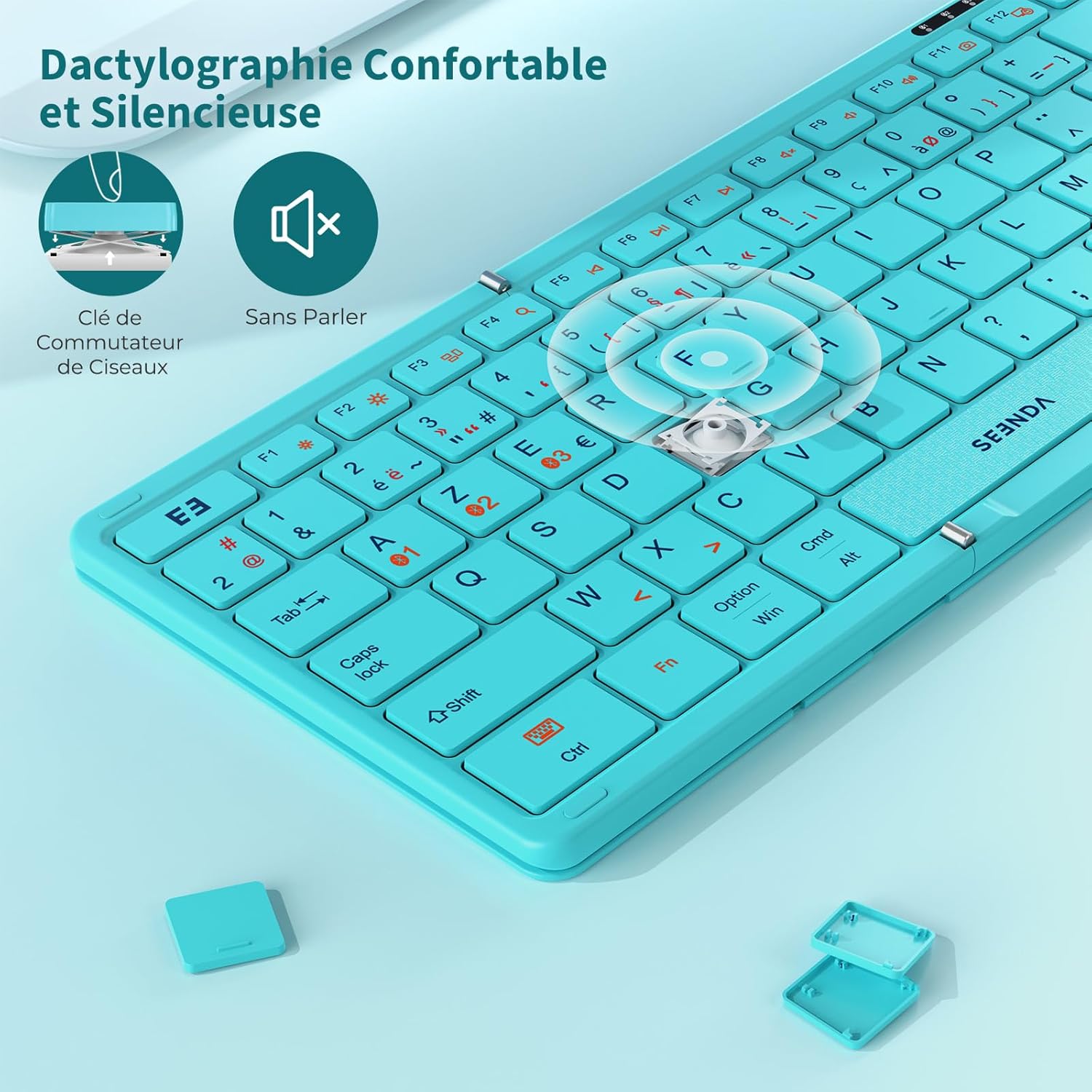
Image 3.2: Detail of the scissor-switch key mechanism, designed for quiet operation.
The keyboard is built with a durable aluminum alloy frame and a wear-resistant PU leather back. A magnetic folding function ensures it stays securely closed when not in use, and anti-slip pads on the bottom provide stability during typing.

Image 3.3: The magnetic design ensures the keyboard remains securely folded.
4. Setup and Connection
4.1 Charging the Keyboard
Before first use, fully charge the keyboard. Connect the provided USB Type-C cable to the charging port on the keyboard and to a USB power source (e.g., computer, wall adapter). The charging indicator light will illuminate during charging and turn off when fully charged. A full charge takes approximately 2 hours.

Image 4.1: Connecting the USB Type-C cable for charging.
4.2 Bluetooth Pairing
The keyboard can connect to up to three devices simultaneously via Bluetooth. Follow these steps to pair your devices:
- Power On: Unfold the keyboard to automatically power it on.
- Select Channel: Press the Fn key simultaneously with one of the Bluetooth channel keys (BT1, BT2, or BT3) to select a channel. The corresponding indicator light will blink slowly.
- Enter Pairing Mode: Press Fn + C (or the dedicated Bluetooth pairing key if available) to enter pairing mode. The indicator light for the selected channel will blink rapidly.
- Enable Bluetooth on Device: On your device (tablet, smartphone, computer), go to Bluetooth settings and turn on Bluetooth.
- Connect: Search for "seenda Keyboard" (or similar name) in the list of available devices and select it to connect.
- Confirm Pairing: Once connected, the indicator light on the keyboard will stop blinking and remain solid for a few seconds before turning off.
Repeat these steps for up to two additional devices, using BT2 and BT3 channels respectively.
Image 4.2: Bluetooth channel indicators for multi-device connectivity.
5. Operating Instructions
5.1 Switching Between Devices
To switch between paired devices, simply press Fn + BT1, Fn + BT2, or Fn + BT3. The keyboard will automatically connect to the selected device.
5.2 Special Function Keys
The keyboard includes various function keys (F1-F12) that can be accessed by pressing the Fn key in combination with the desired function key. Specific functions may vary slightly depending on the operating system of your connected device.
5.3 Auto-Sleep Mode
To conserve battery life, the keyboard will automatically enter sleep mode after 10 minutes of inactivity. To wake it up, simply press any key.
6. Compatibility
The seenda KTU-401 keyboard is compatible with a wide range of operating systems, including:
- Windows
- Mac OS
- iOS (iPad, iPhone)
- Android (Tablets, Smartphones)

Image 6.1: The keyboard connected to various devices, highlighting its broad compatibility.
7. Troubleshooting
- Keyboard not connecting:
Ensure the keyboard is charged and powered on. Make sure Bluetooth is enabled on your device. Try re-pairing the keyboard by following the steps in Section 4.2. Ensure no other Bluetooth devices are interfering. - Keys not responding:
Check if the keyboard is connected to the correct device channel (BT1/BT2/BT3). Recharge the keyboard if the battery is low. - Typing lag or disconnections:
Move the keyboard closer to your device. Avoid obstacles between the keyboard and device. Ensure your device's Bluetooth drivers are up to date. - Numeric keypad not working:
Ensure the Num Lock function is activated.
8. Specifications
| Feature | Specification |
|---|---|
| Model | KTU-401 |
| Connectivity | Bluetooth |
| Keyboard Layout | AZERTY (99 keys with numeric keypad) |
| Battery Capacity | 180mAh |
| Working Time | Up to 100 hours |
| Standby Time | Up to 5 months |
| Charging Time | Approx. 2 hours |
| Charging Port | USB Type-C |
| Open Dimensions | 34.2 x 11.6 cm (13.4 x 4.6 inches) |
| Folded Dimensions | 18.15 x 11.6 x 1.9 cm (7.1 x 4.6 x 0.75 inches) |
| Weight | 255g |
| Material | Aluminum alloy, PU leather, Acrylonitrile Butadiene Styrene |
| Color | Blue |

Image 8.1: Detailed dimensions of the keyboard in both open and folded states.
9. Warranty and Support
seenda products come with a standard manufacturer's warranty. For detailed warranty information, technical support, or customer service inquiries, please refer to the contact information provided on the product packaging or visit the official seenda website. Please retain your proof of purchase for warranty claims.