1. Introduction
The KINGBOLEN S6 is a powerful Bluetooth OBD2 scanner designed for comprehensive vehicle diagnostics. It offers full system diagnosis, 28+ maintenance functions, and full OBDII capabilities. Featuring a 5.99-inch touchscreen and an Android-based operating system, the S6 provides a smooth and efficient diagnostic experience for both car owners and professional technicians. This manual provides detailed instructions for setting up, operating, maintaining, and troubleshooting your Kingbolen S6 device.

Image: The Kingbolen S6 diagnostic tool, showcasing its compact design and included carrying case.
2. Setup
- Unboxing and Initial Charge: Carefully remove the Kingbolen S6 unit and its accessories from the packaging. Connect the provided charging cable to the device's USB port and a suitable power source to ensure the device is fully charged before first use.
- Power On: Press and hold the power button located on the device to turn it on. The Kingbolen S6 logo will appear, followed by the main interface.
- Bluetooth Connection: The S6 connects wirelessly to your vehicle via a Bluetooth OBD2 dongle. Insert the dongle into your vehicle's OBD-II port (typically located under the dashboard). The S6 will automatically attempt to connect to the dongle. Ensure Bluetooth is enabled on the S6 device if prompted.
- Software Update: It is recommended to perform a one-click online update via Wi-Fi upon initial setup to ensure you have the latest software version, vehicle coverage, and functionalities. Navigate to the "Update" section on the main screen and follow the on-screen instructions.

Image: Overview of the Kingbolen S6 hardware, highlighting its 5.99-inch touchscreen, Android 10 OS, 2GB RAM, 32GB storage, and Wi-Fi connectivity.
3. Operating Instructions
3.1. All System Diagnostic
The Kingbolen S6 allows for a comprehensive diagnosis of all electronic control modules in your vehicle. This includes systems such as Engine, Transmission (TCM), Anti-lock Braking System (ABS), Supplemental Restraint System (SRS), Windows, Seats, Audio, and Tire Pressure Monitoring System (TPMS).
- Auto VIN: The advanced Auto VIN function automatically identifies your car's information (year, manufacturer, model, VIN) for most models, streamlining the diagnostic process.
- Read/Clear Fault Codes: Access and clear diagnostic trouble codes (DTCs) from all diagnosed electronic modules.
- ECU Information: View detailed Electronic Control Unit information.
- Live Data Stream: Display combined live data from various modules, allowing for real-time monitoring of vehicle performance. The data is presented in a highly understandable graphical format for accurate problem identification.
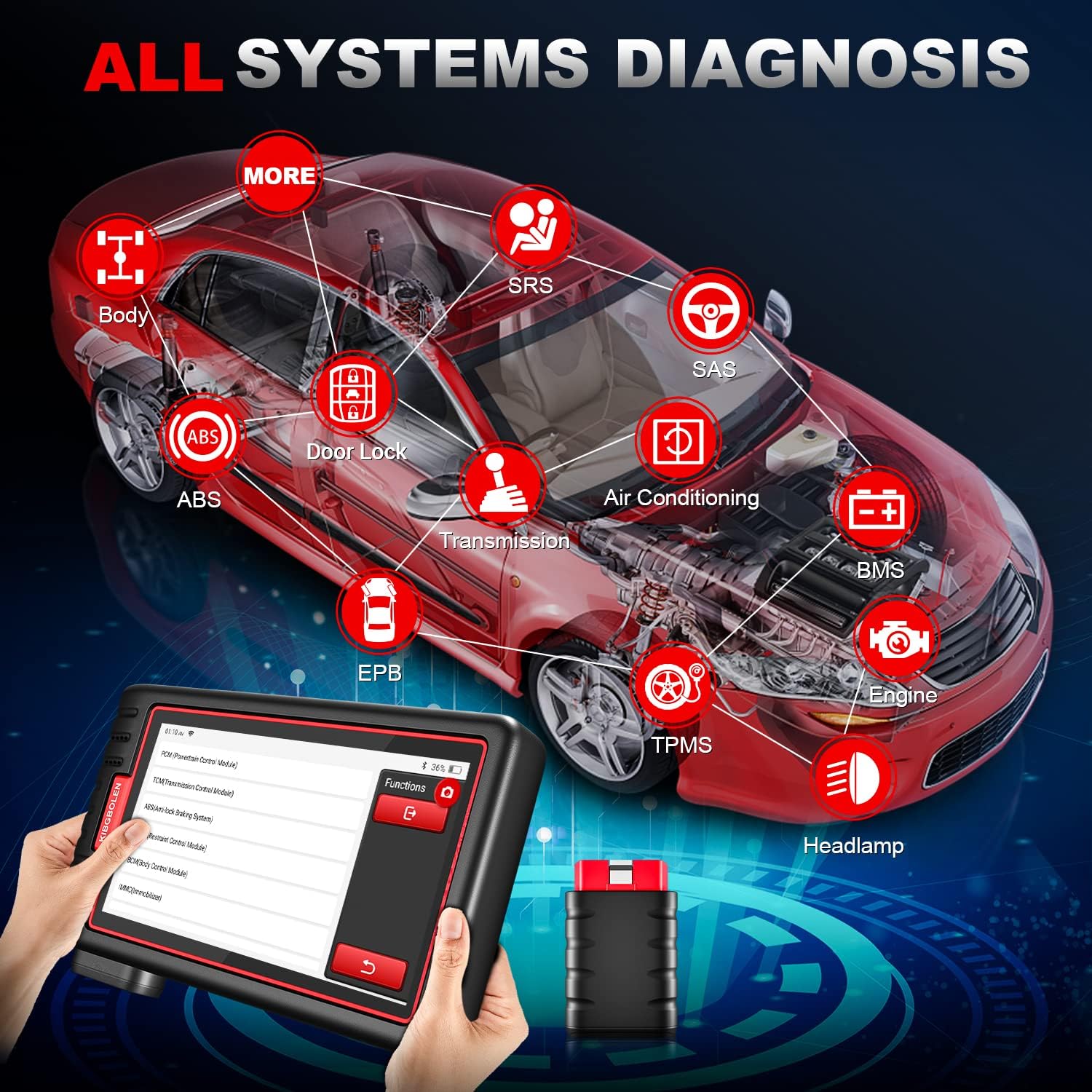
Image: Visual representation of the comprehensive vehicle systems covered by the Kingbolen S6 for full diagnostics.
3.2. 28+ Maintenance Functions
The S6 provides access to over 28 commonly used maintenance and reset functions, enabling users to perform various daily automotive maintenance tasks. These functions include, but are not limited to:
- Brake Reset
- Oil Light Reset
- SAS (Steering Angle Sensor) Reset
- Electric Throttle Relearn
- TPMS (Tire Pressure Monitoring System) Reset
- Injector Coding
- ABS Bleeding
- Battery Matching
- Sunroof Initialization
- Transmission Learning
- DPF Regeneration
- Coolant Bleeding
- Odometer Adjustment
- Window Calibration
- And many more.

Image: A visual guide to some of the 28+ hot reset services available on the Kingbolen S6.
3.3. Full OBD2 Functions
The S6 supports all 10 OBDII modes for comprehensive engine system diagnostics on OBDII compliant vehicles (1996 US-based, 2000 EU-based, 2005 Asian-based, or newer). Key functions include:
- Read Fault Codes
- Clear Fault Codes
- O2 Sensor Monitor Test
- View Freeze Frame Data
- I/M Readiness Status
- EVAP System Test
- DTC Lookup: Built-in Google browser for searching DTC definitions and descriptions.
- On-Board Monitoring Test
- Vehicle Information Retrieval
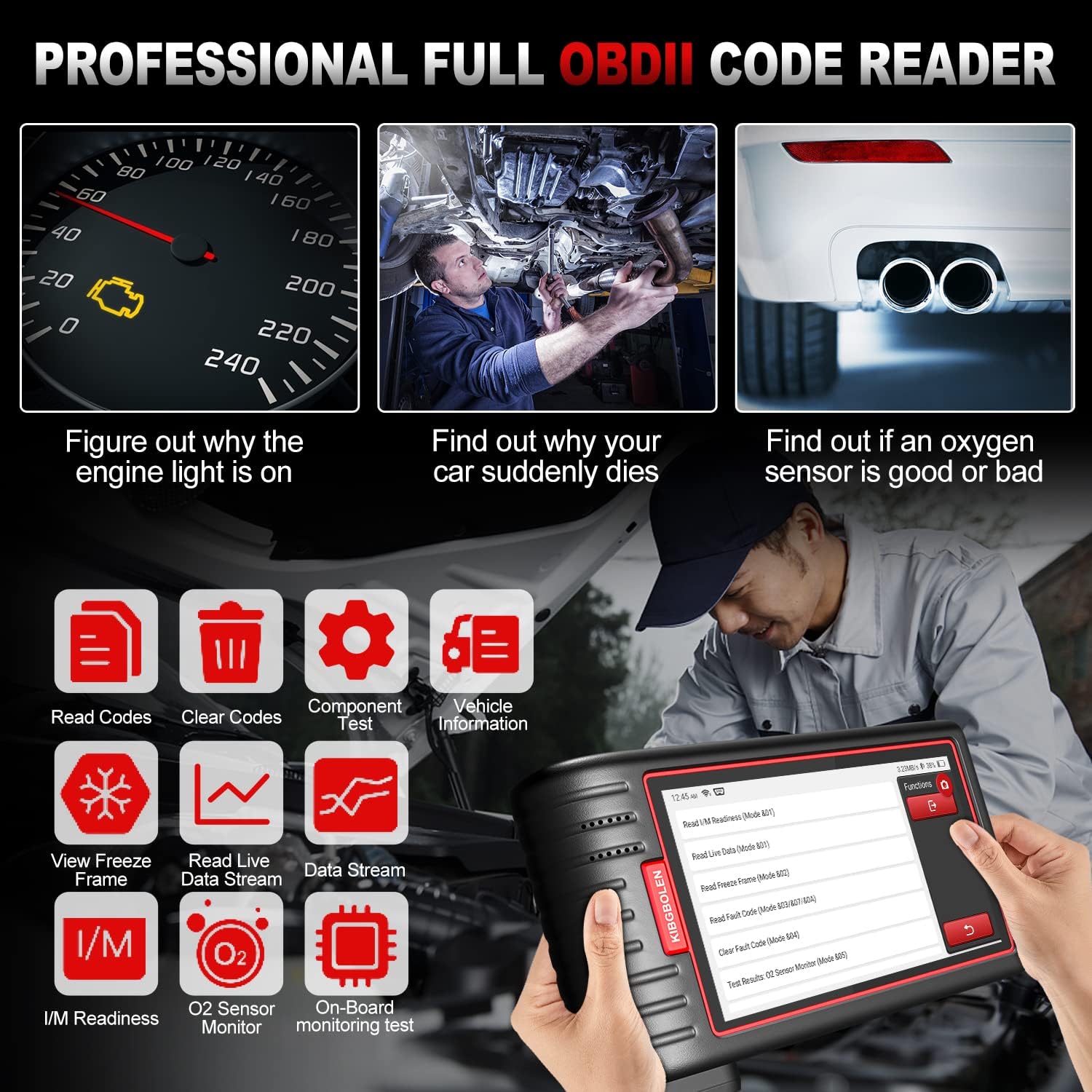
Image: The Kingbolen S6 interface demonstrating its professional full OBDII code reading capabilities.
4. Maintenance
- Software Updates: The Kingbolen S6 offers lifetime gratis one-click updates via Wi-Fi. Regularly check for and install updates to expand vehicle coverage, enhance functionality, and improve user experience. Access this feature through the "Update" icon on the main screen.
- Cleaning: Use a soft, dry cloth to clean the device's screen and body. Avoid using abrasive cleaners or solvents that could damage the unit.
- Storage: When not in use, store the Kingbolen S6 in its provided carrying case in a cool, dry place, away from direct sunlight and extreme temperatures.
5. Troubleshooting
- Device Not Powering On: Ensure the device is fully charged. Connect it to a power source using the provided charging cable. If the issue persists, contact customer support.
- Bluetooth Connection Issues: Verify that the OBD2 dongle is securely plugged into the vehicle's OBD-II port and that the vehicle's ignition is on. Check the Bluetooth settings on the S6 device to ensure it is enabled and attempting to connect. Restarting both the S6 and the vehicle may resolve minor connection glitches.
- "Vehicle Not Supported" Message: If you encounter a "vehicle not supported" message for a specific function (e.g., ABS bleed), first ensure your vehicle model and year are within the supported list for that particular function. Vehicle coverage can vary by specific function. If you believe your vehicle should be supported, ensure your software is up to date.
- Inaccurate Readings/Errors: Ensure the OBD2 dongle is firmly connected. Perform a software update to rule out software-related issues. If problems persist, consult the detailed diagnostic information within the device or contact technical support.
- Slow Performance: Ensure sufficient memory is available. Close any unnecessary applications running in the background. Regular software updates can also improve performance.
6. Specifications
| Feature | Detail |
|---|---|
| Brand | KINGBOLEN |
| Model Number | A-KBLBO4 |
| Operating System | Android (multitask-capable) |
| Display | 5.99-inch Touchscreen (1440*720 pixel resolution) |
| Processor | 4-core processor |
| Memory | 2GB RAM + 32GB Storage |
| Connectivity | Bluetooth OBD2, Wi-Fi |
| Vehicle Coverage | 93 OBD2-compliant car brands (most 1996 US-based, 2000 EU-based, 2005 Asian-based, or newer) |
| Supported Languages | 17 languages (including English, French, German, Italian, Spanish, etc.) |
| Item Weight | 2.84 pounds |
| Batteries | 1 Lithium Ion battery (included) |
7. Warranty and Support
KINGBOLEN provides over 10 years of automotive testing technology experience, ensuring genuine and brand new products. For any questions regarding registration, operation, or hardware issues, please contact the seller as soon as possible. We offer 24-hour after-sales service. It is recommended to confirm the support list with the seller before purchasing to avoid any inconvenience. Hardware problems with the Bluetooth headset and host are covered within one year.


