1. Introduction
Thank you for purchasing the JRD Car FM Transmitter. This device allows you to stream audio from your Bluetooth-enabled devices to your car's FM radio, make hands-free calls, and charge your mobile devices. Please read this manual carefully before use to ensure optimal performance and safety.
2. Safety Information
This section outlines important safety precautions. Please adhere to these guidelines to prevent damage to the device or injury.
- Do not expose the device to extreme temperatures, direct sunlight, or moisture.
- Do not disassemble or modify the device. This will void the warranty and may cause damage.
- Ensure the device is securely plugged into the car's cigarette lighter socket.
- Avoid operating the device in a manner that distracts you from driving.
- General safety warnings may apply, including handling batteries with care, avoiding water and heat, and not using the product while driving unless legal and safe to do so.
3. Product Overview
The JRD Car FM Transmitter is designed for convenience and versatility. It features multiple ports and controls for seamless operation.

Front view of the JRD Car FM Transmitter, showing the display and control buttons.

The JRD Car FM Transmitter plugged into a car's cigarette lighter socket, displaying the frequency.

Detailed diagram of the JRD Car FM Transmitter with labels for each button and port, including U disk socket, 1A charging port, 3.1A charging port, PD charging port, Frequency LED display, microphone, colorful dazzling lights, TF card socket, LED light button, Multi-function button, Previous song, Next song, and Frequency adjustment key.
Key Features:
- Upgraded Bluetooth 5.0 for stable connection and faster data transmission.
- PD3.0 Type-C (20W) and QC3.0 USB (18W) ports for fast charging.
- Additional 5V/1A USB port for music playback via USB disk.
- Supports music playback from Bluetooth, TF card, and USB disk.
- Built-in noise-cancelling microphone for clear hands-free calls.
- Supports A2DP and MP3/WMA/FLAC/AAC/WAV audio formats.
- Memory function for frequency, track, volume, and power-off restart.
4. Package Contents
Upon opening the package, please verify that all items are present and in good condition:
- 1 x JRD Car FM Transmitter
- 1 x User Manual (this document)
5. Setup Instructions
Follow these steps to set up your JRD Car FM Transmitter:
- Insert the Transmitter: Plug the JRD Car FM Transmitter firmly into your vehicle's 12V/24V cigarette lighter socket. The LED display will light up, indicating it is powered on.
The transmitter inserted into the car's power outlet.
- Tune Your Car Radio: Turn on your car's FM radio and find an empty, unused frequency. This should be a frequency with only static, no active radio station. Frequencies between 87.5 MHz and 108.0 MHz are typically used.
- Match Transmitter Frequency:
- Press the "CH" button on the transmitter. The frequency display will start blinking.
- Use the "Previous Song" (K) and "Next Song" (I) buttons to adjust the transmitter's frequency to match the blank frequency you found on your car radio.
- Once matched, wait a few seconds for the frequency to stop blinking, or press the "CH" button again to confirm.
- Pair with Bluetooth:
- Enable Bluetooth on your mobile device.
- Search for available Bluetooth devices and select "JRD" (or similar name) from the list.
- Once connected, the transmitter will indicate successful pairing (e.g., a voice prompt or stable Bluetooth icon on the display).

The transmitter connected wirelessly to a smartphone, ready for audio streaming.
6. Operating Instructions
6.1 Music Playback
The JRD Car FM Transmitter supports three modes for music playback:
- Bluetooth Mode: After successful Bluetooth pairing, open your music player on your phone. Audio will be transmitted to your car's FM radio.
- USB Disk Mode: Insert a USB flash drive (U Disk) containing MP3/WMA/FLAC/AAC/WAV audio files into the 5V/1A USB port. The transmitter will automatically detect and play music from the USB disk.
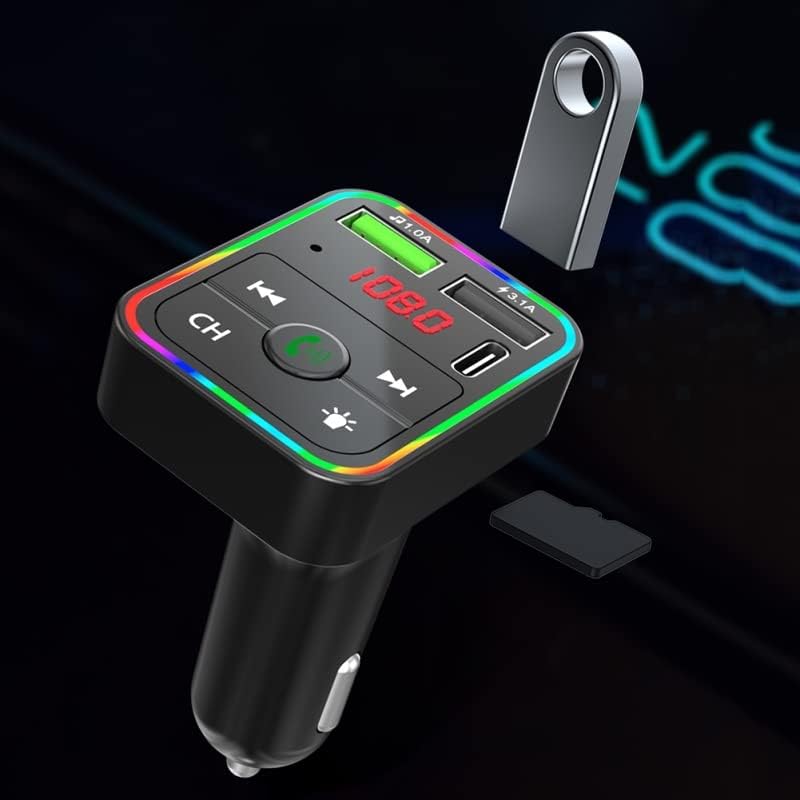
The transmitter showing the USB disk and TF card slots.
- TF Card Mode: Insert a TF (microSD) card containing MP3/WMA/FLAC/AAC/WAV audio files into the TF card slot. The transmitter will automatically detect and play music from the TF card.
6.2 Call Functions
When connected via Bluetooth, you can manage calls using the multi-function button (phone icon) on the transmitter:
- Answer/End Call: Short press the multi-function button.
- Reject Call: Long press the multi-function button.
- Redial Last Number: Double-press the multi-function button.
6.3 Charging Devices
The transmitter features multiple charging ports:
- PD3.0 Type-C Port: Provides up to 20W fast charging for compatible devices.
- QC3.0 USB Port: Provides up to 18W fast charging for compatible devices.
- 5V/1A USB Port: Standard charging port, also used for USB disk music playback.

The transmitter highlighting its dual USB charging capabilities.
6.4 LED Light Control
The transmitter features colorful dazzling lights. Short press the LED light button (sun icon) to cycle through different light modes or turn them off.
7. Maintenance
To ensure the longevity and optimal performance of your JRD Car FM Transmitter, follow these maintenance guidelines:
- Keep the device clean by wiping it with a soft, dry cloth. Do not use liquid cleaners or aerosols.
- Avoid exposing the device to extreme temperatures, humidity, or direct sunlight.
- Store the device in a cool, dry place when not in use for extended periods.
- Ensure the cigarette lighter socket is clean and free of debris for a secure connection.
8. Troubleshooting
If you encounter issues with your JRD Car FM Transmitter, refer to the following common problems and solutions:
| Problem | Possible Cause | Solution |
|---|---|---|
| No power/display off | Loose connection; Car cigarette lighter fuse blown; Vehicle power off. | Ensure the transmitter is firmly plugged in. Check your car's fuse box for the cigarette lighter fuse. Ensure the car's ignition is on. |
| Static or poor audio quality | FM frequency interference; Transmitter/radio frequency mismatch; Volume too low. | Find a clearer, unused FM frequency on your car radio and match the transmitter to it. Increase the volume on both the transmitter and your car radio. Avoid frequencies used by strong local radio stations. |
| Bluetooth not connecting | Bluetooth not enabled on phone; Transmitter not in pairing mode; Incorrect device selected. | Ensure Bluetooth is enabled on your phone. Restart the transmitter and your phone. Search for "JRD" in your phone's Bluetooth settings and try pairing again. |
| Cannot play music from USB disk/TF card | Unsupported file format; Corrupted files; USB disk/TF card not inserted correctly. | Ensure audio files are in MP3, WMA, FLAC, AAC, or WAV format. Check if the USB disk/TF card is inserted fully and correctly. Try another USB disk/TF card. |
| Charging is slow or not working | Cable issue; Device not compatible with fast charging; Port used for music playback. | Use a high-quality charging cable. Ensure your device supports PD3.0 or QC3.0 for fast charging. Note that the 5V/1A port is primarily for music playback and standard charging. |
9. Specifications
Detailed technical specifications for the JRD Car FM Transmitter:
- Model: JRD Car FM Transmitter
- Bluetooth Version: 5.0
- FM Frequency Range: 87.5 - 108.0 MHz
- Input Voltage: 12V-24V
- USB Output 1 (QC3.0): 5V/3A, 9V/2A, 12V/1.5A (Max 18W)
- USB Output 2 (PD3.0 Type-C): 5V/3A, 9V/2.22A, 12V/1.67A (Max 20W)
- USB Output 3 (U Disk/Charging): 5V/1A
- Supported Audio Formats: MP3, WMA, FLAC, AAC, WAV
- Connectivity Technology: Bluetooth, USB
- Item Weight: 4.6 ounces
- Package Dimensions: 5.12 x 4.76 x 1.73 inches
10. Warranty and Support
This product comes with a standard manufacturer's warranty. For specific warranty terms and conditions, please refer to the documentation provided with your purchase or contact the seller directly.
For technical support, troubleshooting assistance, or inquiries regarding your JRD Car FM Transmitter, please contact the seller or manufacturer through the platform where you purchased the product. Please have your purchase details and model number ready when contacting support.


