
Introduction
This manual provides comprehensive instructions for the setup, operation, and maintenance of your USARMT LTV-914 universal replacement remote control. This remote is designed to be compatible with various LG TV models, including AKB73715634, AKB73715679, and LN577S 3D Smart TVs, offering a direct replacement experience without the need for complex programming.
Please read this manual carefully before using the remote control to ensure optimal performance and longevity.
Product Overview
The USARMT LTV-914 remote control is an infrared (IR) device designed for ease of use. It features a standard button layout for LG TVs, providing access to common functions such as power, volume, channel, menu navigation, and smart TV features.
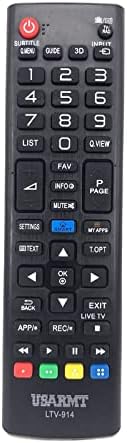
Figure 1: Front view of the USARMT LTV-914 remote control, displaying the full array of buttons including power, number pad, navigation, and smart TV function keys. The USARMT LTV-914 logo is visible at the bottom.

Figure 2: Back view of the USARMT LTV-914 remote control, highlighting its smooth, curved design for comfortable grip. The battery compartment cover is centrally located at the bottom.

Figure 3: Angled perspective of the USARMT LTV-914 remote control, providing a better view of the button arrangement and the slim profile of the device.
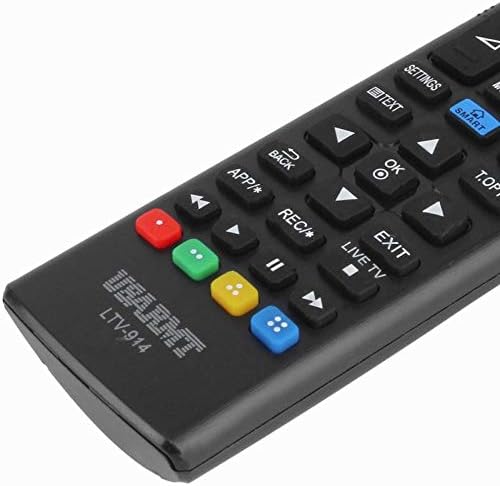
Figure 4: Detailed close-up of the lower part of the remote, showing the distinct red, green, yellow, and blue function buttons, along with the USARMT LTV-914 branding.

Figure 5: The remote control with its battery cover removed, revealing the two slots for AAA batteries. This image demonstrates the correct orientation for battery insertion.

Figure 6: Side profile of the remote control, illustrating its ergonomic curve and slender form factor.
Setup
Battery Installation
- Locate the battery compartment on the back of the remote control.
- Slide the battery cover downwards or press the latch and lift to open.
- Insert two (2) AAA batteries, ensuring the positive (+) and negative (-) terminals align with the markings inside the compartment. Refer to Figure 5 for correct orientation.
- Replace the battery cover by sliding it back into place until it clicks securely.
Initial Use
The USARMT LTV-914 remote control operates using infrared (IR) technology and is pre-programmed for compatible LG TV models. No additional programming or pairing is typically required. Simply point the remote control towards your LG TV and begin using it.
Operating Instructions
The USARMT LTV-914 remote control provides full functionality for your LG TV. Below are common button functions:
- Power (●): Turns the TV on or off.
- Number Pad (0-9): Directly input channel numbers.
- Volume Up/Down (+/-): Adjusts the TV volume.
- Channel Up/Down (CH +/-): Changes TV channels.
- Mute: Mutes or unmutes the TV audio.
- Input/Source: Selects input sources (HDMI, AV, etc.).
- Settings: Accesses the TV's main settings menu.
- Navigation Buttons (Up, Down, Left, Right, OK): Used to navigate menus and confirm selections.
- Back: Returns to the previous screen or menu.
- Exit: Exits the current menu or application.
- Smart/Home: Opens the Smart TV home screen or app launcher.
- Colored Buttons (Red, Green, Yellow, Blue): These buttons typically correspond to specific functions within Smart TV apps or teletext, as indicated on your TV screen.
For specific functions related to your LG TV model, refer to your TV's original user manual.
Maintenance
Cleaning
To clean the remote control, gently wipe it with a soft, dry cloth. For stubborn dirt, slightly dampen the cloth with water. Do not use abrasive cleaners, alcohol, or chemical solvents, as these can damage the remote's surface or internal components.
Battery Replacement
Replace batteries when the remote's response becomes sluggish or it stops functioning. Always replace both batteries at the same time with new AAA batteries. Do not mix old and new batteries, or different types of batteries. Dispose of used batteries according to local regulations.
Storage
If the remote control will not be used for an extended period, remove the batteries to prevent leakage and potential damage to the device.
Troubleshooting
| Problem | Possible Cause | Solution |
|---|---|---|
| Remote control is not working. |
|
|
| Remote control works intermittently. |
|
|
| Certain buttons do not respond. |
|
|
Specifications
- Model: LTV-914
- Compatibility: Universal replacement for various LG TV models, including AKB73715634, AKB73715679, LN577S.
- Wireless Communication: Infrared (IR)
- Frequency: 433 MHz
- Channel: 1
- Power Source: 2 x AAA Batteries (not included)
- Controller Type: Button Control
Safety Information
- Do not expose the remote control to direct sunlight, high temperatures, or high humidity.
- Avoid dropping the remote control or subjecting it to strong impacts.
- Do not attempt to disassemble or modify the remote control. This will void any potential warranty and may cause damage.
- Keep batteries out of reach of children and pets. If swallowed, seek immediate medical attention.
- Dispose of used batteries properly according to local environmental regulations.
Warranty and Support
Specific warranty information for this USARMT product is not provided in this manual. For details regarding warranty coverage, technical support, or replacement parts, please refer to the product packaging or contact the retailer from whom the product was purchased.