
nipify FTX-01B
Nipify Solar Spot Lights Outdoor Motion Sensor User Manual
Model: FTX-01B
1. Introduction
Thank you for choosing Nipify Solar Spot Lights. These 2-in-1 outdoor lights are designed to provide efficient and reliable illumination for your garden, yard, patio, and pathways. Featuring 62 LEDs per light and a sensitive motion sensor, they offer three distinct lighting modes to suit various needs, while being durable and waterproof for all-weather performance.

Figure 1.1: Nipify Solar Spot Lights (2 Pack)
This image displays the two solar spot lights, highlighting their versatility for both ground and wall installation. The lights are shown illuminating outdoor spaces, demonstrating their function as both pathway and security lights.
2. Safety Information
- Ensure the solar panel receives direct sunlight for optimal charging. Avoid shaded areas.
- Do not attempt to disassemble or modify the product. This may void the warranty and pose a safety risk.
- Keep the product away from open flames or extreme heat sources.
- Handle with care during installation to prevent damage to the unit or injury.
- Dispose of the product and its components responsibly according to local regulations at the end of its lifespan.
3. Product Components
Each package of Nipify Solar Spot Lights includes the following components:
- 2 x Solar Spot Lights Outdoor
- 2 x Ground Stakes
- 4 x Screws
- 4 x Expansion Plugs
- 1 x User Manual

Figure 3.1: Product Dimensions and Components
This image provides a detailed view of the solar spot light's dimensions and highlights its key features, including the adjustable head, 62 LEDs, mode switch, and solar panel. It also shows the ground stake length.
4. Setup and Installation
The Nipify Solar Spot Lights offer two versatile installation methods: ground insertion or wall mounting.
4.1. Choosing an Installation Location
For optimal performance, select a location where the solar panel can receive 6-8 hours of direct sunlight daily. Avoid areas under trees, eaves, or other obstructions that may block sunlight.

Figure 4.1: Optimal Installation Location
This graphic illustrates suitable and unsuitable locations for installing the solar lights, emphasizing the importance of direct sunlight exposure for the solar panel to ensure proper charging and operation.
4.2. Ground Installation
- Attach the ground stake to the bottom of the solar light unit.
- Firmly push the assembled light into soft ground in your desired location. Ensure the solar panel faces upwards to capture sunlight.
- Adjust the angle of the light head (up to 90°) to illuminate the desired area.
4.3. Wall Mounting
- Mark the desired mounting position on the wall.
- Drill two holes at the marked points.
- Insert the expansion plugs into the drilled holes.
- Align the light's mounting holes with the plugs and secure the light to the wall using the provided screws.
- Adjust the angle of the light head to illuminate the desired area.

Figure 4.2: Installation Methods
This image visually guides users through both ground stake installation and wall mounting processes, showing the steps involved for each method.
5. Operating Instructions
The Nipify Solar Spot Lights feature an efficient solar charging system and three adjustable lighting modes.
5.1. Initial Charging and Automatic Operation
Upon first use, ensure the solar panel is exposed to direct sunlight for at least 8 hours to fully charge the internal 1200 mAh battery. The lights will automatically charge during the day and illuminate at night due to their integrated day-night sensors.

Figure 5.1: Daytime Charging and Nighttime Illumination
This image demonstrates the automatic functionality of the solar lights, showing how they charge during daylight hours and then automatically activate to provide illumination after dark.
5.2. Lighting Modes
The lights offer three distinct modes, selectable via the mode switch located on the unit:
- Mode 1: Dim Light Mode
The light stays at a constant dim brightness without motion sensor activation. Ideal for continuous ambient lighting.
- Mode 2: Dim Light Sensor Mode
The light stays dim and brightens to high light when motion is detected within 3-5 meters. It returns to dim after motion ceases.
- Mode 3: Safety Sensor Light Mode
The light remains off and turns on to high light when motion is detected within 3-5 meters. It turns off again after motion ceases. This mode is ideal for security and energy saving.

Figure 5.2: Three Lighting Modes
This graphic clearly explains the functionality of each of the three lighting modes, detailing how the light behaves with and without motion detection.
6. Maintenance
To ensure the longevity and optimal performance of your Nipify Solar Spot Lights, follow these maintenance guidelines:
- Clean Solar Panel: Regularly wipe the solar panel with a soft, damp cloth to remove dust, dirt, or debris. A clean panel ensures maximum sunlight absorption and charging efficiency.
- Clear Obstructions: Periodically check that no new obstructions (e.g., growing plants, fallen leaves) are shading the solar panel.
- Weather Resistance: The lights are IP65 waterproof and designed to withstand various weather conditions (rain, snow, frost, heat). No special weather-proofing is required, but ensure the unit is securely installed.
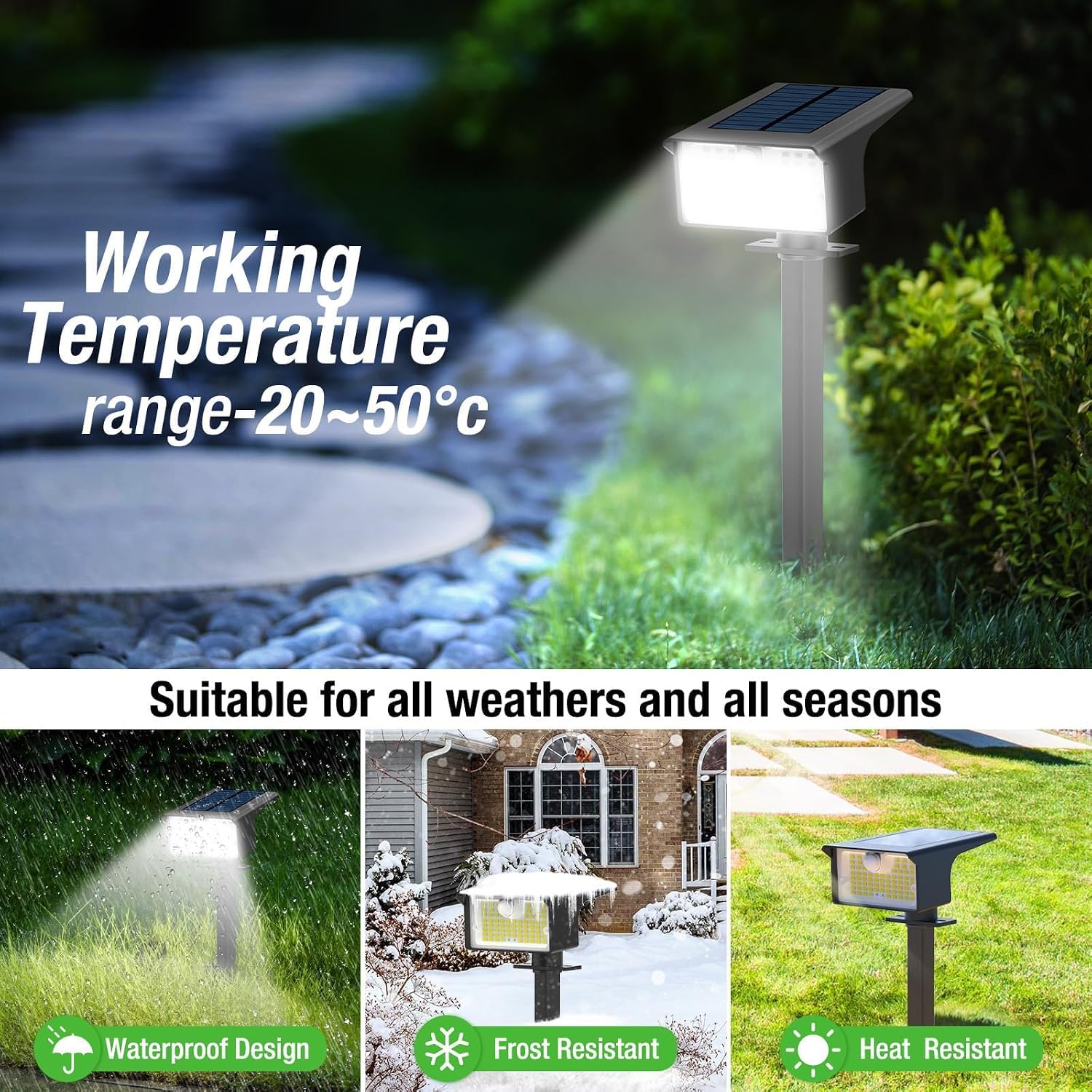
Figure 6.1: All-Weather Durability
This image highlights the robust design of the solar lights, showcasing their ability to function effectively in various weather conditions, including rain, snow, and high temperatures.
7. Troubleshooting
If your solar light is not functioning as expected, please refer to the following common issues and solutions:
| Problem | Possible Cause | Solution |
|---|---|---|
| Light does not turn on at night. | Insufficient sunlight exposure during the day. | Relocate the light to an area that receives 6-8 hours of direct sunlight. Ensure the solar panel is clean. |
| Light is dim or only stays on for a short period. | Battery not fully charged or aging battery. | Ensure full daytime charge. If the problem persists after several sunny days, the battery may need replacement (contact support). |
| Motion sensor not detecting movement. | Incorrect mode selected or sensor obstructed. | Check that Mode 2 or Mode 3 is selected. Ensure the sensor lens is clean and unobstructed. |
| Light flickers or behaves erratically. | Loose connection or internal fault. | Ensure all components are securely attached. If problem persists, contact customer support. |
8. Specifications
| Feature | Detail |
|---|---|
| Brand | nipify |
| Model Number | FTX-01B (Model Name: YHM-GS08-2+-US) |
| Color | Cool White |
| Material | Premium ABS Plastic & Polycrystalline Silicon |
| Light Source Type | LED (62 LEDs per light) |
| Brightness | 1000 Lumen |
| Color Temperature | 6500K |
| Power Source | Solar Powered |
| Battery Capacity | 1200 mAh (estimated from charging time) |
| Charging Time | 8 hours (direct sunlight) |
| Working Time | 10-12 hours (after full charge) |
| Motion Sensor Range | 3-5 meters |
| Water Resistance Level | IP65 Waterproof |
| Product Dimensions | 4.72"L x 3.35"W x 11.8"H |
| Item Weight | 14.9 ounces |
| Installation Type | Ground inserted / Wall mounted |
9. Warranty and Support
Nipify is committed to providing quality products and excellent customer service.
- Warranty: This product comes with a 1-year warranty for quality issues.
- Customer Support: For any questions, concerns, or assistance with your Nipify Solar Spot Lights, please contact our customer service team. We offer 24-hour friendly service and other after-sales support.
- You can find contact information on the product packaging or through your purchase platform.
Ask a question about this manual
Ask about setup, troubleshooting, compatibility, parts, safety, or missing instructions. Manuals+ will review the question and use this page’s manual context to help answer it.