
Tendak DAV-058-BK
Tendak HDMI 2.1 Audio Extractor User Manual
Model: DAV-058-BK
1. Introduction
The Tendak HDMI 2.1 Audio Extractor is designed to separate audio signals from an HDMI source, allowing you to output video to a display and audio to a separate sound system. This device supports high-resolution video up to 8K@60Hz and various audio formats, providing a versatile solution for home theater and gaming setups. It is ideal for connecting devices that lack dedicated audio outputs to soundbars, amplifiers, or headphones.

Figure 1: Tendak HDMI 2.1 Audio Extractor. This image shows the compact black unit with HDMI 2.1 and 8K branding, indicating its high-resolution capabilities. The top and bottom sections of the device are visible, highlighting its sleek design.
2. Safety Information
Please read and follow these safety instructions carefully to ensure safe operation and prolong the life of your device.
- Do not expose this unit to water, moisture, or excessive humidity.
- Ensure proper ventilation around the device to prevent overheating.
- Use only the provided 5V/1A power adapter. Using an incorrect power supply may damage the device.
- Avoid placing the device near heat sources such as radiators, heat registers, stoves, or other heat-producing appliances.
- Do not attempt to open or modify the device. All servicing should be performed by qualified personnel.
- Keep the device away from strong magnetic fields.
- Disconnect the power adapter during lightning storms or when unused for long periods.
3. Package Contents
Verify that all items listed below are included in your package. If any items are missing or damaged, please contact your retailer.
- 1x Tendak HDMI 2.1 Audio Extractor
- 1x Infrared Remote Control
- 1x 5V/1A Power Adapter
- 1x USB Cable
- 1x User Manual
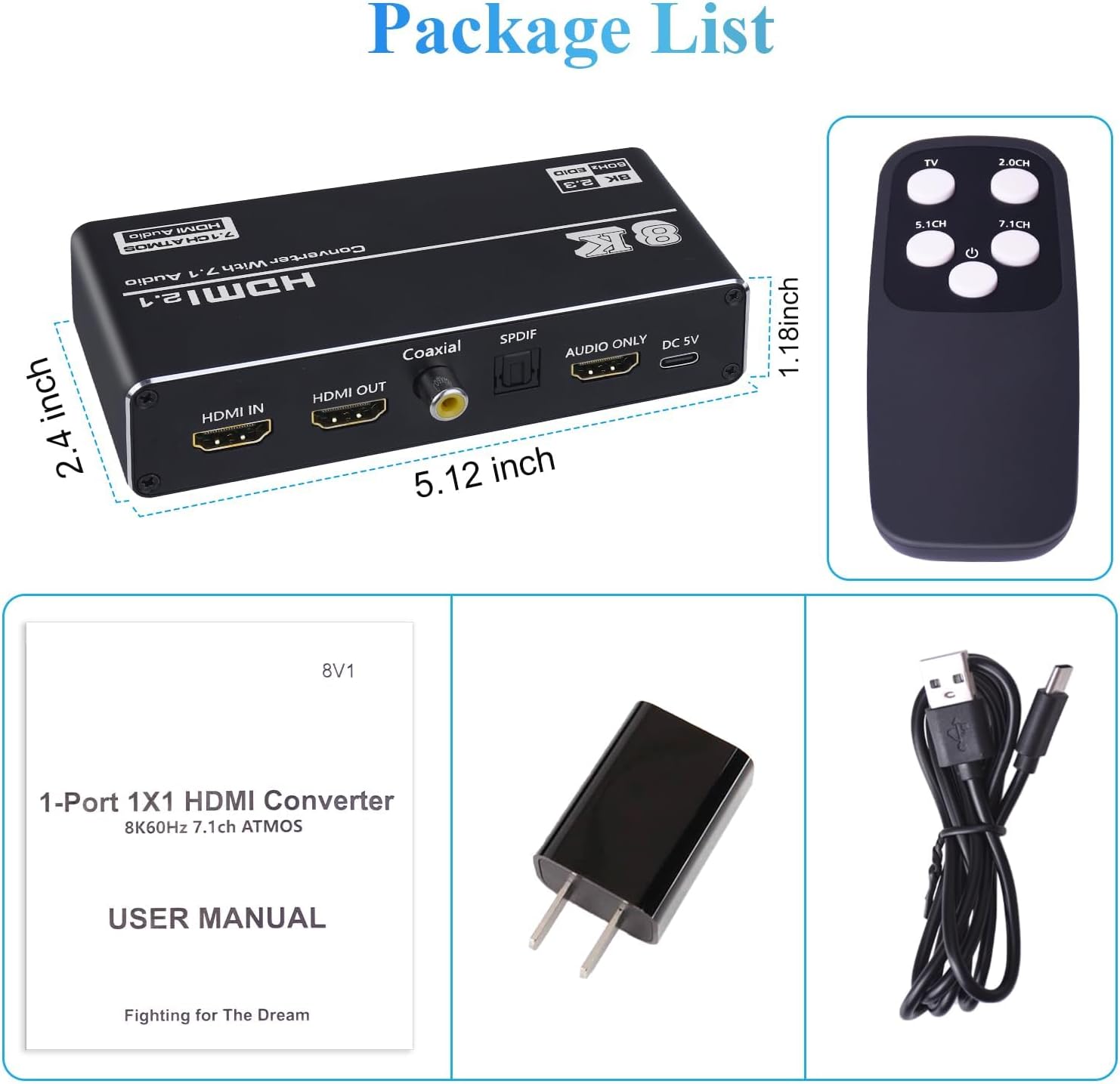
Figure 2: Package List. This image displays all components included in the product package: the HDMI audio extractor unit, an infrared remote control, a 5V power adapter, a USB cable, and the user manual.
4. Product Features
The Tendak HDMI 2.1 Audio Extractor offers a range of advanced features for superior audio and video performance:
- HDMI 2.1 Compliance: Supports the latest HDMI 2.1 standard for high bandwidth and advanced features.
- Ultra HD Resolution: Supports resolutions up to 8K@60Hz, and backward compatible with 4K@120Hz, 4K@165Hz, 4K@144Hz, and 1080p@240Hz.
- Dynamic HDR Support: Compatible with HDR10+ and Dolby Vision for enhanced contrast and color.
- HDCP 2.3: Supports High-bandwidth Digital Content Protection 2.3.
- Variable Refresh Rate (VRR): Supports AMD Free-Sync and G-Sync for smooth, tear-free gaming.
- Chroma Subsampling: Supports 4:4:4, 4:2:2, and 4:2:0 chroma formats.
- High Bandwidth: Maximum baud rate of 48Gbps.
- Multiple Audio Outputs: Extracts audio via HDMI (7.1CH ATMOS), Optical (SPDIF), Coaxial (5.1CH), and 3.5mm Stereo (L/R 2.0CH).
- Extensive Audio Format Support: Compatible with Dolby Atmos, DTS Digital, DTS Digital Plus, Dolby True-HD, DTS 5.1, DTS ES 6.1, DTS HRA, DTS-HD Master, DTS:X, LPCM 5.1/7.1, and PCM 2.0.
- Wide Compatibility: Works with Blu-ray players, DVD players, Apple TV, PS4, PS5, Xbox One X/S, PCs, laptops, HD cameras, HDTVs, monitors, and projectors.

Figure 3: High Resolution Support. This graphic illustrates the device's capability to support 8K@60Hz resolution, along with dynamic HDR, HDR10+, and VRR, promising an immersive visual experience.
5. Product Diagram and Ports
Familiarize yourself with the various ports and indicators on the Tendak HDMI 2.1 Audio Extractor.

Figure 4: Function Panel. This diagram labels the various ports and indicators on the device, including the HDMI Input, HDMI Output, Coaxial Output, SPDIF Output, 3.5mm Jack, IR Receiver, Indicator Light, and DC 5V Power Input.
- HDMI IN: Connect your HDMI source device (e.g., PS5, Xbox, Blu-ray player).
- HDMI OUT: Connect to your display device (e.g., TV, monitor, projector).
- Coaxial Output: Connect to a sound system with a coaxial input.
- SPDIF Output: Connect to a sound system with an optical input.
- 3.5mm Jack: Connect to headphones or a stereo audio system.
- IR: Infrared receiver for the remote control.
- P IN OUT: Indicator light for power and signal status.
- TV/2.0/5.1/7.1: Audio Extract Setting switch to select audio output mode.
- DC 5V: Power input port.
6. Setup and Connection
Follow these steps to connect your Tendak HDMI 2.1 Audio Extractor to your devices:
- Connect HDMI Source: Use an HDMI 2.1 cable to connect your source device (e.g., Blu-ray player, game console, PC) to the HDMI IN port on the audio extractor.
- Connect Display: Use another HDMI 2.1 cable to connect the HDMI OUT port on the audio extractor to your display device (e.g., TV, monitor, projector).
- Connect Audio Output:
- For optical audio, connect an optical cable from the SPDIF Output to your soundbar or amplifier.
- For coaxial audio, connect a coaxial cable from the Coaxial Output to your soundbar or amplifier.
- For stereo audio, connect a 3.5mm audio cable from the 3.5mm Jack to your headphones or stereo speakers.
- For 7.1CH ATMOS audio, the audio will be passed through the HDMI OUT to your HDMI 7.1CH ATMOS compatible receiver/soundbar.
- Connect Power: Connect the provided 5V/1A power adapter to the DC 5V port on the audio extractor, then plug the adapter into a power outlet. The indicator light will illuminate.
- Select Audio Mode: Use the switch on the device or the remote control to select the desired audio output mode (TV/2.0/5.1/7.1).

Figure 5: Connection Diagram. This visual guide illustrates how to connect various input devices (Fire TV, Laptop, PS5) to the HDMI IN port, and how to connect the HDMI OUT to displays (TV, Projector, Display) while simultaneously extracting audio to speakers or amplifiers via Coaxial, SPDIF, or 3.5mm outputs.
7. Operating Instructions
Once connected, operating the Tendak HDMI 2.1 Audio Extractor is straightforward.
7.1 Audio Mode Settings
The device allows you to select different audio output modes to suit your setup. You can switch between modes using the physical switch on the unit or the included infrared remote control.
- TV Mode: The audio format is determined by the EDID of the connected display.
- 2.0CH Mode: Outputs 2-channel stereo audio via the 3.5mm jack, SPDIF, and Coaxial ports.
- 5.1CH Mode: Outputs 5.1-channel surround sound via SPDIF and Coaxial ports (if supported by the source and receiver).
- 7.1CH Mode: Outputs 7.1-channel audio, primarily through the HDMI output for compatible receivers supporting formats like Dolby Atmos or LPCM 7.1.

Figure 6: Audio Mode Selection. This image shows the audio extractor in a living room setting, connected to a TV and speakers, with a hand holding the remote control. It highlights the ease of switching between different audio modes (PCM 2.0, LPCM 5.1/7.1, Dolby Digital, Dolby Digital Plus, Dolby True HD, Dolby Atmos) to meet various audio needs.
7.2 Remote Control Functions
The included infrared remote control allows for convenient switching of audio modes from a distance.
- TV Button: Switches to TV audio mode.
- 2.0CH Button: Switches to 2.0 channel stereo audio mode.
- 5.1CH Button: Switches to 5.1 channel surround sound mode.
- 7.1CH Button: Switches to 7.1 channel audio mode.
8. Troubleshooting
If you encounter issues with your Tendak HDMI 2.1 Audio Extractor, please refer to the following common problems and solutions:
| Problem | Possible Cause / Solution |
|---|---|
| No video output. |
|
| No audio output. |
|
| Intermittent video/audio. |
|
| Remote control not working. |
|
9. Specifications
Detailed technical specifications for the Tendak HDMI 2.1 Audio Extractor:
| Input Port | 1x HDMI |
| Output Ports | 1x HDMI, 1x Optical, 1x Coaxial, 1x 3.5mm Stereo |
| HDMI Version | HDMI 2.1 |
| HDCP Version | HDCP 2.3 |
| Max Resolution | 8K@60Hz (backward compatible with 4K@120Hz, 4K@165Hz, 4K@144Hz, 1080p@240Hz) |
| HDR Support | Dynamic HDR10+, Dolby Vision |
| Chroma Support | 4:4:4 / 4:2:2 / 4:2:0 |
| Max Bandwidth | 48Gbps |
| VRR Support | Free-Sync, G-Sync |
| Supported Audio Formats | Dolby Atmos, DTS Digital, DTS Digital Plus, Dolby True-HD, DTS 5.1, DTS ES 6.1, DTS HRA, DTS-HD Master, DTS:X, LPCM 5.1/7.1, PCM 2.0 |
| HDMI Cable Range (8K@60Hz) | <3m 28AWG HDMI 2.1 Cable |
| HDMI Cable Range (4K@120Hz) | <3m 28AWG HDMI 2.1 Cable |
| HDMI Cable Range (4K@60Hz) | <5m 28AWG HDMI 2.1 Cable |
| Power Supply | DC 5V/1A |
| Power Consumption | 1.75W (Max) |
| Operating Temperature | 0 to +40 ℃ (32 to 104 ℉) |
| Operating Humidity | 20 to 90% RH (non-condensing) |
| Dimensions (L x W x H) | 13.0 x 6.1 x 3.0 cm (5.12 x 2.4 x 1.18 inches) |
| Weight | 160 g |
10. Warranty and Support
Tendak products are designed for reliability and performance. For warranty information and technical support, please refer to the contact details provided with your purchase or visit the official Tendak website.
- Customer Service: Please contact your retailer or the Tendak support team for assistance.
- Online Resources: Visit the official Tendak website for FAQs, updated manuals, and driver downloads (if applicable).
Ask a question about this manual
Ask about setup, troubleshooting, compatibility, parts, safety, or missing instructions. Manuals+ will review the question and use this page’s manual context to help answer it.