
1. Introduction
The GYS Nomad Power Pro 24 XL is a high-performance, portable lithium battery jump starter designed for 24V vehicles such as trucks and buses. This versatile device also functions as an autonomous power bank and features an integrated LED emergency lamp. It is equipped with multiple safety protections, including safeguards against short circuits and reverse polarity, ensuring secure operation.
This manual provides essential information for the safe and effective use, setup, operation, and maintenance of your Nomad Power Pro 24 XL.
2. Safety Instructions
Read all safety warnings and instructions before using this product. Failure to follow these instructions may result in electric shock, fire, and/or serious injury.
- Eye Protection: Always wear appropriate eye protection (safety glasses) when working with batteries.
- Ventilation: Ensure adequate ventilation when working in enclosed spaces.
- Flammable Materials: Keep the jump starter away from flammable materials, fuel, and other combustible liquids.
- Children and Pets: Keep the device out of reach of children and pets.
- Polarity: Always connect the clamps to the correct battery terminals (red to positive, black to negative). Reverse polarity can cause damage to the device and vehicle.
- Damaged Unit: Do not operate the jump starter if it is damaged, dropped, or malfunctioning. Contact customer support.
- Charging: Only use the provided charger to recharge the unit.
- Water Exposure: Do not expose the unit to rain or wet conditions.
- Temperature: Do not store or operate the unit in extreme temperatures.
3. Package Contents
Verify that all items are present in your package:
- GYS Nomad Power Pro 24 XL Jump Starter Unit
- Heavy-Duty Jump Start Clamps (Red and Black)
- USB-C to USB-A Charging Cable
- 12V Car Charger
- 100-240V AC Charger
- Protective Carrying Case

The reverse side of the carrying case details the product's multi-functionality and lists all included accessories.
4. Product Features
The GYS Nomad Power Pro 24 XL offers a range of features for automotive and portable power needs:
- 24V Jump Starting: Instantaneous starting for 24V vehicles, including trucks and construction machinery, with a starting current of 1400 A and a peak current of 3000 A.
- Integrated Power Bank: Equipped with two USB ports (5V/2.1A) and one 12V/3.5A output port for charging electronic devices.
- LED Emergency Lamp: Features a powerful integrated LED light with multiple modes for emergency situations or working in low-light conditions.
- LCD Screen: Provides clear display of battery status and operational information.
- Advanced Safety Protections: Includes protection against short circuits, reverse polarity, over-discharge, over-charge, and overheating.
- Portable Design: Compact and robust design with an integrated carrying handle for easy transport.
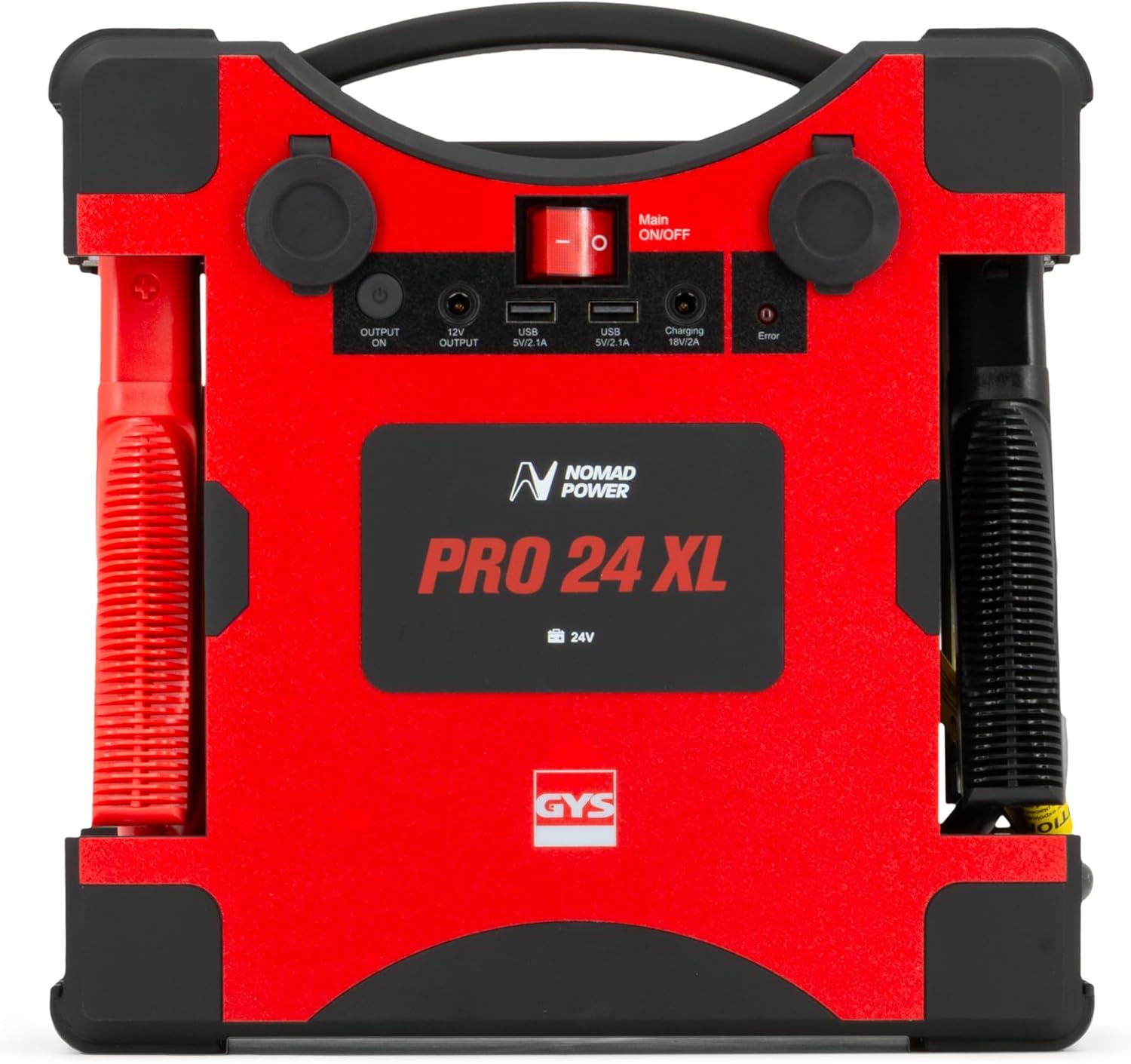
The control panel on top of the unit includes the main power switch, USB charging ports, and a 12V output.

The device features a powerful LED light, useful for emergency situations or working in low-light conditions.
5. Setup
5.1 Initial Charging
Before first use, fully charge the Nomad Power Pro 24 XL. This ensures optimal performance and battery longevity.
- Connect the provided AC charger to the unit's charging input (18V/2A).
- Plug the AC charger into a standard wall outlet (100-240V).
- The LCD screen will indicate the charging status. Charge until the display shows 100% or a full charge indicator.
- Once fully charged, disconnect the charger.
5.2 Checking Battery Level
Regularly check the internal battery level using the LCD screen to ensure the unit is ready for use, especially before jump-starting a vehicle.
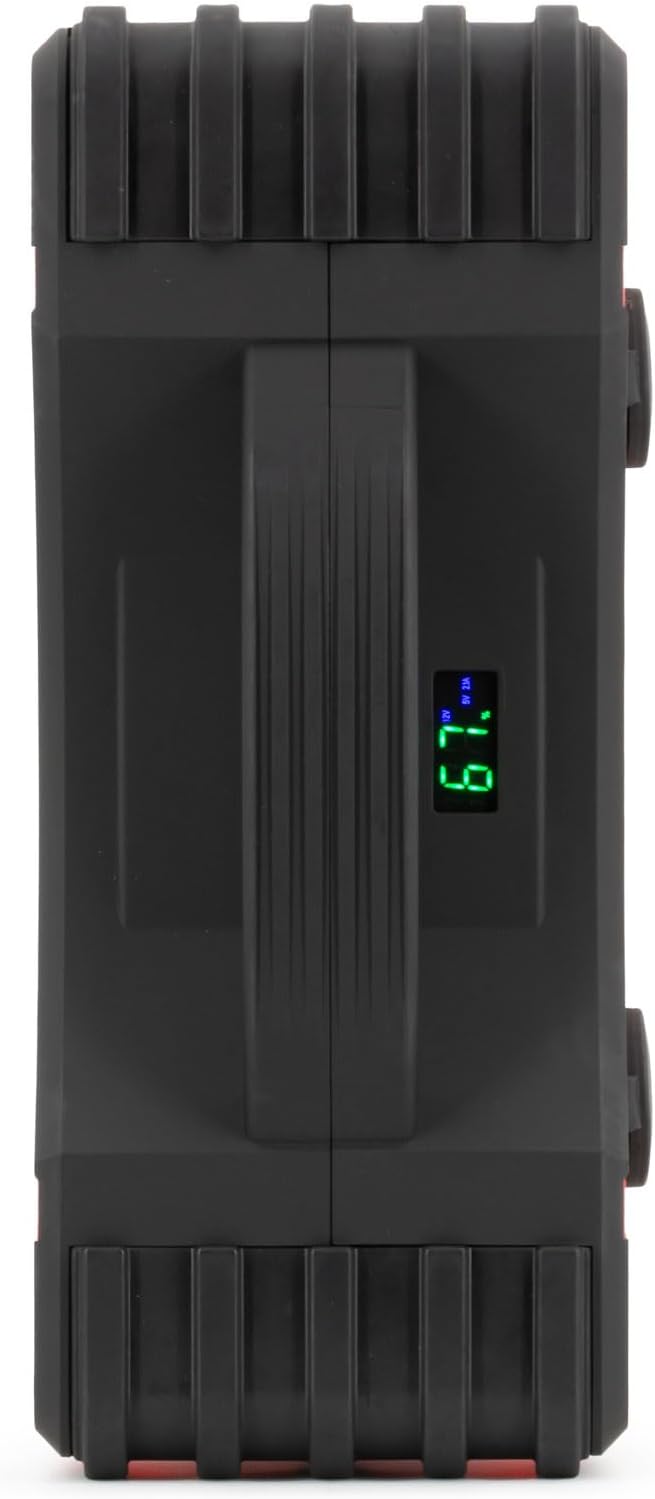
The side of the unit features an LCD screen that displays important information such as battery charge level.
6. Operating Instructions
6.1 Jump Starting a 24V Vehicle
Ensure the Nomad Power Pro 24 XL is sufficiently charged before attempting a jump start.
- Turn Off Vehicle: Ensure the vehicle's ignition is off and all accessories (lights, radio, etc.) are turned off.
- Connect Red Clamp: Connect the red (positive, +) clamp to the positive (+) terminal of the vehicle's battery.
- Connect Black Clamp: Connect the black (negative, -) clamp to the negative (-) terminal of the vehicle's battery. Alternatively, connect the black clamp to a solid, unpainted metal part of the vehicle's chassis, away from the battery and fuel lines.
- Turn On Jump Starter: Switch the main ON/OFF button on the Nomad Power Pro 24 XL to the 'ON' position.
- Start Vehicle: Attempt to start the vehicle. If it does not start immediately, wait 30 seconds before trying again. Do not crank for more than 5 seconds per attempt.
- Disconnect Clamps: Once the vehicle starts, immediately disconnect the black (-) clamp first, then the red (+) clamp.
- Turn Off Jump Starter: Switch the main ON/OFF button on the Nomad Power Pro 24 XL to the 'OFF' position.

The GYS Nomad Power Pro 24 XL unit, featuring its robust design and integrated battery clamps for vehicle jump-starting.
6.2 Using as a Power Bank
The Nomad Power Pro 24 XL can charge various electronic devices.
- USB Output: Connect your device's USB charging cable to one of the two USB output ports (5V/2.1A).
- 12V Output: For devices requiring 12V power, connect them to the 12V/3.5A output port.
- Ensure the unit is powered on to activate the output ports.
6.3 Using the LED Lamp
The integrated LED lamp provides illumination in three modes.
- Press the dedicated light button to cycle through the modes: On (constant light), Strobe, SOS, and Off.
- The lamp is useful for roadside emergencies, working in dark environments, or as a signaling device.
7. Maintenance
7.1 Recharging the Unit
To maintain optimal battery health and readiness, recharge the Nomad Power Pro 24 XL after each use, or at least every 3 months if not used regularly.
- Use only the provided AC charger or 12V car charger.
- Do not overcharge the unit; disconnect once fully charged.
7.2 Storage
- Store the unit in its protective carrying case in a cool, dry place, away from direct sunlight and extreme temperatures.
- Ensure the unit is turned off before storing.
7.3 Cleaning
- Wipe the unit with a soft, dry cloth.
- Do not use harsh chemicals or abrasive cleaners.
- Keep the clamps clean and free of corrosion.
8. Troubleshooting
If you encounter issues with your Nomad Power Pro 24 XL, refer to the following common problems and solutions:
| Problem | Possible Cause | Solution |
|---|---|---|
| Vehicle does not start | Low charge on jump starter Incorrect clamp connection Vehicle battery severely discharged Vehicle issue (not battery related) | Recharge the jump starter fully Check clamp polarity and connection points Allow more time for the jump starter to provide charge (if applicable) or try again after a short pause Consult a mechanic |
| Jump starter not charging | Charger not properly connected Faulty charger or outlet Unit's internal battery issue | Ensure charger is securely plugged into unit and outlet Try a different outlet or charger Contact customer support |
| USB/12V output not working | Unit is off Device cable is faulty Device requires more power than available | Turn on the main power switch Try a different cable or device Check device power requirements |
| Error indicator on LCD | Reverse polarity Short circuit Over-temperature | Disconnect clamps and reconnect with correct polarity Check for any short circuits in the connection Allow unit to cool down before use |
If the problem persists after attempting these solutions, please contact GYS customer support.
9. Specifications
| Feature | Specification |
|---|---|
| Model Number | 025905 |
| Brand | GYS |
| Battery Type | Lithium-ion |
| Battery Capacity | 8 Ah (236.8 Wh) |
| Voltage | 24 Volts |
| Starting Current | 1400 A |
| Peak Current | 3000 A |
| USB Output 1 | 5V / 2.1A |
| USB Output 2 | 5V / 2.1A |
| 12V Output | 12V / 3.5A |
| Charging Input | 18V / 2A |
| Product Dimensions (L x W x H) | 28 x 28 x 11 cm |
| Item Weight | 5.16 Kilograms |
| Vehicle Service Type | Bus, Truck |
10. Warranty and Support
For warranty information, please refer to the documentation provided with your purchase or visit the official GYS website. Keep your proof of purchase for warranty claims.
If you require technical assistance, have questions about the product, or need to report an issue, please contact GYS customer support through their official channels. Contact details are typically available on the GYS website or in the product packaging.


