Introduction
Thank you for choosing the SKMEI Digital Sports Watch Model 2048. This manual provides comprehensive instructions to help you understand and utilize all the features of your new watch. Please read this manual carefully before use and keep it for future reference.

Image: The SKMEI Digital Sports Watch Model 2048, showcasing its digital display and robust design.
Key Features
- Digital Display: Clear and easy-to-read time, date, and day.
- Chronograph: Stopwatch function for timing activities.
- Alarm Clock: Set daily alarms to keep you on schedule.
- EL Backlight: Electro-Luminescent backlight for visibility in low-light conditions.
- Water Resistance: 50 meters (5 ATM) water resistance, suitable for swimming and showering.
- Durable Construction: Features a Thermoplastic Polyurethane (TPU) strap and Acrylonitrile Butadiene Styrene (ABS) case.
- Dual Time: Ability to display two different time zones.

Image: A close-up view of the watch's digital display, showing the time, date, and day of the week.
Setup and Operation
Button Functions:
Your watch has four buttons, typically labeled A, B, C, D or similar, located around the watch case. For this model, we will refer to them as follows:
- Button A (Top Left): EL Light / Reset
- Button B (Top Right): Start / Stop
- Button C (Bottom Left): Mode
- Button D (Bottom Right): Adjust / Set
1. Time and Date Setting:
- From the normal time display mode, press Button C (Mode) three times to enter the time setting mode. The seconds digits will flash.
- Press Button D (Adjust) to reset the seconds to 00.
- Press Button B (Start) to move the flashing selection to the hour digits.
- Press Button D (Adjust) to adjust the hour. Pay attention to AM/PM indicator if in 12-hour format.
- Press Button B (Start) to move the flashing selection to the minute digits.
- Press Button D (Adjust) to adjust the minutes.
- Continue pressing Button B (Start) to cycle through year, month, and day settings, adjusting each with Button D (Adjust).
- Once all settings are correct, press Button C (Mode) to exit the setting mode and return to the normal time display.
2. Alarm Setting:
- From the normal time display mode, press Button C (Mode) twice to enter the alarm setting mode. The hour digits will flash.
- Press Button D (Adjust) to set the desired alarm hour.
- Press Button B (Start) to move the flashing selection to the minute digits.
- Press Button D (Adjust) to set the desired alarm minutes.
- Press Button C (Mode) to exit the alarm setting mode.
- To turn the alarm ON/OFF, press Button D (Adjust) while in the alarm mode (after pressing Button C twice). An alarm icon will appear/disappear on the display.

Image: The watch display indicating the alarm function is active, helping users stay on schedule.
3. Chronograph (Stopwatch) Function:
- From the normal time display mode, press Button C (Mode) once to enter the chronograph mode. The display will show 00:00:00.
- Press Button B (Start) to start the stopwatch.
- Press Button B (Start) again to pause the stopwatch.
- Press Button B (Start) to resume timing.
- To reset the stopwatch, press Button A (Reset) while the stopwatch is paused.
- Press Button C (Mode) to exit the chronograph mode and return to the normal time display.
4. EL Backlight:
Press Button A (EL Light) at any time to illuminate the display for a few seconds, providing visibility in dark environments.

Image: The watch display illuminated by the EL backlight, demonstrating clear readability in low light.
Maintenance
- Cleaning: Wipe the watch regularly with a soft, dry cloth. For stubborn dirt, a slightly damp cloth can be used, followed by drying. Avoid harsh chemicals or abrasive materials.
- Water Resistance: The watch is water-resistant up to 50 meters (5 ATM). This means it is suitable for swimming, showering, and handwashing. Do not press any buttons while the watch is submerged in water, as this can compromise the water seal. Avoid exposure to hot water or steam, which can damage the seals.
- Temperature: Avoid exposing the watch to extreme temperatures (hot or cold) for prolonged periods.
- Impact: Protect the watch from strong impacts or drops.
- Battery: The watch uses a standard watch battery. When the display dims or functions become erratic, it may be time for a battery replacement. It is recommended to have the battery replaced by a qualified watch technician to ensure the water resistance seal is properly maintained.

Image: The watch partially submerged in water, illustrating its 50-meter water resistance capability.
Troubleshooting
| Problem | Possible Cause | Solution |
|---|---|---|
| Display is blank or dim. | Low battery. | Replace the battery. |
| Buttons are unresponsive. | Watch may be in a frozen state or water ingress. | Try pressing all buttons simultaneously for a few seconds to reset. If issue persists, consult a technician. Ensure buttons are not pressed underwater. |
| Time is inaccurate. | Incorrect setting or low battery. | Re-set the time according to the instructions. If problem persists, replace the battery. |
| Condensation inside the watch. | Water resistance compromised (e.g., buttons pressed underwater, exposure to steam). | Stop using the watch immediately. Take it to a qualified watch technician for inspection and repair to prevent further damage. |
Specifications
| Model Number | 2048 |
| Display Type | Digital |
| Movement Type | Quartz |
| Case Material | Acrylonitrile Butadiene Styrene (ABS) |
| Band Material | Thermoplastic Polyurethane (TPU) |
| Water Resistance Depth | 50 Metres (5 ATM) |
| Case Diameter | 4.47 Centimetres |
| Case Thickness | 1.38 Centimetres |
| Band Width | 1.8 Centimetres |
| Item Weight | 43.9 Grams |
| Power Source | Battery Powered |
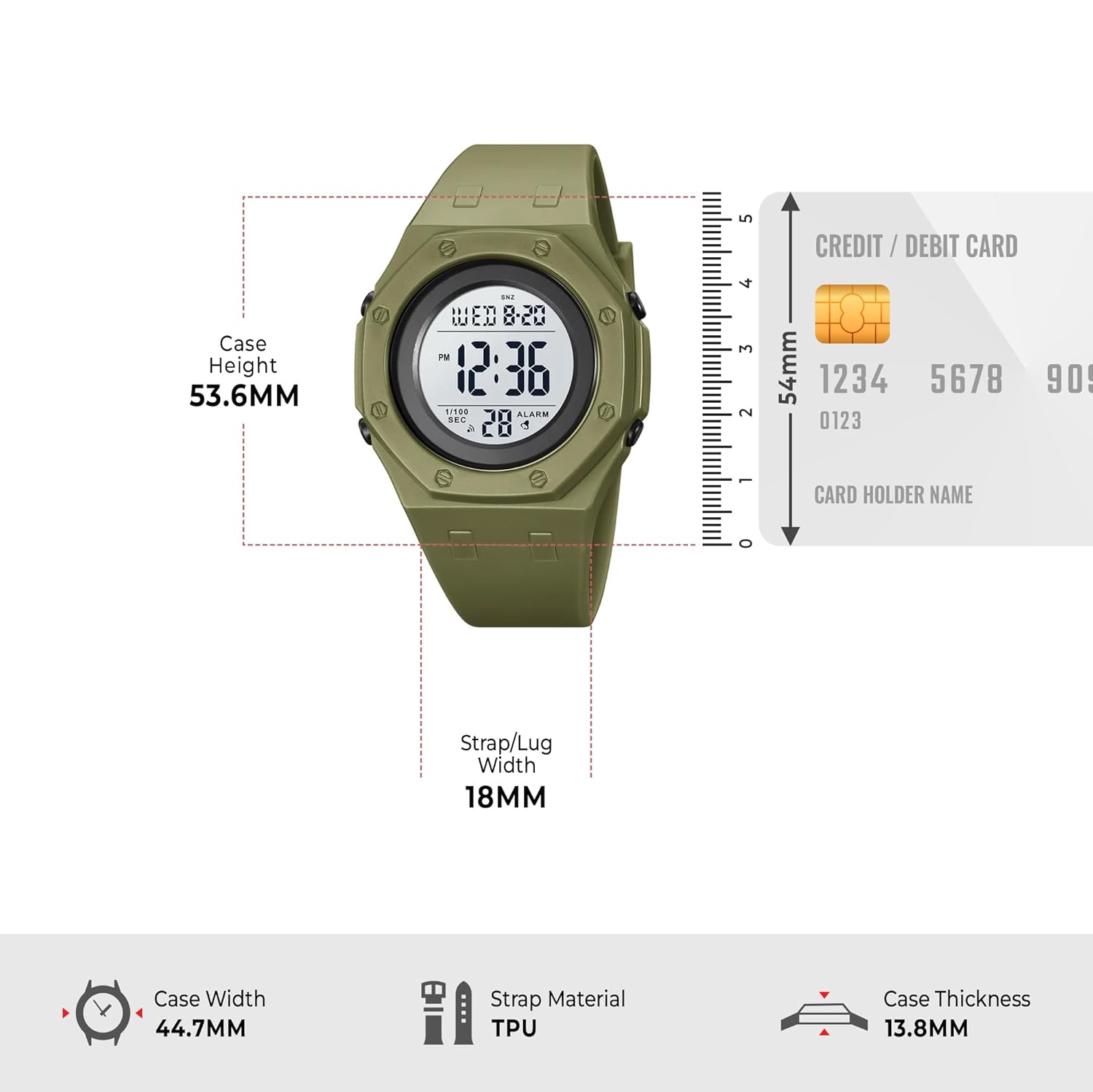
Image: A diagram illustrating the key dimensions of the SKMEI Digital Sports Watch Model 2048, including case height, width, and strap width.
Warranty and Support
Your SKMEI Digital Sports Watch Model 2048 comes with a 9-month Manufacturer Warranty from the date of purchase. This warranty covers manufacturing defects. It does not cover damage resulting from misuse, accidents, unauthorized repairs, or normal wear and tear.
For any service-related inquiries, feedback, or warranty claims, please contact SKMEI India Customer Support:
- Helpline: 1800-889-6251
- Operating Hours: Monday to Saturday, 9:00 AM to 6:00 PM (IST)
Please have your purchase receipt and watch model number (2048) ready when contacting support.


