
Introduction
This manual provides comprehensive instructions for the installation, operation, and maintenance of your Aroepurt phone case designed specifically for the Nokia 8.5 5G. This protective case features a durable 2-in-1 PC+TPU construction, an integrated ring stand, and includes a tempered glass screen protector for enhanced device protection.
Product Features
- 2-in-1 Protection: Combines a rigid polycarbonate (PC) back panel with a soft thermoplastic polyurethane (TPU) frame for dual-layer defense.
- Shock Airbags: Integrated airbags in all four corners provide enhanced shock absorption against drops and impacts.
- Integrated Ring Stand: A 360-degree rotating metal ring stand offers versatile viewing angles and improved grip.
- Magnetic Car Mount Compatibility: The metal ring stand is compatible with magnetic car mounts (car mount not included).
- Tempered Glass Screen Protector: Includes a 9H high hardness, shatterproof, and scratch-resistant tempered glass screen protector.
- Reflective Design: Features a colored reflective light pattern on the frosted surface for a distinct aesthetic.
- Raised Edges: The case design includes raised edges around the camera and screen for flat surface protection.
Package Contents
- 1 x Aroepurt Phone Case for Nokia 8.5 5G
- 1 x Tempered Glass Screen Protector
- 1 x Adhesive Metal Ring Stand (pre-attached or separate, user can choose to apply)
Setup Instructions
1. Installing the Tempered Glass Screen Protector
- Clean the Screen: Thoroughly clean your phone's screen using the provided cleaning wipes (if included) to remove dust, smudges, and fingerprints. Ensure the screen is completely dry.
- Align the Protector: Carefully align the tempered glass screen protector with your phone's screen, ensuring that all cutouts (for camera, speaker, etc.) match perfectly.
- Apply the Protector: Gently lower the screen protector onto the screen. It will adhere automatically. If bubbles appear, gently push them towards the edges with a soft cloth.

Figure 1: Tempered Glass Screen Protector Features. This image illustrates the key attributes of the included screen protector, such as its 9H high hardness, perfect adhesion, shatterproof design, case-friendly compatibility, 99.9% super transparency, and anti-fingerprint properties.

Figure 2: Screen Protector Scratch Resistance Test. This image shows a hammer impacting the screen protector, illustrating its scratch-proof and impact-resistant qualities, designed to protect the phone screen from sharp objects and abrasion.
2. Installing the Phone Case
- Insert Phone: Gently insert your Nokia 8.5 5G into the soft TPU frame of the case, ensuring all buttons and ports align correctly.
- Secure Fit: Press firmly around the edges of the phone to ensure the case is securely fitted and the phone is fully enclosed.

Figure 3: Phone Case Shockproof Design. This image highlights the protective features of the case, including its 2-in-1 construction (hard PC back and soft silicone frame) and the four-corner thickening with integrated shock airbags for enhanced impact protection.

Figure 4: IMD Laser Style and Layered Construction. This image demonstrates the aesthetic appeal of the case's IMD laser style, showing how light reflects differently from various angles. It also illustrates the layered construction: a clear, scratch-resistant protective surface, a laser layer, an ultra HD print pattern layer, and a PC rugged protective backplate.
Operating Instructions
Using the Ring Stand
- Grip Enhancement: Slide your finger through the ring for a more secure grip on your phone, reducing the risk of accidental drops.
- Kickstand Function: Rotate the ring 360 degrees and adjust it to your desired angle to prop up your phone for hands-free viewing in landscape or portrait mode.
- One-Hand Operation: The ring stand facilitates easier one-hand operation by allowing your thumb to reach more areas of the screen.
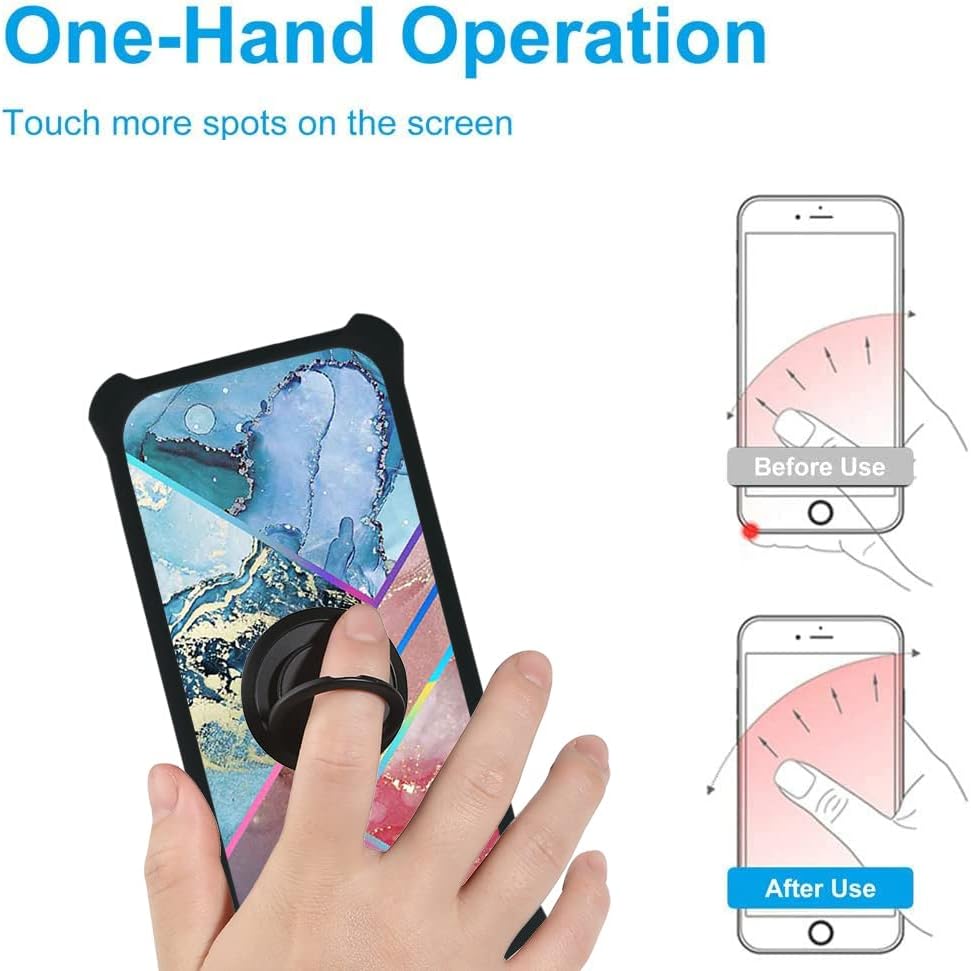
Figure 5: One-Hand Operation with Ring Stand. This image demonstrates how the integrated ring stand improves one-hand usability, allowing the user to comfortably reach more areas of the phone screen.
Using with Magnetic Car Mount
- The metal plate integrated into the ring stand allows for direct attachment to magnetic car mounts. Simply place the back of your phone case onto a compatible magnetic car mount.
- Note: This case does not support wireless charging due to the integrated metal ring stand. Remove the case for wireless charging.

Figure 6: Magnetic Car Mount Compatibility. This image illustrates the phone case's compatibility with magnetic car mounts, showing the 180-degree and 360-degree rotation capabilities of the ring stand. It also notes that the case supports a multi-angle stand but does not support wireless charging.
Maintenance
- Cleaning the Case: Wipe the phone case regularly with a soft, damp cloth to remove dust and smudges. Avoid using harsh chemicals or abrasive cleaners.
- Cleaning the Screen Protector: Use a microfiber cloth to clean the tempered glass screen protector. For stubborn smudges, a screen cleaner spray designed for electronics can be used.
- Inspection: Periodically inspect the case and screen protector for any signs of wear or damage. Replace if significant damage is observed to maintain optimal protection.
Troubleshooting
- Screen Protector Bubbles: If bubbles appear after installation, gently lift the nearest edge of the protector and reapply, pushing the air out with a soft cloth. Small bubbles may disappear naturally within 24-48 hours.
- Case Fit Issues: Ensure your phone model is Nokia 8.5 5G. If the case does not fit correctly, double-check the phone's positioning within the case and ensure all edges are snapped into place.
- Ring Stand Stiffness: If the ring stand feels stiff, gently rotate it a few times to loosen the mechanism. Avoid excessive force.
Specifications
| Brand | Aroepurt |
| Model | IMDH-WSS |
| Compatible Device | Nokia 8.5 5G |
| Material | Rigid Polycarbonate (PC) back panel, Soft Thermoplastic Polyurethane (TPU) frame, Metal ring stand |
| Special Features | Integrated Ring Stand (360° rotation), Magnetic Car Mount Compatible, Shock Airbags, Tempered Glass Screen Protector (9H Hardness, Shatterproof, Scratch-resistant), Raised Camera/Screen Edges |
| Color/Pattern | Colored Reflective Light (IMDH-WSS) |
| Wireless Charging | Not supported with case installed (due to metal ring stand) |
Warranty and Support
For warranty information or technical support, please refer to the seller's contact information or the product packaging. Information regarding spare parts availability and software updates is not provided by the manufacturer for this accessory.
Manufacturer Reference: GX23-4-17 59875 IMDH-WSS
ASIN: B0C3DKVH7D