
Introduction
The SPORTARC DZ40 Smart E-Bike Display is designed to enhance your electric bicycle experience by providing clear, essential riding information. This compact and durable display is specifically engineered for compatibility with Bafang BBS01, BBS02, and BBSHD mid-drive motors.
Featuring an IP65 waterproof rating and a robust ABS shell, the DZ40 is built to withstand various weather conditions, ensuring reliability and longevity. Its intuitive LCD screen presents vital data such as current status and voltage, keeping you informed during your rides. The display supports multiple voltage options (24V, 36V, 48V) for broad compatibility with different e-bike systems. Weighing only 44g, its lightweight and portable design ensures it adds minimal bulk to your e-bike setup.
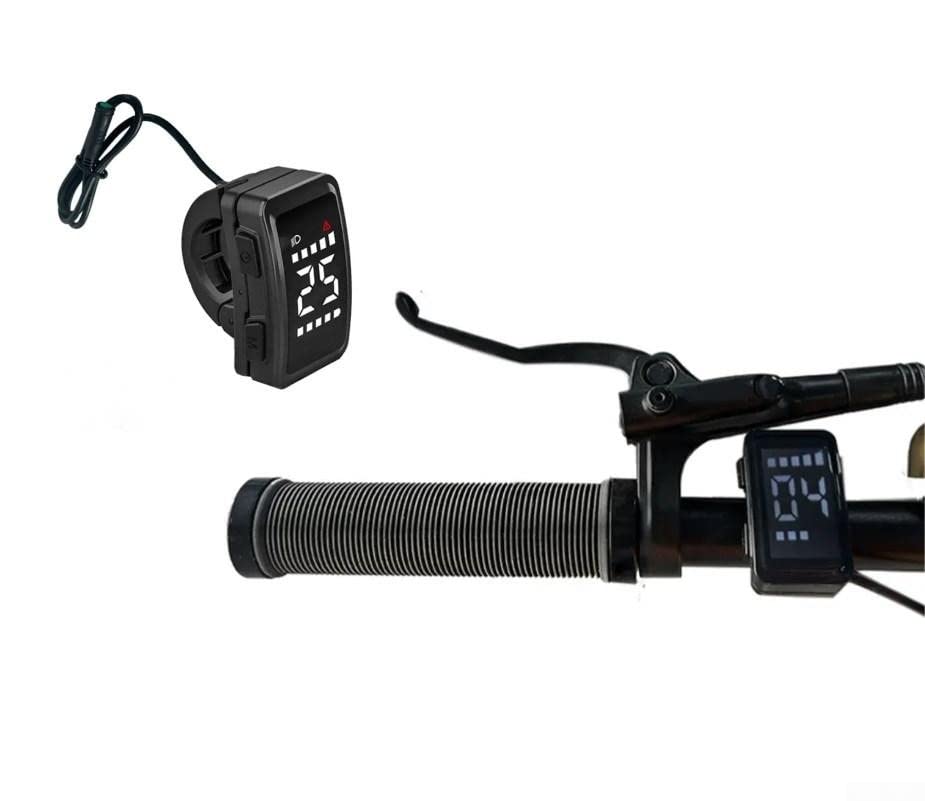
Figure 1: Front view of the SPORTARC DZ40 Smart E-Bike Display, showcasing its compact design and connector.

Figure 2: The DZ40 display highlighting its IP65 waterproof capability and durable ABS casing, designed for outdoor use.
Setup and Installation
The DZ40 display is designed for left-side handlebar mounting. It is compatible with Bafang BBS01, BBS02, and BBSHD mid-drive motors. Ensure your motor system is one of these compatible models for proper function.
- Mounting: Securely attach the display to the left side of your bicycle's handlebar. The clamp is designed for standard handlebar diameters (22.2mm as shown in specifications).
- Connection: Connect the display's serial communication interface cable to the corresponding port on your e-bike's motor system. Ensure the connection is firm and secure to prevent disconnections during riding.

Figure 3: The DZ40 display correctly mounted on the left handlebar of an e-bike, showing its ergonomic placement.
Operating Instructions
The DZ40 display features an intuitive interface with dedicated buttons for control and information display.

Figure 4: Close-up of the DZ40 display, indicating the 'M' function key, 'Open' key, and the '+' and '-' display areas for adjustments.
- Power On/Off: To power on the display, press and hold the 'Open' key (power button) for several seconds until the screen illuminates. To power off, press and hold the 'Open' key again until the display turns off.
- Display Information: The LCD screen shows real-time data such as current speed, battery level, assistance level, and voltage.
- Adjusting Assistance Levels: Use the '+' area (upper part of the display) to increase the assistance level and the '-' area (lower part of the display) to decrease it.
- Activating Headlight: To turn on the e-bike's headlight (if connected and supported), press and hold the '+' area for a few seconds. Repeat to turn off.
- 'M' Function Key: The 'M' key typically cycles through different display modes or accesses settings. Press briefly to change modes. For advanced settings, a long press might be required, depending on the e-bike system's configuration.
Note: The display may not retain previous settings (e.g., assistance level, light status) after being powered off. You might need to re-adjust these settings each time you power on the device.
Maintenance
Proper maintenance ensures the longevity and optimal performance of your DZ40 display.
- Cleaning: Wipe the display screen and body with a soft, damp cloth. Avoid using abrasive cleaners or solvents, as these can damage the screen or casing.
- Water Exposure: While the display has an IP65 waterproof rating, meaning it is protected against dust and low-pressure water jets, it is not designed for submersion. Avoid prolonged exposure to heavy rain or direct high-pressure water sprays.
- Storage: When not in use for extended periods, store the e-bike and display in a dry, temperate environment, away from direct sunlight and extreme temperatures. The recommended storage temperature is -30°C to 80°C.
- Cable Inspection: Periodically check the connection cable for any signs of wear, cuts, or damage. Ensure it remains securely plugged into the motor system.
Troubleshooting
| Problem | Possible Cause | Solution |
|---|---|---|
| Display does not turn on. | Insufficient press duration on power button; loose cable connection; power issue with e-bike. | Press and hold the 'Open' key for several seconds. Check all cable connections to the motor system. Ensure the e-bike battery is charged and powered on. |
| Settings (e.g., assistance level, light) reset after power off. | This is a characteristic of the DZ40 display. | Re-adjust desired settings each time the display is powered on. |
| Headlight does not turn on. | Incorrect activation; headlight not connected or faulty. | Ensure you are pressing and holding the '+' area for a few seconds. Check headlight connection and functionality. |
| Display shows no data or incorrect data. | Loose cable connection; incompatibility with motor system. | Verify all connections are secure. Confirm your e-bike motor is a Bafang BBS01, BBS02, or BBSHD model. |
Specifications
Detailed technical specifications for the SPORTARC DZ40 Smart E-Bike Display:
- Model Name: DZ40 LCD Instrument
- Brand: SPORTARC
- Rated Current: 18 mA
- Color: Black
- Storage Temperature: -30°C to 80°C
- Operating Voltage: 24V, 36V, 48V
- Weight: Approximately 44 g
- Dimensions (L x W x H): Approximately 13 x 8 x 9 cm
- Waterproof Rating: IP65
- Shell Material: ABS
- Communication Interface: Serial
- Compatibility: Bafang BBS01, BBS02, BBSHD mid-drive motors

Figure 5: Technical drawing showing the dimensions of the DZ40 display and a table summarizing key specifications.
Warranty and Support
Information regarding product warranty and customer support is not provided in the available product details. For any warranty claims or technical assistance, please refer to the retailer or the manufacturer's official website if available.