
BAOFENG BF-888S
Contents
BAOFENG BF-888S Walkie Talkies
High-Performance Long Range Two Way Radios
1. Introduction
This manual provides detailed instructions for the proper use and maintenance of your BAOFENG BF-888S Walkie Talkies. These high-performance two-way radios are designed for reliable communication in various environments, from outdoor adventures to team coordination.

Image 1.1: A complete set of BAOFENG BF-888S walkie talkies, including radios, charging bases, earpieces, and a programming cable.
Key Features:
- Exceptional Battery Life: Equipped with a 1500mAh high-capacity battery for extended standby time.
- Long-Distance Communication: Offers a communication range of 1-3 kilometers in urban settings and up to 2-5 kilometers in open areas.
- Crystal Clear Sound Quality: Features a 35mm sound cavity and advanced noise reduction chip for clear conversations.
- Customizable Features: Supports frequency data and functionality programming via computer connection.
- User-Friendly Design: Durable polycarbonate construction with backlit Chinese/English voice prompts and emergency alarm.
- Complete Accessory Set: Includes antennas, batteries, power adapters, smart chargers, belt clips, and slings.

Image 1.2: Visual representation of the key features of the BF-888S walkie talkie.
2. What's in the Box
Your BAOFENG BF-888S package includes the following components:
- 4 × BF-888S Radio
- 4 × Antenna
- 4 × Earpiece
- 4 × Li-ion battery
- 4 × LI-ion charger
- 4 × Belt clip
- 4 × The sling
- 4 × User's manual
- 1 × USB programming cable

Image 2.1: Overview of all included accessories and components in the BF-888S package.
3. Setup
3.1 Battery Installation
- Align the battery with the grooves on the back of the radio.
- Slide the battery upwards until it clicks into place.
- To remove, press the battery release latch and slide the battery downwards.
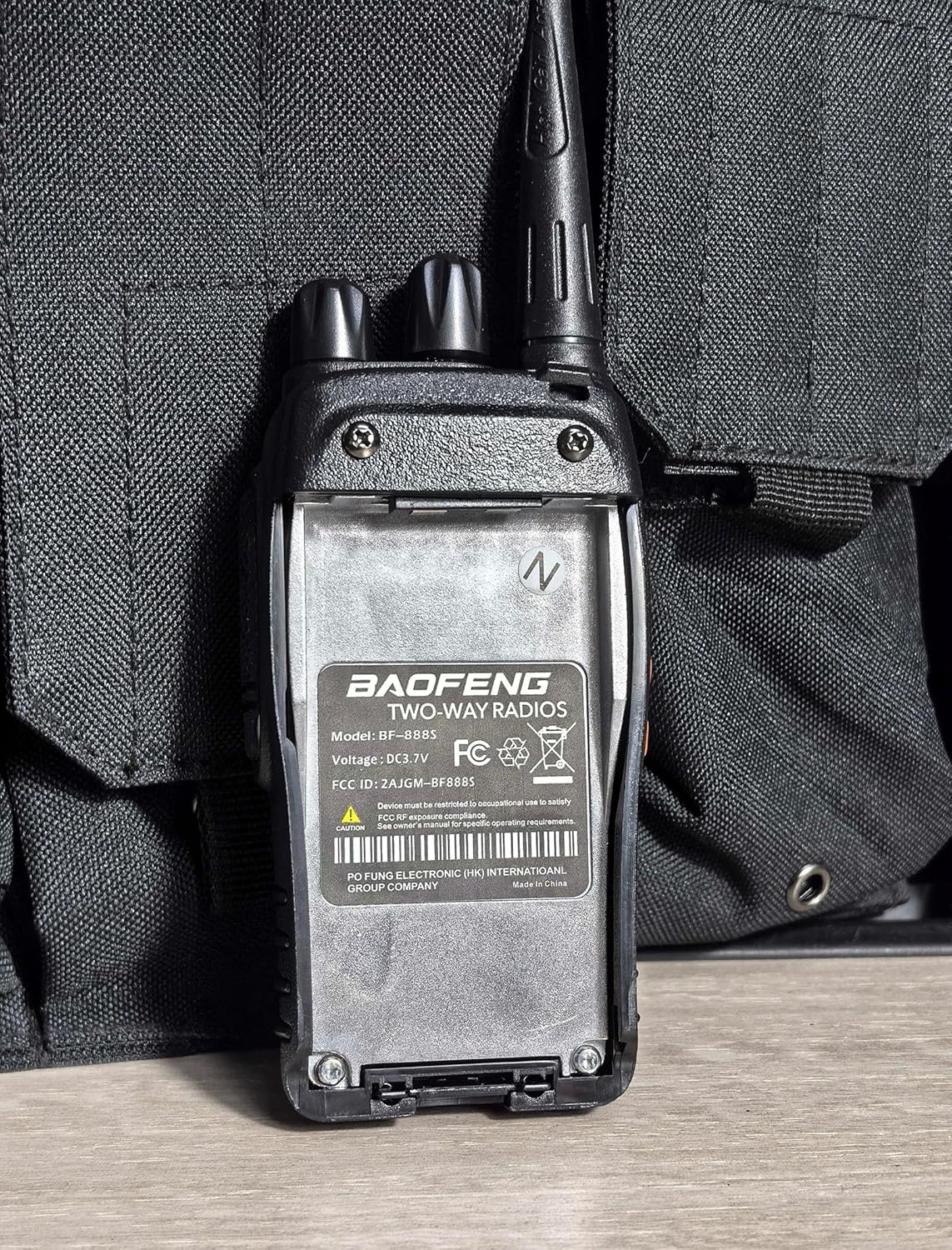
Image 3.1: Rear view of the radio, illustrating the battery compartment area.
3.2 Charging the Battery
- Connect the power adapter to the smart charger.
- Place the radio (with battery installed) into the charging cradle.
- The indicator light on the charger will show charging status (typically red for charging, green for fully charged).
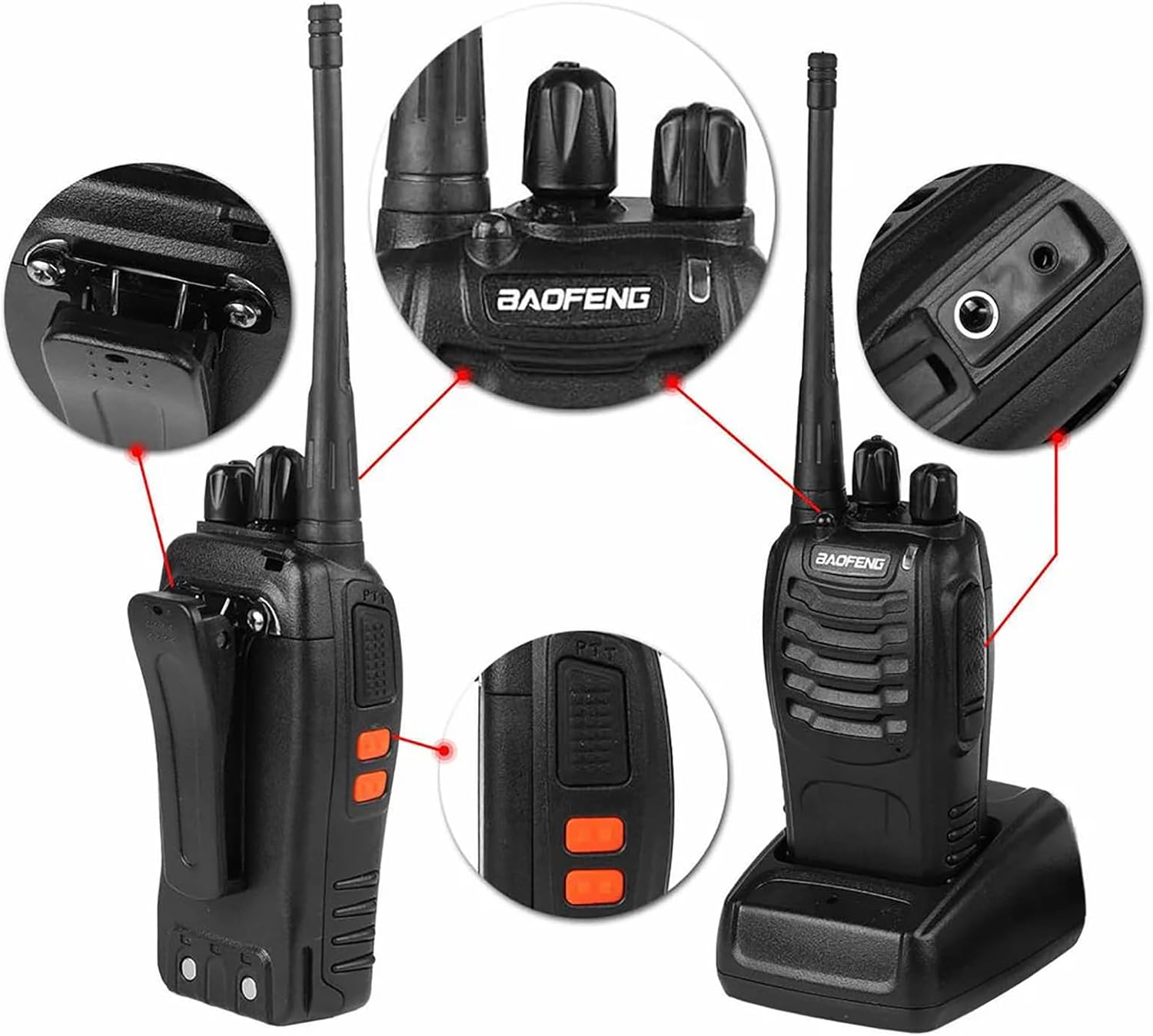
Image 3.2: The radio in its charging base, highlighting the charging process and accessory ports.
3.3 Attaching Accessories
- Antenna: Screw the antenna clockwise onto the connector on top of the radio until secure.
- Belt Clip: Attach the belt clip to the designated screws on the back of the radio.
- Sling: Loop the sling through the attachment point on the radio.
- Earpiece: Insert the earpiece plug into the audio jack on the side of the radio. Ensure it is fully inserted for proper function.

Image 3.3: Instructions for wearing the included earpiece for comfortable use.
3.4 Programming (Optional)
The BF-888S allows for advanced programming of frequencies and features using a computer and the provided USB programming cable. Software such as CHIRP can be used for this purpose. Refer to the specific programming software documentation for detailed instructions.
4. Operating Instructions

Image 4.1: Labeled diagram of the BF-888S radio components.
4.1 Power On/Off and Volume Control
Rotate the Power switch/Volume control knob clockwise to turn the radio on. Continue rotating clockwise to increase the volume. Rotate counter-clockwise to decrease volume and turn the radio off.
4.2 Channel Selection
Rotate the Channel switch knob to select one of the 16 available channels. Ensure all radios in your group are set to the same channel for communication.
4.3 Transmitting and Receiving (PTT Button)
To transmit, press and hold the PTT (Push-to-Talk) Button on the side of the radio. Speak clearly into the microphone. Release the PTT button to receive. The radio will automatically receive signals when the PTT button is not pressed.
4.4 Monitor Function
Press and hold the Monitor Button to temporarily disable the squelch and listen for weak signals on the current channel. This can be useful for checking if a channel is clear before transmitting.
4.5 Function Key (Side Button)
The side Function key can be programmed for various features. By default, it often controls the built-in flashlight or emergency alarm:
- Flashlight: Press the Function key to turn the LED flashlight on/off.
- Emergency Alarm: Press and hold the Function key to activate the emergency alarm. Release to deactivate.

Image 4.2: The integrated flashlight feature in use.
4.6 Voice Operated Transmission (VOX)
The BF-888S supports VOX, allowing for hands-free transmission. When VOX is enabled (requires programming), the radio will automatically transmit when it detects your voice, eliminating the need to press the PTT button. Adjust VOX sensitivity as needed to prevent accidental transmissions or missed voice activation.
5. Maintenance
5.1 Cleaning
Wipe the radio's surface with a soft, damp cloth. Do not use harsh chemicals or abrasive cleaners. Ensure the radio is dry before use or charging.
5.2 Battery Care
- Do not overcharge or deep discharge the battery.
- Store batteries in a cool, dry place when not in use.
- If the radio will not be used for an extended period, remove the battery.
5.3 Storage
Store the radio in a dry, dust-free environment away from direct sunlight and extreme temperatures. Keep out of reach of children.
5.4 Water Resistance
The BAOFENG BF-888S is not water resistant. Avoid exposing the radio to rain, splashes, or immersion in water to prevent damage.
6. Troubleshooting
If you encounter issues with your BF-888S radio, refer to the table below for common problems and solutions.
| Problem | Possible Cause | Solution |
|---|---|---|
| No power | Battery low or not installed correctly | Charge battery; ensure battery is securely installed. |
| Cannot transmit or receive | Incorrect channel; PTT button not pressed; out of range | Verify channel setting; press PTT firmly; move closer to other radios. |
| Poor sound quality / Noise | Weak signal; interference; volume too low | Move to an open area; check for sources of interference; adjust volume. |
| Short communication range | Obstructions (buildings, terrain); low battery; antenna loose | Move to higher ground or open area; charge battery; ensure antenna is tight. |
| Radio continuously transmits | PTT button stuck; VOX sensitivity too high | Check PTT button; adjust VOX sensitivity via programming. |
7. Specifications
| Feature | Specification |
|---|---|
| Brand | BAOFENG |
| Model Number | BF-888S |
| Product Dimensions | 7.5 x 13.8 x 5.5 inches |
| Item Weight | 3.34 pounds |
| Batteries | 1 Lithium Ion battery required (included) |
| Color | Black |
| Number of Channels | 16 |
| Special Feature | Built-In Flashlight, Lightweight, Rechargeable, SOS Alarm |
| Talking Range Maximum | 5 Kilometer |
| Voltage | 3.7 Volts (DC) |
| Water Resistance Level | Not Water Resistant |
| Compatible Devices | Earphone |
8. Safety Information
- Do not operate the radio in explosive atmospheres (e.g., flammable gases, dust particles, metallic powders).
- Do not expose the radio to direct sunlight for prolonged periods or place it near heating appliances.
- Use only BAOFENG-approved batteries and chargers.
- Do not disassemble or modify the radio. Repairs should only be performed by qualified personnel.
- Keep the radio and accessories out of reach of small children.
- Avoid using the radio while driving or operating heavy machinery.
9. Warranty and Support
For warranty information and customer support, please refer to the documentation provided with your purchase or contact BAOFENG directly through their official website or authorized distributors. Keep your purchase receipt as proof of purchase for warranty claims.
Documents and downloads
Ask a question about this manual
Ask about setup, troubleshooting, compatibility, parts, safety, or missing instructions. Manuals+ will review the question and use this page’s manual context to help answer it.