
TRIUMPHKEY scrivania regolabile in altezza
TRIUMPHKEY Height Adjustable Desk User Manual
Model: scrivania regolabile in altezza
Introduction
Thank you for choosing the TRIUMPHKEY Height Adjustable Desk. This manual provides detailed instructions for assembly, operation, and maintenance to ensure safe and efficient use of your new desk. This desk is designed to offer a versatile workspace, allowing you to easily switch between sitting and standing positions, promoting a healthier work environment.

Figure 1: Overview of the TRIUMPHKEY Height Adjustable Desk.
Safety Information
Please read all safety warnings and instructions carefully before using this product. Failure to follow these instructions may result in injury or damage to the product.
- Maximum Weight Capacity: Do not exceed the maximum weight of 80 kg (176 lbs) on the desk surface. Overloading can cause instability and damage.
- Anti-Collision System: The desk is equipped with an integrated anti-collision system. This system is designed to prevent accidents by stopping movement if an obstruction is detected. Always ensure the path of the desk is clear during height adjustments.
- Children and Pets: Keep children and pets away from the desk during operation to prevent injury.
- Power Supply: Use only the provided power adapter. Ensure the power cord is not pinched or damaged.
- Assembly: Follow all assembly instructions precisely. Ensure all screws and fasteners are securely tightened before use.
- Stability: Ensure the desk is placed on a level surface to maintain stability.
Product Features
The TRIUMPHKEY Height Adjustable Desk offers a range of features designed for comfort, convenience, and durability:
- Adjustable Height Range: The desk can be raised and lowered between 72 cm (28.3 inches) and 116 cm (45.7 inches), accommodating various user heights and preferences for sitting or standing.
- 3 Memory Presets: Easily save and recall three common height settings with a single click, allowing for quick transitions between preferred positions.
- Integrated USB Port: A convenient USB port is included for charging mobile phones and other electronic devices directly from the desk's control panel.
- Certified Quality: The adjustable height desk frame holds high-quality certifications from TÜV and CE, ensuring reliability and safety.
- Durable Surface: The 15 mm thick desktop is made from wear-resistant and heat-resistant materials, making it easy to clean and maintain.
- Quiet Motor: Features a powerful, silent motor operating at less than 50 dB, ensuring smooth and quiet height adjustments.
- Anti-Collision System: An advanced anti-collision system is integrated into the desk frame to prevent damage or injury by stopping movement upon detecting an obstruction.
- Rounded Corners: The desktop features rounded corners to prevent potential injuries from bumps and collisions.
- Convenient Hooks and Wheels: Includes side hooks for hanging headphones or bags, and 4 wheels for easy relocation without disassembly.

Figure 2: Product dimensions and components. The desktop is composed of 4 parts for easier shipping and assembly.

Figure 3: The desk's height adjustment range, from sitting to standing positions.

Figure 4: Multifunction controller with memory presets and USB charging.

Figure 5: Demonstration of the anti-collision system in action.
Setup and Assembly
The TRIUMPHKEY Height Adjustable Desk is designed for straightforward assembly. The product is delivered in two separate packages (table support and tabletop).
Before You Begin:
- Unpack all components and verify against the parts list provided in the assembly instructions.
- Ensure you have enough clear space for assembly.
- All necessary tools are included with the product.
Assembly Steps:
- Assemble the Frame: Follow the detailed diagrams in the included assembly manual to connect the leg columns to the foot supports and the crossbar.
- Attach the Desktop: The desktop comes in multiple sections. Securely join these sections using the provided connectors and then attach the assembled desktop to the frame. Ensure all screws are tightened.
- Install Control Panel: Mount the multifunction control panel to the underside of the desk in the designated area. Connect the motor and power cables as instructed.
- Attach Accessories: Install the side hooks and any other accessories as desired.
- Cable Management: Utilize the integrated cable management tray to organize and secure power cords and device cables, keeping your workspace tidy.
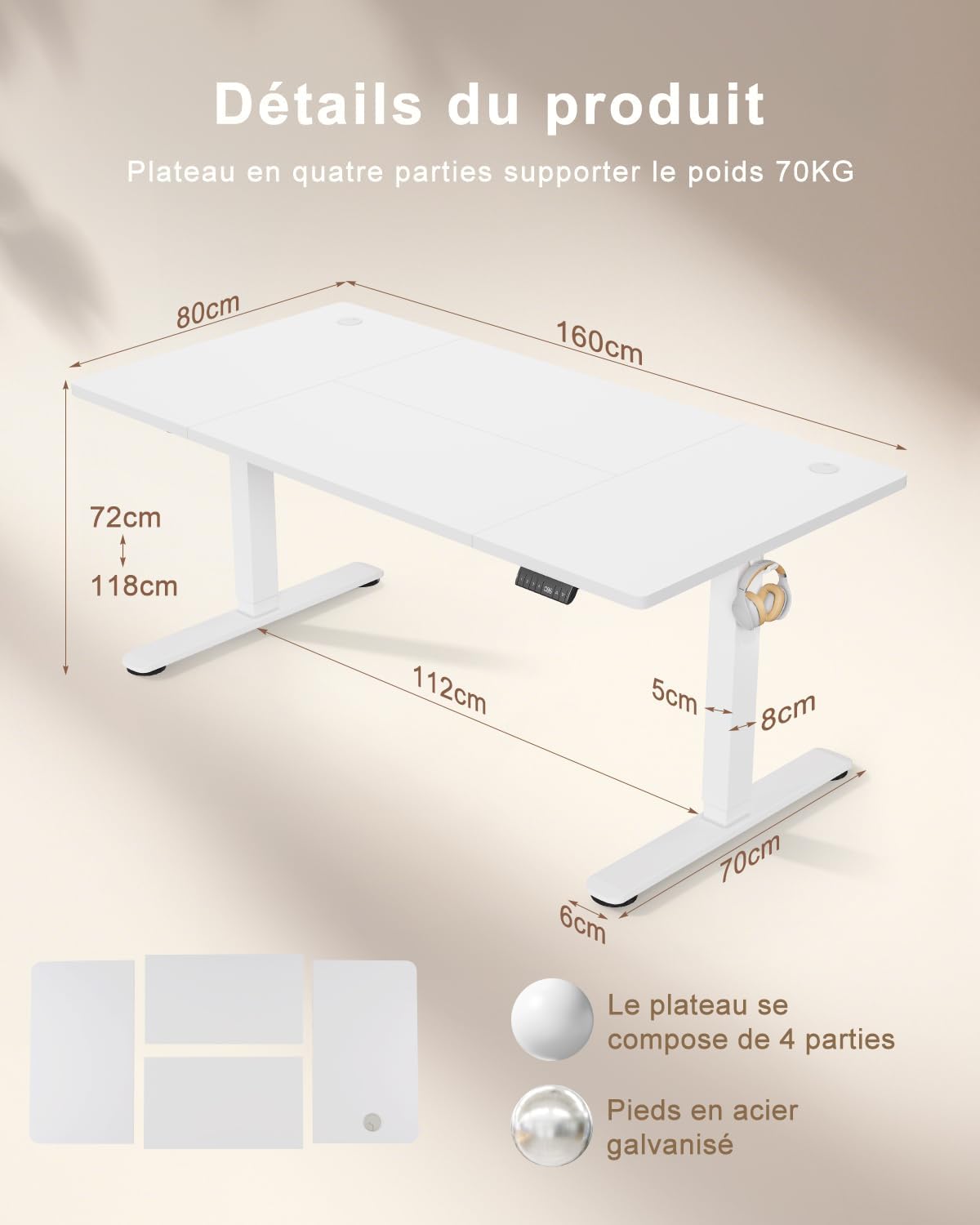
Figure 6: Integrated cable management system.
Operating Instructions
Operating your TRIUMPHKEY Height Adjustable Desk is simple and intuitive.
Basic Height Adjustment:
- Raise Desk: Press and hold the Up Arrow (▲) button on the control panel. The desk will move upwards. Release the button at your desired height.
- Lower Desk: Press and hold the Down Arrow (▼) button on the control panel. The desk will move downwards. Release the button at your desired height.
- The current height will be displayed on the digital screen of the control panel.
Setting Memory Presets:
The desk allows you to save up to three preferred height settings for quick access.
- Adjust the desk to your desired height using the Up/Down arrows.
- Press the "M" (Memory) button. The display will show "S-".
- Within 3 seconds, press one of the memory preset buttons (1, 2, or 3). The display will show "S-1", "S-2", or "S-3" to confirm the height has been saved to that preset.
Using Memory Presets:
To move the desk to a saved height:
- Simply press the corresponding memory preset button (1, 2, or 3). The desk will automatically move to the saved height.
USB Charging Port:
- Connect your mobile phone or other electronic device to the USB-A port on the control panel for convenient charging.
Maintenance
Proper maintenance will ensure the longevity and optimal performance of your TRIUMPHKEY Height Adjustable Desk.
- Cleaning: Wipe the desk surface and frame with a soft, damp cloth. Avoid using harsh chemicals or abrasive cleaners that could damage the finish.
- Regular Checks: Periodically check all screws and fasteners to ensure they remain tight. Re-tighten if necessary.
- Cable Management: Ensure cables are neatly managed and not pinched or tangled, which could affect desk operation or cause damage.
- Motor Care: The motor is designed for long-term use. Avoid continuous operation for extended periods without rest. If the motor feels hot, allow it to cool down before further use.
Troubleshooting
If you encounter any issues with your TRIUMPHKEY Height Adjustable Desk, refer to the following common troubleshooting steps:
| Problem | Possible Cause | Solution |
|---|---|---|
| Desk does not move. | Power cable disconnected; Motor overload; Control panel error. | Check power connection. Unplug and replug the power cord. Allow motor to cool down for 20 minutes. Reset the control panel (refer to manual for specific reset procedure, if available). |
| Desk moves unevenly or makes unusual noise. | Uneven load; Loose connections; Obstruction. | Ensure weight is evenly distributed. Check all assembly screws for tightness. Clear any obstructions around the legs. |
| Anti-collision system frequently activates. | Obstruction in path; Sensitivity setting too high (if adjustable). | Ensure the desk's path is clear of all objects. If the system has adjustable sensitivity, consult the full manual for adjustment instructions. |
| Memory presets not working. | Presets not saved correctly; Power interruption. | Re-save your desired height settings following the "Setting Memory Presets" instructions. |
If the problem persists after attempting these solutions, please contact TRIUMPHKEY customer support for further assistance.
Specifications
| Feature | Detail |
|---|---|
| Brand | TRIUMPHKEY |
| Model Number | scrivania regolabile in altezza |
| Color | White + White |
| Product Dimensions (L x W x H) | 160 x 80 x 72-116 cm (63 x 31.5 x 28.3-45.7 inches) |
| Item Weight | 26.5 Kilograms (58.4 lbs) |
| Material | Alloy Steel (Frame), Durable Board (Desktop) |
| Special Features | Height Adjustable, 3 Memory Presets, USB Charging Port, Anti-Collision System |
| Motor Noise Level | < 50 dB |
| Max Load Capacity | 80 kg (176 lbs) |
| Certifications | TÜV, CE |
Warranty and Support
TRIUMPHKEY is committed to providing high-quality products and excellent customer service.
- Warranty Information: For details regarding the product warranty, please refer to the warranty card included with your purchase or visit the official TRIUMPHKEY website.
- Customer Support: If you have any questions, require technical assistance, or need to report an issue, please contact TRIUMPHKEY customer support. Contact information can typically be found on the product packaging, the official website, or through your point of purchase.
- Online Resources: Additional resources, including FAQs and video tutorials, may be available on the TRIUMPHKEY brand store page or official website.
Related Documents - scrivania regolabile in altezza
 |
Triumphkey Height-Adjustable Electric Desk Assembly and User Manual Comprehensive assembly instructions and user guide for the Triumphkey height-adjustable electric desk, covering specifications, setup, operation, and troubleshooting. |
 |
Triumphkey Corner Desk Assembly Instructions Comprehensive step-by-step guide for assembling the Triumphkey corner desk, including a detailed parts list and hardware specifications. |
 |
Assembly and Function Guide for Ergonomic Gaming Chair Comprehensive guide for assembling and using an ergonomic gaming chair, including parts list, assembly steps, functions, and troubleshooting. |
 |
Triumphkey Ergonomic Gaming Chair Assembly Instructions and User Guide Comprehensive assembly instructions and user guide for the Triumphkey ergonomic gaming chair. This document provides step-by-step guidance for assembly, details on product features like the retractable footrest and lumbar massage, and essential safety precautions for optimal and secure usage. |
 |
Wade Logan Caisyn Mobile Standing Desk Assembly Instructions Step-by-step assembly instructions for the Wade Logan Caisyn Height Adjustable Standing Desk, including parts list and safety information. |
 |
Manuale d'Uso e Istruzioni per Scrivania Regolabile in Altezza Flexispot Guida completa all'installazione, all'uso e alla risoluzione dei problemi per la scrivania regolabile in altezza Flexispot. Include specifiche tecniche, componenti, istruzioni di montaggio e consigli di sicurezza. |