
TRIUMPHKEY 0193-1600
Triumphkey Height Adjustable Electric Desk User Manual
Model: 0193-1600
Important Safety Information
Please read all safety instructions carefully before assembly and operation. Failure to follow these instructions may result in injury or damage to the product.
- Do not exceed the recommended maximum weight capacity of 70 kg (154 lbs) on the desk surface. Overloading can compromise stability and safety.
- Ensure all screws and fasteners are securely tightened during assembly and periodically check for looseness.
- Keep hands and objects clear of moving parts (desk legs) during height adjustment to prevent pinching or collision.
- Do not allow children to operate the desk without adult supervision.
- Disconnect power before cleaning or performing any maintenance.

Image: The desk is designed to safely support up to 70 kg (154 lbs).
Product Features
The Triumphkey Electric Desk is designed for comfort and efficiency, offering a range of features to enhance your workspace.
- Height Adjustment: Electrically adjustable height from 72 cm to 116 cm (28.3 inches to 45.7 inches) to switch between sitting and standing positions.
- 3 Memory Presets: Store and recall up to three preferred height settings with a single touch.
- USB Charging Port: Convenient built-in USB-A port for charging mobile phones and other electronic devices.
- Anti-Collision System: Automatically stops and slightly reverses if an obstruction is detected during height adjustment, preventing damage or injury.
- Sedentary Reminder: A helpful function to remind you to change positions after prolonged sitting.
- Robust Construction: Features reinforced alloy steel legs (80x50mm) for enhanced stability and durability.
- Cable Management: Integrated cable management solutions help keep your workspace tidy and organized.

Image: The Triumphkey electric standing desk in a typical office setup, showcasing its spacious design and integrated features.

Image: The integrated cable management tray helps keep wires neat and organized under the desk.
Assembly Instructions
Assembly of your Triumphkey electric desk is straightforward. It is recommended to have a second person for easier and faster assembly, though it can be done alone in approximately 60 minutes.
- Unpack Components: Carefully unpack all parts and verify against the included parts list. The desktop typically comes in multiple sections (e.g., four parts) for easier shipping.
- Assemble Desktop: Join the desktop sections using the provided wooden dowels and flat iron connectors. For added stability, wood glue can be used with the dowels. Ensure the sections are aligned perfectly to create a smooth surface.
- Attach Frame to Desktop: Place the assembled desktop upside down on a soft, clean surface. Position the electric desk frame onto the desktop, aligning the pre-drilled holes.
- Secure Frame: Fasten the frame to the desktop using the provided screws. Ensure all connections are tight and secure.
- Install Legs and Feet: Attach the desk legs to the frame and then secure the feet to the bottom of the legs.
- Connect Control Box and Cables: Connect the motor cables to the control box and then connect the control panel to the control box. Ensure all cables are properly routed and secured to prevent interference with movement.
- Cable Management: Install the cable management tray and route all power and data cables neatly to maintain a clean workspace.
- Final Check: Once assembled, carefully flip the desk upright. Plug the desk into a power outlet and test the height adjustment functions.

Image: An exploded view illustrating the main components of the desk, including the multi-part desktop and robust frame.

Image: The sturdy steel frame provides a stable foundation for the desk.
Operating Your Desk
The Triumphkey Electric Desk features an intuitive control panel for easy height adjustment and memory functions.
Height Adjustment
- Use the Up (▲) and Down (▼) buttons on the control panel to manually adjust the desk height to your desired level. The current height will be displayed on the digital screen.
Memory Presets
- To save a height setting: Adjust the desk to your desired height. Press the 'M' button, then press one of the numbered memory buttons (1, 2, or 3) within a few seconds. The height is now saved to that button.
- To recall a saved height: Simply press the corresponding numbered memory button (1, 2, or 3). The desk will automatically move to the saved position.
USB Charging Port
- Plug your USB charging cable into the USB-A port located on the control panel to charge your mobile devices.
Anti-Collision System
- The desk is equipped with an anti-collision system. If the desk encounters an obstruction during movement, it will stop and reverse slightly to prevent damage.
Sedentary Reminder
- The sedentary reminder can be activated to prompt you to change positions after a set period. Refer to the full manual for specific activation instructions.

Image: The multifunctional control panel allows for easy height adjustment and memory settings, including a USB charging port.
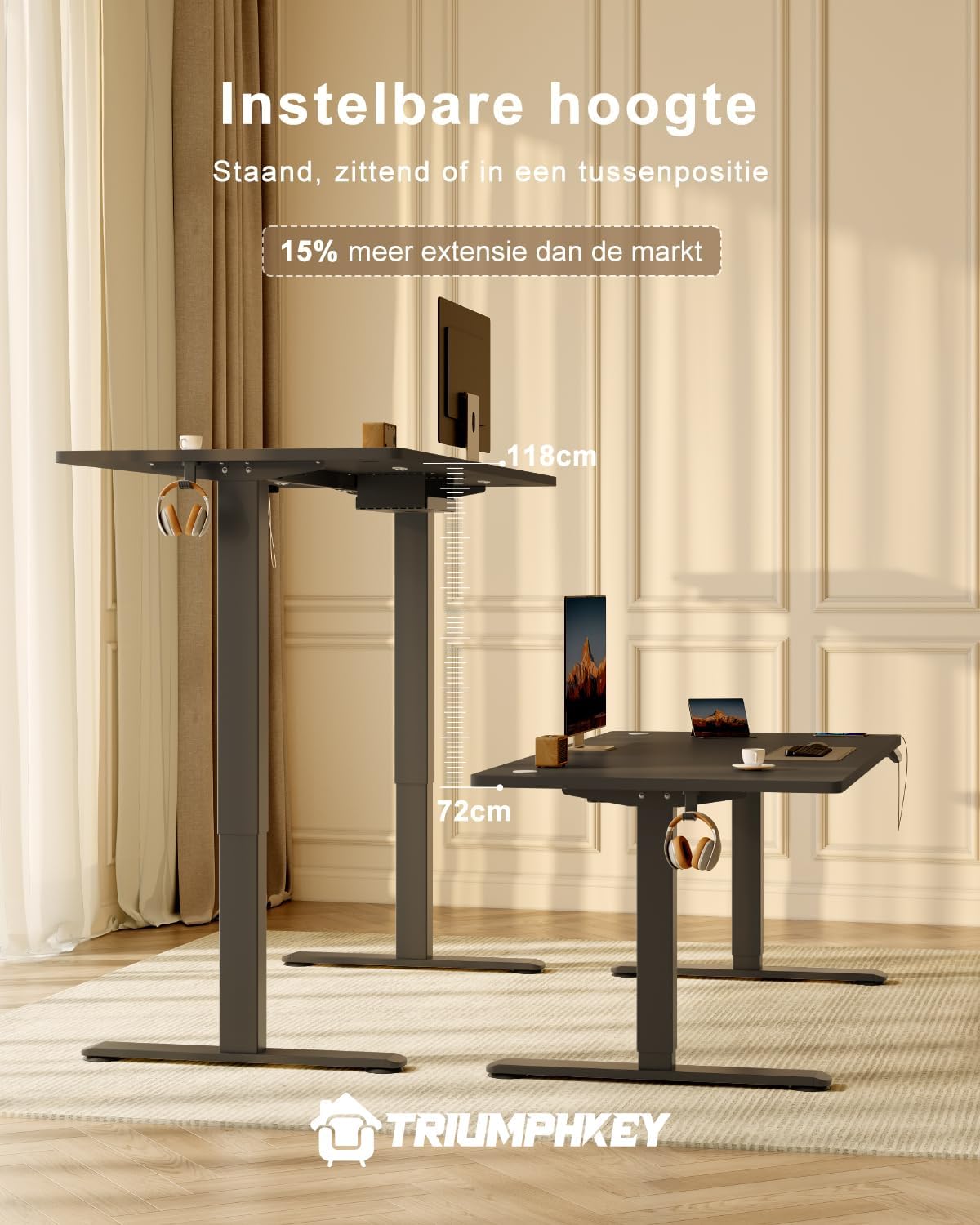
Image: The desk offers a wide range of height adjustment, from 72cm for sitting to 116cm for standing.
Care and Maintenance
Proper care and maintenance will ensure the longevity and optimal performance of your Triumphkey Electric Desk.
- Cleaning: Wipe the desk surface and legs with a soft, damp cloth. Avoid using harsh chemicals or abrasive cleaners that could damage the finish.
- Regular Checks: Periodically check all screws and connections to ensure they remain tight. Re-tighten if necessary.
- Cable Management: Ensure cables are not pinched or tangled, which could affect desk movement or cause damage.
- Motor Care: The electric motor is designed for durability. Avoid continuous operation for extended periods without rest. If the motor feels warm, allow it to cool down.
Troubleshooting
If you encounter any issues with your Triumphkey Electric Desk, refer to the following common troubleshooting steps:
| Problem | Possible Cause | Solution |
|---|---|---|
| Desk does not move. | No power, loose cable connection, or motor overload. | Check if the power cord is securely plugged into the wall outlet and the control box. Ensure all motor cables are firmly connected. Unplug the desk for 10 minutes to reset the motor if it was overloaded, then try again. |
| Anti-collision system activates frequently. | Obstruction in the desk's path or sensitive setting. | Clear any objects from the desk's path (above or below). If the issue persists without visible obstruction, consult the full manual for anti-collision sensitivity adjustment (if available). |
| Desk moves unevenly or makes unusual noises. | Loose connections, uneven load, or damaged component. | Ensure all assembly screws are tightened. Distribute weight evenly on the desk surface. If the problem persists, contact customer support. |
For more detailed troubleshooting or issues not listed here, please refer to the comprehensive user manual provided with your product or contact Triumphkey customer support.
Product Specifications
Detailed specifications for the Triumphkey Height Adjustable Electric Desk (Model 0193-1600).
| Specification | Detail |
|---|---|
| Brand | TRIUMPHKEY |
| Model Number | 0193-1600 |
| Color | Black |
| Product Dimensions (L x W x H) | 160 x 80 x 72-116 cm (63 x 31.5 x 28.3-45.7 inches) |
| Product Weight | 26.5 kg (58.4 lbs) |
| Material | Alloy Steel, Engineered Wood |
| Max. Weight Capacity | 70 kg (154 lbs) |
| Special Features | Ergonomic, Height Adjustable, Built-in USB Port, Wheels (for mobility) |
| Noise Level | Less than or equal to 50dB |

Image: Detailed product dimensions, including the adjustable height range.

Image: The reinforced desk legs (80x50mm) provide unwavering stability.
Warranty and Support
Triumphkey is committed to providing high-quality products and customer satisfaction.
Return Policy
This product is subject to a 30-day refund/replacement policy from the date of purchase. Please retain your proof of purchase for any claims.
Customer Support
For any questions, technical assistance, or warranty claims, please contact Triumphkey customer support through the retailer where you purchased the product or visit the official Triumphkey website for contact information.
Seller: Triumphkey Store
Related documents0193-1600


Ask a question about this manual
Ask about setup, troubleshooting, compatibility, parts, safety, or missing instructions. Manuals+ will review the question and use this page’s manual context to help answer it.