
1. Introduction
This manual provides essential information for the proper installation, operation, and maintenance of the CBBEXP C200H-BC051-V2 Base Module. This industrial automation product is designed for reliable performance in various control systems. Please read this manual thoroughly before using the product to ensure safe and efficient operation.
2. Product Overview
The CBBEXP C200H-BC051-V2 is a critical component in industrial automation systems, known for its robust design and reliable functionality. It is supplied new and sealed, ensuring product integrity upon delivery.
2.1 Key Features
- Model: C200H-BC051-V2
- Type: Industrial Automation Product
- Condition: Supplied 100% NEW and sealed in box.
- Designed for integration into Programmable Logic Controller (PLC) hardware systems.
2.2 Product Image
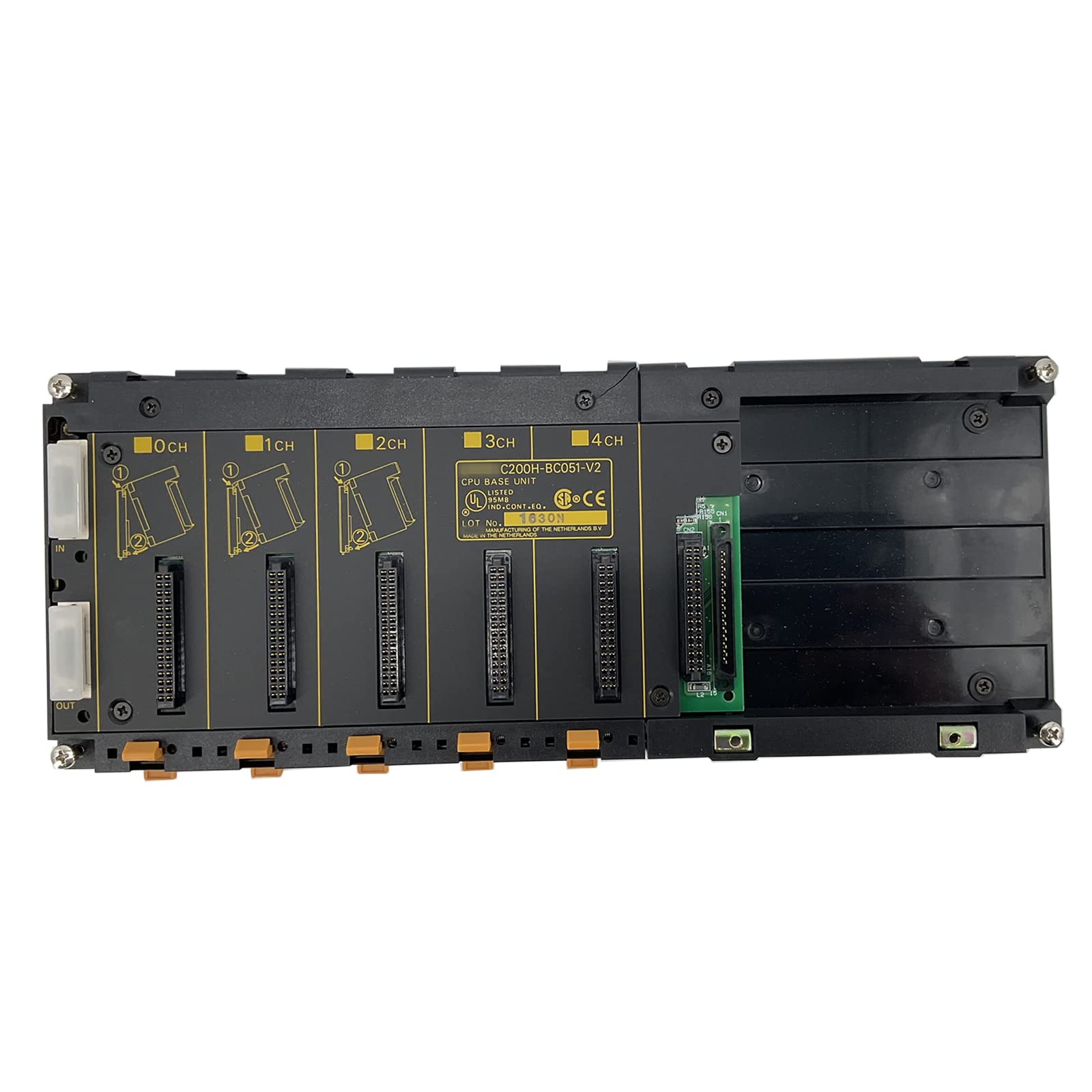
Figure 1: Front view of the CBBEXP C200H-BC051-V2 Base Module. This image displays the module's casing and connection points, typical for industrial automation components.
3. Setup Instructions
Proper setup is crucial for the safe and reliable operation of the C200H-BC051-V2 Base Module. Always follow industry standards and local regulations.
- Safety First: Ensure all power to the system is disconnected before installation. Use appropriate personal protective equipment (PPE).
- Mounting: Securely mount the module in a suitable industrial enclosure, ensuring adequate ventilation and protection from environmental factors such as dust, moisture, and extreme temperatures.
- Wiring: Connect the module to the PLC backplane or associated components according to the system's wiring diagrams. Verify all connections are firm and correctly polarized.
- Power Connection: Once all other connections are made, connect the power supply. Double-check voltage requirements before applying power.
- Initial Power-Up: Apply power and observe the module's indicator lights for proper initialization. Refer to the PLC system's diagnostic tools for any error codes.
4. Operating Instructions
The C200H-BC051-V2 Base Module operates as an integral part of a larger PLC system. Its operation is typically managed through the PLC's programming and control interface.
- System Integration: Ensure the module is correctly recognized and configured within the PLC programming software.
- Monitoring: Monitor the module's status indicators and the PLC's diagnostic interface for normal operation. Any abnormal indicators should be investigated immediately.
- Parameter Configuration: Adjust any necessary operational parameters through the PLC's human-machine interface (HMI) or programming environment, as required by the application.
- Normal Shutdown: Follow the PLC system's recommended shutdown procedures to prevent data corruption or damage to components.
5. Maintenance
Regular maintenance helps ensure the longevity and reliable performance of your CBBEXP C200H-BC051-V2 Base Module.
- Power Disconnection: Always disconnect power before performing any maintenance tasks.
- Cleaning: Periodically clean the module and its enclosure to prevent dust accumulation, which can lead to overheating or electrical issues. Use a soft, dry cloth or compressed air. Avoid liquid cleaners.
- Connection Check: Regularly inspect all wiring connections for looseness, corrosion, or damage. Re-tighten connections as needed.
- Environmental Inspection: Ensure the operating environment remains within specified temperature and humidity ranges. Check for any signs of moisture ingress or excessive heat.
- Firmware Updates: If applicable, consult the manufacturer's documentation for information on firmware updates and apply them as recommended.
6. Troubleshooting
This section provides guidance for common issues you might encounter with the CBBEXP C200H-BC051-V2 Base Module.
6.1 Common Issues and Solutions
- Module Not Powering On:
- Check power supply connections and voltage.
- Verify that the power source is active.
- Inspect for any blown fuses in the system.
- Communication Errors:
- Ensure all communication cables are securely connected.
- Verify communication settings in the PLC software.
- Check for electromagnetic interference (EMI) sources.
- Module Malfunction/Error Indicators:
- Consult the PLC system's diagnostic manual for specific error codes.
- Perform a system reset (power cycle) if safe to do so.
- Inspect the module for visible damage.
If troubleshooting steps do not resolve the issue, contact technical support.
7. Specifications
| Model | C200H-BC051-V2 |
| Manufacturer | CBBEXP |
| Product Type | Industrial Automation Product (Base Module) |
| ASIN | B0C39XMCD4 |
| Date First Available | April 23, 2023 |
8. Warranty and Support
This section outlines the general warranty and support information for the CBBEXP C200H-BC051-V2 Base Module.
8.1 Return Policy
The product is eligible for a 30-day refund/replacement policy from the date of purchase. Please refer to your purchase documentation for specific terms and conditions.
8.2 Technical Support
For technical assistance, troubleshooting beyond this manual, or warranty claims, please contact the seller, Transnew-PLC, through the platform where the purchase was made. They specialize in PLC hardware and can provide expert guidance.