
BAOFENG UV 5RTP
Contents
Baofeng UV-5RTP 8W Dual Band Two Way Radio User Manual
Model: UV 5RTP | Brand: BAOFENG
1. Introduction
The Baofeng UV-5RTP is a high-performance 8-watt dual-band two-way radio designed for reliable communication across various applications, including amateur radio, outdoor activities, and professional use. This manual provides detailed instructions for the proper setup, operation, maintenance, and troubleshooting of your UV-5RTP radio to ensure optimal performance and longevity.
2. Package Contents
Please verify that all items listed below are included in your package:
- Baofeng UV-5RTP Radio Unit
- 1800mAh Li-ion Battery
- Antenna
- Desktop Charger
- Power Adapter
- Earpiece
- Belt Clip
- Hand Strap
- User Manual (this document)

This image displays the complete package contents of the Baofeng UV-5RTP radio, including the handheld unit, antenna, 1800mAh battery, desktop charger, power adapter, earpiece, and belt clip.
3. Product Features
The Baofeng UV-5RTP offers a robust set of features for enhanced communication:
- Tri-Power Output: Selectable power levels (8W/4W/1W) for varied communication needs.
- Dual Band Operation: Supports VHF (144-148MHz) and UHF (420-450MHz) frequencies for both reception and transmission.
- 128 Channels: Ample storage for your preferred frequencies.
- VOX Function: Voice-activated transmission for hands-free operation.
- Durable Design: Rugged metallic frame designed to withstand outdoor conditions.
- High Compatibility: Fully compatible with classic UV-5R series accessories.
- LCD Display: High-definition LED display for clear visibility in various lighting conditions.
- Emergency Alert: Built-in function for urgent situations.
- FM Radio: Built-in FM radio receiver.

This visual illustrates the selectable power output levels of the Baofeng UV-5RTP, allowing users to choose between 1 Watt (Low), 4 Watts (Mid), and 8 Watts (High) for optimal communication range and battery efficiency.

This detailed diagram labels the various parts of the Baofeng UV-5RTP radio, providing a clear reference for identifying the antenna, power/volume knob, Push-to-Talk (PTT) button, LCD screen, and other essential controls and indicators.

This image demonstrates the broad compatibility of the Baofeng UV-5RTP with existing UV-5R series accessories, such as different types of earpieces, programming cables for customization, and car chargers for on-the-go power.
4. Setup Guide
4.1. Battery Installation
- Align the battery pack with the grooves on the back of the radio.
- Slide the battery upwards until it clicks securely into place.
- To remove, press the battery release latch (usually at the bottom of the battery) and slide the battery downwards.
4.2. Antenna Attachment
- Screw the antenna clockwise into the connector on the top of the radio until it is finger-tight. Do not overtighten.
4.3. Charging the Battery
- Connect the power adapter to the desktop charger.
- Plug the power adapter into a standard AC outlet.
- Place the radio (with battery installed) or the battery alone into the charging slot of the desktop charger.
- The LED indicator on the charger will typically turn red while charging and green when fully charged.
5. Operating Instructions
5.1. Power On/Off and Volume Control
- To power on, rotate the knob on the top of the radio clockwise. You will hear a click and the display will light up.
- Continue rotating the knob clockwise to increase volume, and counter-clockwise to decrease volume.
- To power off, rotate the knob counter-clockwise until you hear a click.
5.2. Frequency/Channel Mode (VFO/MR)
- Press the VFO/MR button to switch between Frequency Mode (VFO) and Channel Mode (MR).
- In Frequency Mode, you can manually input frequencies.
- In Channel Mode, you can select pre-programmed channels.
5.3. Transmitting (PTT)
- To transmit, press and hold the PTT (Push-to-Talk) button on the left side of the radio.
- Speak clearly into the microphone.
- Release the PTT button to stop transmitting and listen for a response.
5.4. Adjusting Power Levels
- Press the MENU button.
- Navigate to the TXP (Transmit Power) setting (usually Menu 2).
- Press MENU again to enter the setting.
- Use the UP/DOWN arrows to select High (8W), Mid (4W), or Low (1W).
- Press MENU to confirm, then EXIT to return.
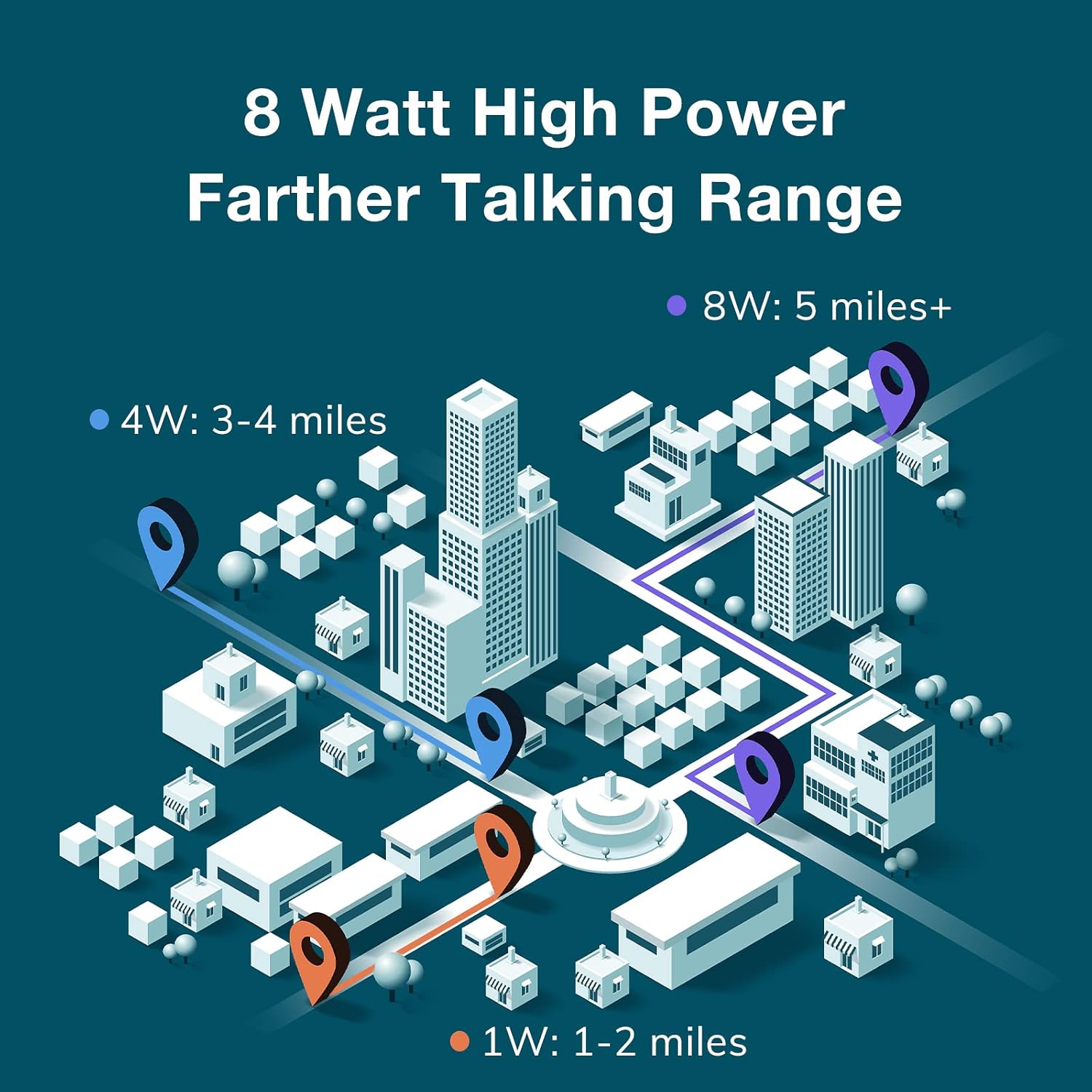
This graphic visually represents the extended communication range achieved with the Baofeng UV-5RTP's 8-watt high power output, showing estimated distances for 1W, 4W, and 8W settings in a typical city landscape.
5.5. VOX (Voice Operated Exchange)
- VOX allows transmission without pressing the PTT button when your voice is detected.
- Press MENU, navigate to the VOX setting (usually Menu 4).
- Press MENU again, use UP/DOWN to select a sensitivity level (1-10, 1 being most sensitive).
- Press MENU to confirm, then EXIT.
5.6. Keypad Lock
- To lock the keypad, press and hold the # key.
- Repeat the action to unlock the keypad.
5.7. Emergency Alarm
- To activate the emergency alarm, press the ALARM button (often the orange button on the side).
- Press it again to deactivate.
5.8. Programming
The Baofeng UV-5RTP can be programmed manually or via computer software (e.g., CHIRP) using a compatible programming cable. For detailed programming instructions, refer to online resources and the CHIRP software documentation.
6. Maintenance
6.1. Battery Care
- Avoid overcharging or completely draining the battery.
- Store the battery in a cool, dry place when not in use for extended periods.
- If the radio will not be used for a long time, remove the battery.
6.2. Cleaning the Unit
- Use a soft, damp cloth to clean the radio's exterior.
- Do not use harsh chemicals, solvents, or abrasive cleaners.
- Ensure the radio is powered off and the battery is removed before cleaning.
6.3. Storage
- Store the radio in a dry, dust-free environment.
- Keep it away from extreme temperatures and direct sunlight.
7. Troubleshooting
| Problem | Possible Cause | Solution |
|---|---|---|
| Radio does not power on. | Battery is low or not installed correctly. | Charge the battery fully. Ensure the battery is securely attached. |
| Cannot transmit or receive. | Incorrect frequency/channel, antenna not connected, or out of range. | Verify frequency/channel settings. Check antenna connection. Move closer to the other radio. |
| Poor audio quality. | Low battery, incorrect squelch level, or interference. | Charge battery. Adjust squelch level (SQL setting). Move away from sources of interference. |
| Keypad is unresponsive. | Keypad lock is active. | Press and hold the '#' key to unlock the keypad. |
8. Specifications
| Feature | Specification |
|---|---|
| Model Number | UV 5RTP |
| Frequency Range | VHF: 144-148MHz (RX only), UHF: 420-450MHz (RX/TX) |
| Output Power | 8W / 4W / 1W (Tri-power) |
| Number of Channels | 128 |
| Battery Type | 1800mAh Lithium Ion (included) |
| Display Type | LCD |
| Dimensions (H x W x D) | 3.94 x 2.05 x 1.26 inches |
| Item Weight | 1.08 pounds |
| Special Features | Dual Band, Emergency Alarm, Keypad Lock, Long Range, Rechargeable |
| Tuner Technology | UHF VHF |
| Voltage | 7.4 Volts (DC) |
| Water Resistance Level | Not Water Resistant |
9. Warranty and Support
The Baofeng UV-5RTP comes with an 18-month warranty and lifetime support. For technical assistance, warranty claims, or any other inquiries, please contact BAOFENG customer service through their official channels or the retailer from whom you purchased the product.
Documents and downloads
Ask a question about this manual
Ask about setup, troubleshooting, compatibility, parts, safety, or missing instructions. Manuals+ will review the question and use this page’s manual context to help answer it.