1. Introduction
This manual provides essential information for the safe and efficient operation of your YougetTech 2500CFM Evaporative Air Cooler. Please read thoroughly before use to ensure proper setup, operation, and maintenance. This 3-in-1 portable cooling fan is designed to blow, humidify, and cool the air, offering a large coverage area and energy-efficient cooling.
2. Important Safety Instructions
- Always plug the unit into a grounded 120V, 60Hz electrical outlet.
- Do not operate the unit with a damaged cord or plug.
- Ensure the water tank is filled to the appropriate level. The unit features a water shortage protection system that automatically stops cooling when the water level is low to protect the pump.
- This evaporative air cooler is designed for use in outdoor or well-ventilated areas. It is not an air conditioning unit and does not use refrigerants to remove heat and humidity.
- Avoid using in high humidity indoor areas, as it introduces moisture into the air, which can make the room feel hotter and more humid.
- Keep children and pets away from the unit during operation.
- Do not block the air inlets or outlets.
- Unplug the unit before cleaning, maintenance, or when not in use.
3. Package Contents
Please check the package contents upon unboxing:
- Evaporative Cooler x 1
- Universal Wheels x 4
- Owner's Manual x 1
- Remote Control x 1
4. Product Overview and Parts Diagram
Familiarize yourself with the main components of your evaporative air cooler:

Figure 4.1: Front view of the YougetTech Evaporative Air Cooler.

Figure 4.2: Key features including Water Inlet, Drain Plug, Universal Caster, and Water Level Indicator.
- Control Panel: Top-mounted touch panel for all functions.
- Air Outlet: Front grilles for cool air dispersion.
- Water Inlet: Convenient opening for adding water (top and side access).
- Water Level Indicator: Transparent window to monitor water level.
- Drain Plug: Located at the bottom for easy water drainage.
- Universal Casters: 4 heavy-duty 360-degree wheels for mobility (2 with brakes).
- Air Filter/Cooling Pad: Located at the rear, accessible for cleaning.
5. Setup Guide
- Unpack the Unit: Carefully remove the evaporative air cooler from its packaging.
- Attach Universal Wheels: Insert the four universal wheels into the designated slots at the bottom of the unit. They are designed to simply push in. Two of the wheels include brakes for stability.
- Position the Cooler: Place the unit on a flat, stable surface in your desired outdoor or well-ventilated area. Ensure there is adequate space around the unit for proper airflow.
- Fill the Water Tank:
- Open the water inlet cover on the side or use the top-filling design.
- Pour clean water into the 8-gallon (30L) tank. You can also add ice for enhanced cooling.
- Monitor the water level indicator to avoid overfilling.

Figure 5.1: Top filling and water level indicator for easy refilling.
- Plug In: Connect the power cord to a suitable 120V, 60Hz electrical outlet. The unit features a long extension cord for flexible placement.
6. Operating Instructions
Your evaporative air cooler can be operated using the touch control panel on top of the unit or the included remote control.
6.1 Control Panel & Remote Control
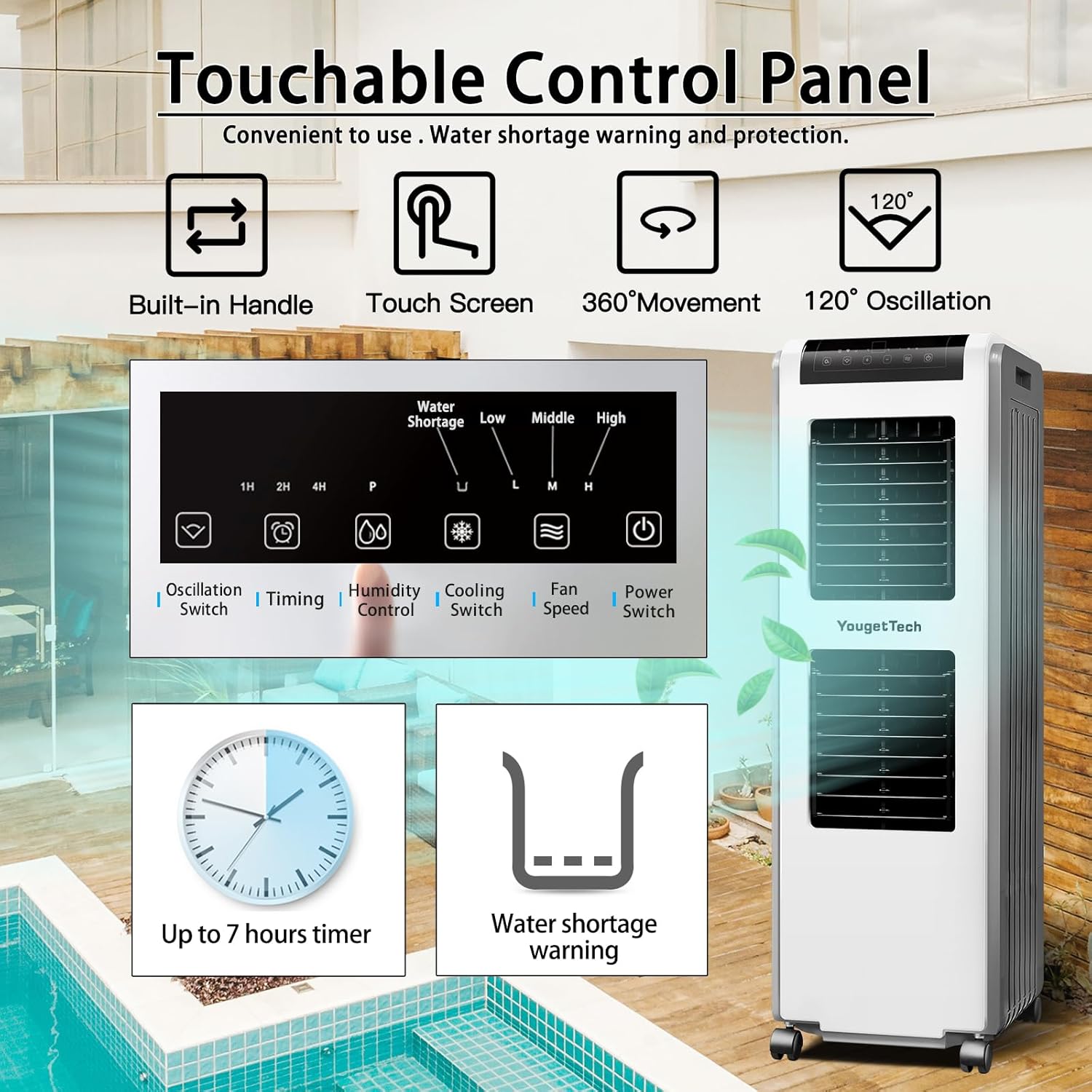
Figure 6.1: Touch Control Panel with various functions.
- Power Button (Ⓘ): Turns the unit ON or OFF.
- Fan Speed (L/M/H): Select Low, Medium, or High fan speed.
- Cooling Mode (❄): Activates or deactivates the evaporative cooling function.
- Oscillation Switch (↶): Controls the horizontal oscillation of the air vents for wider air distribution. The vertical vents can be manually adjusted.
- Timing Function (⏱): Set a timer for automatic shutdown (up to 7 hours).
- Humidity Control (💧): Adjusts humidity output (if applicable, typically tied to cooling mode).
- Water Shortage Reminder: An indicator light will illuminate when the water level is low.
6.2 Remote Control
The fully functional remote control allows you to operate the unit from up to 6 meters away. All functions available on the touch panel are also accessible via the remote.
6.3 Optimal Use
For best cooling performance, ensure the water tank is adequately filled. The unit is designed to cool areas up to 700 square feet with an air supply distance of 25 feet.

Figure 6.2: Illustrates the cooling capacity and air supply distance.
This evaporative cooler is suitable for various scenarios including patios, outdoor gatherings, commercial spaces, and industrial settings.

Figure 6.3: Versatile use in different environments.
6.4 Official Product Video
Video 6.1: Official product demonstration of the YougetTech 2500CFM Evaporative Air Cooler, highlighting its features and functionality.
7. Maintenance
Regular maintenance ensures optimal performance and longevity of your evaporative air cooler.
- Cleaning the Cooling Pad: The 60mm 3D honeycomb cooling pad is designed for enhanced performance and is easy to maintain. Periodically remove and clean the cooling pad to prevent mineral buildup and ensure efficient evaporation.
- Draining the Water Tank: Use the drain plug at the bottom of the unit to empty the water tank when not in use for extended periods or before cleaning.
- Cleaning the Air Filter: The large vent mesh filter at the rear should be cleaned regularly, especially if used in dusty environments or with pets, to maintain optimal airflow.
- General Cleaning: Wipe the exterior of the unit with a soft, damp cloth. Do not use harsh chemicals or abrasive cleaners.
8. Troubleshooting
| Problem | Possible Cause | Solution |
|---|---|---|
| Unit not cooling effectively | Low water level in tank. Cooling pad is dirty. High ambient humidity. | Refill water tank. Clean or replace cooling pad. Evaporative coolers are less effective in high humidity; consider alternative cooling methods or use in drier conditions. |
| Unit not turning on | No power supply. Power button not pressed. | Check power cord connection and wall outlet. Press the Power button on the control panel or remote. |
| Unusual noise during operation | Wheels not turning smoothly (when moving). Water pump issue. | Ensure wheels are clear of obstructions. Note: Some grinding noise from wheels when moving is normal. Check water level; if issue persists, contact support. |
| Water drops expelled from unit | Normal operation for evaporative coolers. | This is normal and indicates the humidification process. No action required. |
9. Specifications
| Feature | Detail |
|---|---|
| Brand | YougetTech |
| Model Name | MBC2800 |
| Air Flow Capacity | 2500 Cubic Feet Per Minute (CFM) |
| Reservoir Capacity | 8 Gallons (30 Liters) |
| Floor Area Coverage | Up to 700 Square Feet |
| Rated Power | 210 Watts |
| Voltage | 120 Volts |
| Number of Speeds | 3 (Low, Medium, High) |
| Product Dimensions (D x W x H) | 16.5"D x 16.5"W x 46.5"H |
| Item Weight | 35.5 pounds |
| Controls Type | Touch Panel & Remote Control |
| Special Features | Water Level Indicator, Easy to Install, Water Shortage Reminder, Top Filling, 7H Timer, Fast Cooling, Wide Oscillating |
| Recommended Uses | Commercial, Industrial, Residential |
10. Warranty and Support
Your YougetTech Evaporative Air Cooler comes with a 1-year manufacturer's warranty from the date of purchase.
For technical support, troubleshooting assistance, or warranty claims, please contact YougetTech customer service through the retailer where the product was purchased or visit the official YougetTech website for contact information.
Please retain your proof of purchase for all warranty-related inquiries.
