
CBBEXP 1794-ADN
CBBEXP 1794-ADN Flex I/O DeviceNet Adapter Module User Manual
Model: 1794-ADN
1. Introduction
This manual provides essential information for the proper installation, operation, and maintenance of the CBBEXP 1794-ADN Flex I/O DeviceNet Adapter Module. This module is designed for industrial automation applications, facilitating communication between Flex I/O modules and a DeviceNet network. Adherence to these instructions ensures reliable performance and longevity of the device.
2. Product Overview
The 1794-ADN is a DeviceNet adapter module for the Flex I/O system, enabling distributed I/O capabilities. It acts as a communication interface, allowing Flex I/O modules to exchange data with a DeviceNet master controller.
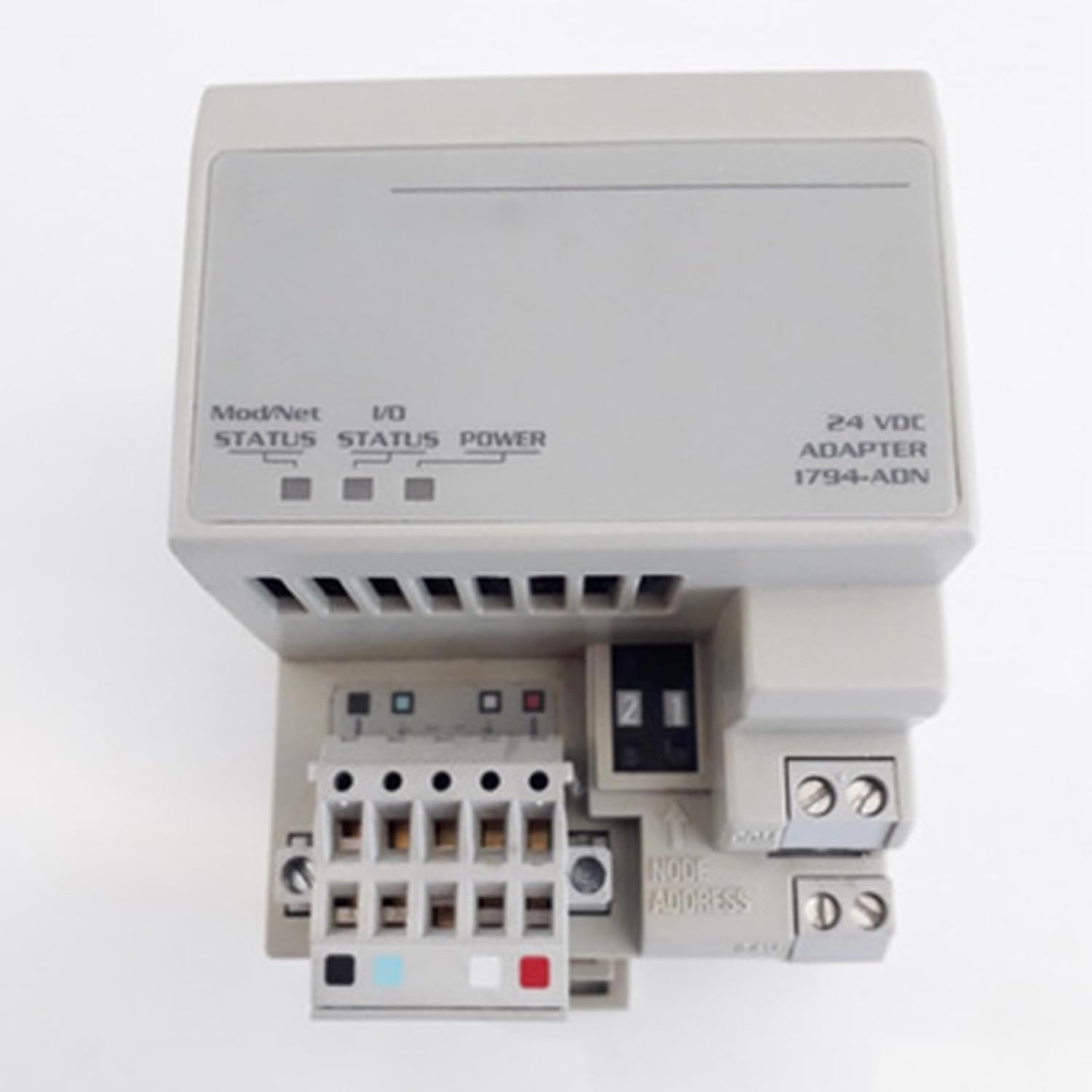
Figure 1: Front view of the CBBEXP 1794-ADN module, showing status indicators for Mod/Net, I/O, and Power, along with the 24 VDC adapter label and Node Address switch.
Key components include:
- Status Indicators: LEDs for Mod/Net, I/O, and Power provide visual feedback on the module's operational status.
- 24 VDC Power Input: The module requires a 24 VDC power supply for operation.
- DeviceNet Connection: Standard DeviceNet port for network communication.
- Node Address Switch: Used to set the unique DeviceNet node address for the module.
- Terminal Block: Provides connections for power and DeviceNet communication.

Figure 2: Side view of the CBBEXP 1794-ADN module, highlighting the compact design and mounting features.

Figure 3: Rear view of the CBBEXP 1794-ADN module, showing the connection points for the Flex I/O backplane and DeviceNet wiring.
3. Setup and Installation
Proper installation is crucial for the reliable operation of the 1794-ADN module. Follow these general steps:
- Mounting: Securely mount the Flex I/O terminal base unit to a DIN rail in an appropriate industrial enclosure.
- Module Insertion: Carefully insert the 1794-ADN adapter module onto the terminal base unit until it clicks into place.
- Node Address Configuration: Set the unique DeviceNet node address using the rotary switches located on the front of the module. Refer to your DeviceNet network documentation for available addresses.
- Power Connection: Connect a stable 24 VDC power supply to the designated terminals on the module. Ensure correct polarity.
- DeviceNet Connection: Connect the DeviceNet communication cable to the module's DeviceNet port. Ensure proper termination of the DeviceNet network.
- I/O Module Installation: Install the desired Flex I/O modules onto their respective terminal bases, adjacent to the 1794-ADN adapter.
- Network Configuration: Configure the 1794-ADN module within your DeviceNet master controller's software, specifying its node address and the I/O modules connected to it.
Warning: Ensure all power is disconnected before performing any wiring or installation procedures to prevent electrical shock or damage to the equipment.
4. Operating Instructions
Once installed and configured, the 1794-ADN module operates by facilitating data exchange between the DeviceNet network and the connected Flex I/O modules. The status indicators provide real-time feedback on its operational state:
- POWER LED:
- Green (Solid): Indicates that the module is receiving 24 VDC power.
- Off: No power is supplied to the module.
- MOD/NET STATUS LED: (Module/Network Status)
- Green (Solid): Module is online and communicating on the DeviceNet network.
- Green (Flashing): Module is online but not communicating (e.g., waiting for connection).
- Red (Solid): Recoverable fault.
- Red (Flashing): Unrecoverable fault.
- Off: Module is not powered or not on the network.
- I/O STATUS LED:
- Green (Solid): All configured I/O modules are operating correctly.
- Green (Flashing): I/O modules are operating, but some are not configured or are in a non-optimal state.
- Red (Solid): Fault detected in one or more I/O modules.
- Off: No I/O modules are connected or powered, or the adapter is not communicating.
5. Maintenance
The CBBEXP 1794-ADN module is designed for robust industrial use and requires minimal maintenance. However, periodic checks can help ensure optimal performance:
- Visual Inspection: Regularly inspect the module for any signs of physical damage, loose connections, or excessive dust accumulation.
- Cleaning: If necessary, gently clean the exterior of the module with a soft, dry cloth. Avoid using abrasive cleaners or solvents. Ensure power is off before cleaning.
- Environmental Conditions: Ensure the operating environment remains within the specified temperature and humidity ranges to prevent premature failure.
- Firmware Updates: Check the manufacturer's website periodically for any available firmware updates that may improve performance or address known issues.
6. Troubleshooting
If the 1794-ADN module is not functioning as expected, refer to the following troubleshooting guide:
- No Power (POWER LED Off):
- Verify the 24 VDC power supply is connected and operational.
- Check wiring to the power terminals for correct polarity and secure connections.
- MOD/NET STATUS LED Red or Flashing:
- Check the DeviceNet cable connections for integrity.
- Verify the DeviceNet network termination resistors are correctly installed.
- Ensure the module's node address is unique and correctly configured on the network.
- Check the DeviceNet master controller for network errors or configuration issues.
- I/O STATUS LED Red or Flashing:
- Inspect the connected Flex I/O modules for proper seating and power.
- Verify the configuration of the I/O modules within the DeviceNet master controller.
- Check the wiring to the individual I/O points for shorts or open circuits.
- Module Not Responding:
- Cycle power to the module.
- Re-verify all wiring and configuration settings.
- If issues persist, consult a qualified technician or contact support.
7. Specifications
| Parameter | Value |
|---|---|
| Model | 1794-ADN |
| Type | Flex I/O DeviceNet Adapter Module |
| Manufacturer | CBBEXP |
| Power Supply | 24 VDC |
| Network Protocol | DeviceNet |
| Operating Temperature | Refer to product datasheet for specific range |
| Storage Temperature | Refer to product datasheet for specific range |
| Humidity | Refer to product datasheet for specific range |
8. Warranty and Support
The CBBEXP 1794-ADN Flex I/O DeviceNet Adapter Module comes with a One-Year Warranty from the date of purchase. This warranty covers defects in materials and workmanship under normal use.
For technical support or warranty claims, please contact your supplier or the manufacturer directly. Ensure you have your product model number (1794-ADN) and purchase details available when seeking assistance.
Ask a question about this manual
Ask about setup, troubleshooting, compatibility, parts, safety, or missing instructions. Manuals+ will review the question and use this page’s manual context to help answer it.