Product Overview
The EUREKA ERGONOMIC ARCH-WN PC Stand Computer Cart is a versatile, height-adjustable 2-tier solution designed to organize your computer setup. It features a sturdy metal frame and durable panels, providing a stable platform for your PC tower and peripherals. The integrated wheels allow for easy mobility, making it suitable for various home and office environments.

Image: The EUREKA ERGONOMIC PC Stand Computer Cart positioned next to a desk in a modern home office. A computer tower is on the bottom shelf, and the top shelf is used for a mouse and keyboard, extending the desk workspace.
Key Features
- Height Adjustable Design: Manually adjustable from 23 1/4 inches to 33 1/4 inches to accommodate various desk heights and computer tower sizes, promoting better heat dissipation.
- 2-Tier Multifunctional Storage: The bottom shelf is designed for computer towers (including full-size ATX cases), while the top shelf can hold printers, smaller PCs, mixers, plants, documents, or magazines.
- Integrated Pegboard: A pegboard on the back provides organization for office supplies, such as power strips (accessories not included).
- Included Mousepad: A large mousepad is provided for the top shelf, offering a comfortable surface for mouse operation and arm rest.
- Enhanced Mobility: Equipped with four 360-degree rotating mute wheels, two of which have brakes, for smooth movement and stable positioning on various floor types.
- Durable Construction: Features an EPA TSCA Title VI & CARB Phrase Ⅱ Certified desktop panel with an anti-scratch finish and a thickened steel frame with a powder-coated finish for stability and longevity.
- Load Capacity: The bottom shelf supports up to 100 lbs, and the top shelf supports up to 80 lbs. When moving the cart, the total supported weight should not exceed 80 lbs.
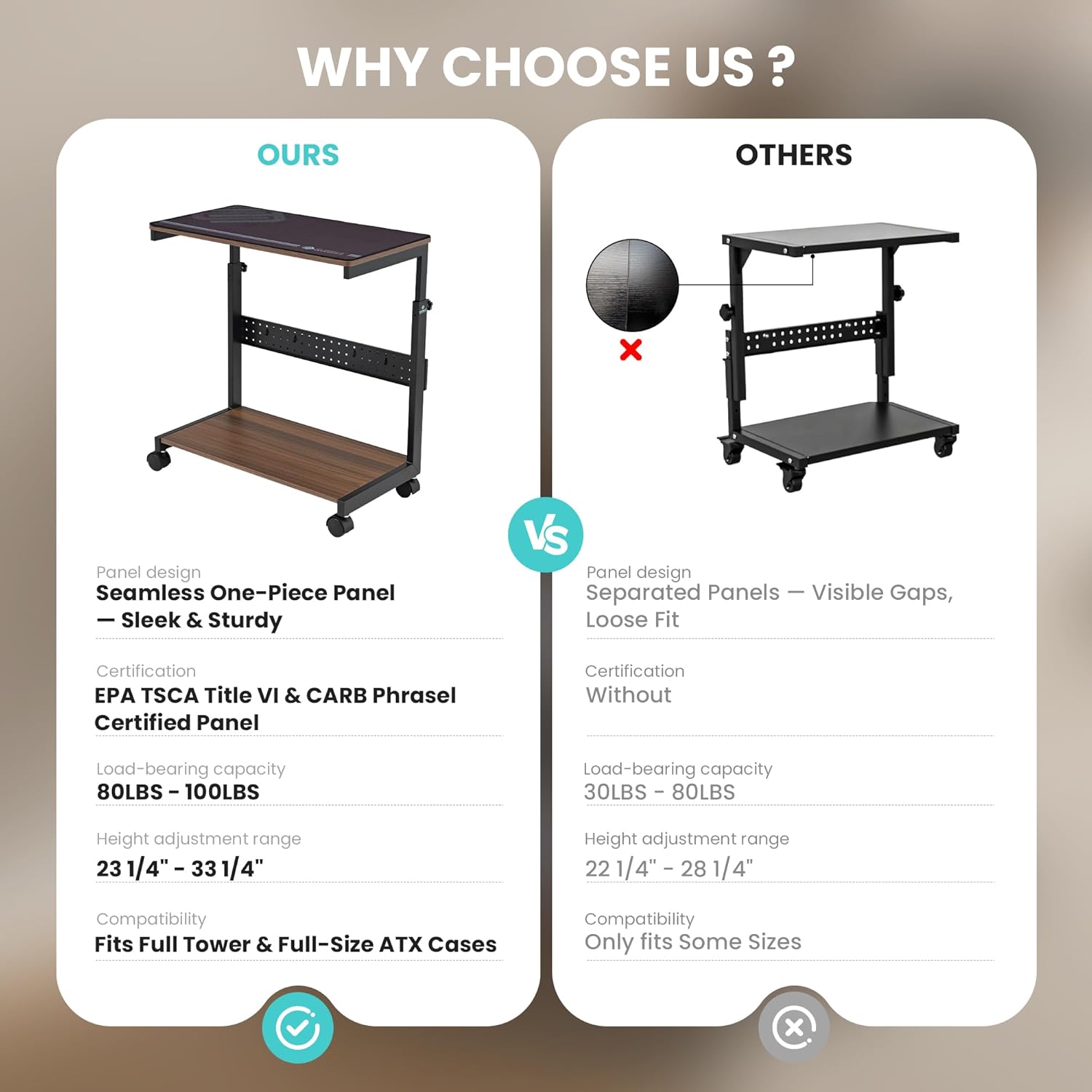
Image: A side-by-side comparison graphic illustrating the superior features of the EUREKA ERGONOMIC PC Stand, including its seamless one-piece panel, EPA TSCA Title VI & CARB Phrase II certification, higher load-bearing capacity (80-100 lbs), wider height adjustment range (23 1/4" - 33 1/4"), and compatibility with full tower and full-size ATX cases, compared to a generic alternative.
Setup Instructions
1. Unpacking and Component Check
Carefully unpack all components from the packaging. Verify that all parts listed in the assembly guide are present and undamaged. If any parts are missing or damaged, contact customer service immediately.
2. Assembly
Follow the step-by-step instructions provided in the included assembly manual. Ensure all screws and fasteners are tightened securely to guarantee stability. Do not overtighten.
3. Attaching Wheels
Attach the four 360-degree rotating wheels to the base of the cart. Ensure the two wheels with brakes are positioned on the same side for easier locking and unlocking.
4. Height Adjustment
To adjust the height of the top shelf, loosen the adjustment knobs on both vertical supports. Carefully raise or lower the top shelf to the desired height (between 23 1/4'' and 33 1/4''). Ensure both sides are adjusted to the same level for stability. Tighten the knobs firmly once the desired height is achieved.

Image: A visual guide demonstrating the six manual height adjustment levels of the EUREKA ERGONOMIC PC Stand, illustrating how the top shelf can be raised or lowered to fit different spaces and user preferences, with measurements from 23 1/4" to 33 1/4".
Operating Instructions
1. Placing Your Computer Tower
Place your computer tower on the bottom shelf. Ensure it is centered and stable. The bottom shelf can support up to 100 lbs.
2. Utilizing the Top Shelf
The top shelf can be used for various items such as a printer, a smaller PC, documents, or as an extended mouse and keyboard area with the provided mousepad. The top shelf supports up to 80 lbs.

Image: The EUREKA ERGONOMIC PC Stand shown in use, with a computer tower on its lower tier and a printer on the upper, height-adjusted tier, demonstrating its suitability for full-tower computer cases and its ability to provide additional workspace.
3. Using the Pegboard
The integrated pegboard on the back of the cart can be used to hang power strips, cables, or other small office accessories to keep your workspace tidy. (Pegboard accessories are sold separately).
4. Mobility and Stability
To move the cart, unlock the brakes on the two braked wheels. Gently push the cart to its new location. Once positioned, engage the brakes to secure the cart in place. When moving the cart, ensure the total weight on both shelves does not exceed 80 lbs to maintain stability.

Image: The EUREKA ERGONOMIC PC Stand demonstrating its 360-degree rotation capability and the functionality of its wheels with brakes, highlighting its ease of movement and stable positioning.
Maintenance
- Cleaning: Wipe surfaces with a soft, damp cloth. Avoid abrasive cleaners or harsh chemicals that may damage the finish.
- Fastener Check: Periodically check all screws and fasteners to ensure they remain tight. Retighten as necessary to maintain structural integrity.
- Wheel Maintenance: Keep the wheels free of dust and debris to ensure smooth operation.
- Mousepad Care: The included mousepad can be cleaned with a mild soap and water solution. Allow it to air dry completely before reuse.
Troubleshooting
- Wobbling:
- Ensure all assembly screws are tightened.
- Verify that the height adjustment knobs are securely fastened on both sides and that the top shelf is level.
- Check if the weight distribution on the shelves is even and within the specified load capacities.
- Difficulty Moving:
- Ensure the wheel brakes are disengaged.
- Check wheels for any obstructions or debris.
- Verify that the total weight on the cart does not exceed 80 lbs when attempting to move it.
- Top Shelf Not Level:
- Loosen the height adjustment knobs, re-level the top shelf, and then firmly retighten both knobs.
Specifications
| Model Number | ARCH-WN |
| Product Dimensions | 25.2 x 13.8 x 33.3 inches (L x W x H) |
| Item Weight | 19.4 pounds |
| Height Adjustment Range | 23 1/4'' to 33 1/4'' |
| Bottom Shelf Load Capacity | Up to 100 lbs |
| Top Shelf Load Capacity | Up to 80 lbs |
| Moving Load Capacity | Up to 80 lbs |
| Material | EPA TSCA Title VI & CARB Phrase Ⅱ Certified Panel, Thickened Steel Frame |
| Color | Walnut |
Warranty and Support
For any questions or assistance, please contact EUREKA ERGONOMIC customer service. Information regarding warranty coverage is typically included with your product packaging or available on the manufacturer's official website.
Contact: Refer to your product's packaging or the EUREKA ERGONOMIC website for the most current customer service contact information.
Product Videos
Video 1: Product Overview and Features
Description: This video provides a general overview of the EUREKA ERGONOMIC PC Stand, showcasing its design, two-tier structure, and how it can be used in a home office setup. It highlights the included mousepad and the ability to store a PC tower on the bottom shelf.
Video 2: Height Adjustment Demonstration
Description: This video demonstrates the manual height adjustment feature of the EUREKA ERGONOMIC PC Stand, showing how to raise and lower the top shelf to different levels. It also illustrates the placement of a PC tower on the lower shelf and other items on the top.
Video 3: Versatile Use Cases
Description: This video highlights the versatility of the EUREKA ERGONOMIC PC Stand, showing it used as a mobile laptop stand, a bedside cart, and a printer stand, demonstrating its adaptability to various environments and needs.