
1. Introduction
Thank you for choosing the Marsail Office Chair. This ergonomic desk chair is designed to provide comfort and support for extended periods of use. It features a 360° swivel, breathable mesh back, wide PU leather seat, adjustable lumbar support, flip-up armrests, and adjustable height. This manual provides detailed instructions for assembly, operation, maintenance, and troubleshooting to ensure optimal performance and longevity of your chair.

Image: The Marsail Office Chair, black, with a mesh back and leather seat, positioned at a desk in a modern office environment.
2. Safety Guidelines
Please read and understand all safety information before assembling and using the chair. Keep this manual for future reference.
- Weight Capacity: Do not exceed the maximum weight capacity of 300 lbs (136 kg). Exceeding this limit may cause damage to the chair or personal injury.
- Assembly: Ensure all screws and bolts are securely tightened before use. Periodically check and re-tighten fasteners as needed.
- Stability: Avoid standing on the chair or using it as a step stool. Do not lean excessively to one side or the back to prevent tipping.
- Children: Keep children away from the chair during assembly. Small parts may pose a choking hazard.
- Movement: Use caution when moving the chair, especially on uneven surfaces.
3. Package Contents
Before assembly, verify that all components are present and undamaged. If any parts are missing or damaged, please contact customer support.
- Backrest Assembly (Mesh)
- Seat Cushion Assembly (PU Leather)
- Headrest
- Armrests (2)
- Gas Lift Cylinder
- Star Base (5-star)
- Caster Wheels (5)
- Mechanism Plate
- Hardware Kit (Screws, Allen Wrench)
4. Assembly Instructions
Assembly typically takes 10-20 minutes. Follow these steps carefully. It is recommended to assemble the chair on a soft, clean surface to prevent scratches.
Step 1: Attach Casters to Base
Insert each of the five caster wheels into the holes at the end of each leg of the star base. Push firmly until they click into place.

Image: The five-star base with caster wheels attached, ready for the gas lift cylinder.
Step 2: Install Gas Lift
Place the gas lift cylinder into the center hole of the assembled star base. Ensure it is seated firmly.
Step 3: Attach Mechanism Plate to Seat Cushion
Align the mechanism plate with the screw holes on the underside of the seat cushion. Ensure the front of the mechanism plate faces the front of the seat. Secure with screws using the provided Allen wrench. Tighten all screws evenly.
Step 4: Attach Armrests to Seat Cushion
Attach the armrests to the sides of the seat cushion using the designated screws. Ensure the armrests are oriented correctly (left and right). Do not fully tighten all screws yet.
Step 5: Attach Backrest to Armrests and Seat Cushion
Align the backrest with the attachment points on the armrests. Connect the backrest to the armrests and then secure the armrests to the seat cushion. INSTALLATION NOTE: When connecting the armrests to the backrest, do not tighten all screws before aligning them with the corresponding holes. Align each screw with its respective hole and then tighten them one by one to ensure a proper installation.

Image: Close-up of the ergonomic backrest, highlighting the S-shaped design for spinal support and adjustable lumbar support.
Step 6: Install Headrest
Slide the headrest into the designated slots at the top of the backrest. Secure it with the provided screws. INSTALLATION NOTE: When installing the headrest, do not tighten all screws on both sides before aligning them with the corresponding holes. Make sure to align each screw with its respective hole first, and then tighten them one by one to ensure a successful installation.

Image: A detailed view of the flexible headrest, illustrating its 45-degree tilt and 3.9-inch height adjustment capabilities.
Step 7: Connect Seat Assembly to Gas Lift
Carefully place the assembled seat and backrest onto the gas lift cylinder. Press down firmly to ensure a secure connection.
Your Marsail Office Chair is now assembled. Please test all functions before regular use.
5. Adjustments and Operation
The Marsail Office Chair offers several adjustable features to customize your seating experience for optimal comfort and ergonomics.
5.1. Seat Height Adjustment
To adjust the seat height, pull the lever located under the right side of the seat upwards. While pulling the lever, stand up to raise the seat or remain seated to lower it. Release the lever to lock the height in place. The seat height is adjustable from 16.9 inches to 20.9 inches.
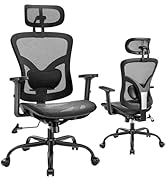
Image: Diagram illustrating the adjustable seat height range of the chair.
5.2. Backrest Tilt and Rocking Function
The backrest can tilt between 90° and 120°. To recline, pull the lever located under the left side of the seat outwards. Lean back to your desired angle and push the lever inwards to lock the position. To enable the rocking function, pull the lever outwards and allow the chair to rock freely. Push the lever inwards to lock the backrest in an upright position.

Image: A person demonstrating the chair's recline feature, showing the range from 90 degrees (upright) to 120 degrees (relaxed).
5.3. Adjustable Lumbar Support
The adaptive lumbar support is adjustable by 2 inches to match various body heights and shapes. Locate the knob or lever on the back of the chair, typically at the lower back section, and adjust it to provide optimal support for your lower back.

Image: A detailed view of the lumbar support mechanism, indicating its 2-inch vertical adjustment range.
5.4. Flip-up Armrests
The armrests can be flipped up by 90° to allow the chair to be pushed closer to a desk or to provide more freedom of movement. Simply lift the armrests upwards until they lock into the vertical position. To return them to the down position, gently pull them down.

Image: A composite image demonstrating the 90-degree flip-up armrests, showing their utility for stable arm support during work, increased freedom for relaxation, and space-saving when not in use.
5.5. Headrest Adjustment
The headrest is adjustable in height (up to 3.9 inches) and tilt (up to 45°). Gently push or pull the headrest to adjust its height, and tilt it forward or backward to find your preferred angle for neck and head support.

Image: A detailed view of the headrest's adjustment mechanism, highlighting its 45-degree tilt and 3.9-inch vertical adjustment capabilities.
6. Care and Maintenance
Proper care and maintenance will extend the life of your Marsail Office Chair.
- Cleaning: Wipe clean with a damp cloth. For PU leather, use a mild leather cleaner if necessary. Avoid harsh chemicals or abrasive cleaners.
- Mesh Back: The breathable mesh back can be gently wiped with a damp cloth. Do not scrub vigorously.
- Inspection: Periodically check all screws and bolts to ensure they are tight. Re-tighten if any feel loose.
- Casters: Clean caster wheels regularly to remove hair, dust, and debris that may hinder smooth movement.
- Avoid Direct Sunlight: Prolonged exposure to direct sunlight can cause the PU leather to fade or crack.
7. Specifications
| Feature | Detail |
|---|---|
| Brand | Marsail |
| Model Name | MSOC5 |
| Color | Black |
| Product Dimensions (D x W x H) | 22.83"D x 23.62"W x 43.31"H |
| Seat Height Range | 16.9" - 20.9" |
| Maximum Weight Recommendation | 300 Pounds (136 kg) |
| Back Style | Solid Back with Mesh |
| Special Features | Adjustable Height, Adjustable Lumbar, Flip-up Arm Rest, Ergonomic, Head Support |
| Backrest Tilt Angle | 90° to 120° |
| Lumbar Support Adjustment | 2 inches |
| Headrest Adjustment | 3.9 inches height, 45° tilt |
| Gas Lift | Class 3 SGS Certified |
| Casters | 360° smooth swivel, quiet, suitable for wood, carpet, tile |
| Materials | PU Leather (seat, armrests, headrest), Breathable Mesh (backrest), High-density Foam (seat) |
Image: A visual representation of the chair's key dimensions, including height, width, depth, and seat height range, along with the 300 lbs maximum load capacity.
8. Troubleshooting
If you encounter any issues with your Marsail Office Chair, please refer to the following common problems and solutions. If the problem persists, contact customer support.
- Chair Sinks or Does Not Hold Height:
- Ensure the gas lift lever is fully engaged.
- Check if the gas lift cylinder is damaged. If so, it may need replacement.
- Chair Wobbles or Feels Unstable:
- Verify that all screws and bolts are securely tightened, especially those connecting the mechanism plate to the seat and the armrests to the backrest.
- Ensure the gas lift is properly seated in the star base.
- Casters Not Rolling Smoothly:
- Check for hair, dust, or debris wrapped around the caster wheels and remove them.
- Ensure casters are fully inserted into the base.
- Backrest Does Not Recline or Lock:
- Ensure the tilt lock lever is properly engaged or disengaged.
- Check for any obstructions in the reclining mechanism.
- Squeaking Noises:
- Tighten all screws and bolts.
- Apply a small amount of silicone lubricant to moving parts if necessary, avoiding contact with fabric or leather.
9. Warranty and Customer Support
Marsail provides a 5-year after-sales guarantee for this office chair. This warranty covers issues such as missing parts, product damage, or other unsatisfactory issues.
If you experience any problems or have questions, please contact our dedicated customer support team via the email address provided in the instruction manual (refer to the physical manual included with your product). Our team typically responds within 24 hours during workdays.
Thank you for choosing Marsail. We are committed to ensuring your satisfaction.


