
FEZIBO B0C372YQK5
FEZIBO Height Adjustable Electric Standing Desk User Manual
Model: B0C372YQK5
1. Introduction
Thank you for choosing the FEZIBO Height Adjustable Electric Standing Desk. This manual provides essential information for the safe assembly, operation, and maintenance of your new desk. Please read these instructions carefully before beginning assembly and retain them for future reference.
Important Safety Warnings
WARNING: This desk is heavy and requires proper assembly to ensure stability. Do not exceed the weight limit of 176 pounds. Be cautious when adjusting the height of the desk to prevent tripping hazards. Always follow the instructions provided for safe use and maintenance.
- Ensure all components are present and undamaged before assembly.
- Assemble the desk on a soft, clean surface to prevent scratches.
- Keep children and pets away from the desk during operation.
- Do not place hands or objects near moving parts during height adjustment.
- Disconnect power before cleaning or maintenance.
2. Components Checklist
Before assembly, verify that all parts listed below are included in your package. If any parts are missing or damaged, please contact customer support.
- Desktop (Splice Board)
- Desk Frame (Legs and Crossbar)
- Electric Motor and Control Box
- Keypad Controller
- 4 Drawers (Fabric/Faux Leather)
- Keyboard Tray
- Hooks (for accessories)
- Storage Shelf/Monitor Stand
- Power Adapter and Cable
- Assembly Hardware (screws, bolts, Allen wrenches)
- Cable Management Tray
- Replaceable Lockable Casters (optional, may be included)
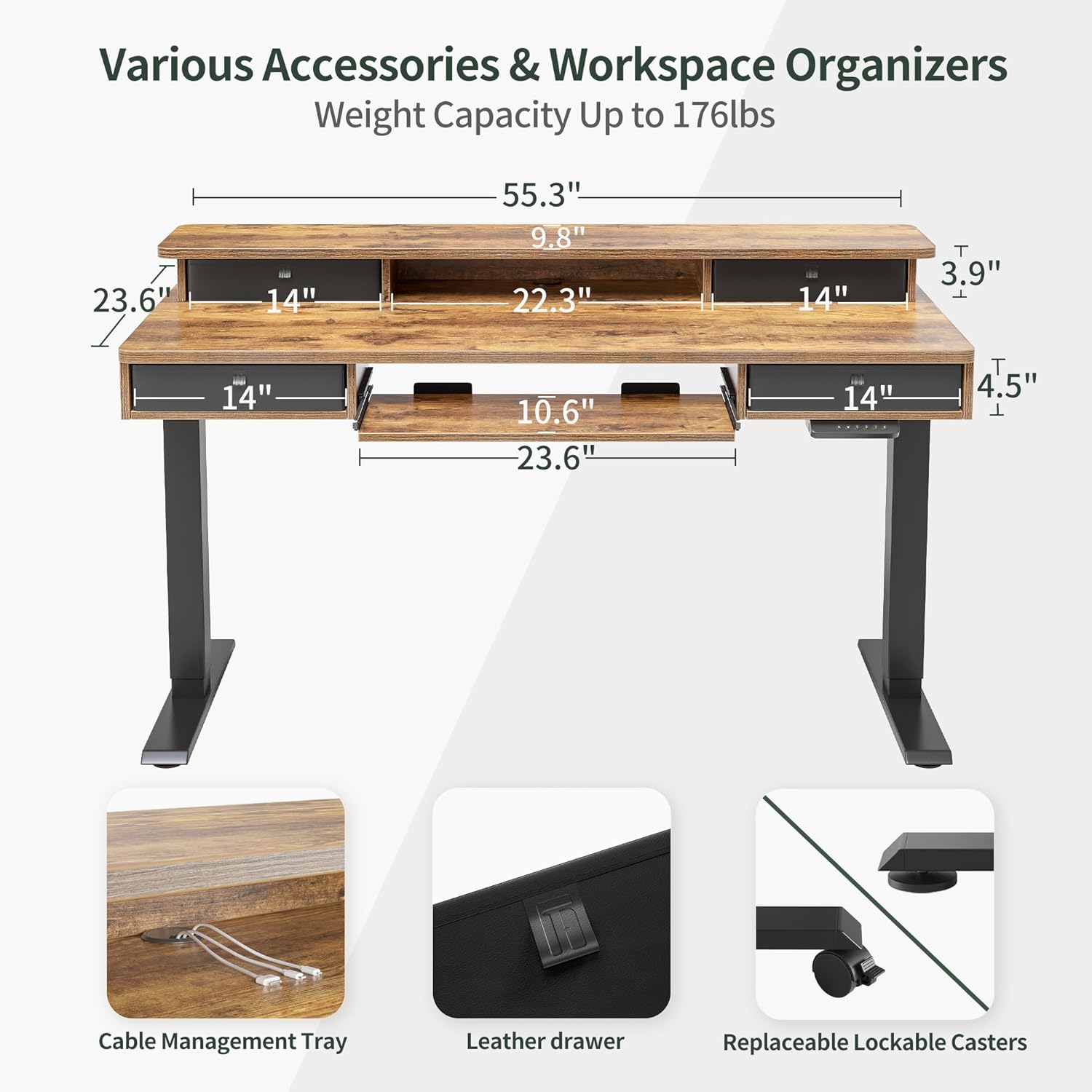
Image: Overview of desk dimensions and included accessories.
3. Assembly Instructions
Assembly typically requires two people due to the weight and size of the components. Follow the steps below carefully. Refer to the included graphical instructions for detailed diagrams.
- Unpack and Organize: Carefully unpack all components and lay them out on a clean, soft surface. Verify all parts against the checklist.
- Assemble the Desk Frame: Attach the lifting columns to the foot supports. Connect the crossbar between the two lifting columns. Ensure all bolts are securely tightened.
- Attach the Desktop: Carefully place the desktop onto the assembled frame. Align the pre-drilled holes and secure the desktop to the frame using the provided screws.
- Install the Motor and Control Box: Mount the electric motor and control box to the designated locations on the underside of the desktop or frame, following the specific instructions for wiring.
- Install the Keypad Controller: Attach the keypad controller to the front edge of the desk, typically on the right side, and connect its cable to the control box.
- Assemble and Install Drawers: Construct the four drawers and slide them into their designated slots within the desk structure.
- Attach Keyboard Tray: Mount the sliding keyboard tray mechanism to the underside of the desk and attach the tray itself.
- Install Storage Shelf: Secure the top storage shelf/monitor stand to the desktop.
- Connect Power: Plug the power adapter into the control box and then into a wall outlet.
- Cable Management: Use the cable management tray and ties to organize all power and control cables for a tidy workspace.

Image: Fully assembled FEZIBO standing desk with accessories.

Image: Detailed view of the desk's storage options: four drawers, a storage cubicle, and a wooden stand.

Image: Dimensions and load capacity of the keyboard tray.
4. Operating Instructions
Your FEZIBO standing desk features an intelligent keypad controller for easy height adjustment and memory presets.
Keypad Controller Functions

Image: Multi-Function Intelligent Keypad Controller.
- Up & Down Buttons (▲ / ▼): Press and hold to adjust the desk height manually. Release to stop at the desired height.
- Memory Presets (1, 2, 3): The desk has 3 programmable memory buttons. To set a height: adjust the desk to your desired height, then press the 'M' button (or similar memory set button, if present) followed by the desired number (1, 2, or 3). To recall a preset height, simply press the corresponding number button.
- Automatic Anti-Collision Technology: The desk is equipped with a sensor that detects obstacles during height adjustment. If an obstacle is detected, the desk will automatically stop and reverse slightly to prevent damage.
- Screen Lock Button (S): This button may be used to lock the keypad to prevent accidental adjustments. Press and hold 'S' to activate/deactivate.
Height Adjustment Range
The desk can be adjusted from a minimum height of 27 inches to a maximum height of 46 inches, at a speed of 1 inch per second. The motor operates with a low noise level, typically under 50 dB.

Image: Desk height adjustment range and smooth operation.
Ergonomic Use
Utilizing the height adjustment feature allows you to switch between sitting and standing positions throughout your workday, promoting better posture and reducing discomfort associated with prolonged sitting.

Image: Ergonomic benefits of using an adjustable height desk.

Image: Anti-Collision Technology in action.
5. Maintenance
Regular maintenance ensures the longevity and optimal performance of your FEZIBO standing desk.
- Cleaning: Wipe the desktop and frame with a soft, damp cloth. Avoid harsh chemicals or abrasive cleaners that could damage the finish.
- Cable Management: Periodically check and reorganize cables to prevent tangles and ensure they do not interfere with the desk's movement.
- Fastener Check: Every few months, check all screws and bolts to ensure they remain tight. Retighten if necessary.
- Motor Inspection: Ensure the motor and control box are free from dust and obstructions. Do not attempt to open or repair the motor unit yourself.
6. Troubleshooting
If you encounter issues with your desk, refer to the common problems and solutions below. If the problem persists, contact customer support.
- Desk Not Moving:
- Check if the power cable is securely plugged into both the desk and the wall outlet.
- Ensure the keypad is not locked (if applicable, press and hold 'S' to unlock).
- Perform a motor reset: Consult your specific graphical instructions for the reset procedure, which typically involves holding down certain buttons for a few seconds until the desk moves to its lowest position and resets.
- Motor Error Displayed:
- An error code on the display usually indicates an issue. Refer to your specific manual for error code meanings. Often, a power cycle (unplugging for 30 seconds and plugging back in) or a motor reset can resolve this.
- Desk Wobbles:
- Ensure all assembly screws and bolts are securely tightened, especially those connecting the frame components.
- Verify the desk is on a level surface. Adjust the leveling feet if necessary.
- Ensure the weight on the desk does not exceed the maximum capacity of 176 lbs and is evenly distributed.
- Anti-Collision System Triggering Frequently:
- Check for any obstructions under or around the desk.
- The sensitivity of the anti-collision system might be adjustable. Refer to your specific manual for instructions on adjusting sensitivity.
7. Specifications
| Feature | Detail |
|---|---|
| Brand | FEZIBO |
| Model | B0C372YQK5 |
| Product Dimensions (D x W x H) | 24"D x 55"W x 47"H |
| Color | Rustic Brown |
| Style | Modern |
| Base Material | Alloy Steel |
| Top Material Type | Engineered Wood |
| Lifting Mechanism | Electric |
| Minimum Height | 27 Inches |
| Maximum Height | 46 Inches (Note: Data provided states 34.19 Feet, which is incorrect. Using 46 inches from feature bullets.) |
| Number of Drawers | 4 |
| Included Components | Keyboard Tray, Hooks |
| Maximum Weight Recommendation | 176 Pounds |
| Noise Level | Under 50 dB |
| Required Assembly | Yes |
| Recommended Number of People for Assembly | 1 (Note: User reviews suggest 2 people are better for heavy parts) |

Image: Noise level comparison for the desk's operation.
8. Warranty and Customer Support
Warranty Information
This FEZIBO product comes with a Limited Warranty. Please refer to the warranty card included with your product for specific terms, conditions, and duration. Retain your proof of purchase for warranty claims.
Customer Support
For any questions, missing parts, assembly assistance, or troubleshooting not covered in this manual, please contact FEZIBO customer support. You can typically find contact information on the FEZIBO official website or through the retailer where you purchased the product.
When contacting support, please have your product model number (B0C372YQK5) and purchase date ready.
For general inquiries or to visit the brand store, you may refer to the FEZIBO Brand Store.
Related documentsB0C372YQK5


Ask a question about this manual
Ask about setup, troubleshooting, compatibility, parts, safety, or missing instructions. Manuals+ will review the question and use this page’s manual context to help answer it.