Introduction
The INSOON 5-in-1 Robot Building Set offers an engaging and educational experience for children aged 6 and up. This versatile kit allows users to construct five different robotic models: a Wall Robot, Engineering Robot, Mech Dinosaur, Tank, and Stunt Car. Each model can be controlled via a physical remote control or a dedicated mobile application, providing multiple modes of interaction including path mode, gyro mode, and programming mode. This set is designed to enhance hand-eye coordination, fine motor skills, imagination, and logical thinking through hands-on building and interactive play.

Image: The INSOON 5-in-1 Robot Building Set showcasing its various forms, including the Wall Robot, Engineering Robot, Mech Dinosaur, Tank, and Stunt Car, alongside the remote control and app interface.
Setup
Unboxing and Initial Assembly
Carefully unpack all components from the box. Verify that all 520 pieces are present according to the included parts list in the instruction manual. Begin assembly by following the step-by-step instructions provided in the detailed building guide. Only one model can be built at a time using the provided pieces.

Image: A child and an adult engaged in the assembly process of the robot building set, demonstrating the hands-on nature of the product.
Battery Installation
The robot requires batteries for operation. Locate the battery compartment on the main control unit. Insert the required batteries, ensuring correct polarity (+/-). Refer to the battery diagram on the product packaging or in the manual for specific battery type and quantity. The remote control also requires separate batteries.

Image: A section of the product packaging illustrating the battery installation process for the robot's main unit, indicating battery type and placement.
Operating Instructions
Remote Control Operation
Once the robot is assembled and batteries are installed, power on both the robot and the remote control. The remote operates on a 2.4GHz frequency, providing a stable signal. Use the joysticks and buttons on the remote to control the robot's movement and actions. Familiarize yourself with the remote's layout for forward, backward, turning, and specific model functions.
App Control and Modes
For enhanced control and interactive play, download the official INSOON app. Scan the QR code provided on the product packaging or in the manual to access the download link. Once installed, connect the app to your robot via Bluetooth. The app offers various control modes:
- Path Mode: Draw a path on your device screen, and the robot will follow it.
- Gyro Mode: Control the robot's movement by tilting your mobile device.
- One-handed and Two-handed Driving Mode: Standard virtual joystick controls for intuitive movement.
- Programming Mode: Drag and drop command blocks to create custom sequences of actions for the robot.
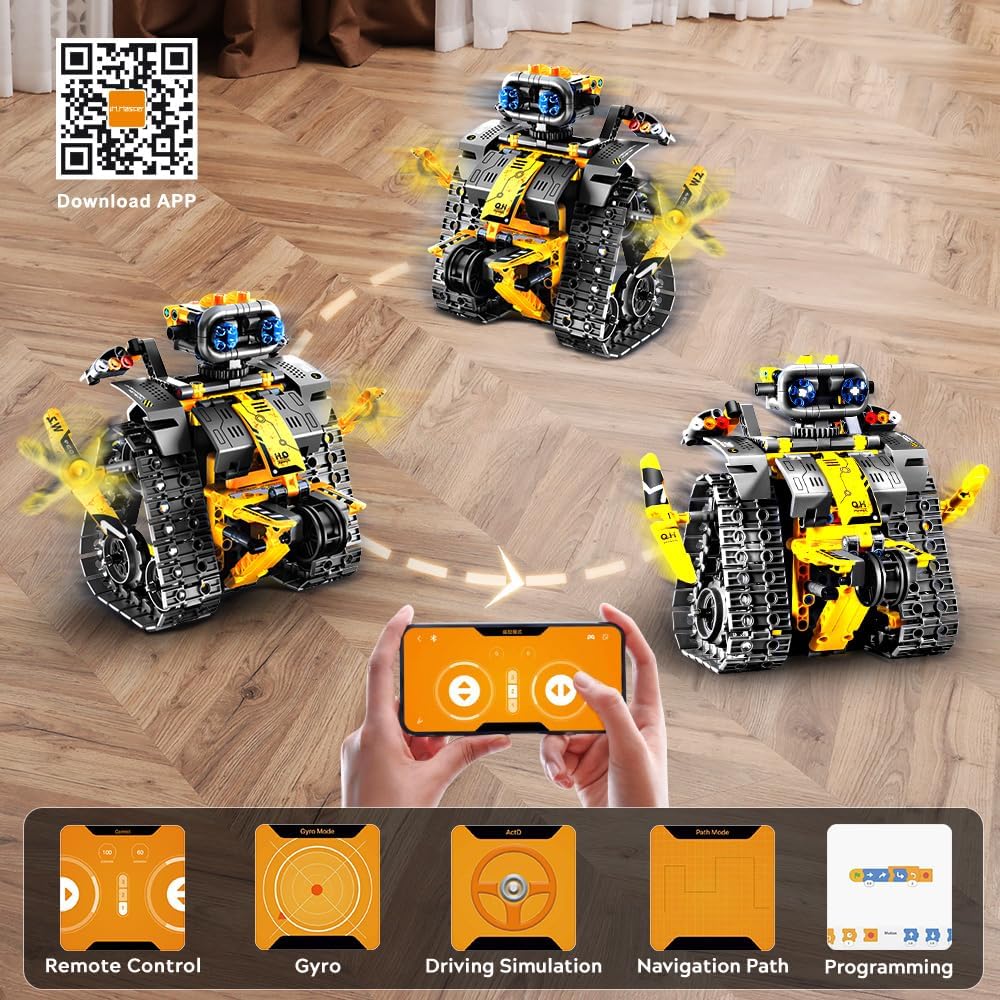
Image: The INSOON mobile application interface, displaying options for remote control, gyro mode, driving simulation, navigation path, and programming, along with a QR code for app download.
Product Features in Action
The robot models feature movable joints, rotatable tracks, and a 360-degree rotating head, allowing for dynamic play and interaction. These flexible components enable the robot to navigate various terrains and perform different actions depending on the assembled model.

Image: Detailed views highlighting the robot's freely adjustable hands, rotatable tracks, movable joints, and 360-degree rotating head, showcasing its articulation.
Official Product Video
Video: An official product video demonstrating the assembly process, various robot transformations, app control functionalities, and remote control operation of the INSOON Robot Toys Building Set.
Maintenance
Cleaning
To clean the robot and its components, use a soft, dry cloth. Avoid using water or cleaning solutions, as these can damage the electronic parts. For stubborn dirt, a slightly damp cloth can be used, but ensure all parts are completely dry before reassembly or storage.
Storage
When not in use, store the robot and its components in a cool, dry place away from direct sunlight and extreme temperatures. Keep the pieces organized to prevent loss and facilitate future assembly. The original packaging can be used for storage.
Battery Care
Always remove batteries from the robot and remote control if they will not be used for an extended period. Dispose of used batteries responsibly according to local regulations. Do not mix old and new batteries, or different types of batteries. Ensure batteries are inserted with correct polarity.
Troubleshooting
Common Issues and Solutions
- Robot not responding: Check battery levels in both the robot and the remote control. Ensure both devices are powered on and properly paired.
- App connectivity issues: Make sure Bluetooth is enabled on your mobile device and the robot is within range. Restart the app and the robot if connection problems persist.
- Movement problems: Verify that all gears and tracks are correctly assembled and free from obstructions. Ensure the motor unit is securely connected.
- Parts missing or damaged: Contact customer support for assistance with replacement parts.
Specifications
Product Specifications
| Feature | Detail |
|---|---|
| Product Dimensions | 1 x 1 x 1 inches |
| Item Weight | 0.847 ounces |
| Model Number | 8039 |
| Recommended Age | 6 years and up |
| Number of Pieces | 520 |
| Control Method | App & Remote Control (2.4GHz) |

Image: A visual representation of the product's various components and their approximate dimensions, aiding in understanding the scale and parts included.
Warranty and Support
Warranty Information
This product comes with a standard manufacturer's warranty covering defects in materials and workmanship. Please retain your proof of purchase for any warranty claims. For detailed warranty terms and conditions, refer to the information provided with your product packaging or contact INSOON customer support.
Customer Support
For any questions, concerns, or technical assistance regarding your INSOON 5-in-1 Robot Building Set, please contact our customer support team. You can typically find contact information on the product packaging or on the official INSOON website. Please have your model number (8039) and purchase details ready when contacting support.