1. Setup
1.1 Included Components
Your MAGIC-REFINER MK32 keyboard package includes:
- MK32 82-Key Hot Swappable Wired Mechanical Keyboard
- Acrylic Wrist Rest
- Custom Coiled USB-C Cable
- Keycap Puller
- Switch Puller
1.2 Connectivity
The MK32 keyboard offers versatile connectivity options:
- Wired (USB-C): Connect the keyboard directly to your device using the provided USB-C cable.
- 2.4GHz Wireless: For a stable and fast wireless connection, use the dedicated 2.4GHz dongle.
- Bluetooth: Connect wirelessly to compatible devices via Bluetooth.
To switch between connectivity modes, locate the switch on the top edge of the keyboard. Select your desired mode (Wired, 2.4G, or Bluetooth).
1.3 Physical Adjustments
The keyboard features two-level adjustable feet on the underside to customize your typing angle for optimal comfort.

Image: Overall view of the MAGIC-REFINER MK32 keyboard with vibrant RGB lighting.
2. Operating Instructions
2.1 Basic Keyboard Functions
The MK32 is an 82-key, 75% form factor keyboard. All standard alphanumeric and function keys operate as expected. Refer to your operating system's documentation for specific key combinations.
2.2 RGB Lighting Control
The keyboard features double-sided RGB LEDs with 18 default lighting effects. You can adjust multiple brightness levels and flowing backlight speeds. Use the FN key in combination with other keys (refer to the included function card) to:
- Cycle through 18 lighting effects.
- Adjust brightness levels.
- Control backlight speed.
- Control base and keyboard lighting effects separately.

Image: Dynamic RGB lighting effects illuminating the transparent keycaps and base of the MK32 keyboard.
2.3 Rotary Knob Functionality
The rotary knob located on the top right of the keyboard provides convenient media control:
- Rotate: Adjusts system volume (clockwise for up, counter-clockwise for down).
- Press: Toggles play/pause for media playback.

Image: The 82-key layout of the MK32 keyboard, highlighting the convenient rotary knob for media control.
2.4 Hot-Swappable Switches
The MK32 features a hot-swappable PCB, allowing you to easily replace switches without soldering. It supports 99% of 3/5-pin MX-similar mechanical switches. The keyboard comes equipped with custom Ice-rock linear switches, designed for smooth and quick feedback with lower sound.
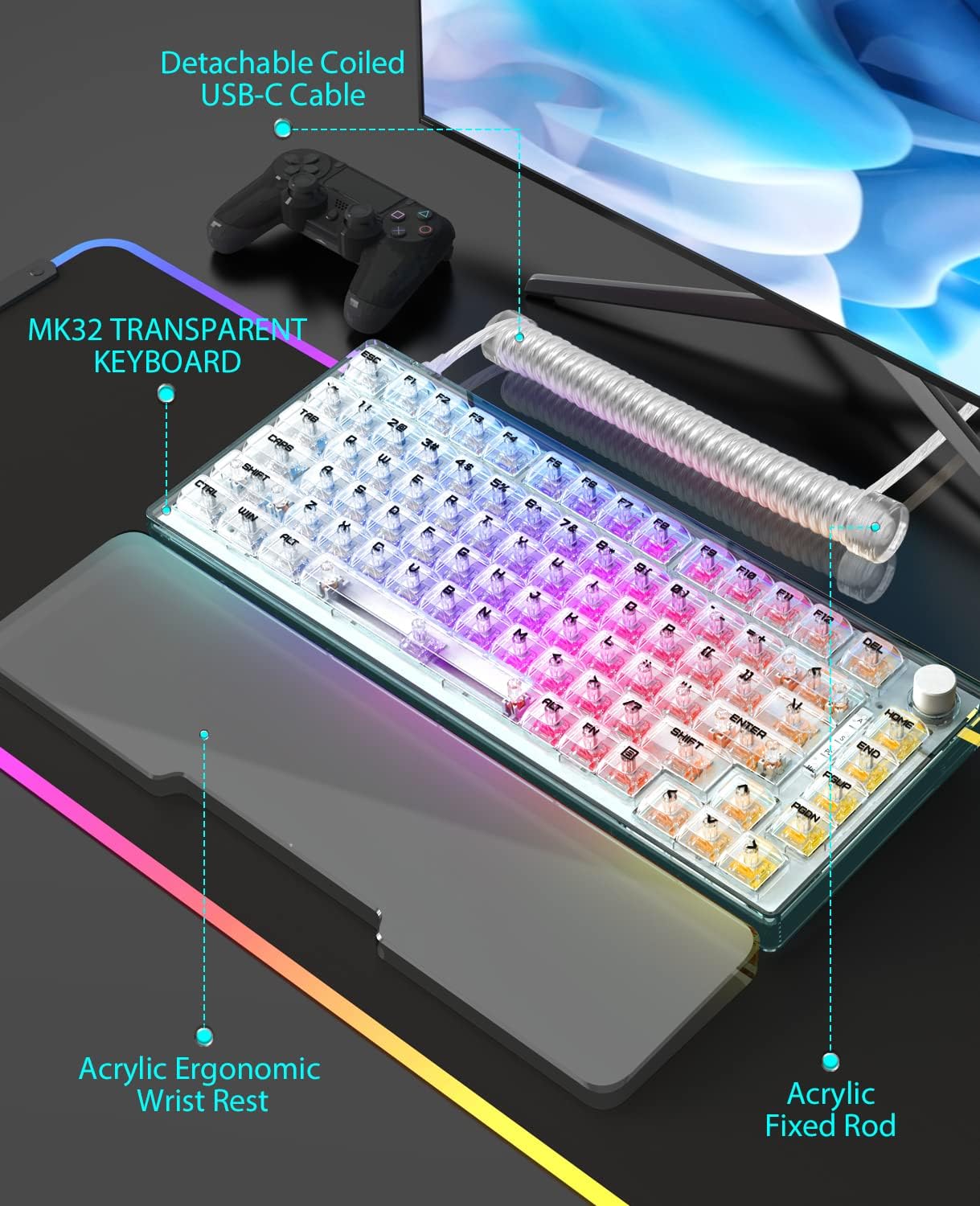
Image: A close-up view of the transparent OEM profile keycaps, showcasing their clear design and the underlying switches.
2.5 System Compatibility
The keyboard is compatible with a wide range of operating systems and devices, including:
- PC (Windows series)
- Android
- Linux
- iOS
- Gaming Consoles: PS4, Xbox Series X|S, Xbox One
3. Maintenance
3.1 Cleaning the Keyboard
To maintain optimal performance and appearance, regularly clean your keyboard:
- Use a soft brush or compressed air to remove dust and debris from between keycaps.
- Wipe the keycaps and frame with a slightly damp, lint-free cloth. Avoid harsh chemicals.
- For the acrylic wrist rest, wipe clean with a damp cloth as needed, especially if it's white and prone to showing dirt.
3.2 Replacing Switches and Keycaps
Utilize the included keycap puller to carefully remove keycaps. Use the switch puller to gently extract switches from the PCB. When inserting new switches, ensure the pins are aligned correctly to avoid damage. Press firmly until the switch clicks into place.

Image: The MK32 keyboard paired with its ergonomic acrylic wrist rest and custom coiled USB-C cable.
4. Troubleshooting
4.1 Connectivity Issues
- Wired: Ensure the USB-C cable is securely connected to both the keyboard and your device. Try a different USB port or cable.
- 2.4GHz Wireless: Verify the 2.4GHz dongle is properly inserted into your device. Ensure the keyboard is switched to 2.4GHz mode.
- Bluetooth: Ensure Bluetooth is enabled on your device and the keyboard is in pairing mode. Re-pair the device if necessary.
4.2 Key Malfunctions
If a key is unresponsive or inconsistent:
- Carefully remove the keycap and switch using the provided tools.
- Inspect the switch for any visible damage or debris. Clean if necessary.
- Re-insert the switch firmly. If the issue persists, try replacing it with one of the spare switches or a known working switch.
4.3 RGB Lighting Issues
If the RGB lighting is not functioning correctly:
- Check the keyboard's lighting settings using the FN key combinations.
- Ensure the brightness level is not set to minimum.
- If using wireless mode, ensure the battery has sufficient charge.
5. Specifications
| Feature | Detail |
|---|---|
| Model Number | MK32 |
| Layout | 82-Key, 75% Form Factor |
| Connectivity | Wired (USB-C), 2.4GHz Wireless, Bluetooth |
| Switches | Hot-swappable, Custom Ice-rock Linear Switches (40g force) |
| Keycaps | Transparent OEM Profile Keycaps |
| Backlighting | Double-sided RGB LEDs (18 effects, adjustable brightness/speed) |
| Material | Japanese silencing NANO cotton, high-density EVA, acrylic, TPU |
| Special Features | Ergonomic Wrist Rest, Transparent Base, Rotary Knob, Two-level Adjustable Feet |
| Dimensions | 10 x 5 x 1 inches (Package) |
| Item Weight | 10.4 ounces |
6. Warranty & Support
6.1 Protection Plans
Optional protection plans are available for your product:
- 3-Year Protection Plan
- 4-Year Protection Plan
- Complete Protect (monthly billing)
For details on coverage and terms, please refer to the specific protection plan documentation.
6.2 Manufacturer Support
For any product inquiries, technical assistance, or warranty claims, please contact MAGIC-REFINER customer support.
Manufacturer: MAGIC-REFINER
For additional information and support, visit the MAGIC-REFINER Store on Amazon.


