
1. Product Overview
The Jensen JA4B is a compact 4-channel Class-D car audio amplifier designed to deliver powerful and clear sound. This amplifier integrates a Digital Signal Processor (DSP) for advanced audio tuning, controllable via a dedicated mobile application. Its efficient Class-D design ensures high power output with minimal heat generation, making it suitable for various vehicle installations.
Key features include:
- Jensen DSP AMP App compatibility (Apple/Android) for comprehensive control.
- Customizable RGB illumination for aesthetic integration.
- Versatile input options: High Level (speaker wire) and Low Level (RCA).
- Adjustable Bass Boost at 45 Hz for enhanced low-frequency response.
- CTA-2006-D Certified for reliable power ratings.

Figure 1.1: Front view of the Jensen JA4B amplifier, showcasing its compact design and illuminated Jensen logo.
2. Setup and Installation
2.1 Safety Precautions
- Disconnect the vehicle's negative battery terminal before starting any electrical work.
- Ensure all wiring is properly insulated to prevent short circuits.
- Use appropriate wire gauges as recommended in the specifications.
- Mount the amplifier securely in a location that allows for adequate ventilation and is protected from moisture and excessive heat.
2.2 Mounting the Amplifier
Choose a mounting location that is dry, well-ventilated, and away from direct sunlight or heat sources. Secure the amplifier using the provided mounting hardware. Ensure there is sufficient space around the amplifier for air circulation.
2.3 Wiring Connections
Proper wiring is crucial for optimal performance and safety. Refer to the diagrams below for connection points.
2.3.1 Power and Speaker Connections
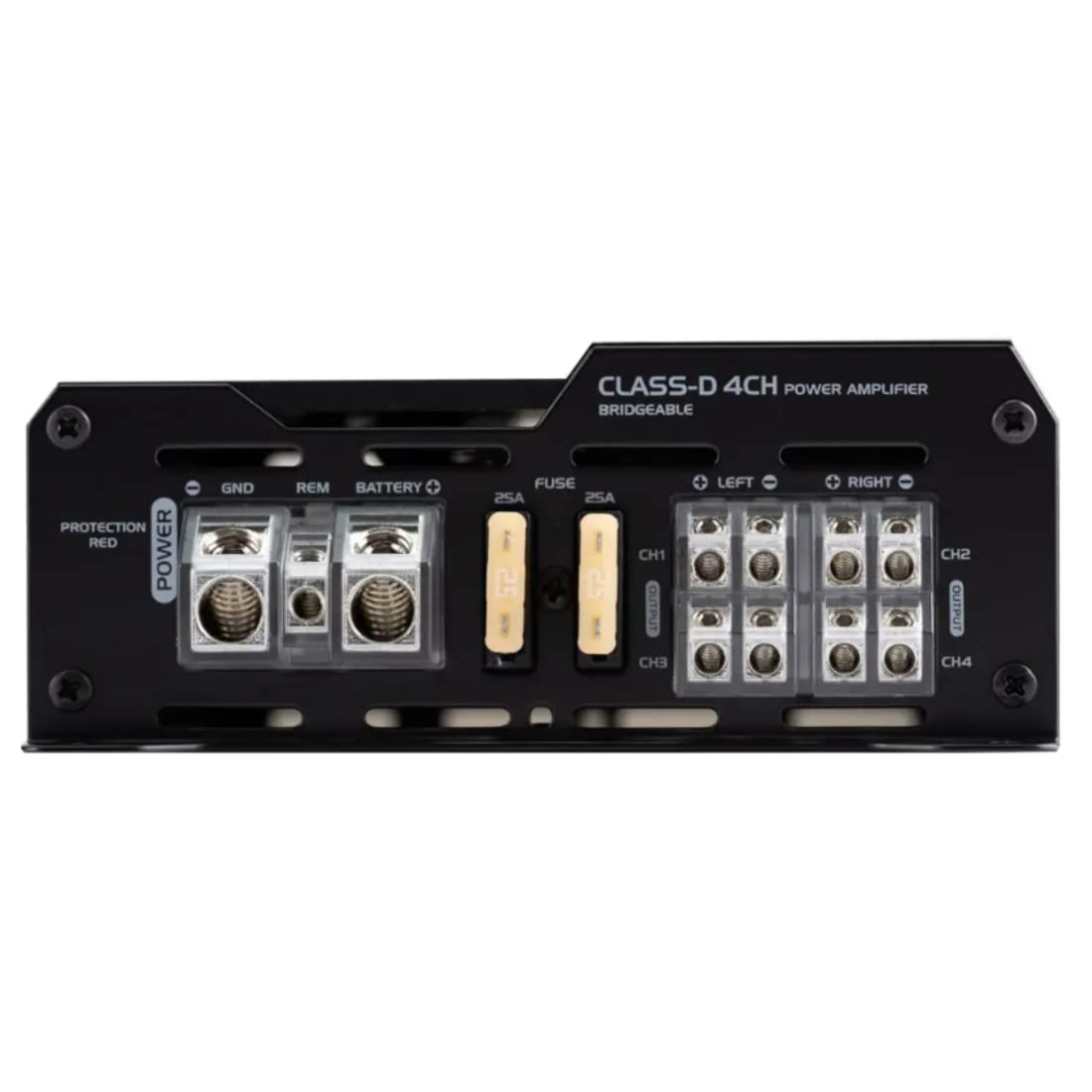
Figure 2.1: Rear view of the Jensen JA4B amplifier, detailing the power input, fuse, and speaker output terminals.
- Power (BATTERY+): Connect a 4-8 AWG power wire from the amplifier to the positive terminal of the vehicle's battery. Install an in-line fuse (not supplied) within 18 inches of the battery.
- Ground (GND): Connect a 4-8 AWG ground wire from the amplifier to a clean, unpainted metal surface on the vehicle's chassis. Ensure a solid electrical connection.
- Remote (REM): Connect a 18 AWG remote turn-on wire from the amplifier to the remote output of your head unit. This wire turns the amplifier on and off with the head unit.
- Speaker Outputs (CH1, CH2, CH3, CH4): Connect your speakers to the corresponding output terminals. The amplifier supports 4-channel operation. Refer to your speaker's impedance for proper connection. Recommended speaker wire is 12-16 AWG.
- Fuses: The amplifier is equipped with two 25A fuses. Ensure these are correctly seated.
2.3.2 Signal Input Connections

Figure 2.2: Top view of the Jensen JA4B amplifier, illustrating the signal input options and DSP control area.
- Low Level (RCA) Inputs: Connect RCA cables from your head unit's pre-amp outputs to the amplifier's RCA inputs (CH1/CH2, CH3/CH4).
- High Level (Speaker Wire) Inputs: If your head unit does not have RCA outputs, connect the speaker outputs from your head unit directly to the amplifier's high-level input terminals.
- RCA Pass Through Outputs: These outputs allow you to send the audio signal to another amplifier in your system.
3. Operating the Amplifier
3.1 Initial Power On
Once all connections are secure, reconnect the vehicle's negative battery terminal. Turn on your head unit. The amplifier should power on, indicated by the illuminated Jensen logo.
3.2 DSP App Control
The Jensen JA4B amplifier features an integrated Digital Signal Processor (DSP) that can be controlled via the Jensen DSP AMP App, available for Apple and Android devices. This app allows for precise audio tuning.
- Download the "Jensen DSP AMP" app from your device's app store.
- Ensure your amplifier is powered on.
- Open the app and follow the on-screen instructions to connect to your amplifier via Bluetooth.
- Within the app, you can adjust various audio parameters, including:
- Gain Adjustment: Variable from 200 mV to 6 V, allowing you to match the amplifier's input sensitivity to your head unit's output.
- Crossovers: Adjustable High-Pass and Low-Pass Crossovers (32-320 Hz) to filter frequencies for specific speakers.
- Bass Boost: Adjustable at 45 Hz to enhance bass response.
- Equalization: Fine-tune the frequency response.
- Time Alignment: Adjust speaker delays for optimal sound staging.
- RGB Illumination: Customize the color of the Jensen logo illumination.
4. Maintenance
The Jensen JA4B amplifier requires minimal maintenance to ensure long-term performance.
- Cleaning: Periodically wipe the amplifier's exterior with a soft, dry cloth to remove dust and debris. Do not use harsh chemicals or abrasive cleaners.
- Ventilation: Ensure that the amplifier's cooling fins are not obstructed. Proper airflow is essential to prevent overheating.
- Fuse Replacement: If the amplifier does not power on, check the two 25A fuses located on the power input side. Replace blown fuses only with fuses of the same type and rating (25A).
- Connection Check: Occasionally inspect all wiring connections for tightness and corrosion. Loose or corroded connections can lead to poor performance or damage.
5. Troubleshooting
If you experience issues with your Jensen JA4B amplifier, refer to the following common problems and solutions:
| Problem | Possible Cause | Solution |
|---|---|---|
| No Power / Amplifier Not Turning On |
|
|
| No Sound Output |
|
|
| Distorted Sound / Noise |
|
|
| Amplifier Overheating |
|
|
6. Specifications
| Feature | Detail |
|---|---|
| Model Number | JA4B |
| Number of Channels | 4 |
| Amplifier Class | Class D Digital |
| Speaker Inputs | High Level (Speaker Wire), Low Level (RCA) |
| Illumination | RGB Custom Color |
| App Control | Yes (Jensen DSP AMP App) |
| Crossover | Adjustable High and Low-Pass Crossovers (32-320 Hz) |
| Frequency Response | 20 Hz – 20 kHz |
| Signal to Noise Ratio | 70 dBA |
| Total Dynamic Power | 740 Watts |
| Outputs | RCA Pass Through |
| Gain Adjustment | Variable 200 mV ~ 6 V |
| Adjustable Bass Boost | 45 Hz |
| Power Supply | PWM MOSFET |
| Fuse Size and Type | 25A x 2 |
| Dimensions (H x W x D) | 2.16″ x 8.38″ x 5.59″ (5.49 cm x 21.29 cm x 14.20 cm) |
| Recommended Power/Ground Wire | 4-8 AWG |
| Recommended Speaker Wire | 12 - 16 AWG |
| Voltage | 6 Volts (DC) |
| Product Weight | 3.86 Pounds (1.75 kg) |
7. Warranty and Support
Warranty information for the Jensen JA4B amplifier is typically provided with the product packaging or available on the official Jensen website. Please refer to the manufacturer's website for the most current warranty terms and conditions, as well as for technical support resources.
For additional support, frequently asked questions, or to download the latest version of the Jensen DSP AMP App, visit the official Jensen support page or the Jensen Brand Store on Amazon.
Note: This manual does not include embedded videos as no relevant official product videos were available from the seller.


