
1. Important Safety Information
WARNING: Always disconnect power at the electrical panel before any installation.
DISCLAIMER: This product must be installed under the supervision of a professional and in compliance with safety instructions. Failure to adhere to these instructions will void the manufacturer's responsibility for product malfunction and associated risks.
2. Product Overview
The Silumen Universal Connected Thermostatic Head is designed to optimize your heating system by providing precise temperature control for individual radiators. This device features an LCD screen for local control and can be integrated into a smart home system for remote management.
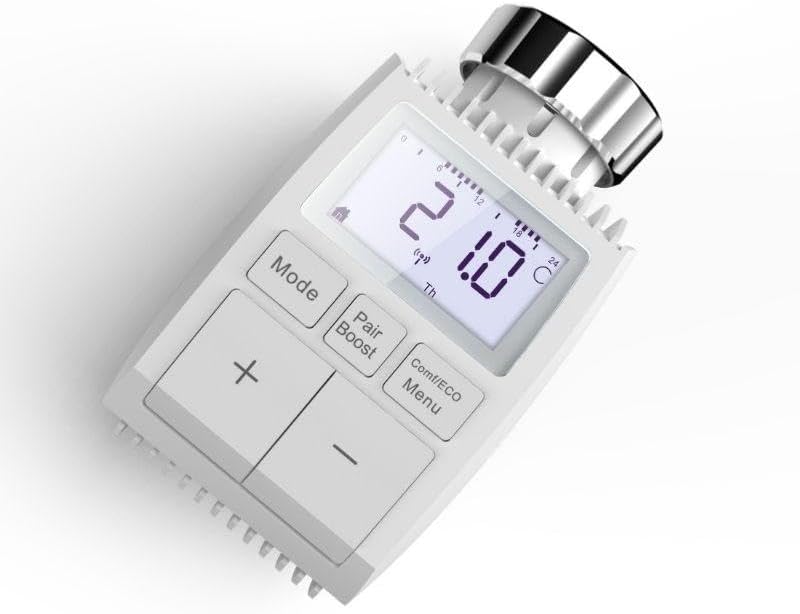
Figure 2.1: Silumen Universal Connected Thermostatic Head with LCD Screen.
3. Package Contents
Your package should contain the following items:
- 4 x Silumen Universal Connected Thermostatic Heads
- Universal mounting rings
- Adapters for Danfoss type valves (RAVL, RAV, RA)
- User Manual (this document)
4. Setup and Installation
4.1 Pre-installation Requirements
To enable remote control and smart features, a Zigbee gateway must be installed and configured in your home. This thermostatic head requires a Zigbee gateway for smartphone control and integration with smart assistants.

Figure 4.1: The thermostatic head, a Zigbee gateway, and compatibility logos for Google Assistant and Amazon Alexa.
4.2 Physical Installation on Radiator
- Ensure the radiator valve is in the closed position.
- Remove your existing thermostatic head from the radiator valve.
- If your radiator valve is a Danfoss type (RAVL, RAV, RA), attach the appropriate adapter provided. For standard M30 x 1.5 threaded valves, no additional adapter is needed.
- Screw the Silumen Universal Connected Thermostatic Head onto the radiator valve until it is securely fastened. No special tools are required.

Figure 4.2: Hands installing the thermostatic head onto a radiator valve.
4.3 Pairing with Zigbee Gateway and Smartphone App
- Download the free Silumen Home or Tuya Smart application from your smartphone's app store.
- Open the application and follow the on-screen instructions to add a new device.
- Initiate pairing mode on your Zigbee gateway (refer to your gateway's manual for specific instructions).
- On the thermostatic head, press and hold the 'Pair/Boost' button until the pairing indicator appears on the LCD screen.
- Once successfully paired, the device will appear in your smartphone application, allowing remote control and programming.

Figure 4.3: Thermostatic head installed on a radiator, with a smartphone displaying the control application.
5. Operating Instructions
5.1 LCD Screen and Buttons Overview
The LCD screen displays important information such as the current temperature, active mode, and date. The buttons allow for local adjustment and mode selection.

Figure 5.1: Diagram illustrating the functions of the thermostatic head's LCD screen and control buttons.
- Mode Button: Cycles through automatic, manual, and vacation modes.
- Pair/Boost Button: Initiates pairing mode or activates a temporary boost function for rapid heating. Also serves as a return key in menus.
- Comf/ECO/Menu Button: Accesses comfort/economy modes or the main menu.
- +/- Buttons: Adjust temperature settings.
- Rotary Knob: For fine-tuning temperature adjustments.
5.2 Temperature Adjustment
You can set the desired room temperature between 5°C and 30°C using the +/- buttons or the rotary knob on the device. The current temperature will be displayed on the LCD screen.
5.3 Operating Modes
The thermostatic head offers several operating modes to suit your needs:
- Automatic Mode: Follows the programmed weekly schedule.
- Manual Mode: Maintains a constant temperature set by the user, overriding the schedule.
- Vacation Mode: Sets a lower, constant temperature for an extended period to save energy while you are away.
- Anti-freeze Mode: Prevents pipes from freezing by maintaining a minimum temperature (e.g., 5°C).
- Heating Off Mode: Completely turns off heating for the radiator.
5.4 Weekly Programming
The device supports weekly programming with up to 10 temperature stages per day. This allows you to customize your heating schedule to match your daily routine.
- Access the programming menu via the 'Comf/ECO/Menu' button or through the smartphone application.
- Select the day(s) you wish to program.
- Set up to 10 time intervals and corresponding temperatures for each day.
- Save your settings.

Figure 5.2: Smartphone application interface for scheduling heating times and temperatures.
5.5 Remote Control and Smart Assistant Integration
Once paired with a Zigbee gateway and the Silumen Home or Tuya Smart app, you can control and program your thermostatic heads remotely from your smartphone. The device's 2.4 GHz Wi-Fi connectivity also enables compatibility with Amazon Alexa and Google Assistant, allowing for voice control of your heating settings.
- Open the Silumen Home or Tuya Smart app on your smartphone.
- Select the desired thermostatic head to view its status or adjust settings.
- For voice control, link your Silumen Home or Tuya Smart account to your Amazon Alexa or Google Assistant app.
- Use voice commands such as "Alexa, set the living room temperature to 21 degrees" or "Hey Google, what is the temperature in the bedroom?"
6. Maintenance
The Silumen Universal Connected Thermostatic Head requires minimal maintenance.
- Wipe the device with a soft, dry cloth to remove dust. Do not use abrasive cleaners or solvents.
- Ensure the battery compartment is clean and dry if replacing batteries (batteries are not included).
- Periodically check for firmware updates through the Silumen Home or Tuya Smart application to ensure optimal performance and access to new features.
7. Troubleshooting
If you encounter issues with your thermostatic head, refer to the following common solutions:
| Problem | Possible Cause | Solution |
|---|---|---|
| Device not responding | Low batteries, no power, or connection issue. | Replace batteries. Check if the device is properly installed. Re-pair with the Zigbee gateway if necessary. |
| Cannot control via app | No Zigbee gateway, gateway offline, or device not paired. | Ensure Zigbee gateway is online and connected to your network. Verify the thermostatic head is paired with the gateway and the app. |
| Inaccurate temperature reading | Device placed in direct sunlight or near another heat source. | Relocate the device if possible, or consider using an external temperature sensor if supported by your Zigbee system. |
| Heating not turning on/off as scheduled | Incorrect schedule settings, device in manual mode, or communication error. | Review your schedule in the app. Ensure the device is in Automatic Mode. Check Zigbee connection. |
8. Specifications
| Manufacturer | Silumen |
| Model Number | LOT4-TV01-ZG |
| Dimensions (L x W x H) | 15 x 15 x 15 cm (approximate, for one unit) |
| Weight | 6 Grams (for one unit) |
| Material | Multiple materials |
| Power Source | Battery powered (batteries not included) |
| Installation Method | General (M30 x 1.5 thread, includes Danfoss adapters) |
| Number of Pieces | 4 (in this pack) |
| Usage | Indoor use only |
| Temperature Range | 5°C to 30°C |
| Connectivity | Zigbee (requires gateway), Wi-Fi 2.4 GHz (for smart assistant compatibility) |
| Control Method | Application (Silumen Home / Tuya Smart), Voice (Alexa, Google Assistant) |

Figure 8.1: Technical drawing showing the dimensions of the thermostatic head.
9. Warranty Information
This product comes with a 2-year warranty from the date of purchase. Please retain your proof of purchase for warranty claims. The warranty covers manufacturing defects under normal use conditions.
10. Customer Support
For further assistance, technical support, or warranty inquiries, please contact Silumen customer service through their official website or the retailer from whom you purchased the product.
Visit the Silumen Brand Store for more information.

