
1. Introduction
This manual provides detailed instructions for the proper setup, operation, and maintenance of your Micsig SATO1004 Automotive Oscilloscope. The SATO1004 is a high-performance digital portable oscilloscope designed for automotive diagnostics, featuring a 100MHz bandwidth, 1GSa/s sampling rate, 70Mpts memory depth, and an 8-inch touch screen interface. It runs on an Android operating system, offering an intuitive user experience and comprehensive diagnostic capabilities.

Image 1.1: Micsig SATO1004 Automotive Oscilloscope highlighting its 100-200MHz bandwidth, 2/4 analog channels, 1GSa/s sampling rate, and 70Mpts memory depth.
2. Setup
2.1 Unboxing and Package Contents
Carefully unpack all components from the box. Verify that all items listed below are present. If any items are missing or damaged, please contact Micsig customer support.

Image 2.1: Contents of the Micsig SATO1004 Standard Kit, including the oscilloscope, passive probes, alligator clips, BNC-Banana leads, power cord, and adapter.
Standard Kit Contents:
- 1 x SATO Series Automotive Oscilloscope
- 2 x Passive Probes
- 2/4 x BNC-Banana Cable (depending on model)
- 1/2 Pair x Alligator Clips (depending on model)
- 1/2 Pair x Soft Pin Probe (depending on model)
- 1 x Screen Protector
- 1 x Power Adapter
- 1 x Power Cord
- 1 x Quick Guide Collection
Master Kit Contents (if applicable):
The Master Kit includes all Standard Kit items plus additional specialized accessories for advanced automotive diagnostics.
- 1 x SATO Series Automotive Oscilloscope
- 2 x Passive Probes
- 2/4 x BNC-Banana Cable (depending on model)
- 1/2 Pair x Alligator Clips (depending on model)
- 1/2 Pair x Soft Pin Probe (depending on model)
- 1 x Secondary Ignition Probe
- 1 x Multimeter Probe
- 1 x Screen Protector
- 1 x Power Adapter
- 1 x Power Cord
- 1 x Quick Guide Collection
- 1 x Suitcase

Image 2.2: Diagram illustrating the components included in the SATO1004 Standard Kit.

Image 2.3: Diagram illustrating the comprehensive components included in the SATO1004 Master Kit, including specialized probes and a carrying case.
2.2 Initial Charging
Before first use, fully charge the built-in 7500mAh Li-ion battery using the provided power adapter and cord. The charging indicator will show the charging status. A full charge typically provides 4-5 hours of operation.
2.3 Connecting Probes
Connect the appropriate probes (passive probes, BNC-Banana cables, etc.) to the input channels on the side of the oscilloscope. Ensure connections are secure. For specific measurements, refer to the probe's individual instructions.

Image 2.4: Side view of the Micsig SATO1004 oscilloscope, illustrating the various input ports for probes and other connections.
3. Operating Instructions
3.1 Powering On/Off
Press and hold the power button located on the side of the device to power on or off the oscilloscope. The device runs on an Android operating system, providing a familiar interface.
3.2 User Interface
The SATO1004 features an 8-inch touch screen for intuitive navigation and control. Additionally, physical buttons are provided on the side for quick access to common functions such as Run/Stop, Auto, Quick Menu, Menu, Zoom, Cursors, Trigger Level, Position, Scale, Math, and Reference.
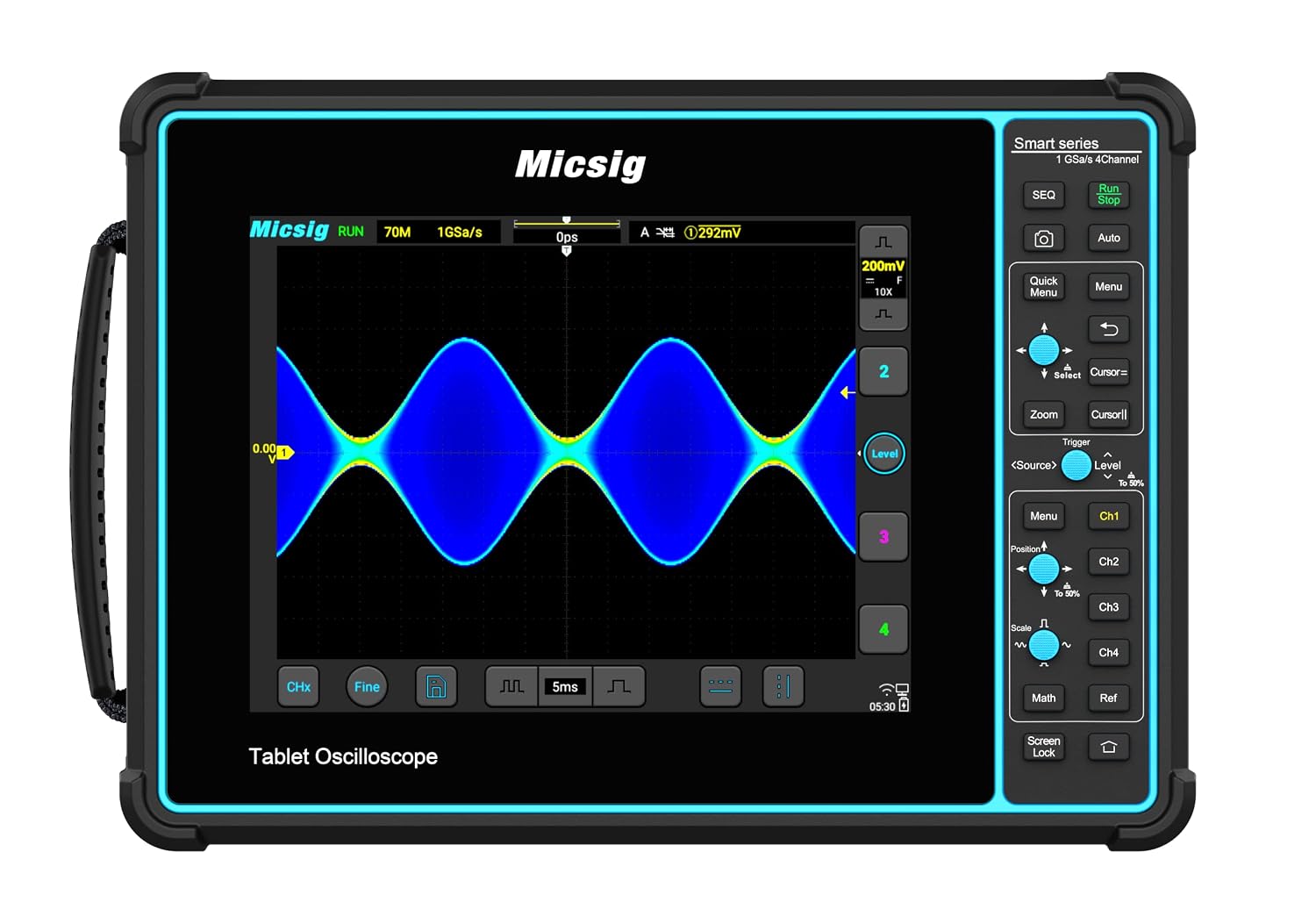
Image 3.1: Front view of the Micsig SATO1004 oscilloscope, showcasing its 8-inch touch screen display and the array of physical control buttons on the right side.
3.3 Basic Measurement Functions
The oscilloscope offers 4 channels with a 100MHz bandwidth and a 1GSa/s sampling rate, allowing for clear and accurate signal display. The 70Mpts deep memory enables detailed waveform analysis, including zooming into specific sections of a captured signal.

Video 3.1: A detailed demonstration of the Micsig SATO1004 Automotive Oscilloscope's interface, features, and basic operation, including probe calibration and signal display.
3.4 Automotive Diagnostic Presets
The SATO1004 is equipped with a comprehensive automotive diagnostic software preset. This feature assists mechanics in quickly identifying various vehicle problems by providing pre-configured settings for common automotive signals.

Image 3.2: Examples of automotive diagnostic presets available on the Micsig SATO1004, including Primary Ignition, Crankshaft, CAN Bus, Throttle Position, Variable-speed cooling Fan, Start/Charging Current, Camshaft, and Carbon Canister Solenoid Valve.

Image 3.3: Visual examples of the Micsig SATO1004 being used in various car diagnostic scenarios, demonstrating its practical applications in automotive repair.

Video 3.2: An overview of the Micsig SATO1004 and SATO2002 Automotive Digital Oscilloscopes, highlighting their features such as memory depth, intensity grading, color temperature display, and real-time auto range.
3.5 Data Storage and Portability
The SATO1004 includes 32GB of internal storage for saving waveforms, screenshots, and recorded videos. Its compact, portable design and built-in battery make it suitable for field work.

Image 3.4: The Micsig SATO1004 oscilloscope demonstrating its compact and portable design, shown alongside a protective carrying case (available with Master Kit).
4. Maintenance
4.1 Battery Care
To maximize battery life, avoid fully discharging the battery frequently. Store the device in a cool, dry place when not in use for extended periods. The 7500mAh Li-ion battery supports power-off lock for secure travel.
4.2 Cleaning
Use a soft, dry cloth to clean the exterior of the oscilloscope, including the screen. Do not use abrasive cleaners or solvents, as these can damage the display or casing. Ensure no liquids enter the device.
4.3 Storage
When storing the oscilloscope, especially for long durations, ensure it is powered off and placed in a protective environment. If a Master Kit was purchased, utilize the provided suitcase for optimal protection.

Image 4.1: Rear view of the Micsig SATO1004 oscilloscope, showing the battery compartment and ventilation, important for proper maintenance.
5. Troubleshooting
This section provides general guidance for common issues. For more complex problems, please refer to the official Micsig support resources.
5.1 Device Not Powering On
- Ensure the battery is sufficiently charged. Connect the power adapter and attempt to power on.
- Verify the power adapter and cable are securely connected and functional.
5.2 No Signal Displayed
- Check that probes are correctly connected to both the oscilloscope and the circuit under test.
- Verify probe settings (e.g., attenuation) match the physical probe in use.
- Adjust vertical scale (Volts/Div) and horizontal scale (Time/Div) to appropriate ranges.
- Ensure the trigger level is set correctly and the trigger source is active. Use the 'Auto' function to attempt automatic signal detection.
5.3 Touch Screen Unresponsive
- Restart the device.
- Ensure the screen is clean and free of debris or moisture.
- If a screen protector is installed, ensure it is properly applied and not interfering with touch sensitivity.
6. Specifications
Below are the key technical specifications for the Micsig SATO1004 Automotive Oscilloscope.
| Feature | Specification |
|---|---|
| Model | SATO1004 |
| Bandwidth | 100MHz |
| Channels | 4 |
| Sampling Rate | 1GSa/s |
| Memory Depth | 70Mpts |
| Display | 8-inch Touch Screen |
| Operating System | Android |
| Internal Storage | 32GB |
| Battery | 7500mAh Li-ion (4-5 hours life) |
| Manufacturer | Micsig |
| First Available | April 20, 2023 |
7. Warranty and Support
7.1 Warranty Information
Micsig products are designed for reliability and performance. For specific warranty terms and conditions, please refer to the warranty card included with your product or visit the official Micsig website. Keep your proof of purchase for warranty claims.
7.2 Customer Support
For technical assistance, troubleshooting, or service inquiries, please contact Micsig customer support. You can typically find contact information on the Micsig website or in the quick guide provided with your oscilloscope. The seller for this product is MICSIG Direct.