
Introduction
The Hygger HG070 Aquarium Wave Maker is designed to create natural water flow patterns in freshwater and marine aquariums. Utilizing unique cross-flow technology, it generates soft, 360-degree waves, eliminating dead spots and promoting a healthy aquatic environment. This device features an intelligent LED display controller for easy mode selection and flow rate adjustments.
Important Safety Information
- Always disconnect power before performing any maintenance or installation.
- Ensure the power adapter and controller are kept dry and away from water.
- Do not operate the pump if the power cord or plug is damaged.
- This device is designed for indoor aquarium use only.
- Keep out of reach of children.
- Ensure the pump is fully submerged in water during operation to prevent damage.
Package Contents
Verify that all items are present in the package:
- Hygger Cross Flow Wave Maker Pump
- LED Display Controller
- Magnetic Mounting System
- Power Adapter
- User Manual

Figure 1: Contents of the Hygger HG070 Wave Maker package, including the pump, controller, magnetic mount, and power adapter.
Setup Instructions
1. Attaching the Power Adapter
- Locate the power adapter and the connector cable from the controller.
- Align the arrows on both parts of the connector. This ensures the three pins align correctly.
- Gently push the connectors together and twist the locking ring to secure the connection.
2. Mounting the Wave Maker
The Hygger HG070 wave maker uses a powerful magnetic mounting system for secure placement within your aquarium.
- Identify the internal pump unit and the external magnetic mount.
- Place the pump unit inside the aquarium at your desired location.
- Position the external magnetic mount on the outside of the aquarium glass, directly opposite the internal pump unit. The strong magnets will hold the pump in place.
- Ensure the pump is fully submerged and securely attached before powering on. The rotatable head allows for adjustable flow direction.

Figure 2: Illustration of the magnetic mounting system and adjustable angle of the Hygger HG070 Wave Maker.
Operating Instructions
Controller Overview
The intelligent LED display controller allows for precise control over the wave maker's functions.
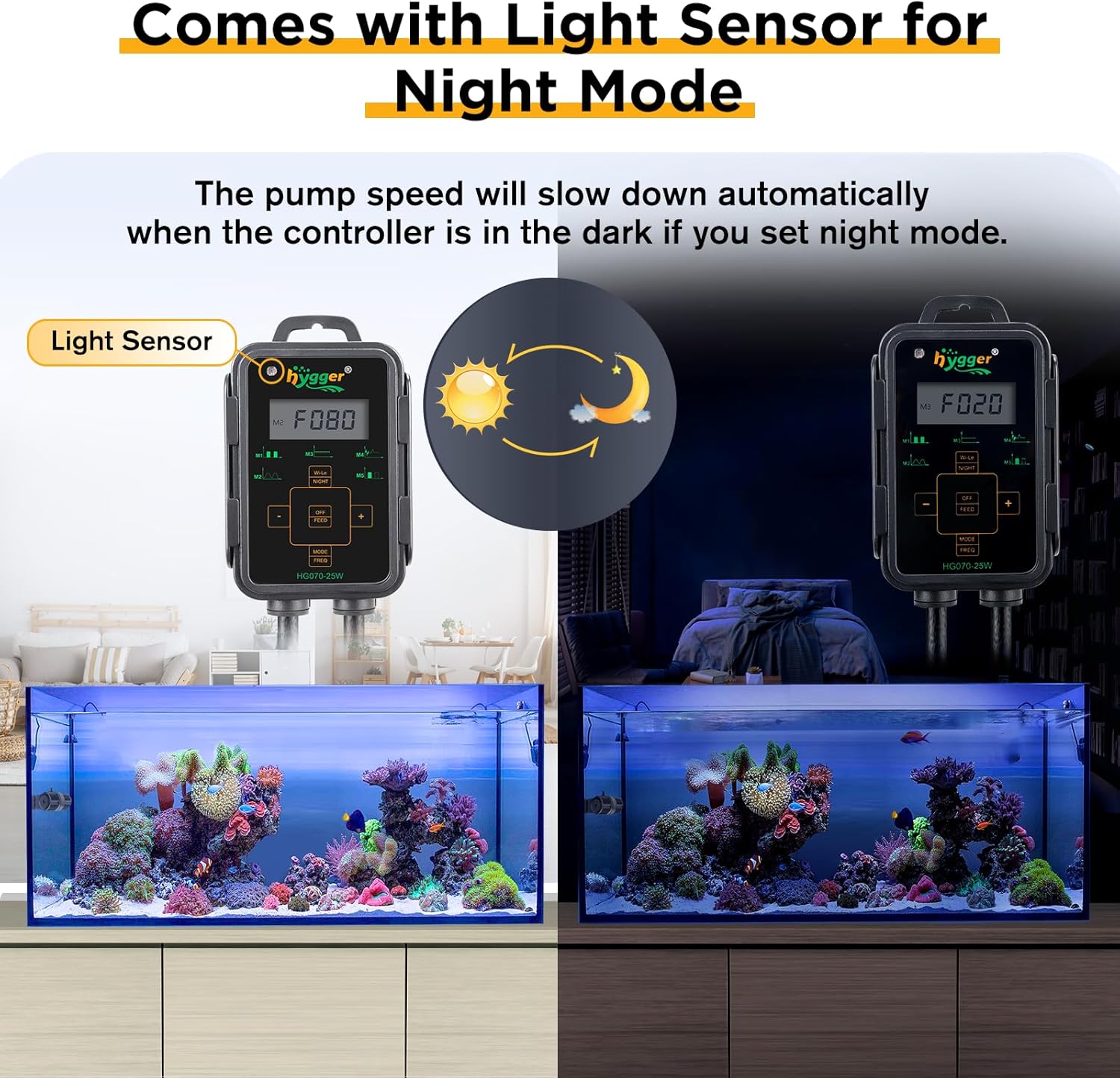
Figure 3: Detailed view of the Hygger HG070 Wave Maker controller panel, highlighting buttons and indicators for various modes and settings.
- MODE/FREQ Button: Short press to select wave mode (M1-M5). Long press to display frequency, then use +/- buttons to adjust.
- +/- Buttons: Adjust flow rate (speed) or frequency depending on the selected mode.
- OFF/FEED Button: Short press to turn the pump on/off. Long press to activate feeding mode.
- Wi-Le/NIGHT Button: Short press to select master, slave, or independent control. Long press to enter night mode.
- Lock Mode: Press and hold "+" and "-" buttons simultaneously until a lock indicator appears. Repeat to unlock.
Wave Modes
The controller offers 5 distinct wave modes to simulate various natural water movements:
- M1: Pulse Wave Mode
- M2: Sine Wave Mode
- M3: Constant Wave Mode
- M4: Random Wave Mode
- M5: Classic Wave Cross-Flow Mode
Short press the "MODE/FREQ" button to cycle through these modes. The selected mode will be displayed on the LCD screen.

Figure 4: Visual representation of the 5 wave modes available on the Hygger HG070 Wave Maker controller.
Adjusting Flow Rate and Frequency
After selecting a wave mode, you can adjust the flow rate (speed) using the "+" and "-" buttons. To adjust the frequency, long press the "MODE/FREQ" button until "FREQ" appears on the display, then use the "+" and "-" buttons.
Feeding Mode
To temporarily pause the wave maker for feeding, long press the "OFF/FEED" button. The pump will stop for 10 minutes, allowing fish to feed without strong currents. The pump will automatically resume operation after 10 minutes.

Figure 5: The controller displaying feeding mode, indicating the pump is paused for 10 minutes.
Night Mode
Long press the "Wi-Le/NIGHT" button to activate night mode. The pump speed will automatically slow down when the controller's light sensor detects darkness, simulating natural nighttime conditions in the aquarium.

Figure 6: Comparison of day and night mode operation, illustrating how the light sensor adjusts pump speed in darkness.
Wireless Linkage Mode
The controller supports wireless linkage, allowing one unit to act as a master to control other Hygger wave makers (slaves). Short press the "Wi-Le/NIGHT" button to toggle between Master (M), Slave (S), and Independent (I) control modes. In Master mode, the controller performs all function operations for linked slave units. In Slave mode, the unit only adjusts flow rate based on the master, with other operations disabled.
Placement Recommendations
The placement of the wave pump can significantly impact the water flow patterns in your aquarium:
- Upper Side: Installed near the water surface, it can create surface agitation, simulating waves or tidal ebb and flow.
- Middle: Placed in the middle of the tank, it helps exercise fish and encourages corals to catch food by creating continuous small bubbles and general circulation.
- Bottom: Positioned near the bottom, it can help blow away debris and accumulated waste, contributing to a cleaner tank and improved water quality.
Note: When the wave maker is fully submerged, you may not observe distinct waveforms, but rather general water movement and small bubbles.

Figure 7: Diagram illustrating three recommended positions for the wave maker and their respective effects on water flow and tank cleanliness.
Maintenance
Regular maintenance ensures optimal performance and longevity of your Hygger HG070 Wave Maker.
- Cleaning the Pump: Periodically remove the pump from the aquarium and disassemble it according to the user manual (if detailed instructions are provided, otherwise general disassembly for cleaning). Clean the impeller and pump housing to remove any algae, debris, or mineral buildup. A soft brush and aquarium-safe cleaning solution (e.g., vinegar diluted in water) can be used. Rinse thoroughly before reassembling and returning to the tank.
- Inspecting Cables: Regularly check all power cords and connectors for any signs of damage, fraying, or corrosion. Replace any damaged components immediately.
- Controller Care: Keep the LED display controller dry and clean. Avoid exposing it to direct water splashes.
Troubleshooting
| Problem | Possible Cause | Solution |
|---|---|---|
| Pump not operating or weak flow | Power disconnected, impeller clogged, air in pump, incorrect mode/speed setting. | Check power connection. Disassemble and clean impeller. Ensure pump is fully submerged. Adjust mode and speed settings on the controller. |
| Unusual noise (humming, whistling) | Impeller obstructed by debris (e.g., small rocks), worn impeller, improper seating. | Disconnect power, remove pump, and thoroughly clean the impeller and housing. Ensure all parts are correctly reassembled. Adjust settings; sometimes changing wave patterns can reduce specific noises. |
| Controller displays "Er04" error code | Indicates a blocked propeller or internal pump issue. | Disconnect power immediately. Remove the pump from the aquarium and inspect the impeller for any blockages or damage. Clean thoroughly and ensure it spins freely. Reassemble and restart. If the error persists, contact customer support. |
| Controller screen dim or not lighting up | Faulty screen, power issue to controller. | Ensure power connection is secure. If the issue persists, the controller may be faulty. Contact customer support for assistance. |
Specifications
The Hygger HG070 Wave Maker is available in different wattage models. This manual primarily refers to the 25W model (HG070-25W), but general operating principles apply to all variants.
Figure 8: Product parameters for various Hygger HG070 Wave Maker models (12W, 18W, 25W).
| Feature | HG070-12W | HG070-18W | HG070-25W |
|---|---|---|---|
| Input Voltage | AC100-240V 50/60Hz | ||
| Output Voltage | DC24V | ||
| Max Flow Rate | 1321 GPH (5000 L/H) | 1850 GPH (7000 L/H) | 2380 GPH (9000 L/H) |
| Recommended Tank Size | ≤ 60 Gallons | ≤ 135 Gallons | ≤ 265 Gallons |
| Recommended Glass Thickness | ≤ 0.315" (8mm) | ≤ 0.39" (10mm) | ≤ 0.47" (15mm) |
| Dimensions (L x W x H) | 11.1"L x 2.4"W x 2.4"H (for 25W model) | ||
| Material | Plastic | ||
| Color | Black | ||
Warranty and Support
Hygger products typically come with a 1-year warranty. For warranty claims, technical support, or any questions regarding your Hygger HG070 Wave Maker, please contact Hygger customer service. Refer to the product packaging or the official Hygger website for the most current contact information.


