
1. Introduction
This manual provides essential information for the safe and effective use of your Arenti OP1 4MP Outdoor Security Camera. Please read this manual thoroughly before installation and operation, and retain it for future reference. The Arenti OP1 camera is designed to provide comprehensive outdoor surveillance with advanced features such as 4MP resolution, dual-band Wi-Fi connectivity (2.4GHz/5GHz), color night vision, and intelligent motion tracking.

Figure 1.1: Arenti OP1 4MP Outdoor Security Camera. This image displays the cream-colored camera unit with its two external antennas, designed for outdoor use.
2. What's in the Box
Verify that all components are present and in good condition upon opening the package.
- Camera (x1)
- Power Adapter (x1)
- Type-C Cable (x1)
- Mounting Bracket (x1)
- Screw Package (x1)
- Quick Guide (x1)

Figure 2.1: Contents of the Arenti OP1 package. This diagram illustrates the camera, power adapter, Type-C cable, mounting bracket, screw package, and quick guide.
3. Product Overview
The Arenti OP1 camera features a robust design suitable for outdoor environments, offering pan, tilt, and zoom capabilities for comprehensive area coverage.
Key Features:
- 4MP Ultra HD Resolution: Provides clear and detailed video footage.
- Dual-Band Wi-Fi (2.4GHz/5GHz): Offers flexible and stable network connectivity.
- 360° Pan/Tilt/Zoom (PTZ): Allows remote adjustment of the camera's viewing angle.
- Color Night Vision: Enhanced visibility in low-light conditions.
- Intelligent Motion Tracking: Automatically follows detected movement.
- IP65 Water Resistant: Designed to withstand various weather conditions.
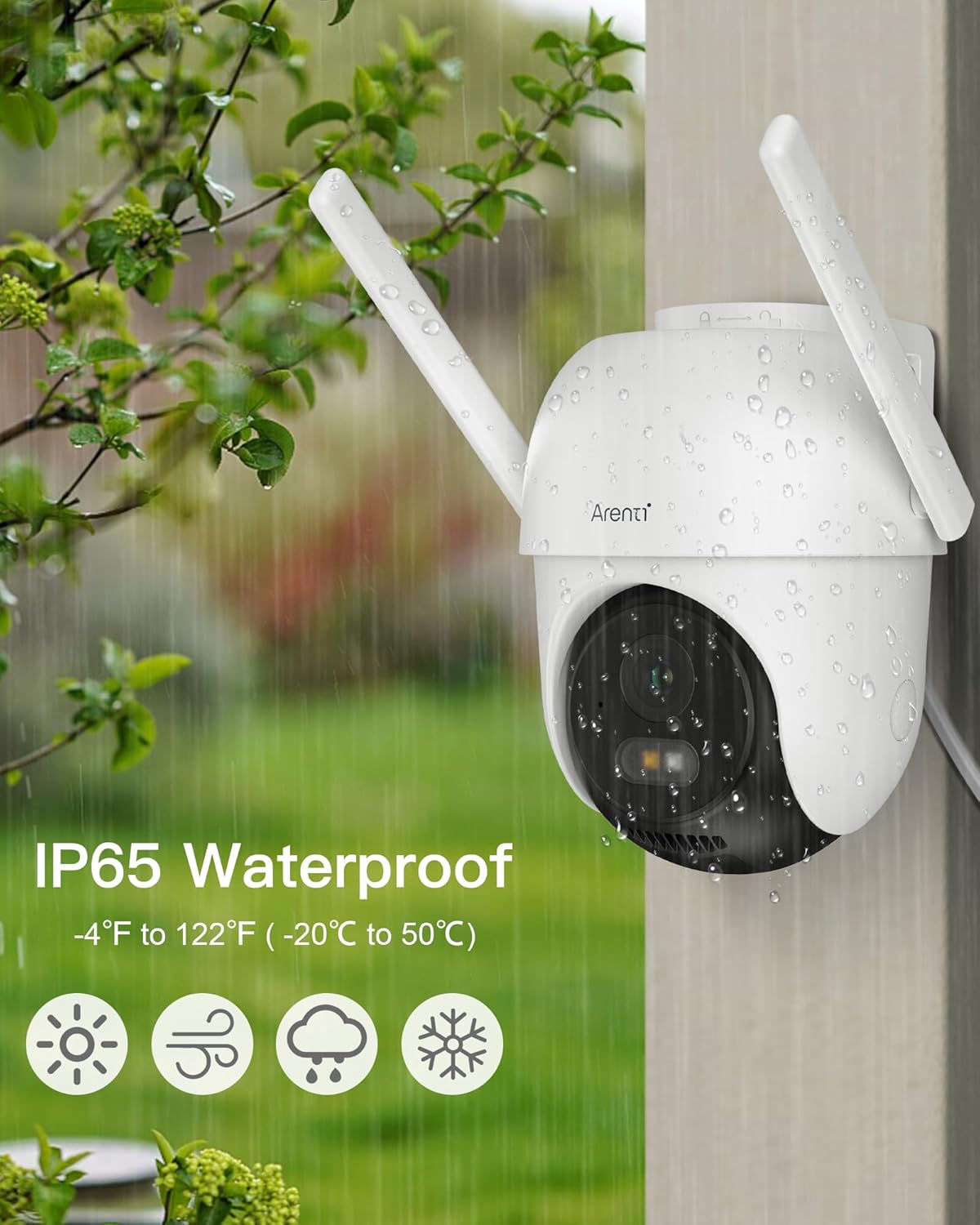
Figure 3.1: The Arenti OP1 camera demonstrating its IP65 water resistance, shown with raindrops on its casing, indicating suitability for outdoor use in various weather conditions.
4. Setup
4.1 Initial Setup
- Power On: Connect the camera to a power source using the provided power adapter and Type-C cable. The camera will initiate its startup sequence.
- Download App: Download the Arenti app from the App Store (iOS) or Google Play Store (Android).
- Account Registration: Open the app and register for a new account or log in if you already have one.
- Add Device: Follow the in-app instructions to add your Arenti OP1 camera. This typically involves scanning a QR code on the camera or manually selecting the device model.
4.2 Wi-Fi Connection
The Arenti OP1 supports both 2.4GHz and 5GHz Wi-Fi networks. Choose the network that best suits your installation environment.
- 2.4GHz Wi-Fi: Offers a longer connection distance, suitable for installations further from your router.
- 5GHz Wi-Fi: Provides faster response speeds, ideal for closer installations requiring minimal latency.

Figure 4.1: Dual-band Wi-Fi connectivity. This image illustrates the benefits of 5GHz (faster speed) and 2.4GHz (longer distance) Wi-Fi for camera placement around a property.

Figure 4.2: Visual representation of 2.4GHz and 5GHz Wi-Fi signal ranges. The 5GHz signal is depicted as faster but with shorter range, while 2.4GHz has a longer range.
4.3 Mounting the Camera
The camera is designed for wall mounting. Ensure the mounting surface is stable and can support the camera's weight.
- Choose Location: Select an outdoor location that provides optimal viewing angles and is within Wi-Fi range.
- Mark Holes: Use the mounting bracket as a template to mark the screw holes on the wall.
- Drill Holes: Drill pilot holes at the marked locations.
- Secure Bracket: Attach the mounting bracket to the wall using the provided screws.
- Attach Camera: Securely attach the camera to the mounting bracket.
5. Operating Instructions
5.1 Live View and PTZ Control
Access the live feed through the Arenti app. You can remotely control the camera's pan (horizontal), tilt (vertical), and zoom functions to adjust the viewing area.
- Pan: Rotate the camera horizontally up to 355 degrees.
- Tilt: Adjust the camera vertically up to 90 degrees.
- Zoom: Utilize the digital zoom feature to magnify specific areas of the live feed.

Figure 5.1: The Arenti OP1 camera's 360-degree viewing capability. This image shows the camera mounted on a house, with arrows indicating its pan (355°) and tilt (90°) range, and a smartphone displaying the wide view.
5.2 Video Quality and Night Vision
The camera provides 4MP (2K) resolution for clear images. It features both infrared and color night vision modes.
- Infrared Night Vision: Uses infrared LEDs for black and white video in complete darkness.
- Color Night Vision: Utilizes a starlight CMOS sensor and warm light to provide full-color video even in low-light conditions.

Figure 5.2: Resolution comparison between 1080P and Arenti 4MP. The image shows a split view of an outdoor gathering, with the Arenti 4MP side displaying significantly clearer details than the 1080P side.

Figure 5.3: Night vision modes. This image compares infrared night vision (monochrome) with enhanced color night vision, showing a house at night with improved detail and color in the latter mode.
5.3 Intelligent Detection and Alerts
The camera offers free motion and sound detection, with intelligent alerts capable of differentiating between people, pets, and vehicles.
- Motion Tracking: The camera can automatically track detected movement within its field of view.
- Customizable Alert Zones: Set specific areas to monitor for activity to reduce false alarms.
- Instant Notifications: Receive real-time alerts on your smartphone when an event is detected.
- Light and Sound Alarms: Configure the camera to activate a strobe light and/or siren upon detection of suspicious activity.

Figure 5.4: Human detection and motion tracking. This image shows a father and son walking in a yard, with the camera's detection boxes highlighting them and an arrow indicating motion tracking.

Figure 5.5: Motion detection and instant alerts. This image depicts a person climbing through a window at night, with a smartphone displaying an alert message from the Arenti app, indicating detected movement.

Figure 5.6: Camera alert options. This image shows a camera projecting light and sound waves, with options for message push, video record, light alarm, sound alarm, and combined light and sound alarm.
5.4 Two-Way Audio
The integrated microphone and speaker allow for two-way communication through the camera. This feature can be used to greet visitors or deter intruders.

Figure 5.7: Two-way audio communication. This image shows a camera on a house communicating with a delivery person, demonstrating the ability to speak and listen remotely.
5.5 Storage Options
The Arenti OP1 offers flexible storage solutions for your video recordings.
- Local Storage: Supports Micro SD card storage up to 256GB (card not included) for continuous 24/7 recording.
- Cloud Service: Includes a free 7-day loop for 6-second event recordings. Additional cloud storage plans may be available.

Figure 5.8: Flexible storage options. This image highlights the camera's support for up to 256GB SD card storage and a free cloud service for 7-day loop 6-second event recording.
5.6 App Features and Sharing
The Arenti app provides a comprehensive interface for managing your camera and viewing footage. You can also share camera access with family and friends without subscription fees.

Figure 5.9: Family sharing feature. This image shows various devices (smartphones, tablets, laptops) displaying live camera feeds, along with icons representing different family members who can share access to the camera.
6. Maintenance
6.1 Cleaning
To ensure optimal performance, periodically clean the camera lens and housing. Use a soft, damp cloth. Avoid abrasive cleaners or solvents that could damage the camera's finish or lens.
6.2 Weather Protection
The Arenti OP1 camera is IP65 water resistant, meaning it is protected against dust ingress and low-pressure water jets from any direction. While designed for outdoor use, extreme weather conditions (e.g., prolonged heavy rain, snow, or direct exposure to high-pressure water) should be considered during installation to maximize longevity.
7. Troubleshooting
If you encounter issues with your Arenti OP1 camera, refer to the following common problems and solutions.
| Problem | Possible Cause | Solution |
|---|---|---|
| Camera offline | No power; Wi-Fi signal lost; Router issue | Check power connection; Verify Wi-Fi signal strength; Restart router; Reconfigure Wi-Fi in app. |
| Poor video quality | Weak Wi-Fi signal; Dirty lens; Insufficient lighting | Ensure strong Wi-Fi connection; Clean camera lens; Verify night vision settings. |
| Frequent false alarms | Motion detection sensitivity too high; Unwanted objects in detection zone | Adjust motion detection sensitivity in app; Define specific alert zones to exclude irrelevant areas. |
| Cannot connect to 5GHz Wi-Fi | Camera too far from 5GHz router; Router settings | Move camera closer to the 5GHz router; Ensure router is broadcasting 5GHz network correctly. |
| SD card not recording | SD card full or corrupted; Incorrect recording settings | Format SD card via app; Check recording schedule and settings; Replace SD card if corrupted. |
If the problem persists, please contact Arenti customer support.
8. Specifications
Technical specifications for the Arenti OP1 4MP Outdoor Security Camera.
| Feature | Detail |
|---|---|
| Model Name | OP1 |
| Video Capture Resolution | 4MP (2K) |
| Wireless Communication Technology | 5GHz/2.4GHz Dual Wi-Fi |
| Mounting Type | Wall Mount |
| Viewing Angle | 100 Degrees |
| Night Vision Range | 33 Feet |
| Water Resistance Level | IP65 Water Resistant |
| Power Source | Corded Electric (5 Volts, 2.5 Watts) |
| Local Storage | Up to 256GB Micro SD Card (not included) |
| Compatible Devices | Amazon Alexa, Google Assistant, Smartphone |
| Item Dimensions (L x W x H) | 10.6 x 12.3 x 20.6 Centimetres |
| Item Weight | 660 g |
| Colour | Cream |
9. Warranty and Support
9.1 Manufacturer's Warranty
The Arenti OP1 camera comes with a 2 Year Manufacturer Warranty. Please retain your proof of purchase for warranty claims.
9.2 Customer Support
For technical assistance, warranty inquiries, or any other support needs, please contact Arenti customer service:
- Email: support@arenti.com


