
Introduction
This manual provides essential information for the safe and efficient operation of your Energenie EG-UPS-PS3000-02 3000VA Pure Sine Wave Uninterruptible Power Supply (UPS). Please read it thoroughly before installation and use to ensure proper functionality and to prevent damage to the unit or connected equipment.
Safety Instructions
Important Safety Precautions:
- Do not open the UPS casing. There are no user-serviceable parts inside. Refer all servicing to qualified service personnel.
- Do not expose the UPS to rain, moisture, or excessive humidity. Operate the unit indoors only.
- Ensure proper ventilation around the UPS. Do not block any ventilation openings. Maintain at least 10 cm (4 inches) of clearance on all sides.
- Connect the UPS to a grounded power outlet only. The power cord must be connected to an outlet with a protective earth connection.
- Do not connect appliances with high power consumption (e.g., laser printers, heaters, vacuum cleaners) to the UPS outputs, as this may overload the unit.
- In case of emergency, press the power button to turn off the UPS and immediately disconnect it from the AC power supply.
- Avoid placing the UPS near flammable liquids or gases.
Package Contents
Verify that all items are present and undamaged in the package:
- Energenie EG-UPS-PS3000-02 UPS Unit
- User Manual (this document)
- USB Communication Cable
- Power Input Cable
- Output Power Cables (quantity may vary)
Product Overview
The Energenie EG-UPS-PS3000-02 is a 3000VA (1800W) pure sine wave UPS designed to provide reliable power backup and protection for your electronic devices. It features an intuitive LCD display for real-time status monitoring, multiple output sockets for diverse connectivity, and a USB port for advanced power management.
Front Panel
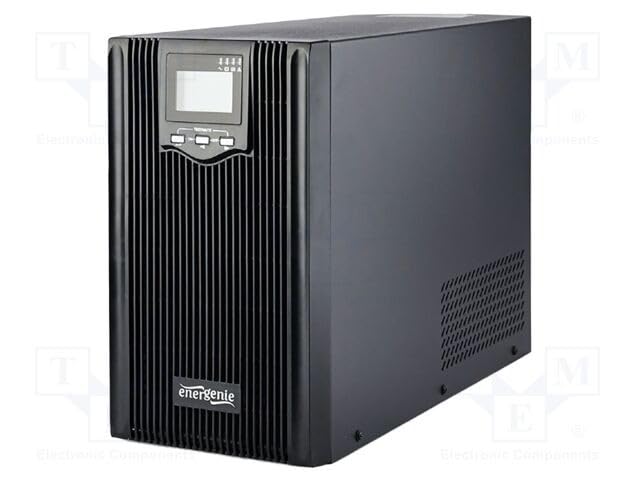
This image displays the front of the Energenie EG-UPS-PS3000-02 UPS. Key features visible include the central LCD display, which shows operational status and battery information, and the power button located below the display. The overall design is a black tower casing.
Rear Panel Connections
The rear panel of the UPS houses all the necessary input and output connections, as well as communication ports.
- AC Input: This is where the main power cord connects the UPS to the wall outlet.
- Schuko Outputs (3x): These outlets provide battery backup and surge protection for devices with standard European (Schuko) plugs.
- C13 Outputs (3x): These outlets provide battery backup and surge protection for devices that use C14 power inlets, commonly found on computers, monitors, and networking equipment.
- USB Port: Connects the UPS to a computer for monitoring and control via power management software.
- Circuit Breaker: Provides overload protection for the UPS. If an overload occurs, this breaker may trip to protect the unit.
Setup
- Unpacking: Carefully remove the UPS from its packaging. Inspect the unit for any signs of shipping damage.
- Placement: Place the UPS in a clean, cool, and well-ventilated indoor area. Avoid direct sunlight, heat sources, and areas with excessive dust or moisture. Ensure there is adequate space around the unit for proper airflow.
- Initial Charging: Connect the UPS to a grounded wall outlet using the provided power input cable. Allow the UPS to charge for at least 8 hours before connecting any devices. This ensures the internal batteries are fully charged and conditioned for optimal performance. The LCD display will indicate the charging status.
- Connecting Devices:
- Connect your critical devices (e.g., computer, monitor, router) to the UPS output sockets (Schuko or C13).
- Ensure the total power consumption of all connected devices does not exceed the UPS's rated capacity of 1800W. Overloading the UPS can cause it to shut down or trip the circuit breaker.
- USB Connection (Optional): For advanced monitoring and automatic shutdown features, connect the USB cable from the UPS to an available USB port on your computer. Install the appropriate power management software (usually available from the manufacturer's website).
Operating the UPS
Turning On the UPS
After connecting the UPS to AC power and allowing initial charging, press and hold the power button on the front panel for approximately 3 seconds until you hear a short beep and the LCD display illuminates. The UPS will perform a self-test and then enter AC mode.
Turning Off the UPS
To turn off the UPS, press and hold the power button for approximately 3 seconds until the LCD display turns off and the unit powers down. Ensure all connected devices are properly shut down before turning off the UPS.
LCD Display Information
The LCD display provides real-time status updates and critical information about the UPS operation:
- Input Voltage: Displays the incoming AC voltage from the wall outlet.
- Output Voltage: Shows the voltage being supplied to connected devices.
- Battery Level: Indicates the current charge level of the internal batteries.
- Load Capacity: Displays the percentage of the UPS's capacity currently being used by connected devices.
- Operating Mode: Shows whether the UPS is operating in AC mode (normal operation), Battery mode (during a power outage), or Bypass mode.
- Error Codes: If an issue occurs, an error code may be displayed. Refer to the troubleshooting section for guidance.
Battery Mode Operation
In the event of a power outage or significant voltage fluctuation, the UPS will automatically switch to battery mode, providing uninterrupted power to connected devices. An audible alarm will sound to indicate battery operation. To silence the alarm temporarily, press the power button briefly. The UPS will continue to provide power until the battery is depleted or AC power is restored. It is recommended to save your work and shut down connected devices gracefully during extended power outages.
Maintenance
- Cleaning: Clean the exterior of the UPS with a soft, dry cloth. Do not use liquid cleaners, aerosols, or solvents, as these can damage the casing or internal components.
- Battery Care: To prolong battery life, avoid frequent deep discharges. If the UPS is stored for an extended period (e.g., 3 months or more), recharge it for at least 8 hours to prevent battery degradation.
- Ventilation: Regularly check that the ventilation openings on the UPS are clear of dust and obstructions to ensure proper heat dissipation.
- Battery Replacement: Batteries are consumable items and have a limited lifespan. When the battery capacity significantly decreases, contact qualified service personnel for replacement. Do not attempt to replace batteries yourself.
Troubleshooting
This section provides solutions to common issues you might encounter with your UPS.
| Problem | Possible Cause | Solution |
|---|---|---|
| UPS does not turn on. | No AC input power; Low battery charge. | Check if the power cord is securely connected to a live wall outlet. Allow the UPS to charge for several hours before attempting to turn it on. |
| UPS beeps continuously in AC mode. | Overload condition. | Disconnect non-essential devices from the UPS outputs. Reduce the total power load to below 1800W. Check if the circuit breaker has tripped. |
| Short backup time during power outage. | Battery not fully charged; Battery nearing end-of-life; Excessive load. | Ensure the UPS has been charged for at least 8 hours. Reduce the number of connected devices. If the battery is old, contact service for replacement. |
| UPS switches to battery mode frequently. | Unstable AC input power. | This indicates the UPS is performing its function. If it happens excessively, check your building's electrical wiring or consult an electrician. |
Specifications
| Model | EG-UPS-PS3000-02 |
| Capacity | 3000 VA / 1800 W |
| Input Voltage | 230 V AC |
| Output Voltage | 230 V AC |
| Waveform | Pure Sine Wave |
| Outputs | 3 x Schuko, 3 x C13 |
| Communication Port | USB |
| Dimensions (L x W x H) | 50 x 50 x 28 cm |
| Weight | 5.66 kg |
Warranty and Support
For warranty information, technical support, or service inquiries, please refer to the official Energenie website or contact your local dealer. It is recommended to keep your purchase receipt as proof of purchase for warranty claims.
Manufacturer: EnerGenie
Product ASIN: B0C32ZS11H


