Introduction
This manual provides essential information for the safe and efficient operation of your Energenie EG-UPS-PS1000-01 1000VA Pure Sine Wave Uninterruptible Power Supply (UPS). Please read this manual thoroughly before installation and use, and retain it for future reference. This UPS is designed to provide reliable backup power and protection for your electronic devices.
Safety Instructions
Observe the following safety precautions to prevent injury and damage to the UPS or connected equipment:
- Do not open the UPS casing. There are no user-serviceable parts inside. Refer all servicing to qualified personnel.
- Do not connect appliances that could overload the UPS, such as laser printers or heaters.
- Ensure the UPS is placed in a well-ventilated area, away from direct sunlight, heat sources, and moisture.
- Connect the UPS to a grounded AC power outlet only.
- In case of fire, use a dry chemical extinguisher. Water can cause electrical shock.
- Disconnect the UPS from the AC power outlet before cleaning. Use a dry cloth only.
Package Contents
Verify that all items are present in the package:
- Energenie EG-UPS-PS1000-01 UPS Unit
- User Manual (this document)
- USB Communication Cable
- Power Cord
Product Overview
The Energenie EG-UPS-PS1000-01 is a 1000VA pure sine wave UPS featuring an LCD display and USB connectivity. It provides stable power to connected devices during outages and protects against power fluctuations.
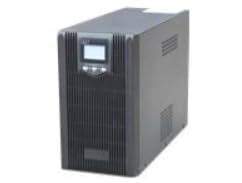
Figure 1: Front view of the Energenie EG-UPS-PS1000-01 UPS. This image displays the main unit, highlighting its compact design and the integrated LCD screen on the front panel. The unit is black, with visible ventilation slots and power outlets on the rear (not fully visible in this angle).
Front Panel
- LCD Display: Shows real-time status, battery level, load, input/output voltage, and operational modes.
- Power Button: Used to turn the UPS on or off.
- Function Buttons: For navigating the LCD menu and adjusting settings.
Rear Panel
- AC Input: Connects the UPS to the main power supply.
- Output Sockets: Provides battery backup and surge protection for connected devices.
- USB Port: For communication with a computer to monitor UPS status and manage shutdowns.
- Circuit Breaker: Resettable overload protection.
Setup
- Unpacking: Carefully remove the UPS from its packaging. Inspect for any shipping damage.
- Placement: Position the UPS on a flat, stable surface in a clean, dry, and well-ventilated indoor environment. Ensure adequate clearance around the unit for airflow. Avoid placing it near windows or in direct sunlight.
- Initial Battery Charge: Connect the UPS to a standard grounded AC outlet using the provided power cord. Allow the unit to charge for at least 8 hours before connecting any devices to ensure optimal battery performance. The UPS will charge even if it is turned off.
- Connecting Devices:
- Plug your computer, monitor, and other critical equipment into the UPS output sockets.
- Do not connect surge protectors or power strips to the UPS output sockets.
- Ensure the total power consumption of connected devices does not exceed the UPS's capacity (1000VA).
- USB Communication (Optional): Connect the USB cable from the UPS to your computer's USB port. Install the monitoring software (if provided or downloaded from the manufacturer's website) to enable advanced power management features and automatic shutdown.
Operating the UPS
Turning On/Off
- To Turn On: Press and hold the Power button for approximately 3 seconds until you hear a beep and the LCD display illuminates.
- To Turn Off: Press and hold the Power button for approximately 3 seconds until you hear a beep and the LCD display turns off.
LCD Display Information
The LCD display provides real-time status updates. Use the function buttons to cycle through different information screens, which may include:
- Input Voltage
- Output Voltage
- Battery Charge Level
- Load Level (percentage of capacity used)
- Operating Mode (e.g., AC mode, Battery mode)
- Estimated Backup Time (under current load)
USB Communication and Software
The USB port allows the UPS to communicate with a connected computer. With the appropriate software installed, you can:
- Monitor UPS status, battery health, and power conditions.
- Configure automatic shutdown of the computer during extended power outages to prevent data loss.
- Schedule UPS self-tests.
Refer to the software's documentation for detailed installation and usage instructions. The software is typically available for download from the Energenie support website.
Maintenance
- Battery Care: To maximize battery life, ensure the UPS is connected to AC power at all times. If the UPS is stored for an extended period, recharge the battery every 3 months for at least 8 hours.
- Cleaning: Disconnect the UPS from the AC power outlet and all connected devices before cleaning. Use a soft, dry cloth to wipe the exterior. Do not use liquid or aerosol cleaners.
- Ventilation: Regularly check that the ventilation openings are clear of dust and obstructions to prevent overheating.
Troubleshooting
If you encounter issues with your UPS, refer to the following common problems and solutions:
| Problem | Possible Cause | Solution |
|---|---|---|
| UPS does not turn on. | Battery not connected or discharged. | Ensure the UPS is plugged into a live AC outlet and allow it to charge for several hours. |
| UPS beeps continuously in AC mode. | Overload condition. | Disconnect non-essential equipment. Reduce the total load to within the UPS's capacity. |
| UPS switches to battery mode frequently. | Unstable input power or sensitivity setting. | Check the AC power source. If the issue persists, consult the software manual for sensitivity adjustments (if available). |
| No power output from sockets. | Circuit breaker tripped. | Check and reset the circuit breaker on the rear panel. Reduce the load if it was an overload. |
Specifications
| Feature | Detail |
|---|---|
| Brand | Energenie |
| Model Number | EG-UPS-PS1000-01 |
| Capacity | 1000VA |
| Waveform | Pure Sine Wave |
| Display | LCD |
| Connectivity | USB |
| Color | Black |
| Battery Composition | Sealed Lead-Acid |
| Product Dimensions | 45P x 25l x 34H centimeters |
| Voltage | 12 Volts (internal battery voltage, not output) |
| Item Weight | 12.6 Kilograms |
Warranty and Support
Energenie products are designed for reliability and performance. For information regarding warranty coverage, technical support, or service, please refer to the warranty card included with your product or visit the official Energenie website. Do not attempt to repair the unit yourself, as this may void your warranty.
For the latest drivers and software, please visit: Energenie Support Website