1. Introduction
Thank you for choosing the SYTECH Artico SYCL490 Portable Evaporative Air Cooler. This compact and versatile appliance is designed to cool, ventilate, purify, and humidify the air, making it ideal for spaces ranging from 15 to 25 m². Featuring an ambient temperature display, a multi-function electronic control panel, and three operating modes, it provides a comfortable environment. Please read this manual thoroughly before operation to ensure proper use, maintenance, and safety.
2. Important Safety Instructions
Always follow basic safety precautions when using electrical appliances to reduce the risk of fire, electric shock, and injury.
- Read all instructions before using the appliance.
- Do not operate any appliance with a damaged cord or plug, or after the appliance malfunctions or has been dropped or damaged in any manner.
- Do not immerse the appliance, cord, or plug in water or other liquids.
- Unplug from outlet when not in use, before putting on or taking off parts, and before cleaning.
- Do not allow children to operate or play with the appliance.
- Ensure the appliance is placed on a stable, level surface.
- Do not block air inlets or outlets.
- Use only clean tap water in the water tank.
- Do not use the appliance in direct sunlight or near heat sources.
- Keep the appliance away from flammable materials.
3. Product Components
Familiarize yourself with the parts of your SYTECH Artico SYCL490.
- Main Unit (Evaporative Air Cooler)
- Remote Control (1 unit)
- CR2025 Battery (1 unit, for remote control)
- Ice Packs (2 units)
- Honeycomb Filter (pre-installed)
- Wheels (pre-installed for easy transport)
- Integrated Handle

Figure 3.1: Front view of the SYTECH Artico SYCL490 Portable Evaporative Air Cooler, showing the main air outlet and digital display.
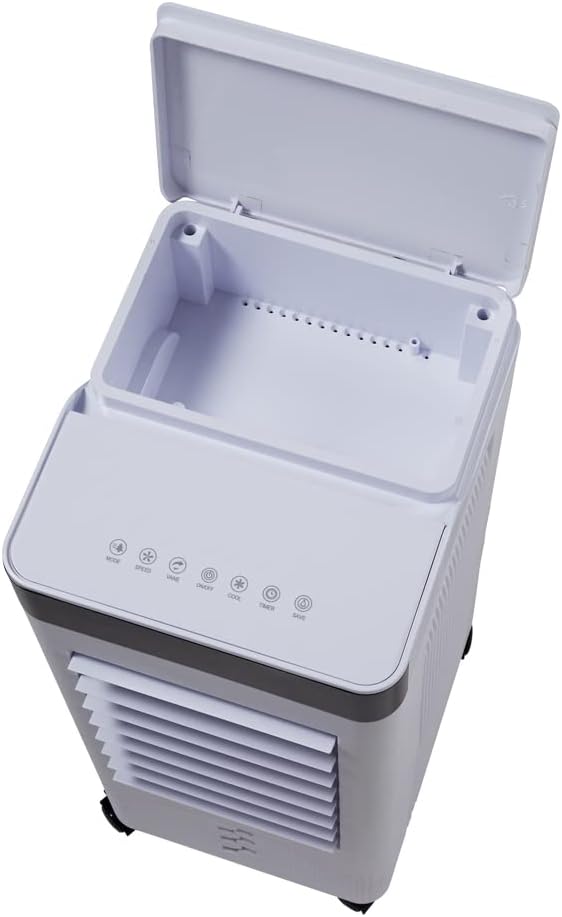
Figure 3.2: Top view of the air cooler, illustrating the electronic control panel and the water filling inlet.

Figure 3.3: Rear view of the air cooler, showing the removable Honeycomb filter and the transparent water tank for easy monitoring.

Figure 3.4: The air cooler with its remote control, depicting the cool air output and the unit's compact design.
4. Setup
- Unpacking: Carefully remove the air cooler and all accessories from the packaging. Retain packaging for future storage or transport.
- Placement: Place the unit on a firm, level surface. Ensure there is adequate space around the unit for proper airflow (at least 20 cm from walls or furniture). The integrated wheels allow for easy repositioning.
- Water Filling:
- The water tank can be filled from the top or the bottom.
- For top filling, open the lid on the top panel and pour clean tap water directly into the reservoir.
- For bottom filling, carefully pull out the water tank from the rear of the unit. Fill the tank with clean tap water, ensuring not to exceed the "MAX" fill line.
- If using the included ice packs, place them in the water tank after filling with water for enhanced cooling performance.
- Securely close the lid or reinsert the water tank.
- Power Connection: Plug the power cord into a standard 220V-240V ~ 50-60Hz electrical outlet.
5. Operating Instructions
The SYCL490 can be operated via the electronic control panel on the top of the unit or using the remote control.
Control Panel / Remote Control Functions:
- Power (On/Off): Press to turn the unit on or off.
- Speed: Adjusts fan speed (3 levels: Low, Medium, High). The RPMs are approximately 800, 1000, and 1250 respectively.
- Mode: Selects operating mode:
- Normal Breeze: Constant airflow at selected speed.
- Natural Mode: Simulates natural wind by varying fan speed.
- Sleep Mode: Operates quietly with reduced fan speed, ideal for night use.
- Timer: Sets the operating time from 1 to 12 hours. The unit will automatically turn off after the set time.
- Swing (Oscillation): Activates or deactivates the automatic oscillation function for even air distribution.
- Cool (Evaporative Cooling): Activates or deactivates the evaporative cooling function. Ensure water is in the tank when this function is active.
- Ambient Temperature Display: Shows the current room temperature on the digital display.
6. Maintenance
Regular maintenance ensures optimal performance and extends the lifespan of your air cooler.
- Cleaning the Exterior: Wipe the exterior surfaces with a soft, damp cloth. Do not use abrasive cleaners or solvents.
- Water Tank Cleaning:
- Empty and clean the water tank regularly, especially if the unit is not used for an extended period.
- Remove the tank, rinse it with clean water, and wipe it dry to prevent mold and mildew growth.
- Honeycomb Filter Cleaning:
- The Honeycomb filter helps remove dust and odors. It should be cleaned periodically, depending on usage and air quality.
- To remove, locate the filter compartment at the rear of the unit (refer to Figure 3.3). Gently pull out the filter.
- Rinse the filter under running water. For stubborn dirt, use a soft brush.
- Allow the filter to air dry completely before reinserting it into the unit.
- Storage: If storing the unit for a long time, ensure the water tank is empty and clean, and the filter is dry. Store in a cool, dry place.
7. Troubleshooting
| Problem | Possible Cause | Solution |
|---|---|---|
| Unit does not turn on. | No power supply; Power cord not properly plugged in. | Check power outlet; Ensure power cord is securely plugged in. |
| No cool air / Weak airflow. | Water tank empty; Honeycomb filter clogged; Air inlets/outlets blocked. | Fill water tank; Clean Honeycomb filter; Ensure no obstructions around the unit. |
| Unpleasant odor from unit. | Stagnant water in tank; Dirty Honeycomb filter. | Empty and clean water tank thoroughly; Clean or replace Honeycomb filter. |
| Remote control not working. | Battery depleted; Obstruction between remote and unit. | Replace CR2025 battery; Ensure clear line of sight to the unit's receiver. |
8. Specifications
| Feature | Detail |
|---|---|
| Model Number | SY-CL490 |
| Airflow Rate | 380 m³/h (223.66 CFM) |
| Water Tank Capacity | 8.0 Liters |
| Fan Speeds (RPM) | Speed 1: 800 rpm, Speed 2: 1000 rpm, Speed 3: 1250 rpm |
| Power Consumption | 65 W (0.065 kW/h) |
| Noise Level | < 64 dB |
| Water Consumption | 0.37 l/h |
| Power Cable Length | 1.5 m |
| Filter Type | Honeycomb |
| Cooling Area | 15-25 m² |
| Power Supply | 220V-240V ~ 50-60Hz |
| Product Dimensions (L x W x H) | 24.3 x 28.8 x 56.3 cm (approx. 24 x 28 x 56 cm) |
| Product Weight | 4.9 kg (approx. 5.77 kg packaged) |
| Material | Plastic |
9. Warranty and Support
This product comes with a standard manufacturer's warranty. For specific warranty terms and conditions, please refer to the documentation provided with your purchase or contact SYTECH customer support. For technical assistance, troubleshooting beyond this manual, or spare parts inquiries, please contact your local retailer or the manufacturer's authorized service center.
Note: The user manual included with the product may be in French or other languages. This document provides instructions in English.


